

80+ AI Media Skills in Claude Code: No More FFmpeg Manuals
The author tests Volcano Engine's AI MediaKit Skill integrated with Claude Code, evaluating 80+ audio/video capabilities including 480p-to-1080p enhancement, subtitle removal, smart editing, voice separation, and background removal, with detailed metrics on processing time, cost, quality, and the dual local/cloud architecture.
Reading font

The article presents a hands-on evaluation of Volcano Engine's AI MediaKit Skill, a suite of 80+ atomic audio/video capabilities exposed via a CLI ( mediakit-cli) and packaged as five Claude Code Agent Skills ( byted-mediakit-video, editing, image, audio, shared). The author tests core scenarios using official demo assets, recording natural-language prompts, agent actions, latency, output metrics, and cost.
Architecture and Design
AI MediaKit adopts a three-layer model: (1) 80+ atomic capabilities across video (30), image (21), audio (4), and general (2) domains — e.g., video enhancement, subtitle erasure, highlight detection, background removal, voice separation, ASR. (2) mediakit-cli, an MIT-licensed CLI wrapping each capability as a terminal command (e.g., mediakit-cli --cloud video erase-video-subtitle). (3) Five Agent Skills conforming to Claude Code's Skill spec, enabling natural-language orchestration.
Two key design choices stand out:
Dual-mode execution: --local runs on the machine's FFmpeg (≥5.1) synchronously at zero cost; --cloud offloads to Volcano Engine's GPU cluster for AI-heavy tasks. Both share identical parameter schemas, so switching modes requires no code changes.
Minimal auth: A single API Key set via environment variable (never written to config files) — a stark contrast to OAuth/STS/IAM flows.
Core Scenario Tests
4.1 Video Quality Enhancement (480p → 1080p)
Source: 3.87 MB, 496×864, 2.0 Mbps. Prompt: "Enhance this video to 1080p and download result." Agent presented four enhancement tiers (standard, professional, extreme-speed, generative) with algorithm counts and pricing differences translated to plain language. Chose standard . Cloud job submitted via video enhance-video, polled via task_id. Total wall time: 3 min 45 sec . Output: 1080×1880, 7.1 Mbps, 13.7 MB (3.4× size increase). Visual comparison shows sharp texture recovery (food granules, oil edges) without color shift, over-sharpening halos, or smearing. Limitation: cannot fix composition or camera shake — "clearer garbage" remains garbage.


Tier selection guidance: default to standard ; use generative for heavily damaged/aged footage; extreme-speed for large-scale pre-processing.
4.2 Subtitle Erasure: Standard vs Pro
Source: 12.3 MB, 39 s vertical short drama with hard-coded subtitles. Two modes: erase-video-subtitle (standard, ¥0.4/min) and erase-video-subtitle-pro (pro, ¥1/min). Standard uses efficient blur; pro adds high-frame-rate OCR + AIGC texture reconstruction, supports manual region selection for watermarks/logos.
Both tiers tested sequentially. Standard: 4 min 18 sec total (≈3.5 min cloud + 54 s download 86 MB). Pro: 6 min 35 sec total (≈5.5 min cloud + 1 min download 95 MB). Processing-time multiples: 6.6× and 10× clip duration (cloud-only 5.4× / 8.5×), within documented 5–9× RTF range. Output bitrate jumped from 2.5 to 18–19 Mbps (~7× size).
Visual diff at 24.4 s: standard blurred a prescription prop's calligraphy; pro preserved characters and red grid lines. At 30.9 s: both removed dialogue cleanly, retaining fur collar and embroidery texture. Verdict: the ¥0.6/min delta buys "discrimination between what to erase and what to keep." Default detection limited to lower-third, horizontally centered, 1–10% height, white Chinese/English subtitles; top, oversized, other languages excluded. License compliance reminded.



4.3 Smart Editing: Local Trim + Cloud Highlight Detection
Local trim: Prompt "cut first 10 seconds." Agent invoked --local editing trim-video, streaming the remote demo URL directly into local FFmpeg (no intermediate download). Result: 4.8 sec end-to-end for a 39 s, 9 MB clip — 28.96 s, 9.5 MB output. Note: "seconds-level" assumes small source + fast CDN.
Cloud highlight detection (short-drama mode): Prompt with defaults (30–180 s segments, max 6, montage mode, opening hook enabled). Cloud processing 7 min 25 sec (story understanding + render), download 28 s / 44 MB for 6 files. Server returned 6 distinct URLs but content-hash dedup revealed only 2 unique clips : a 38.9 s "full" version and a 32.7 s "condensed" version differing only by removal of first 6.2 s. Effective on long-form; limited on 39 s source. Movie/TV clipping mode requires ≤180 min, ≤1080p, audio track, clear Chinese dialogue.
Bonus Quick Scans (same short-drama clip)
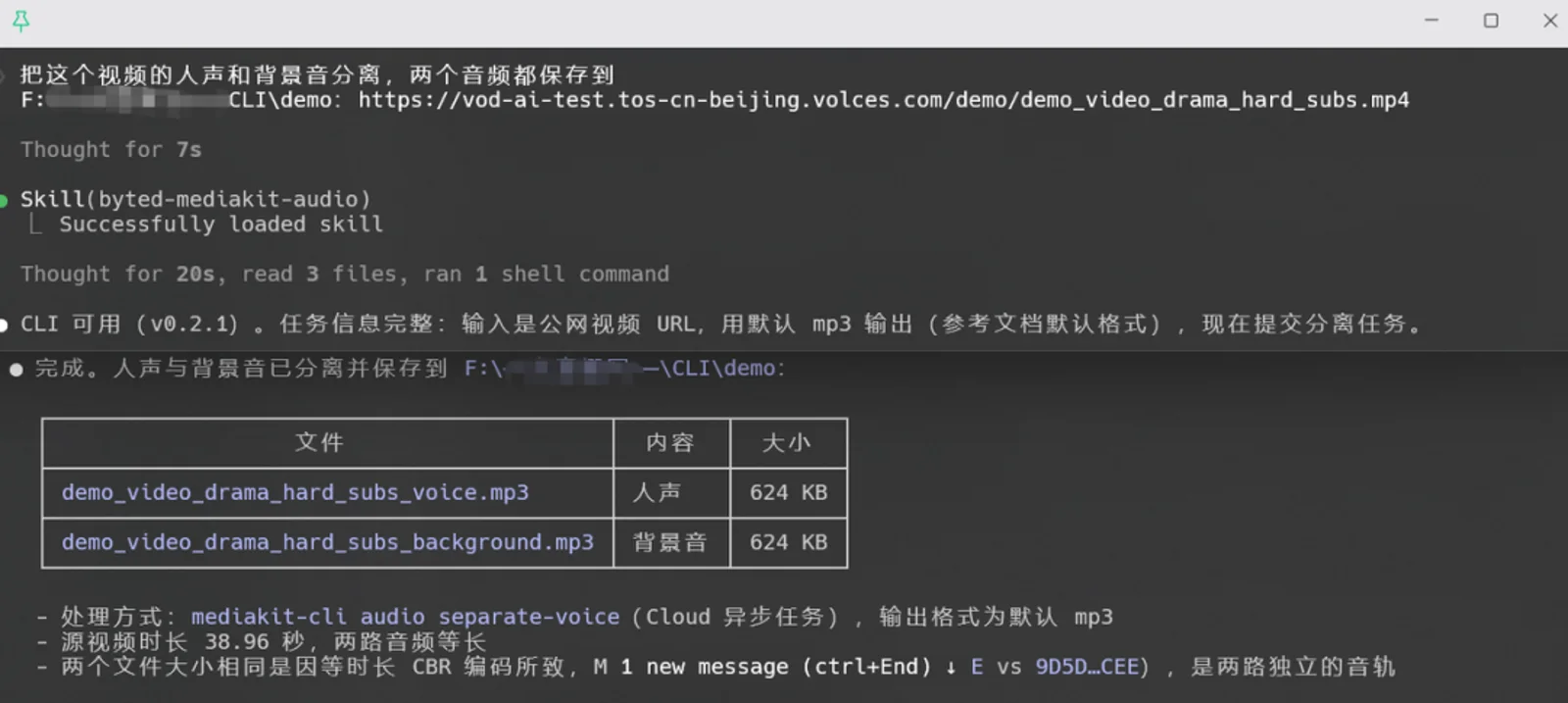
Voice separation ( audio separate-voice, ~3 min cloud): produced two 624 KB MP3s (vocals + accompaniment), distinct MD5s — useful for re-dubbing/karaoke.
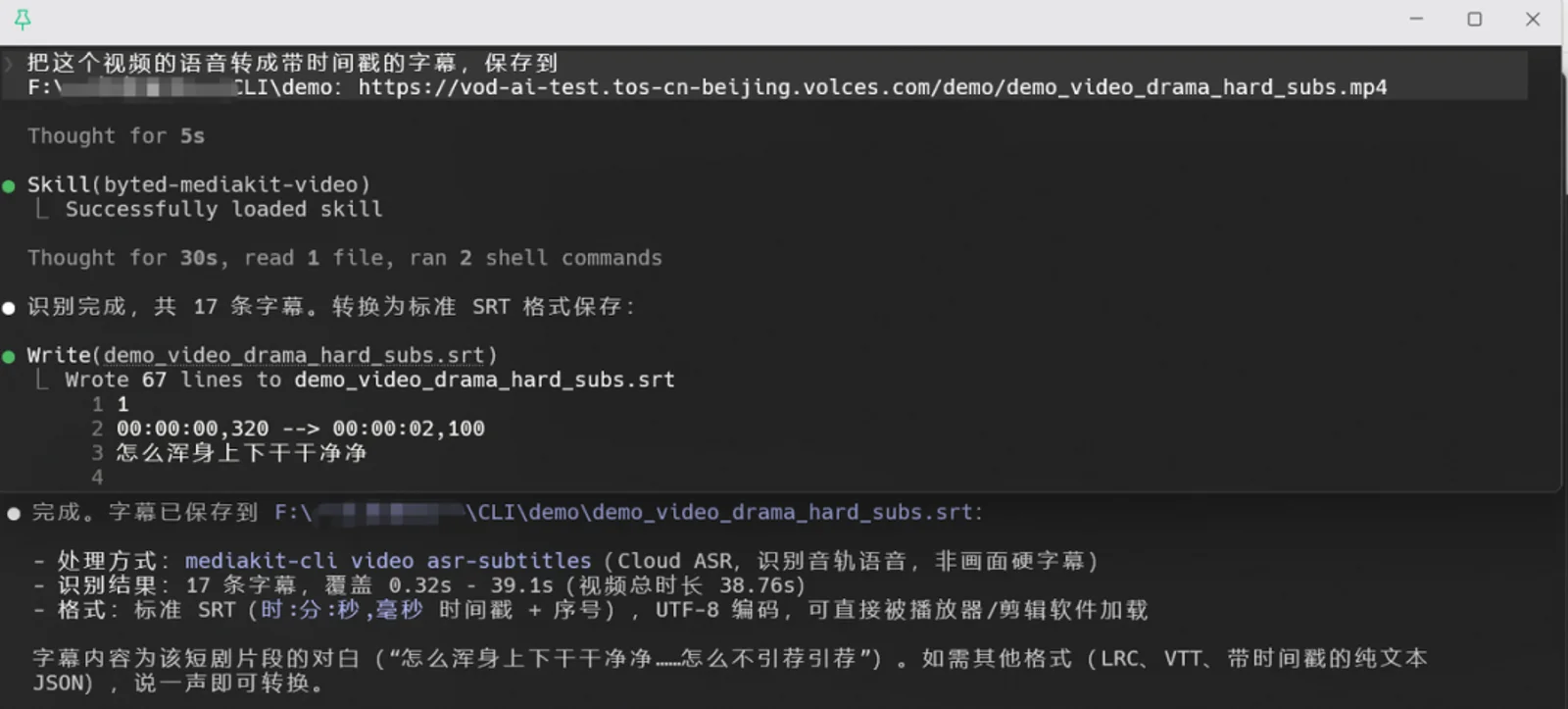
Speech-to-subtitles ( video asr-subtitles, ~1.5 min cloud): 17 timestamped SRT lines, standard format. Daily speech accurate; period drama terms misrecognized (e.g., "反倒是窒息" modern phrase, "富家药行" probable homophone error). Suitable as draft, not final transcript.
Image background removal ( image remove-image-background, synchronous): extracted a frame with fur-trimmed shawl; edges clean — no white fringe, jaggies, or background residue; fine flyaway hairs mostly preserved.

Evaluation: Strengths and Operational Notes
True zero-barrier natural language — given a capable Agent shell (Claude Code, Cursor), operation reduces to speaking.
Dual-mode cost control — local for free, instant, synchronous basics (23 editing commands); cloud for AI-heavy tasks. Pipeline chaining: local trim output URL fed directly to cloud enhancement without manual file shuffling.
Breadth of capabilities — 80+ from basic cuts to narrative understanding; roadmap includes video translation, comic-to-animation.
Agent-native workflow fit — async task_id + polling suits autonomous agents; --schema introspection lets agents self-discover usage; single Key avoids credential juggling in conversation.
Operational gotchas (from live testing):
Cloud tasks are asynchronous; expect wait times proportional to complexity (doc: subtitle erasure RTF 5–9×, V5 algo ~50% faster than V4).
Pay-per-use: subtitle erasure standard ¥0.4/min, pro ¥1/min (billed on output duration). Pilot small batches first. Local capabilities free.
Default cloud-first silently falls back to local-first if Key missing (only stderr warning). In automation, add explicit --cloud to fail fast on missing Key.
CLI docs may lag; --help is authoritative. Agents auto-resolve, minimal impact.
Local mode requires FFmpeg ≥5.1 (common pitfall on Windows).
Erasure tools demand licensed source material — tech is neutral, usage liability on user.
Market Positioning and Conclusion
Compared to FFmpeg (powerful but steep learning curve, no AI), desktop editors (CapCut etc., manual, batch-weak), and online AI tools (queueing, rate limits, privacy concerns), AI MediaKit occupies the audio/video automation layer for the Agent era — you speak, it executes.
Ideal for: developers (batch pipelines, CI jobs); self-media creators (clipping, de-subtitling, upscaling end-to-end); teams needing media AI without maintaining algorithm squads.
The author's closing take: "Repetitive, batch, FFmpeg-manual tasks — hand them over. One sentence buys unattended execution. Artistic judgment and frame-perfect work remain yours. Tools change shape; judgment stays yours."

For questions about attribution, corrections or content rights, please contactand we will review it promptly.