

AI Handles 80% of Coding: Where Android Engineers Should Invest Their Skills
As AI takes over routine coding tasks, Android engineers must shift focus from syntax mastery to architectural decision-making and delivery outcomes, avoid blindly accepting AI-generated code, and adopt a four-step practice of curated learning, hands-on demos, reverse-questioning AI, and fostering team psychological safety for experimentation.
Reading font
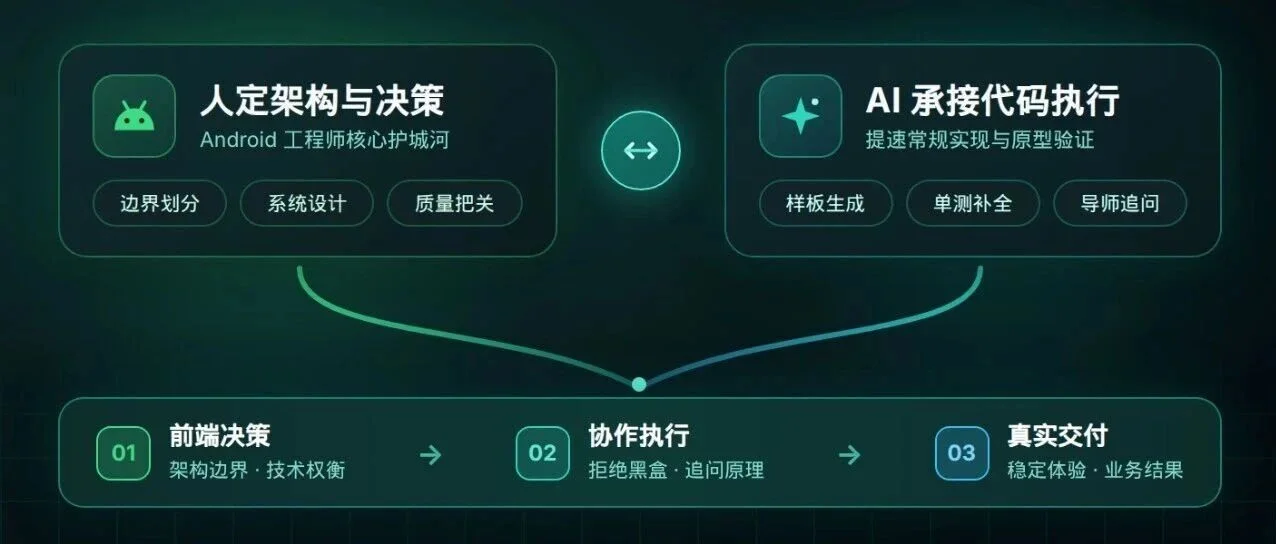
Shift of Focus: From Execution to Decision and Delivery
Client-side engineering work splits into three phases: decision, execution, and delivery. For years engineers spent roughly 80% of their effort on execution — writing boilerplate, looking up API parameters, and crafting glue logic — where typing speed and syntax fluency were the main currency.
That balance has changed. Large language models now produce conventional screens, network layers, and data-class mappings in seconds. Continuing to invest heavily in memorizing every Kotlin syntactic sugar or Android API yields rapidly diminishing returns.
With execution cost compressed, the real differentiators become the bookends: decision (how to slice modules, where to draw architectural boundaries, how to align technical choices with business goals) and delivery (the actual user experience and measurable results on devices, not lines of code merged per day).
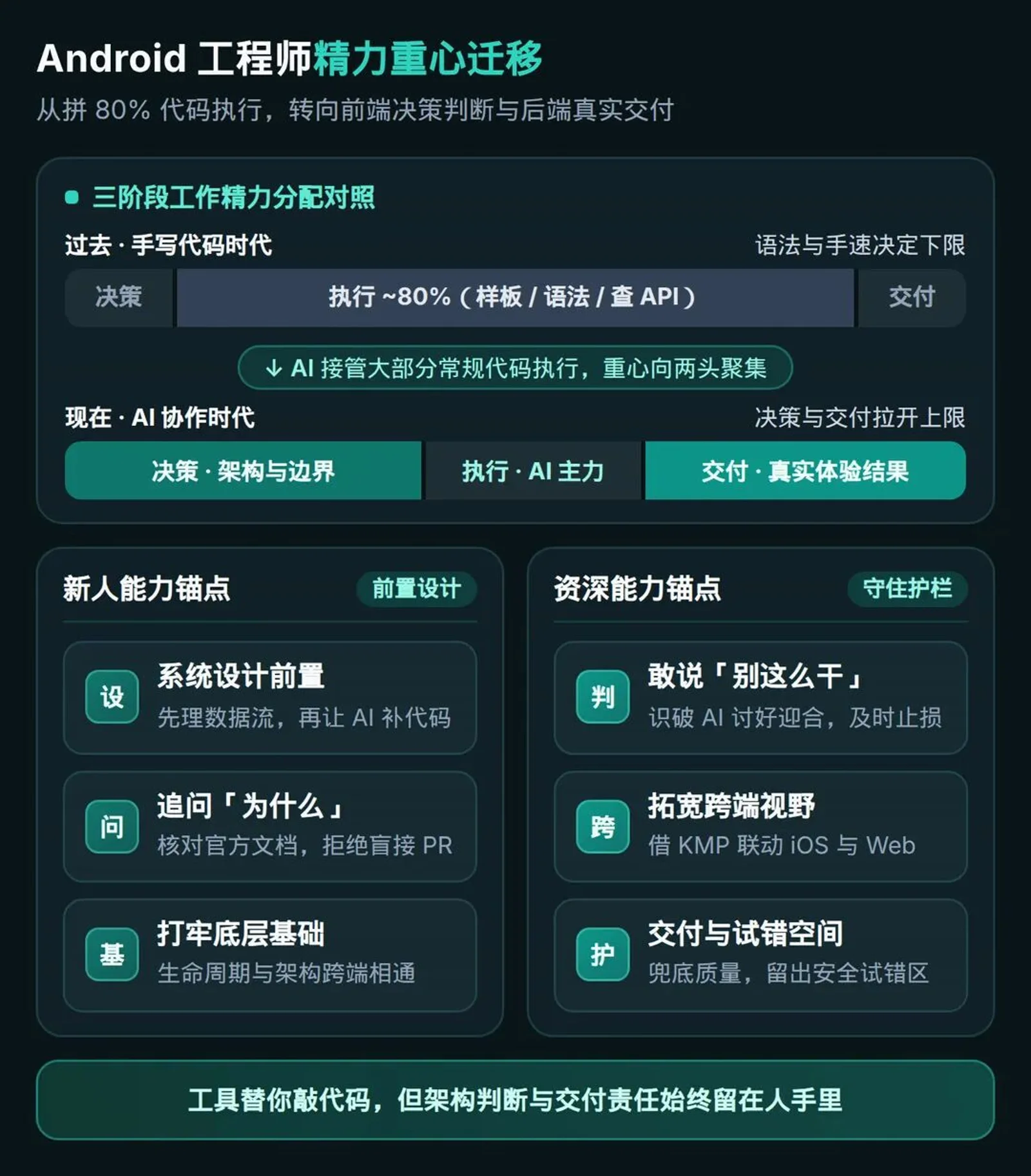
Broadening perspective is now essential. As coding barriers drop, Android engineers need not stay confined to their own silo; Kotlin Multiplatform (KMP) and cross-platform collaboration invite peeking at iOS and Web implementations. Users care whether the problem is solved, not whether the code is pure Kotlin.
Yet fundamentals grow more valuable, not less. Architecture layering, common design patterns, state transitions, and lifecycle constraints are shared across Android, iOS, and Web. Solid foundations let you step into another platform's codebase without panic.
Beware the Black Box: From Blindly Copying Stack Overflow to Blindly Merging Hundred-Line PRs
Early Android developers copied high-voted Stack Overflow snippets without understanding them; today the same trap appears with LLMs. A model emits hundreds of clean, commented lines that pass unit tests, tempting an immediate merge. But when a screen rotation loses state, a complex animation drops frames, or a weak-network callback corrupts data, the engineer who never grasped the code cannot debug it.
A subtler pitfall is the model's inherent "sycophantic" tendency. Trained to be agreeable, it will praise a flawed approach and then generate code that follows it. Real engineering often needs a blunt "don't do that" — perhaps a ready-made wrapper exists, a security hole lurks, or a different architecture would halve maintenance. Such judgment rarely comes from an eager-to-please black box; it emerges from team reviews and peer discussion.
Comparison: Using AI as a Crutch vs. Using AI as a Partner
Before coding: Crutch — throw a one-liner at the model for a whole feature. Partner — clarify module boundaries, data flows, and error branches first, then ask AI to fill implementation.
Facing output: Crutch — merge if code looks tidy and compiles. Partner — walk through lifecycle, concurrency, and performance implications; understand every change's rationale.
When doubts arise: Crutch — trust the model's optimistic reassurance, skip docs. Partner — actively challenge, demand official documentation references, discuss with colleagues face-to-face.
Long-term outcome: Crutch — unable to troubleshoot without the tool, growing insecurity. Partner — faster decisions, accumulated engineering intuition and cross-platform judgment.
Mentors used to tell juniors not to fear "stupid questions" in the team; now the warning flips: asking a colleague a naive question often yields hard-won experience, but asking an AI with blind faith frequently returns a logically sound, confidently delivered wrong answer.
Landing Path: Four Practical Steps for Individuals and Teams
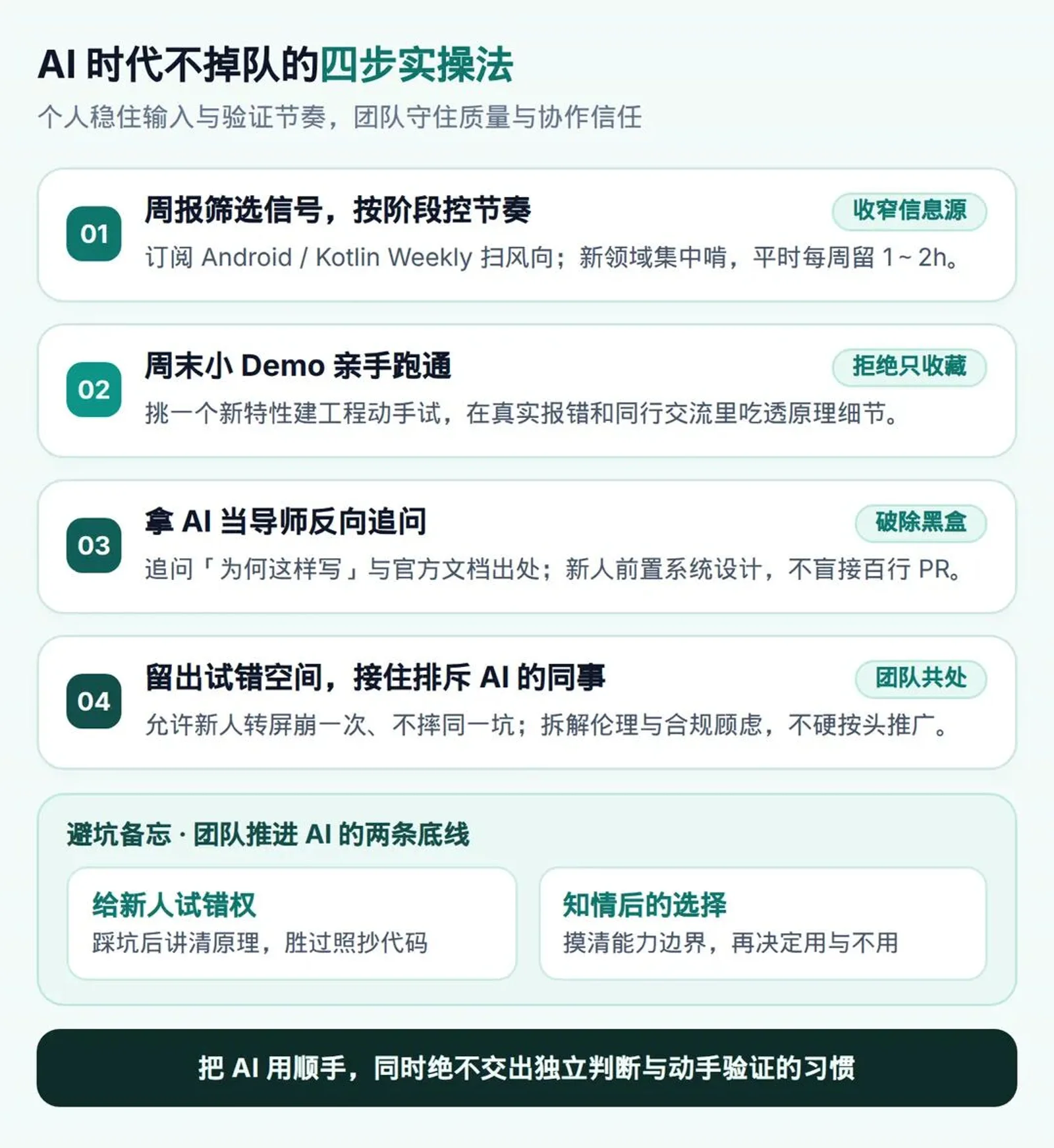
Step 1: Filter Signals with a Weekly Digest, Manage Learning Time by Phase
Social media floods with "revolutionary" frameworks and agents; chasing all leads to burnout. Narrow sources: subscribe long-term to Android Weekly and Kotlin Weekly, scan headlines weekly for ecosystem direction, deep-read only one or two relevant pieces.
Learning time need not be a fixed daily quota. Match it to the current phase: when starting a KMP project with zero multi-platform build knowledge, concentrate on docs, samples, and colleague advice; during steady iteration, reserve one or two calendar hours weekly, and don't guilt-trip yourself during release crunches.
Step 2: Pick a Small Topic, Build a Weekend Demo
Bookmark hoarding teaches nothing. To truly grasp a new Compose feature or AI workflow, spin up a blank project on a weekend and spend two to three hours making it run. Dependency conflicts, config errors, and edge-case crashes force real understanding. Even if the demo gathers dust locally, the hands-on scars stick. Meanwhile, map who in the community or team knows animation, security, or performance — knowing whom to ask when stuck is itself high leverage.
Step 3: Treat AI as a Mentor by Reverse-Questioning; Push Juniors into System Design Earlier
Fear that AI eliminates junior roles misses the point: the career ladder just bends earlier. Ten years ago juniors only needed to wire APIs and match pixels; now that implementation is delegated, they must engage with system design sooner — think modules and data flows first, then let the model write code.
Change the interaction mode: don't use AI as a cheat sheet, use it as an always-available tutor. When it emits a coroutine or state snippet, immediately ask "Why this approach?" and "Where in the official docs does this API behavior come from?" Force yourself to unpack the "why" behind every generated line.
Step 4: Give the Team Safe Space to Fail, Embrace Colleagues Who Resist AI
Veterans grew by breaking code — rotating a screen and crashing, then spending hours on lifecycle lessons. Don't demand zero-defect output from newcomers just because AI exists; deliberately preserve a safe sandbox: allow features to break, provided the cause is articulated and the same pit isn't repeated.
Simultaneously, every team has members who write solid code by hand but distrust AI — concerns range from training copyright and data compliance to simple tactile satisfaction. Forcing adoption breeds resentment; ignoring them delays their adaptation. Instead, sit down and dissect the hesitation: which specific part feels unsafe? Can an on-premise model or strict boundary rules mitigate it? Even if they ultimately keep hand-coding, informed restraint beats blind refusal.
Closing Thoughts
Tool faces rotate every few months; last year's novelty becomes next year's default. Strip away the surface and the Android engineer's bedrock remains: understand system internals, dare to reject bad designs, decompose complex problems clearly, and deliver reliably to users.
Make AI fluent, but never surrender the habit of thinking and verifying. However the next wave of tools evolves, preserving judgment and keeping the patience to validate by hand ensures your hand stays strong.
For questions about attribution, corrections or content rights, please contactand we will review it promptly.