

Anthropic's Guide to Building High-Quality Claude Code Skills: 9 Patterns & Lessons
Anthropic engineer Thariq Shihipar shares nine battle-tested Skill categories — from library references to runbooks — distilled from hundreds of internal Skills, plus practical patterns for progressive disclosure, gotchas, hooks, state persistence, and team distribution via plugin marketplace.
Reading font
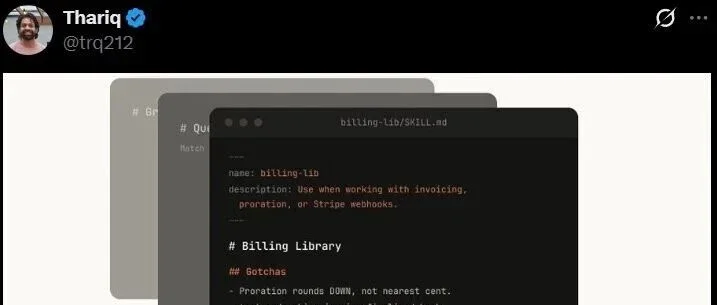
Skills Are Not Just Markdown Files
The author corrects a common misconception: Skills are folders, not merely Markdown files. A Skill folder can contain scripts, resources, data, and configuration that the agent can discover, explore, and operate on. In Claude Code, Skills also support rich configuration options including dynamic Hook registration. The most valuable internal Skills at Anthropic creatively exploit these configuration options and folder structures.
Nine Types of Skills
The author cataloged all internal Skills at Anthropic and identified nine recurring categories. The best Skills cleanly belong to one category; confusing Skills often span several. This taxonomy helps teams spot gaps.
1. Library & API Reference
These Skills explain correct usage of a library, CLI, or SDK — whether internal or a general-purpose library where Claude Code sometimes errs. They typically include a folder of reference code snippets and a checklist of common mistakes Claude should avoid. Examples: billing-lib (edge cases and gotchas for an internal billing library), internal-platform-cli (every subcommand with usage examples), frontend-design (helps Claude conform to the team's design system).
2. Product Verification
These describe how to test and verify that code works, often using external tools like Playwright or tmux. The author emphasizes verification Skills are critical for ensuring Claude's output correctness and worth an engineer spending a full week polishing . Recommended techniques: have Claude record output video, enforce programmatic state assertions at each step, implemented via multiple scripts embedded in the Skill. Examples: signup-flow-driver (drives sign-up → email verification → onboarding with injectable assertions), checkout-verifier (drives checkout with Stripe test cards and verifies invoice status).
3. Data Fetching & Analysis
These connect to the team's data and monitoring systems. They can include credentialed data-fetching libraries, specific Dashboard IDs, and documentation of common data workflows. Examples: funnel-query (sign-up → activation → paid event correlation queries plus authoritative user_id field docs), grafana (data source UIDs, cluster names, problem-to-Dashboard mapping table).
4. Business Process & Team Automation
These encapsulate repetitive workflows into a single command, often depending on other Skills or MCP tools. The author recommends saving each run's result to a log file so the model can maintain consistency and review history on subsequent runs. Examples: standup-post (aggregates tickets, GitHub activity, Slack history → formatted daily digest, outputs only new changes), weekly-recap (merges PRs + closed tickets + deploy records → formatted weekly report).
5. Code Scaffolding & Templates
These generate boilerplate for specific codebase capabilities. The author notes they excel at scaffolding scenarios that have natural-language requirements not fully expressible in code. Examples: new-<framework>-workflow (annotated new service/workflow template), create-app (new app template with built-in Auth, logging, deploy config).
6. Code Quality & Review
These enforce org-wide code standards and assist code review, and can include deterministic scripts for robustness. They can be auto-triggered via Hooks or GitHub Actions. Examples: adversarial-review (spawns a "fresh eyes" sub-agent for critical review, iterates until issues downgrade to nitpicks), code-style (enforces code styles Claude struggles with by default).
7. CI/CD & Deployment
These help fetch, push, and deploy code, often referencing other Skills to gather required data. Examples: babysit-pr (monitors PR → retries flaky CI → resolves merge conflicts → enables auto-merge), deploy-<service> (build → smoke test → canary release with error-rate comparison and auto-rollback).
8. Runbooks
These accept a symptom (Slack message, alert, error signature), execute multi-tool investigation, and output a structured report. Examples: <service>-debugging (symptom → tool → query pattern mapping handbook), oncall-runner (fetches alert → checks common suspects → formats investigation conclusion).
9. Infrastructure Operations
These perform routine maintenance and ops tasks. The author highlights they are especially valuable for destructive operations — built-in guardrails help engineers follow best practices. Examples: <resource>-orphans (finds orphaned Pods/Volumes → Slack notify → cooldown → user confirm → cascading cleanup), cost-investigation (investigates sudden storage/traffic bill spikes).
Advice for Writing Good Skills
Don't State the Obvious
Claude Code already knows your codebase, and Claude has broad programming knowledge and default judgments. If a Skill mainly conveys knowledge, focus on information that pushes Claude past its default behavior . The frontend-design Skill — iteratively refined by an Anthropic engineer with users — helps Claude avoid AI-typical aesthetic patterns like Inter font and purple gradients.
Invest in the Gotchas Section
The author considers the Gotchas section the highest information-density part of a Skill. These should be distilled from actual failures Claude encounters and updated continuously over time.
Use the Filesystem for Progressive Disclosure
Treat the entire filesystem as a context-engineering and progressive-disclosure mechanism. In SKILL.md, tell Claude what files exist in the folder; the model will read them on demand. Simplest form: split detailed content into other Markdown files (e.g., references/api.md for function signatures and usage examples). Also use assets/ for output templates, scripts/ for executables.
Avoid Over-Constraining Claude
Because Skills are highly reusable, the author warns against writing overly specific instructions. Give Claude the information it needs, but retain enough flexibility for it to adapt to different situations.
Consider Initialization Config
Some Skills need context from the user first. The recommended pattern: store a config.json in the Skill directory; if unset, the agent prompts the user. For structured multi-choice prompts, instruct Claude to use the AskUserQuestion tool.
Description Field Is a Model-Facing Trigger
Claude Code scans every Skill's description field at startup to decide "which Skill fits this request." Therefore description is not a summary — it is a trigger condition that determines when Claude invokes the Skill.
Memory & State Persistence
Certain Skills achieve cross-session memory by storing data in files — from a simple append-only text log to a SQLite database. For example, standup-post can keep a history log of daily digests; on next run Claude reads history to know what changed since last time. Critical warning: data stored inside the Skill directory itself may be deleted on upgrades; use the stable directory ${CLAUDE_PLUGIN_DATA} provided by Anthropic for persistent storage.
Store Scripts in Skills & Let Claude Generate Code
Giving Claude executable scripts and libraries is more effective than textual descriptions — it lets Claude spend reasoning cycles on "what to do" rather than reconstructing boilerplate . Example: embedding a helper-function library in a data-analysis Skill enables Claude to dynamically compose scripts answering complex questions like "what happened last Tuesday."
On-Demand Hooks
Skills can include Hooks that activate only when the Skill is invoked and auto-expire when the session ends. Two examples: /careful (blocks rm -rf, DROP TABLE, force-push — enabled only when touching production), /freeze (restricts writes to a specific directory during debugging to prevent accidental changes elsewhere).
Distributing Skills in a Team
Two distribution methods: commit Skills to the repo ( ./.claude/skills) or build an internal plugin marketplace for on-demand install. Committing works for small teams, but as scale grows, an internal plugin marketplace is superior because every Skill consumes model context.
Managing the Marketplace
Anthropic's approach: no dedicated review team; let quality Skills emerge organically. Engineers upload to a GitHub sandbox folder, promote via Slack for trial; once a Skill gains sufficient adoption, the author submits a PR to merge into the official marketplace. The author cautions that low-quality and redundant Skills appear easily, so some form of human curation before publishing is necessary .
Composing Skills
Skills can depend on each other — just reference another Skill by name in SKILL.md; if installed, the model auto-invokes it. This dependency management is not yet built into the marketplace mechanism.
Measuring Skill Usage
The author suggests using a PreToolUse Hook to log Skill invocations, revealing which Skills see high usage and which have lower-than-expected trigger rates.
Closing
The author stresses Skills are powerful and flexible but still early; everyone is discovering best practices. Treat this article as a "useful collection of experiences," not an authoritative guide.
For questions about attribution, corrections or content rights, please contactand we will review it promptly.