

iCloud's Twin Outages Expose Authentication as a Single Point of Failure
The article analyzes two iCloud outages in November 2026, revealing how authentication service failures locked users out of data and password resets, explores iCloud's architecture, compares with Azure's similar outage, and discusses local-first, DID, and multi-cloud alternatives for resilience.
Reading font
Preface
In November 2026, Apple users experienced a rare "double kill" — on November 10 and 17, iCloud suffered two large-scale outages within a week. Large numbers of users were forcibly signed out of their Apple IDs; iCloud Photos, Notes, and Keychain were all locked. Even more absurdly, the password reset page (iforgot.apple.com) was also inaccessible. This occurred less than two weeks after Microsoft Azure's global outage in early November, making "can cloud services be trusted" the hottest topic in tech circles.
This article starts from the timeline of these two incidents, dissects the authentication and synchronization architecture behind iCloud, analyzes the root causes, and discusses mainstream 2026 alternatives such as multi-cloud disaster recovery and local-first architectures. No anxiety-mongering, just technology.
Table of Contents
1. What Exactly Happened in the Two Outages
2. Dissecting iCloud's Authentication and Data Synchronization Architecture
3. Why You Couldn't Even Reset Your Password — The Single-Point Dependency in the Authentication Chain
4. Microsoft Just Crashed, Then Apple Crashed: Cloud Vendors' "Common-Mode Failures"
5. 2026 Alternatives: From Cloud Dependence to Local-First
6. What Ordinary Users Can Do Right Now
1. What Exactly Happened in the Two Outages
First Outage: November 10, Lasting ~7 Hours
Around 10:00 AM Beijing time on November 10, domestic users began reporting that iCloud Drive files would not sync and iCloud Photos showed "Downloading" but stalled. By noon, the problem escalated — some users found themselves forcibly signed out of their Apple IDs, and re-login attempts returned "Verification failed, unknown error." Apple's official System Status page did not mark iCloud Account & Sign In as "Service Disruption" until 1:00 PM, while the actual impact began much earlier.
Service gradually recovered around 11:00 PM, but many users experienced iCloud Keychain sync delays, and some third-party app tokens were invalidated, requiring re-authorization.
Second Outage: November 17, Lasting ~4 Hours
Just one week later, at 3:00 PM on November 17, iCloud suffered another large-scale failure. This time the symptoms were more severe: not only was login broken, but iforgot.apple.com (the password reset page) also returned 503 errors. In other words, your photos were locked in the cloud, your password was wrong, and the very portal to change that password was also down. The topic "iCloud outage" hit the Weibo top-10 hot search within two hours.
Apple has not publicly released a root cause analysis (RCA) for either incident, but from externally observable phenomena and industry norms we can make reasonable technical inferences.
2. Dissecting iCloud's Authentication and Data Synchronization Architecture
To understand this failure, we must first examine iCloud's core architecture. Although Apple does not disclose all details, through WWDC technical sessions, CloudKit documentation, and security white papers we can reconstruct the general architecture.
iCloud's system roughly divides into three layers:
Authentication Layer (Identity Service)
Metadata & Routing Layer (CloudKit)
Object Storage Layer
Every user action — opening a photo, syncing a note, auto-filling a password — must first pass the authentication layer to obtain a token, then use CloudKit to locate the data shard, and finally fetch the actual content from object storage.
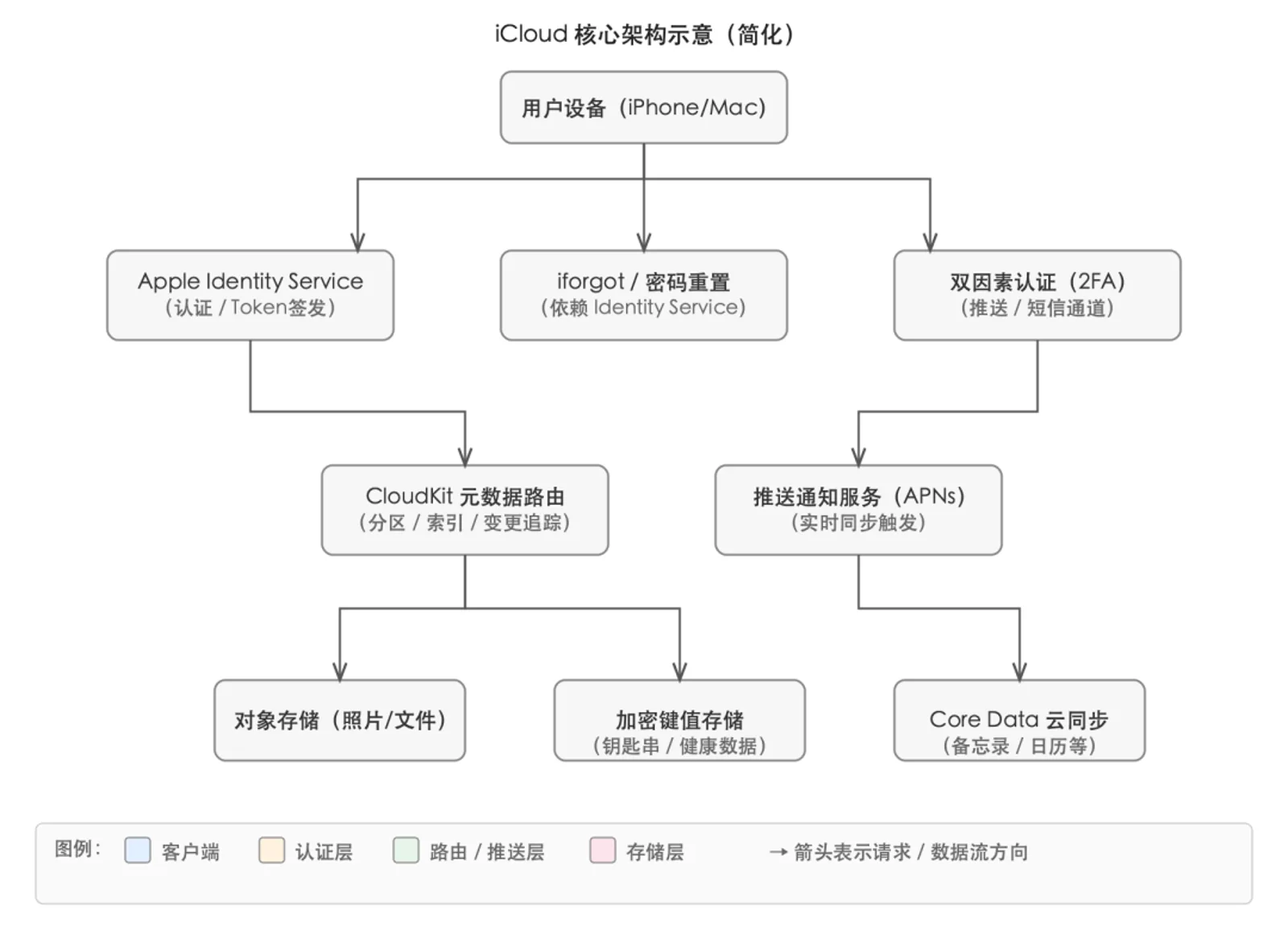
The critical point: all operations depend on the token issued by Identity Service . The photos themselves may sit perfectly fine on S3-compatible object storage, but if the authentication layer is down, you cannot even prove "who you are," so you get nothing.
3. Why You Couldn't Even Reset Your Password — The Single-Point Dependency in the Authentication Chain
The most maddening detail of the second outage was that iforgot.apple.com went down with it. This is easy to understand — the password reset service is itself a downstream consumer of Identity Service. The reset flow roughly works as follows:
User visits iforgot page and enters Apple ID email.
Backend calls Identity Service to verify the account exists and whether 2FA is enabled.
If 2FA is enabled, trigger a verification code push to trusted devices (via APNs) or SMS.
User enters the code; Identity Service issues a temporary token.
User uses the temporary token to set a new password; Identity Service writes the new credentials.
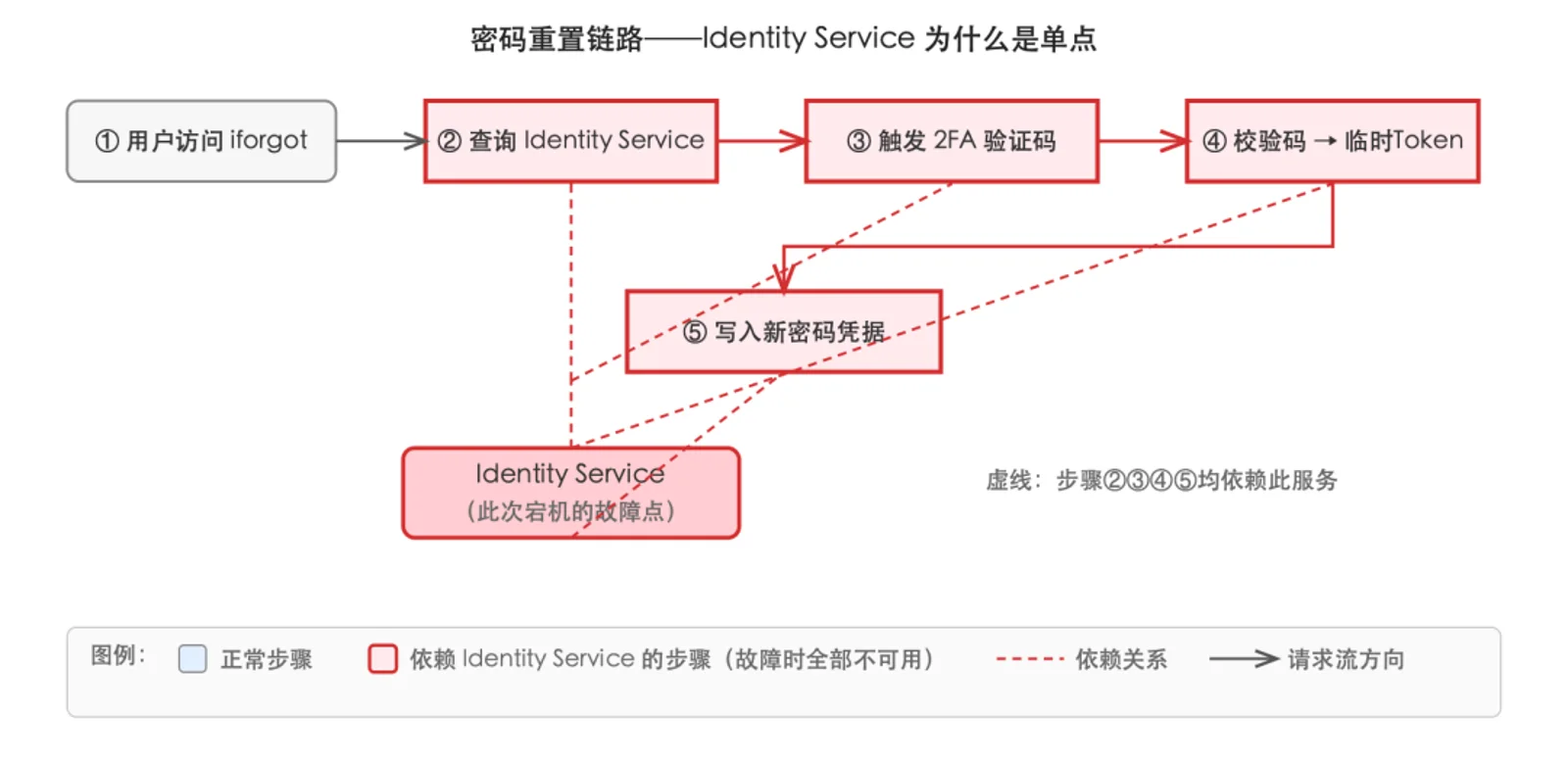
Steps 2, 3, 4, and 5 all depend entirely on Identity Service. It is not an "auxiliary component" of password reset; it is the central hub of the entire chain. Once Identity Service becomes unavailable, password reset is a dead end.
This is why users felt "completely locked out" — not because their photos were lost, but because the entire identity system collapsed, taking every identity-related operation with it.
From an architectural perspective, this is a classic authentication service single-point failure propagation . Google suffered a similar incident in 2024 when a GCP IAM anomaly took down Firebase Auth and Google Sign-In simultaneously. The industry calls this pattern an "Auth Storm": after the auth service fails, all downstream services frantically retry token acquisition, which further increases load on the auth service, creating a vicious cycle.
4. Microsoft Just Crashed, Then Apple Crashed: Cloud Vendors' "Common-Mode Failures"
Viewed in isolation, this is an Apple operations issue, but placed in a larger context it becomes interesting.
On November 3, Microsoft Azure's North America region experienced a 14-hour major outage; Outlook, Teams, and OneDrive all went down. The cause was a configuration change in Entra ID (formerly Azure AD) that broke token issuance logic — symptoms strikingly similar to Apple's.
Within two weeks, the world's two largest cloud platforms both flipped on their authentication modules. This is not coincidence; it is a structural problem:
Modern cloud service architectures almost universally treat identity authentication as a "God service." Unlike databases that can be sharded or CDNs that can fail over across regions, authentication services demand extremely high consistency (you cannot have a user logged in in Region A but not logged in in Region B). This strong consistency requirement inherently suppresses the possibility of active-active multi-region deployment.
Moreover, over the past two years both Apple and Microsoft have pushed Passkeys and end-to-end encryption — technologies that are good in themselves but further deepen dependence on centralized authentication nodes. Passkey registration and recovery must go through the auth service; end-to-end encryption key escrow also hangs on the auth service. The paradox of "more security, more centralization" has been laid bare in 2026.
5. 2026 Alternatives: From Cloud Dependence to Local-First
After this incident, the hottest discussion in the technical community was not "which cloud to switch to" but "can we reduce rigid dependence on the cloud." Several relatively mature paths in 2026:
5.1 Local-First Architecture
CRDT (Conflict-free Replicated Data Type) engines represented by Automerge and cr-sqlite matured significantly in 2025-2026. The core idea: data lives locally first; synchronization is just icing on the cake . Cloud down? Local works fine; when cloud recovers, automatic merge happens.
Products like Anytype and Obsidian Sync already use this architecture. For photos, the open-source combination of Syncthing + immich can achieve multi-device photo sync without relying on any cloud vendor's authentication system.
5.2 Decentralized Identity (DID + Self-Sovereign Identity)
W3C's DID (Decentralized Identifier) specification entered practical deployment in 2026. The basic idea: your identity is not "issued" by Apple or Google, but "declared" by your own key pair. Authentication does not depend on any single service endpoint; instead, verifiable credentials are validated on the client side.
Of course, this is still far from replacing Apple ID at scale, but in enterprise intranet scenarios, zero-trust identity frameworks based on SPIFFE/SPIRE can already operate without a single central authentication authority.
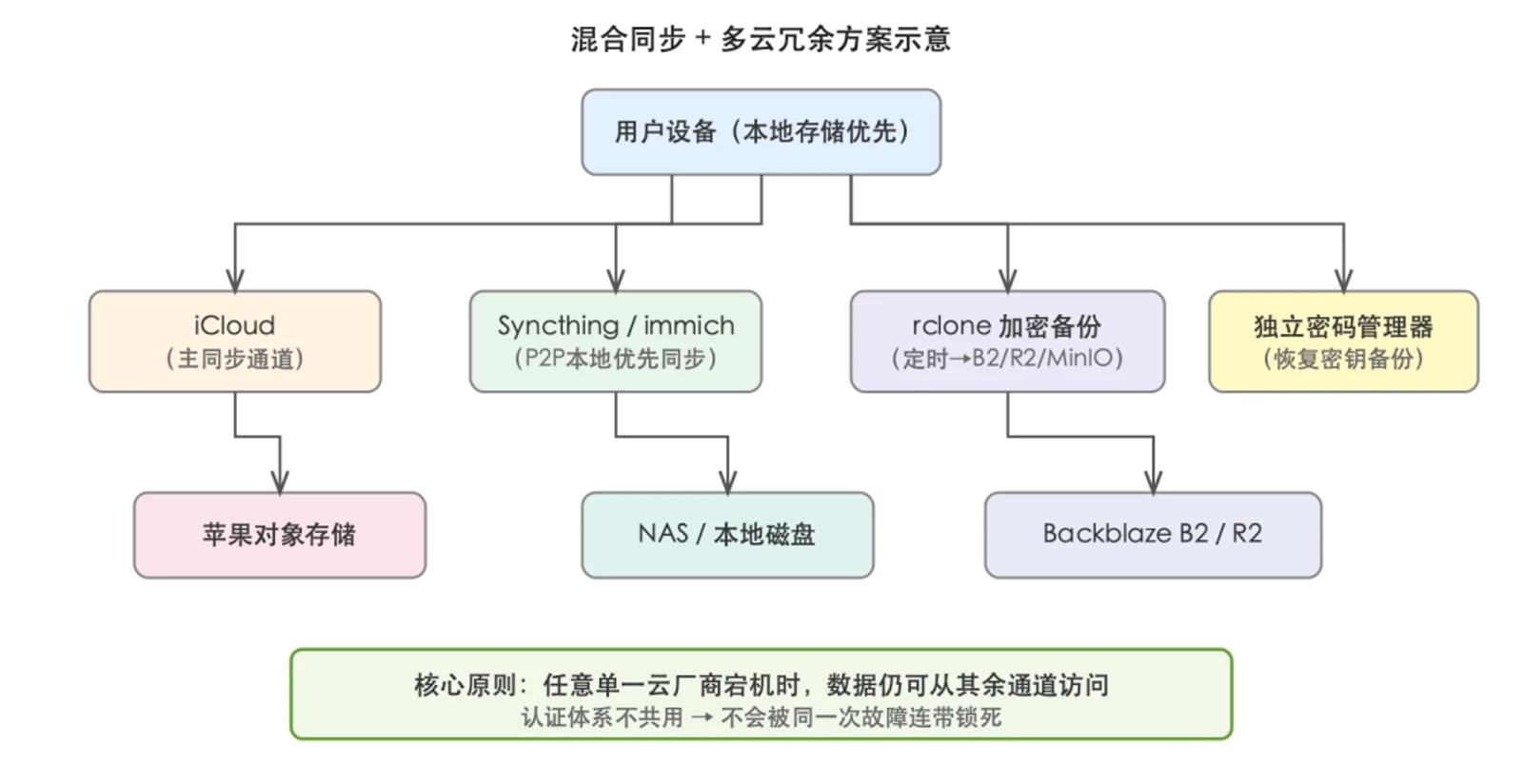
5.3 Hybrid Sync + Multi-Cloud Redundancy
For a less radical approach, the most pragmatic practice is: keep at least two copies of critical data, and ensure they are not under the same vendor's authentication system . For example, keep iCloud Photos enabled, but also use rclone to periodically encrypt and back up photos to Backblaze B2 or Cloudflare R2. For authentication, store recovery keys in an independent password manager like 1Password or Bitwarden — don't put all eggs in the iCloud Keychain basket.
6. What Ordinary Users Can Do Right Now
Beyond architecture, here are concrete steps for everyday users:
1. Export Your iCloud Photos to Local Storage
Open the Photos app on Mac → Preferences → check "Download Originals to this Mac." ~50,000 photos require roughly 200 GB and one to two days to download. Once synced, you have a complete local copy.
2. Save Your Recovery Key Offline
The Apple ID Recovery Key is a 28-character string. Go to appleid.apple.com → Sign-In & Security → Recovery Key, generate it, then print it out or write it on paper and store it in a safe. Do not keep it only in iCloud Keychain — this outage proved that puts the key inside the same safe that just jammed shut.
3. Prepare a Backup Authentication System
Install Bitwarden or 1Password and store passwords, TOTP seeds, and recovery codes for critical accounts. These tools have their own independent authentication systems and local vaults, so they remain functional even when Apple is down.
4. Follow the 3-2-1 Backup Rule for Important Data
Old rule: 3 copies, 2 media types, 1 off-site. iCloud counts as one cloud copy; a local hard drive is the second; use rclone or Duplicati to encrypt and push a third copy to another cloud storage provider. Costs less than ¥10/month for peace of mind.
Final Thoughts
These two outages are not saying "Apple is no good" — Apple's engineering capability remains top-tier in the industry. The real issue is:
When over a billion people's digital lives rest on a single authentication system, that system's reliability ceases to be a technical problem and becomes an infrastructure problem.
Power grids have redundancy, water supplies have emergency reserves, banks have disaster recovery — yet most people's photos, passwords, notes, and health data have only one path. In 2026, that status quo is no longer acceptable.
While iCloud is still accessible, go back up your data now.
For questions about attribution, corrections or content rights, please contactand we will review it promptly.