

Linux Routing Internals: IP Forwarding Setup & Container Network Proof
This article explains Linux routing implementation including routing tables, IP forwarding, and policy rules, demonstrates sysctl configuration for net.ipv4.ip_forward, and verifies its necessity for Docker container inter-network communication through practical ping tests and packet captures.
Reading font
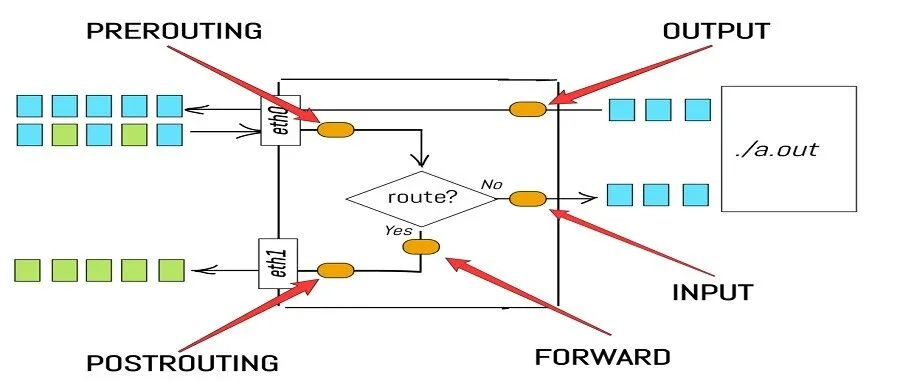
1. Linux Routing Functionality
Routing determines how network packets traverse networks to reach destinations. It enables path selection via routing tables, logical network isolation and segmentation (subnets/VLANs communicating via routers), and Network Address Translation (NAT) converting private addresses to public ones.
1.1 Linux Routing Implementation
Linux routing relies on routing table management , IP address forwarding , and routing policies .
1) Routing Table Management
Routing tables guide packet forwarding. Linux maintains multiple tables; defaults are main, local, default:
main : system default routing table, also holds user-defined routes.
local : handles local loopback and broadcast packets; kernel-maintained, immutable.
default : used for default gateway and fallbacks when other tables lack matches.
2) IP Address Forwarding
Enables packet forwarding between networks. Controlled by kernel parameter net.ipv4.ip_forward (set to 1 to enable). When enabled, the kernel consults routing tables for next-hop gateway; if destination is on local LAN, packets are sent directly via the corresponding NIC.
3) Routing Policies
Policies select optimal routes via algorithms like route caching, source routing, multipath, multi-gateway. View rules with ip rule list:
# ip rule list
0:      from all lookup local
32766:  from all lookup main
32767:  from all lookup default
Processing flow: rules are matched by priority (lowest number first). Each rule has a Selector (match condition, e.g., "from all") and an Action (e.g., "lookup local"). If a table yields no match, the next rule is evaluated.
Example local table contents ( ip route list table local):
# ip route list table local
broadcast 127.0.0.0 dev lo proto kernel scope link src 127.0.0.1
local 127.0.0.0/8 dev lo proto kernel scope host src 127.0.0.1
local 127.0.0.1 dev lo proto kernel scope host src 127.0.0.1
broadcast 127.255.255.255 dev lo proto kernel scope link src 127.0.0.1
broadcast 192.168.112.0 dev ens33 proto kernel scope link src 192.168.112.121
local 192.168.112.121 dev ens33 proto kernel scope host src 192.168.112.121
broadcast 192.168.112.255 dev ens33 proto kernel scope link src 192.168.112.121
Packets for 192.168.112.121 are handled by interface ens33; broadcasts to 192.168.112.255 egress via ens33. Non-local IPs fall through to rule 32766 (main table), then default.
Main table example ( ip route show):
# ip route show
default via 192.168.112.2 dev ens33 proto static metric 100
192.168.112.0/24 dev ens33 proto kernel scope link src 192.168.112.121 metric 100
Custom rules can be added/removed via ip rule add/delete.
1.2 Linux Routing Basic Flow
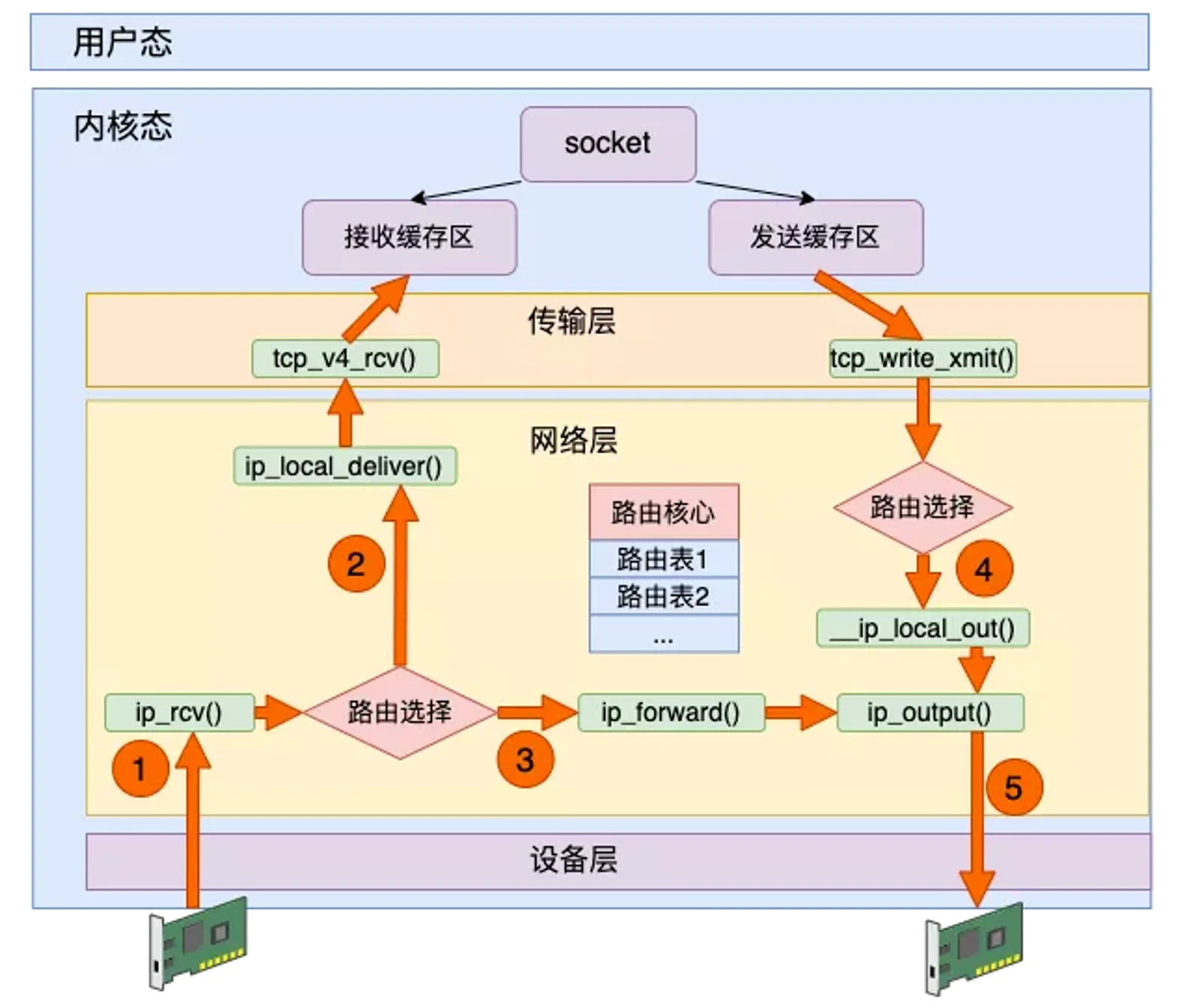
Packet Reception : NIC passes packet to kernel network stack; IP layer performs checksum and parsing.
Route Selection : IP layer looks up routing tables for next-hop. If destination matches a local IP, packet goes to ip_local_deliver for upper-layer (TCP/UDP) processing. If non-local, packet enters ip_forward for forwarding , then ip_output for egress.
Packet Transmission : Kernel encapsulates packet (e.g., Ethernet frame) and sends via determined egress interface across physical links.
2. ip_forward Parameter Function & Configuration
IP forwarding routes received packets toward destinations per routing info. Disabled by default for security (host processes only packets addressed to itself). Toggle via net.ipv4.ip_forward: 1 = enabled, 0 = disabled.
1) Temporary via sysctl
sysctl -w net.ipv4.ip_forward=1Takes effect immediately; lost on reboot.
2) Permanent via /etc/sysctl.conf
# vi /etc/sysctl.conf
net.ipv4.ip_forward = 1
# sysctl -p  # apply dynamically
3. Why Configure ip_forward in Container Environments
In Docker, containers communicate via host's network interfaces. Docker creates a virtual bridge (e.g., docker0); containers attach to it. External traffic reaches host first, then host forwards to target container per routing rules.
Container-to-external or external-to-container traffic requires host forwarding; without ip_forward, packets drop, breaking connectivity.
Inter-container communication on same host also needs host forwarding; disabled ip_forward causes failures.
1) Docker Network Modes & IP Forwarding
Bridge : Docker creates virtual bridge; container interfaces connect to it.
net.ipv4.ip_forward</strong> must be ON for cross-network communication.</li>
<li><strong>Host</strong>: Container shares host network namespace; no IP forwarding needed as packets move directly within host namespace.</li>
<li><strong>Overlay</strong>: Spans multiple hosts using overlay virtual devices; requires <code>net.ipv4.ip_forward
enabled for cross-node packet forwarding.
2) IP Forwarding Test
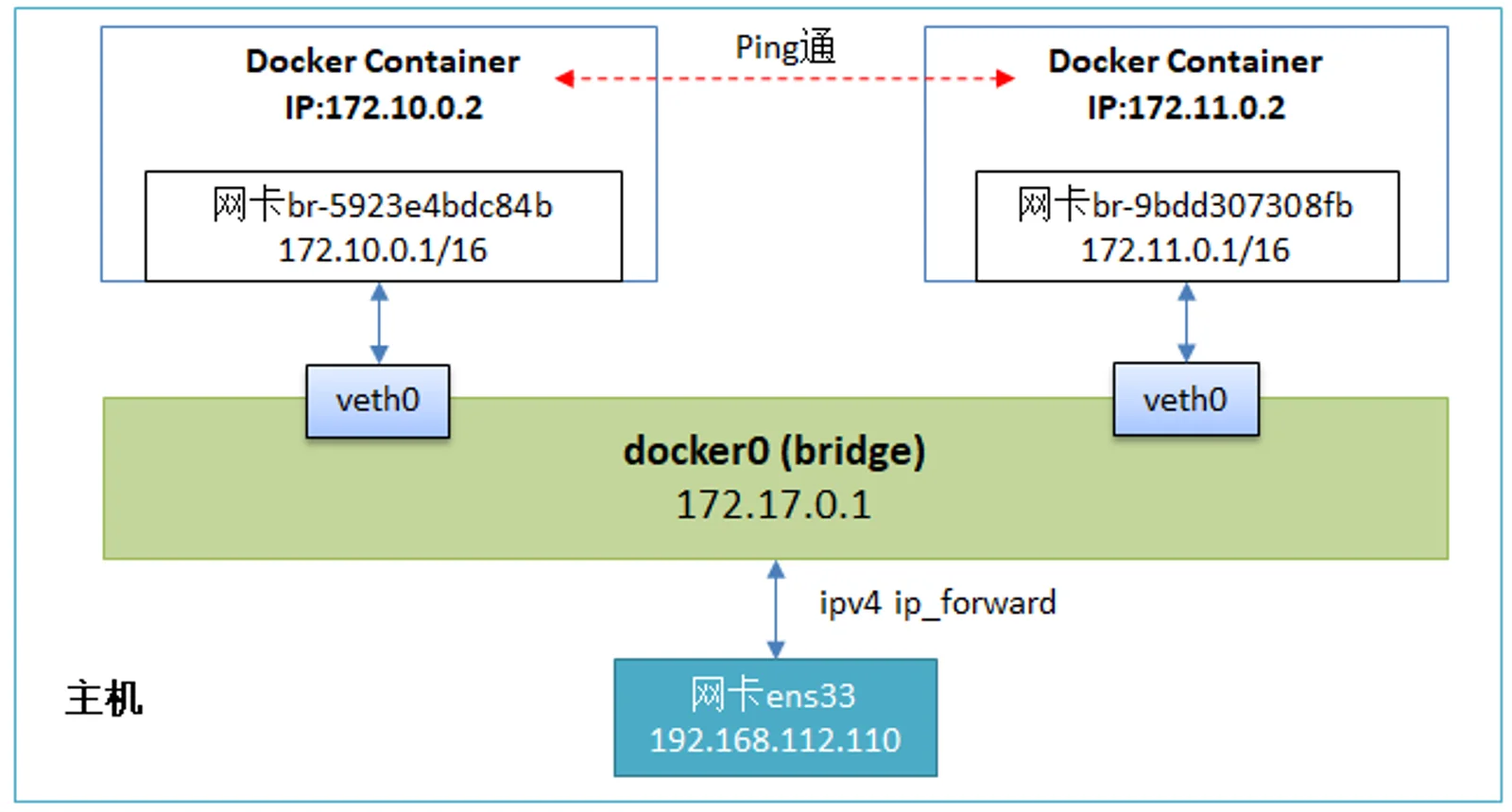
Step 1: Launch containers with IPs
# Create networks
 docker network create --subnet 172.10.0.0/16 net10
 docker network create --subnet 172.11.0.0/16 net11
# Run containers
 docker run -it --name centos0 --net net10 --ip 172.10.0.2 centos bash
 docker run -it --name centos1 --net net11 --ip 172.11.0.2 centos bash
 iptables -F
# Verify
 docker network ls
 brctl show
 docker network inspect net10
 docker network inspect net11
Output shows two bridge networks (net10: 172.10.0.0/16, net11: 172.11.0.0/16) with containers centos0 (172.10.0.2) and centos1 (172.11.0.2) attached via veth pairs.
Step 2: Test connectivity inside container
docker exec -it centos0 bash
ping 172.11.0.2
PING 172.11.0.2 (172.11.0.2) 56(84) bytes of data.
64 bytes from 172.11.0.2: icmp_seq=1 ttl=63 time=0.066 ms
Ping succeeds (TTL 63 indicates one hop via host).
Step 3: Disable ip_forward and retest
sysctl -w net.ipv4.ip_forward=0
ping 172.11.0.2
PING 172.11.0.2 (172.11.0.2) 56(84) bytes of data.
# No replies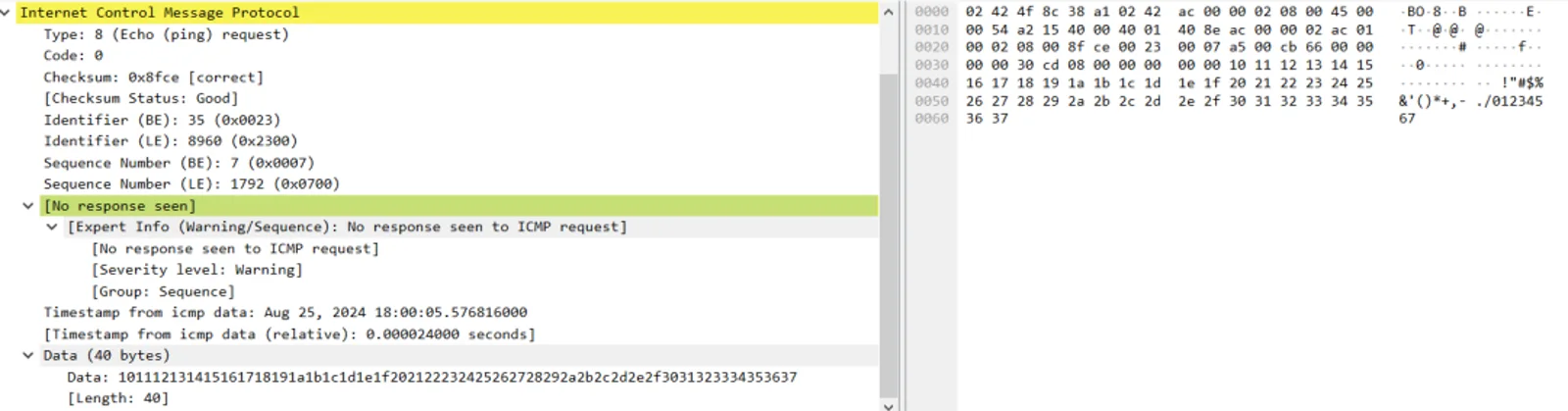
Packet capture confirms no reply. With IP forwarding off, inter-container connectivity fails, proving net.ipv4.ip_forward is essential for container network communication.
References: https://blog.csdn.net/qq_43684922/article/details/128881968 https://blog.csdn.net/weixin_43702146/article/details/131379569 https://www.51cto.com/article/698945.html
For questions about attribution, corrections or content rights, please contactand we will review it promptly.