

LLM Tool Calling Explained: Dual Dependency of Model and Engine
This article explains LLM Tool Calling as a dual dependency between model reasoning and inference engine interfaces, detailing the five-step workflow, OpenAI API implementation with code examples, JSON Schema tool definitions, and common pitfalls like naming conventions and parameter design.
Reading font
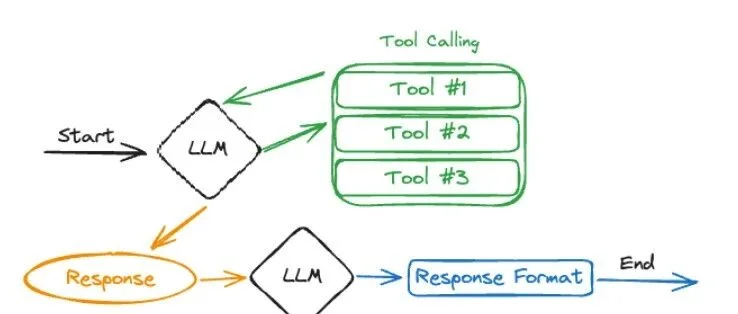
1. The Essence of Tool Calling: Dual Dependency
Tool Calling capability arises from the combination of the model's own reasoning ability and the inference engine's interface support; both are indispensable.
1.1 Model's Core Capabilities
The model must be trained to recognize when a user request requires an external tool, select the appropriate tool from provided definitions, and emit a structured call (typically JSON Schema) with correct parameters. It then incorporates the tool's execution result into the final natural-language response. Different models vary in this ability; for example, early DeepSeek-R1 had weak Tool Calling support, while DeepSeek V3.1 is expected to perform well.
Identify the part of user intent that needs external action
Generate structured tool call requests (function name + parameters)
Produce the final natural-language reply using tool execution results
1.2 Inference Engine's Interface Support
The engine provides a standardized mechanism that includes:
Receiving tool definitions: allows developers to declare available tools in a structured way
Guiding model output: uses specific prompt templates to organize the user query and tool definitions into the model's input
Parsing model responses: supplies a post-processing module that reliably extracts tool call instructions from model output
2. Working Principle and Technical Architecture
2.1 Complete Workflow
Intent recognition: model analyzes the user query and decides whether an external tool is needed
Tool selection: chooses the most suitable tool from the available set
Parameter extraction: pulls required parameters from the user query
Tool execution: external system actually runs the tool call
Result integration: model incorporates the tool's result into the final response
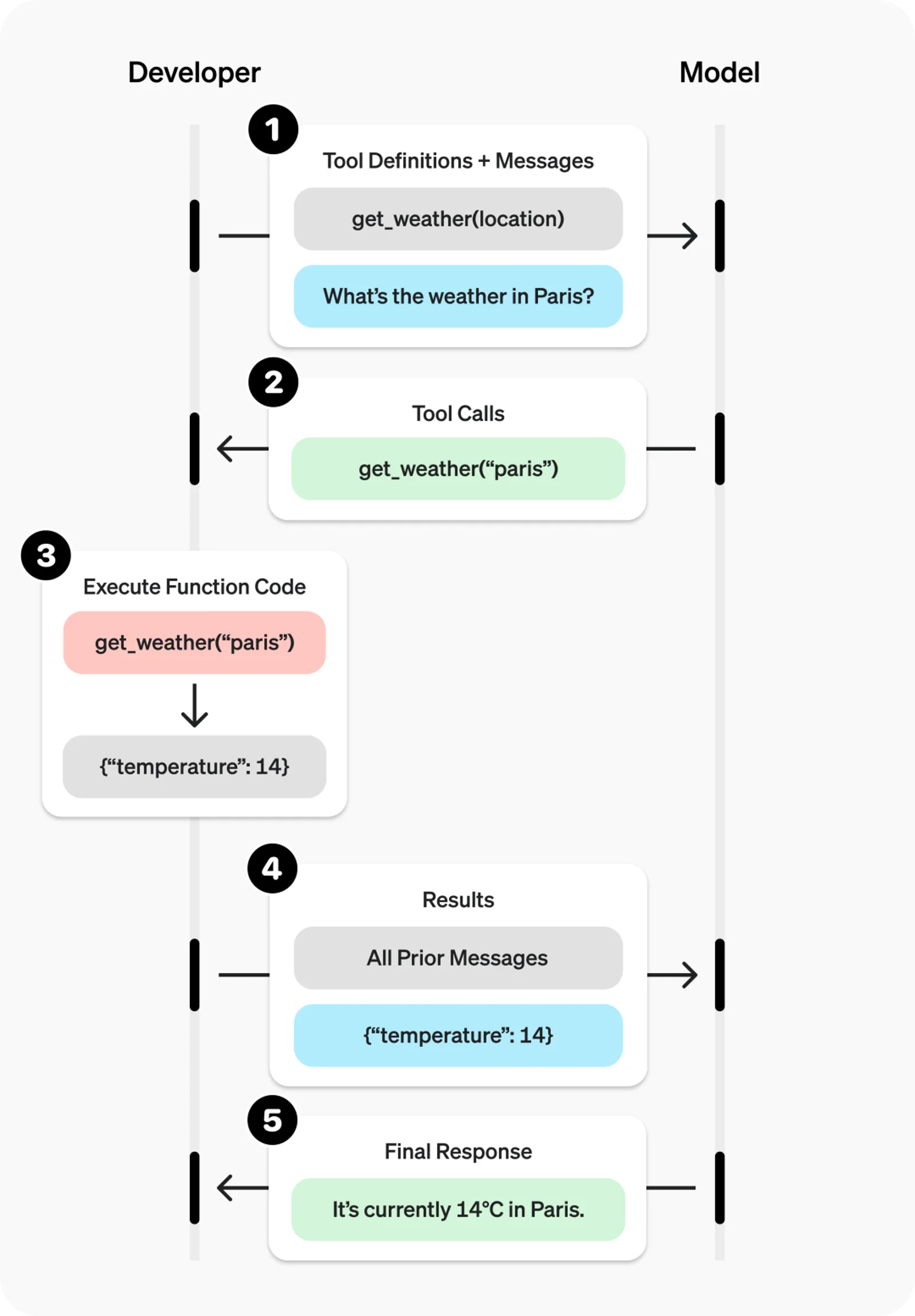
3. Practical Demonstration: OpenAI Framework Implementation
3.1 OpenAI Native API Example
Below is a complete example of stock/horoscope query using OpenAI-style API (code adapted from official documentation):
from openai import OpenAI
import json

client = OpenAI()

# 1. Define a list of callable tools for the model
tools = [
    {
        "type": "function",
        "name": "get_horoscope",
        "description": "Get today's horoscope for an astrological sign.",
        "parameters": {
            "type": "object",
            "properties": {
                "sign": {
                    "type": "string",
                    "description": "An astrological sign like Taurus or Aquarius"
                },
            },
            "required": ["sign"],
        },
    },
]

def get_horoscope(sign):
    return f"{sign}: Next Tuesday you will befriend a baby otter."

# Create a running input list we will add to over time
input_list = [
    {"role": "user", "content": "What is my horoscope? I am an Aquarius."}
]

# 2. Prompt the model with tools defined
response = client.responses.create(
    model="gpt-5",
    tools=tools,
    input=input_list,
)

# Save function call outputs for subsequent requests
input_list += response.output

for item in response.output:
    if item.type == "function_call":
        if item.name == "get_horoscope":
            # 3. Execute the function logic for get_horoscope
            horoscope = get_horoscope(json.loads(item.arguments))

            # 4. Provide function call results to the model
            input_list.append({
                "type": "function_call_output",
                "call_id": item.call_id,
                "output": json.dumps({
                    "horoscope": horoscope
                })
            })

print("Final input:")
print(input_list)

response = client.responses.create(
    model="gpt-5",
    instructions="Respond only with a horoscope generated by a tool.",
    tools=tools,
    input=input_list,
)

# 5. The model should be able to give a response!
print("Final output:")
print(response.model_dump_json(indent=2))
print("
" + response.output_text)
3.2 Tool Definition Specification
Tool definitions must follow JSON Schema; this ensures the model correctly understands each tool's purpose and expected inputs. A function is defined by its schema, which tells the model what the function does and what parameters it expects. The schema includes the following fields: type: Always
functionname: Function name (e.g., get_weather) description: Explains when and how to use the function parameters: JSON schema defining the function's input parameters strict: Whether to enforce strict mode when calling the function
Example get_weather definition:
{
    "type": "function",
    "name": "get_weather",
    "description": "Retrieves current weather for the given location.",
    "parameters": {
        "type": "object",
        "properties": {
            "location": {
                "type": "string",
                "description": "City and country e.g. Bogotá, Colombia"
            },
            "units": {
                "type": "string",
                "enum": ["celsius", "fahrenheit"],
                "description": "Units the temperature will be returned in."
            }
        },
        "required": ["location", "units"],
        "additionalProperties": false
    },
    "strict": true
}
3.3 Multi-turn Tool Calling
Complex queries may require multiple tool calls, which necessitates maintaining conversation context; this article does not expand further on that topic.
4. Common Pitfalls to Avoid
Function naming convention: use clear verb-noun combinations.
❌ "name": "func1" ✅ "name": "get_weather" Clear and accurate descriptions: detail the tool's functionality and applicable scenarios.
❌ "description": "天气功能" ✅
"description": "获取指定城市的当前天气情况,包括温度和天气状况"Reasonable parameter definitions: avoid redundant parameters, clearly mark required ones.
5. Summary and Outlook
Dual dependency: Tool Calling relies on both the LLM's reasoning capability and the inference engine's interface support.
Technical maturity: Mainstream frameworks (OpenAI API, LangChain, Spring AI) provide solid Tool Calling support, but implementation differences must be evaluated.
Model variability: Different models exhibit significant differences in Tool Calling ability; choose models based on specific requirements.
Future direction: Tool Calling is evolving toward more intelligent, automated multi-tool collaboration and autonomous planning capabilities.
Proper use of Tool Calling lets LLMs transcend their intrinsic limits and become interactive intelligent agents, laying a foundation for complex AI applications.
Code examples are for reference only; adjust and optimize according to the specific framework version in production.
For questions about attribution, corrections or content rights, please contactand we will review it promptly.