

Splash: 1.7x Faster Local LLM Inference on Mac with Model-Specific Metal Kernels
Splash, a model-specific inference engine for Apple Silicon, achieves 91.1 tok/s on an M5 Pro 48GB running Inkling 2 Mini — 1.7x faster than MTPLX — by fusing operations into custom Metal kernels and using DFlash 2 speculative decoding, but only supports five models and requires M3+ chips with macOS 26.4+.
Reading font
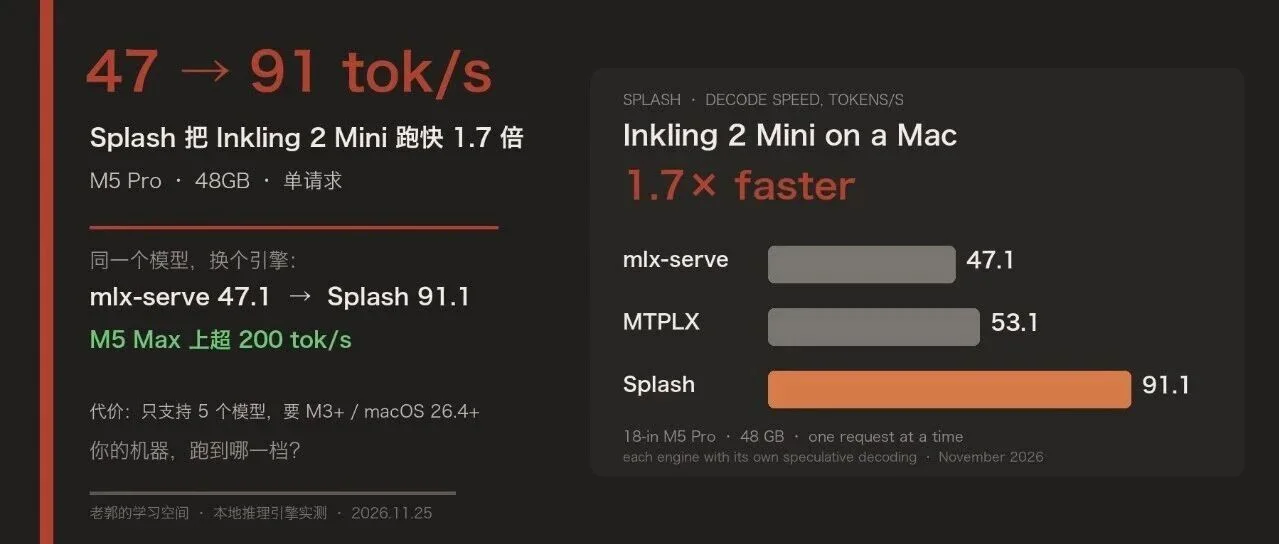
Inco AI's open-source Splash inference engine (v1.7.2) targets Apple Silicon exclusively. On an 18-inch M5 Pro with 48 GB memory running a single request, Splash decodes Inkling 2 Mini at 91.1 tok/s , compared to 53.1 tok/s for MTPLX and 47.1 tok/s for mlx-serve — a 1.72× speedup over the second-place MTPLX (1.93× over mlx-serve). The benchmark uses each engine's own speculative decoding and best checkpoint, making it a fair comparison.
Benchmark Details and Clarifications
Decoding vs. prefill: The 91.1 tok/s figure measures token generation speed (decoding), not prompt processing (prefill). Mixing the two is a common benchmarking pitfall.
1.7× baseline: The “1.7× faster” claim uses MTPLX (53.1 tok/s) as the reference; versus mlx-serve the gain is nearly 2×.
Fair configuration: Footnotes confirm “one request at a time” and “each engine with its own speculative decoding and best checkpoint,” so no engine runs a handicapped setup.
Why Splash Is Fast: Three Technical Innovations
Splash abandons the general-purpose engine approach (like llama.cpp, MLX, Ollama) in favor of per-model specialization:
Per-model fused Metal kernels: Matrix multiply, activation, normalization, and residual addition are fused into a single GPU dispatch. Kernels are pre-compiled for the model's exact tensor shapes (hidden size, head count, KV heads, vocab size). Weights are loaded directly into the kernel's required layout with zero copies. Inco's internal kernel agent auto-generates and verifies these kernels — human authoring would be infeasible.
DFlash 2 speculative decoding as the sole decode path: Unlike traditional draft-then-verify, DFlash 2 lets the draft model emit multiple candidate tokens in parallel; the target model verifies them all in one forward pass. On a 5-layer Qwen3-4B variant running GSM8K, the top-1 candidate is correct 85.4% of the time, and the correct answer falls within the top-16 candidates 99.5% of the time. This yields multiple accepted tokens per step. The method is lossless : greedy output matches the target model token-for-token, and sampling preserves the original distribution.
Automatic memory planning with zero configuration: At startup Splash queries the Metal allocator for the memory ceiling, subtracts target model, draft model, and per-request overhead, and allocates the remainder to KV cache and concurrency. If the model doesn't fit, it prints a memory budget and refuses to launch — no silent swap-based degradation.
Trade-offs and Limitations
Only five supported models: Qwen3.8-27B, Qwen3.6-35B-A3B, Ornith-1.5-122B, Qwen3.8-Flash-Next, and Flint. Both GGUF and MLX formats work, with vision and tool-calling support, but pure BF16/F16 weights are not supported. If your model isn't on the list, Splash cannot run it.
Hardware/OS floor: Requires M3 or newer Apple Silicon and macOS 26.4+. Older Macs are excluded.
Strict memory gating: If the memory plan says the model won't fit, Splash exits rather than falling back to slower execution. This is both a safety feature and a hard constraint.
Real-World Performance Across Chip Tiers
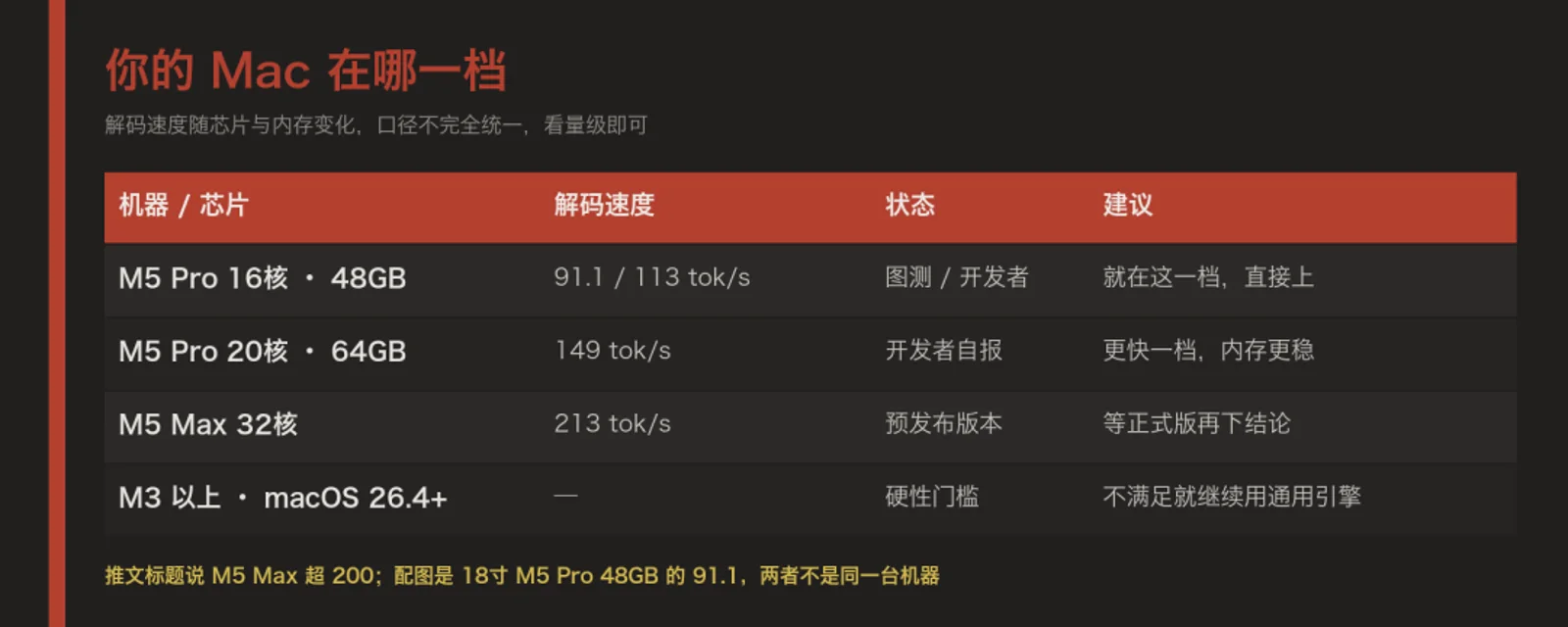
The announcement mentions “over 200 tok/s on M5 Max,” but the published screenshot is for an 18-inch M5 Pro 48 GB (91.1 tok/s). Community-reported numbers (non-uniform, different versions) give a rough tiered picture:
16-core M5 Pro / 48 GB ≈ 113 tok/s
20-core M5 Pro / 64 GB ≈ 149 tok/s
32-core M5 Max ≈ 213 tok/s (pre-release build)
Do not assume your M5 Pro will hit 200+ tok/s.
Should You Switch? Decision Framework
Your model is in the supported five and you have an M3+ Mac: Worth trying. Single-request, low-concurrency workloads (personal coding agent, chat) are Splash's sweet spot — its custom kernels and speculative decoding saturate the hardware.
Your model is not listed, or you're on M2/older or macOS < 26.4: Stick with LM Studio, llama.cpp, or MLX. An engine that can't load your model delivers zero value.
You need multi-user concurrent serving: The single-request benchmark does not reflect batch throughput. Evaluate Splash's concurrent performance separately.
Installation and Usage
Two commands suffice for a quick test:
brew install incoai/tap/splash
splash serve --model unsloth/Qwen3.8-27B-GGUF:UD-Q4_K_M
First run downloads the matching draft model. The server starts at 127.0.0.1:8000 with OpenAI/Anthropic-compatible API endpoints — usable directly in a browser or wired to a coding agent. Avoid port conflicts with LM Studio.
Conclusion
Local inference is splitting into two camps: general-purpose engines (llama.cpp, MLX) that run everything flexibly, and specialized engines (Splash) that squeeze maximum speed from a handful of models. For users locked into one or two supported models, a 1.7× decode speedup isn't just a benchmark — it cuts wait time in half, directly affecting whether the tool gets used at all.
For questions about attribution, corrections or content rights, please contactand we will review it promptly.