

Trivy Finds Vulnerabilities But No One Fixes Them? AI Assistant Auto-Generates Remediation Plans
The author built a Streamlit tool integrating Harbor, Trivy, and DeepSeek to automate container image vulnerability scanning and remediation, providing a web UI that selects images, runs scans via SSH, visualizes results, and uses an LLM to generate actionable fix plans with go/no-go decisions, prioritized CVEs, step-by-step commands, and residual risks.
Reading font

Problem: Scanning Is Easy, Remediation Is Hard
Most teams already run Harbor private registries and Trivy vulnerability scanners, but the workflow stalls at decision-making. Trivy outputs large JSON reports full of CVEs, leaving operators to manually verify exploitability, decide whether to rebuild base images, modify Dockerfiles, rebuild, push, and roll out Kubernetes updates. This manual process delays fixes and often lets vulnerable images reach production.
Solution: An Integrated Streamlit Web Tool
The author developed a self-contained Streamlit application that closes the "last mile" by connecting Harbor, Trivy, and the DeepSeek LLM into a single four-step loop: select image → one-click scan → visual vulnerability table → AI-generated remediation plan.
1. Harbor Registry Integration
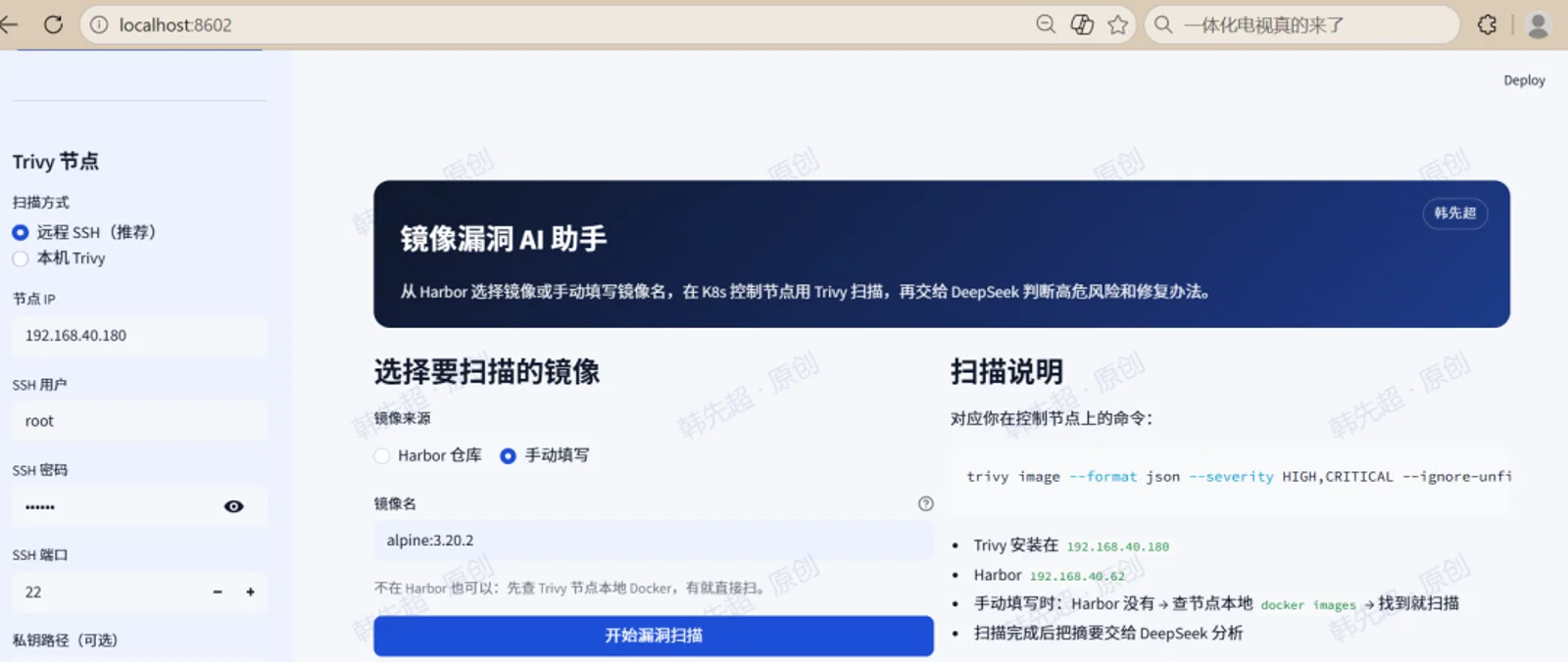
The UI automatically connects to a private Harbor instance and lets users drill down through projects, repositories, and tags to assemble the full image reference. If an image only exists locally on a node, the user can paste the image name manually.
2. Trivy Scan Execution
By default the tool SSHes into a Kubernetes control plane node (where Trivy is pre-installed) and runs the familiar command:
trivy image --format json --severity HIGH,CRITICAL --ignore-unfixed <image-name>Users can toggle severity filters and the --ignore-unfixed flag. The default filters out unfixed vulnerabilities so teams focus on immediately actionable risks.
3. DeepSeek-Powered Risk Decision
Only a concise summary of high-severity findings (first few dozen CVEs, OS info, image source) is sent to DeepSeek. The prompt enforces strict constraints: never invent CVEs outside the scan output, and produce a structured report matching operational ticket templates.
AI Output Template
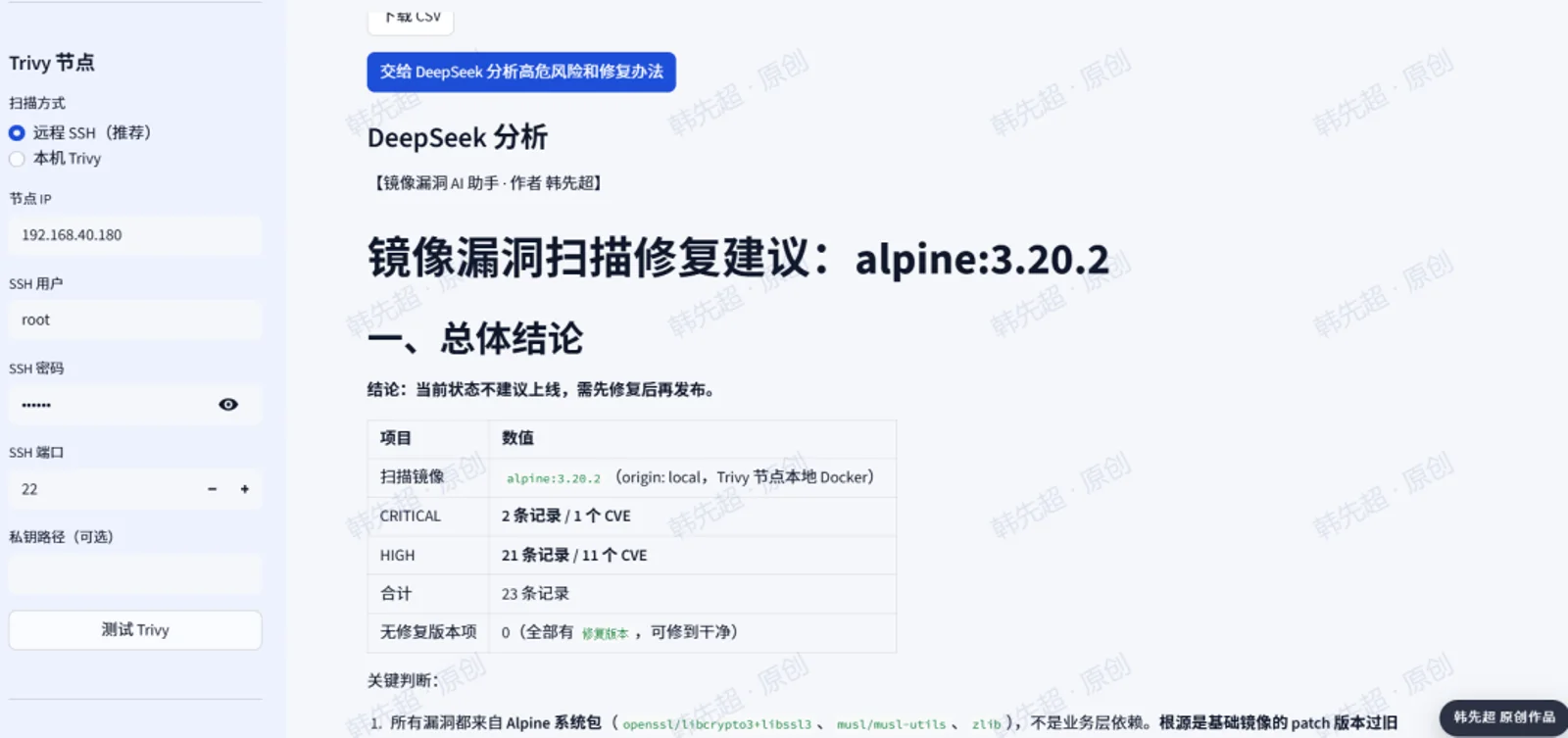
Overall Verdict : clear go/no-go decision for production deployment.
Critical List : each CVE with package name, current version, fixed version.
Remediation Steps : concrete commands — base image upgrade, apk/apt package updates, Dockerfile edits, rebuild, push to Harbor, Kubernetes rolling update.
Residual Risks : unfixed CVEs filtered out by --ignore-unfixed.
Three Engineering Designs for Reliability
1. Multi-Source Image Adaptation
The tool first tries to pull from Harbor; if the image is only present on the node, it falls back to docker images and runs Trivy with --image-src docker. This covers temporary pre-registry scenarios and reduces false errors.
2. Concise Summaries to Prevent Hallucination
Instead of dumping the full JSON (tens of KB), the tool sends only the top high-severity entries plus metadata. This cuts token costs and keeps the LLM focused on real findings.
3. Remediation Mapped to Operational Actions
The AI distinguishes system-level vulnerabilities (suggest base image replacement) from application-layer ones (provide full rebuild and rollout steps). All output is copy-paste ready for ticketing systems.
User Experience Walkthrough
Fill sidebar with SSH node details, Harbor URL, DeepSeek API key.
Connect to Harbor, pick target image via dropdowns.
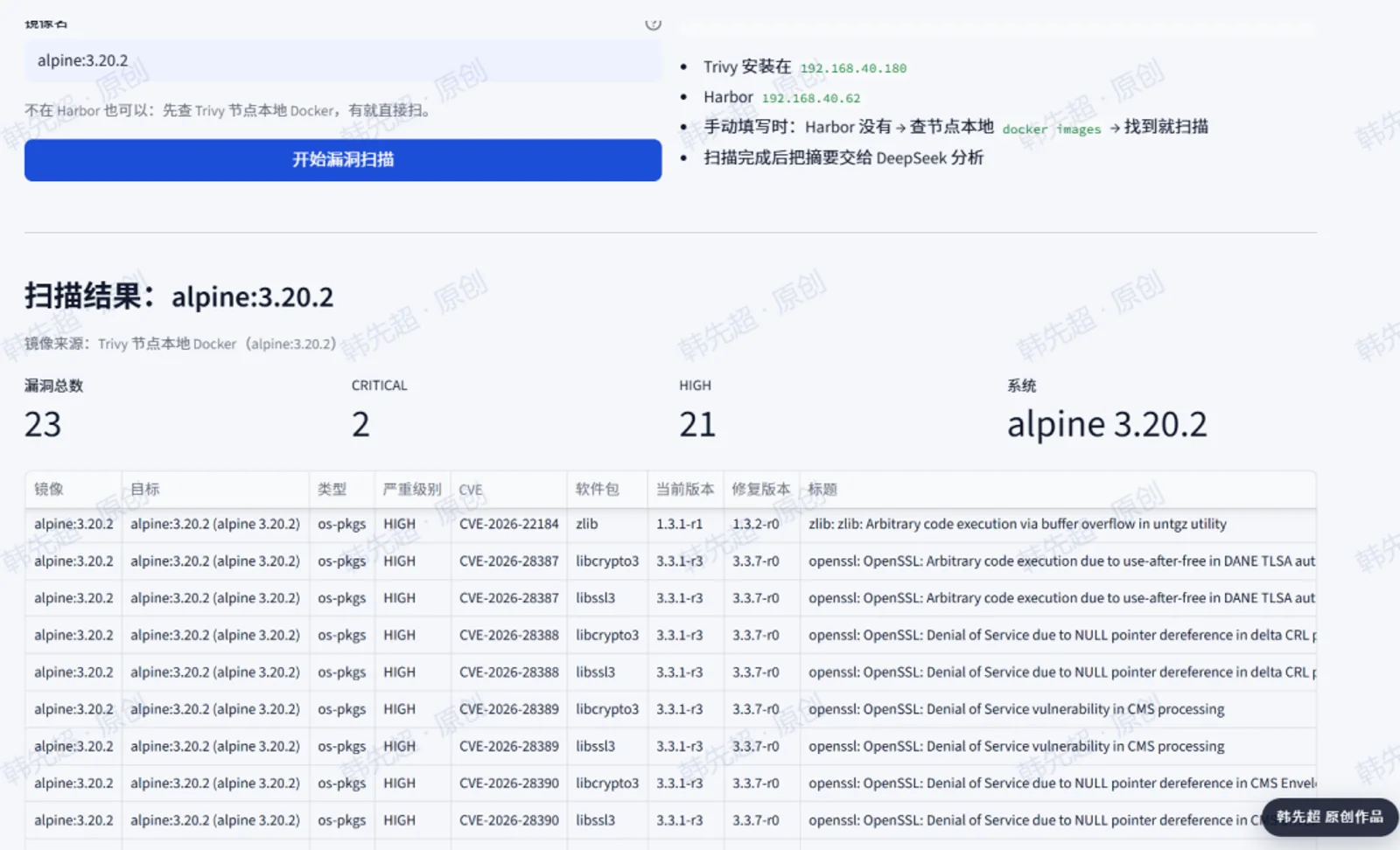
Click "Start Scan" — four summary cards appear (total, critical, high, OS info).
Sortable table shows CVE ID, package, current version, fixed version, official link; exportable to CSV.
Click "AI Analysis" to generate the structured remediation report.
Deployment
Requires Python. Two commands launch the service:
python -m pip3 install -r requirements.txt
python -m streamlit run app.py
Then open the local port in a browser. The author warns to keep the DeepSeek key in environment variables or sidebar input, never hard-coded in repositories.
Target Teams and Limitations
Best suited for teams already using Harbor + Kubernetes with Trivy on control nodes, where dev, ops, and security share a single risk conclusion, and who want a lightweight alternative to commercial SCA platforms. The tool does not replace full software composition analysis or admission control policies; its value is stitching existing tools into an end-to-end decision pipeline.
Conclusion
Container security tooling is abundant; the bottleneck is turning scan reports into timely go/no-go decisions. This tool compresses the workflow to under ten minutes: pick image → scan → get verdict → copy fix commands. High-risk vulnerabilities block release until remediated, letting automation guard the baseline.

For questions about attribution, corrections or content rights, please contactand we will review it promptly.