

Volta-Forever: Run CUDA 13 Apps on V100 via PTX Rewriting & FP8 Emulation
The open-source volta-forever project enables NVIDIA Tesla V100 GPUs to run CUDA 13 applications by translating PTX and SASS code at runtime and emulating BF16, FP8, and NVFP4 formats, allowing frameworks like vLLM, SGLang, and llama.cpp to run models such as Qwen3.5-35B-A3B with measurable token throughput.
Reading font
Background: CUDA 13 Drops Support for Volta Architecture
NVIDIA's CUDA 13.0 release removed offline compilation and library support for Volta, Pascal, and Maxwell GPUs. As AI frameworks like PyTorch, vLLM, and SGLang migrate to CUDA 13, Tesla V100 (Volta, 2017) users face software incompatibility despite functional hardware.
Solution: volta-forever Compatibility Layer
Developer Nicolas announced the open-source project volta-forever (GitHub: nbald/volta-forever) on X. It provides a universal software compatibility layer that lets V100 run CUDA 13 applications without modifying GPU drivers or recompiling frameworks. Users simply prefix launch commands with vf.
Core Mechanism: PTX Rewriting and SASS Translation
volta-forever intercepts kernel-load requests at runtime and converts new-architecture code for Volta execution:
PTX Rewriting: For programs containing PTX (NVIDIA's intermediate representation), unsupported instructions are replaced with Volta-equivalent sequences, the target architecture is updated, and the NVIDIA driver performs just-in-time (JIT) compilation.
SASS Translation: For pre-compiled machine code (SASS) targeting Turing, volta-forever attempts direct translation to Volta-executable machine code.
Additionally, CUDA 13 library calls are forwarded to CUDA 12.9.2 libraries that already contain V100-compatible kernels. A just-in-time compilation cache avoids repeated translation overhead.
Software Emulation of BF16, FP8, and NVFP4
V100 Tensor Cores natively support only FP16 matrix ops. volta-forever emulates newer low-precision formats (BF16, FP8, NVFP4) by converting their instructions into sequences executable on Volta, enabling V100 to run models quantized to these formats.
Installation and Usage
Requirements: Tesla V100, NVIDIA R580 driver, Linux x86-64 with glibc ≥ 2.34, plus curl, python3, xz.
# Install volta-forever
curl -fsSL "install-script-url" | bash

# Configure PATH
export PATH="$HOME/.local/bin:$PATH"

# Verify environment
vf doctor
Run CUDA 13 PyTorch:
vf venv .venv
.venv/bin/pip install torch --index-url "pytorch-cu130-repo"
.venv/bin/python -c "import torch; print(torch.cuda.get_device_name())"
Run local LLMs with llama.cpp:
vf llama-completion -m model.gguf -p "Hello" -n 48 -ngl 99Benchmark Results
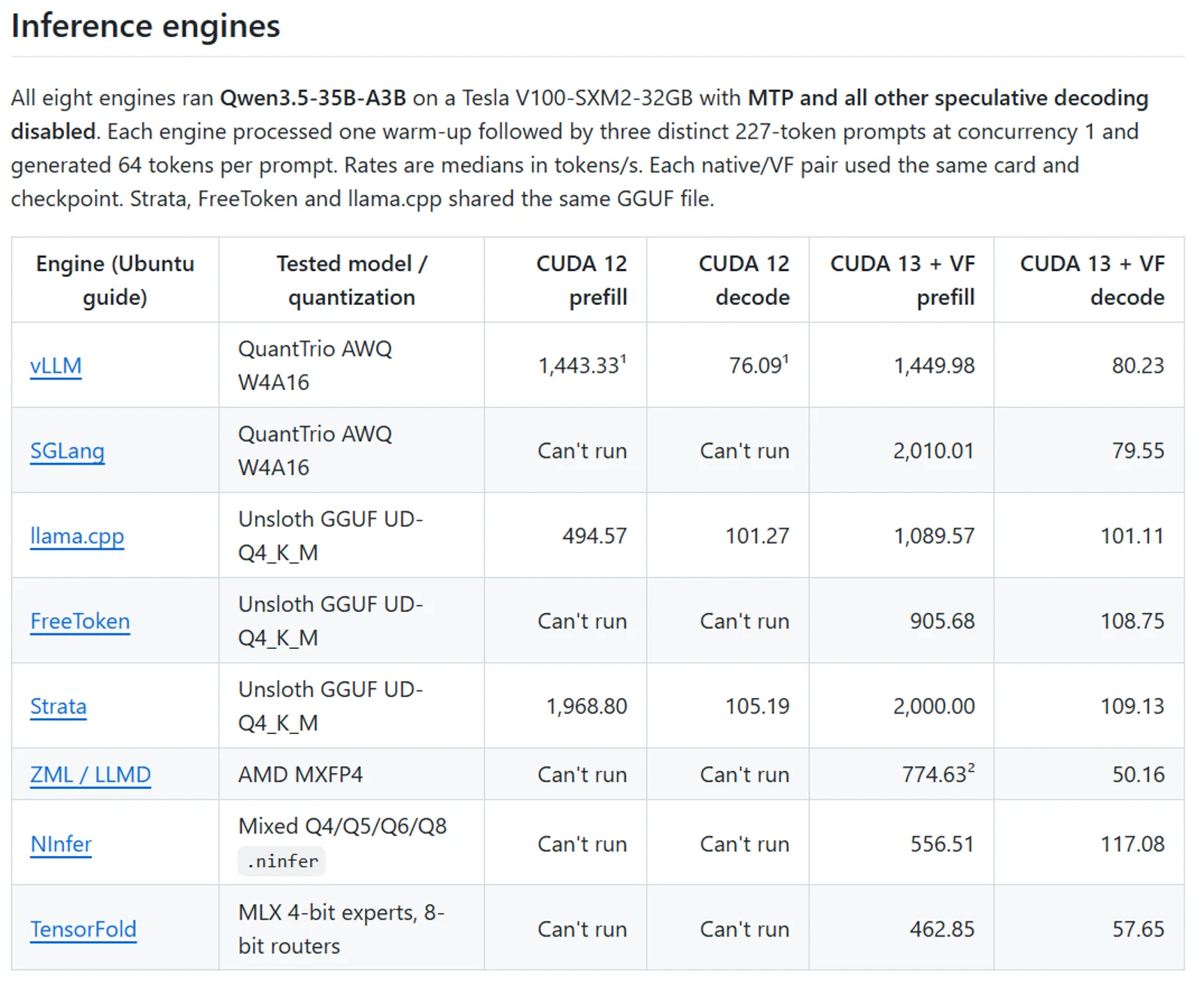
On a single 32 GB Tesla V100 running Qwen3.5-35B-A3B:
llama.cpp decode throughput: 101.11 tokens/s
NInfer decode throughput: 117.08 tokens/s
Significance
volta-forever demonstrates that software compatibility layers can extend the useful life of older GPU hardware for modern AI inference workloads, providing a cost-effective alternative to purchasing new accelerators.
For questions about attribution, corrections or content rights, please contactand we will review it promptly.