

Why Linux Dominates AI Deployment: Containers, GPUs, and Automation
This article analyzes why Linux is the preferred OS for deploying and running AI workloads, covering its advantages in open-source project compatibility, GPU container integration, reproducible container environments, automation with systemd, fine-grained resource control via cgroups, and how Windows and macOS fit via WSL2 and Apple Silicon.
Reading font
Open-source projects run more smoothly on Linux
Researching a new model typically involves pulling code, installing dependencies, compiling extensions, downloading weights, and running startup scripts. The closer a project is to GPU inference and training internals, the more critical the OS and compiler environment become. For example, vLLM's mainline NVIDIA GPU installation path officially requires Linux. Windows users can run a compatible Linux environment via WSL2, but using Linux directly aligns with the maintainers' documented steps, reducing porting and dependency-adjustment effort.
When choosing a distribution, match the project's validated scope. CUDA imposes compatibility requirements across the distribution, compiler, and GPU. Following the system-and-dependency combination verified by the project helps avoid "same code fails on another machine" errors.
GPU ecosystem connects to deployment and scaling
Running models requires GPUs, drivers, compute runtimes, and deep-learning frameworks that must be mutually compatible. Linux's advantage is that this stack can further integrate with GPU containers, remote servers, and multi-machine deployments.
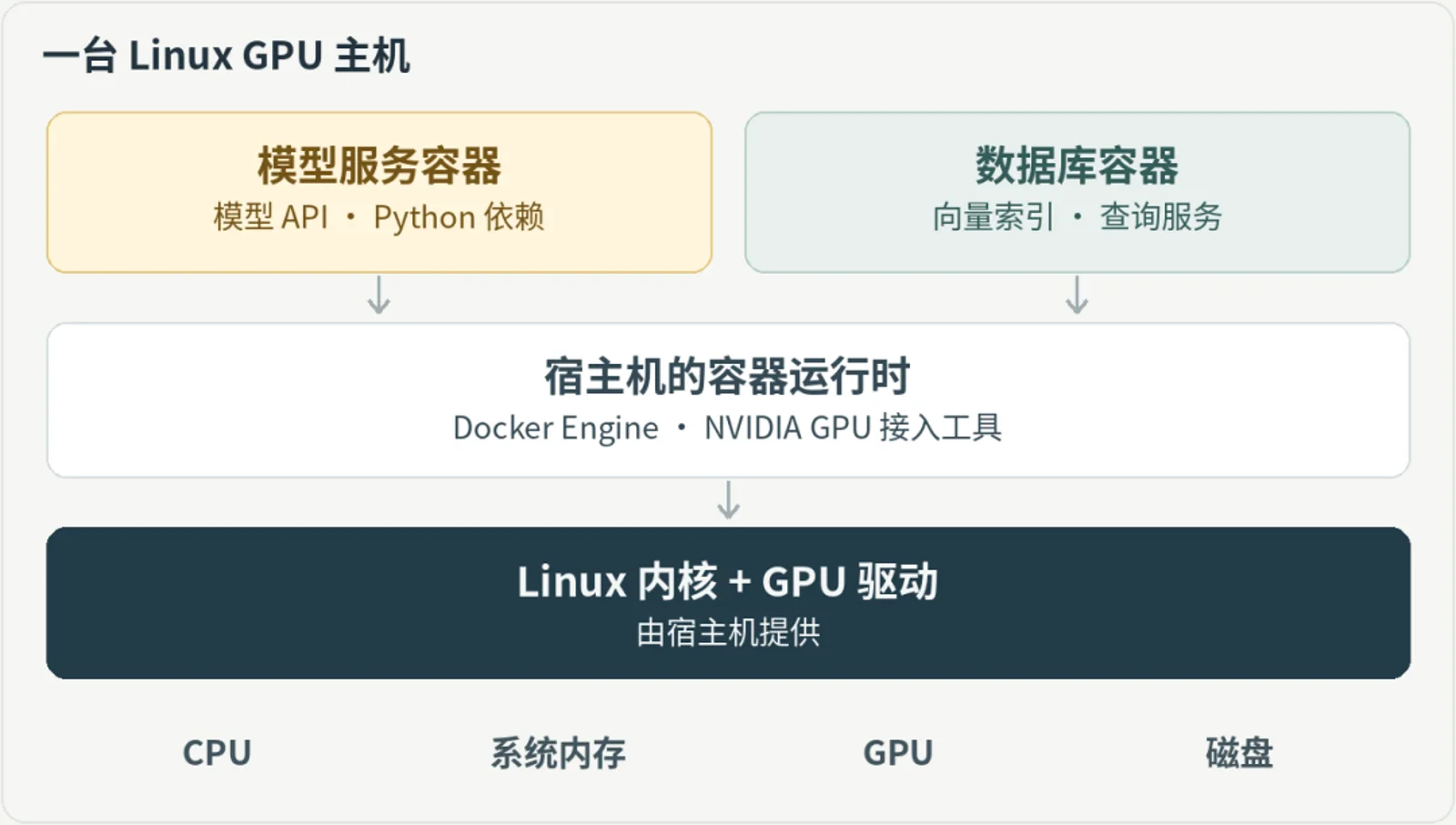
For instance, NVIDIA Container Toolkit exposes host GPU capabilities to containers. You can package the model service and Python dependencies into an image, deploy on a compatible Linux GPU host, and gradually add monitoring and cluster scheduling. Actual throughput still depends on GPU, VRAM, model, quantization, and inference engine; Linux's value lies in smoothing this engineering pipeline.
Containers make "it runs here" reproducible
Knowledge-base applications often depend on a web service, model API, and database simultaneously. Encoding their versions, startup parameters, and data directories into images and deployment configs gives teammates a repeatable environment specification.
Linux containers use the Linux kernel. On native Linux, Docker Engine leverages the host kernel directly. Windows' Docker Desktop provides a Linux environment via WSL2; macOS runs containers through a Linux VM. The closer the development environment matches the target server, the fewer path, permission, and network discrepancies arise. Image migration still requires matching CPU architecture and GPU driver, and model files plus databases need persistent storage arrangements.
AI writes scripts, Linux runs the tasks
Suppose you process daily audio batches: transcribe, store, summarize. Linux can chain programs with Shell, trigger processing via cron, and save output to logs. AI assists in writing scripts, explaining errors, and modifying workflows.
On systemd-based distributions, you can configure auto-start on boot, restart on abnormal exit, and centralize service logs. Batch jobs stay on the server; you connect remotely to monitor progress. The pipeline can record each file's processing state, isolate failures for retry, and scale with daily file volume. Program parameters and logs are text, making them easy for AI to analyze. Value emerges when tasks shift from manual to daily automation.
Finer-grained resource control
Running model, database, and web service on one machine makes resource allocation critical. Linux cgroups combined with container tools can limit CPU and system memory for process groups, preventing a single task from monopolizing resources. GPU VRAM still requires management at the inference-engine or device level.
You can also opt for minimal installs, enable services on demand, or split data processing and inference across machines. Cost calculations must include hardware, electricity, maintenance time, and software support; long-term operation benefits from this configurability. For self-hosted knowledge bases, raw files, model weights, and indexes reside in self-managed storage with access control and backup configured together. The system provides these management capabilities; actual data flows depend on your application deployment.
Windows and macOS have their own convenient AI paths
Windows users keep their familiar desktop while using Linux dev tools via WSL2. NVIDIA provides CUDA on WSL support, suitable for balancing desktop software and AI development needs.
Apple Silicon Macs can leverage GPU via Metal, PyTorch MPS, or MLX. MLX exploits unified memory so CPU and GPU share data, fitting exploration of compatible local models. Specific model and operator support still depends on the chosen tools.
Task-to-path quick reference
Chat & writing via cloud API: All three systems work; choose by habitual software.
Reproducing projects: Linux follows project environment directly; Windows uses WSL2.
Local models on Apple Silicon: macOS with compatible Metal, MPS, or MLX tools.
Long-running GPU services: Linux eases integration with containers, service management, and cluster operations.
A practical combo: Windows or Mac for daily office and development, SSH to manage remote Linux. Deploy one model service, learn to inspect logs, pin dependencies, update versions — you'll directly experience Linux's advantages in AI workflows.
For questions about attribution, corrections or content rights, please contactand we will review it promptly.