

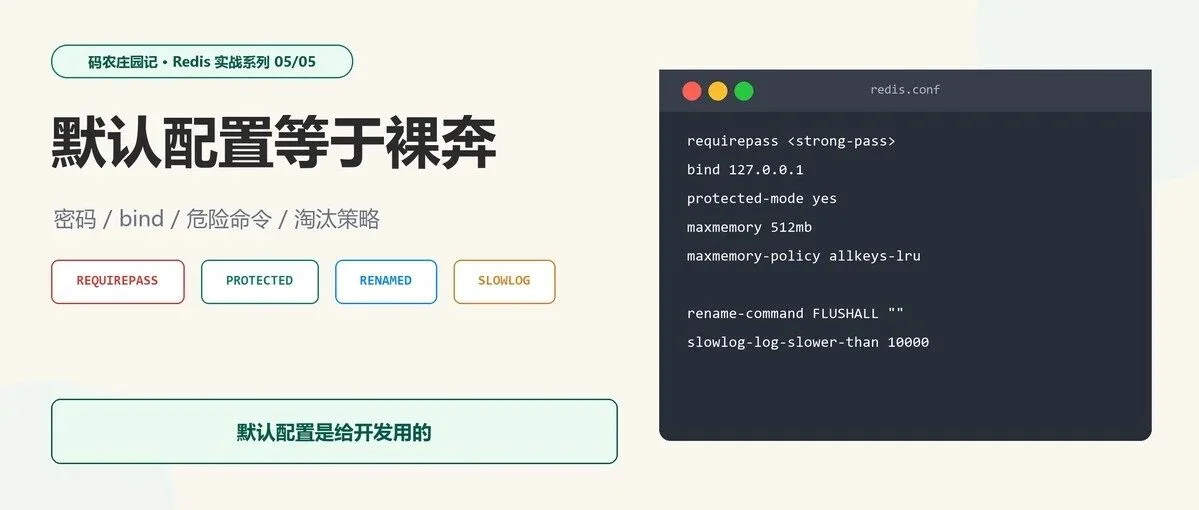
Why Redis Default Config in Production Is a Security Disaster (And How to Fix It)
This guide explains why Redis default configuration exposes servers to unauthorized access attacks, detailing six critical settings to change—authentication, network binding, protected mode, port exposure, dangerous commands, and non-root execution—plus memory limits, eviction policies, slow logging, big key detection, backup procedures, and a pre-launch checklist for production-ready Redis deployments.
Reading font
Introduction
Running docker run -p 6379:6379 redis and verifying with PING makes the service appear functional, but the default configuration leaves the server wide open: no password, listening on 0.0.0.0, and protected-mode only activates when no password is set. If the machine is publicly reachable, scanners will discover it within hours. "Redis unauthorized access" remains a top entry point for server compromise—attackers can write cron jobs for reverse shells or inject SSH keys into authorized_keys without any exploit, simply by leveraging the default configuration.
Ready-to-Use Docker Compose Configuration
The following Compose file addresses each critical issue:
services:
  redis:
    image: redis:7-alpine
    container_name: redis
    restart: unless-stopped
    ports:
      - "16379:6379"  # Host port changed to avoid conflict with existing instance
    command: &
      redis-server
      --requirepass <strong-password>
      --appendonly yes
      --appendfsync everysec
      --maxmemory 512mb
      --maxmemory-policy allkeys-lru
    volumes:
      - redis_data:/data

volumes:
  redis_data:
Each line solves a specific problem: 16379:6379 — Host port avoids conflict with any existing Redis on 6379. --requirepass — Mandatory; without a password there is zero authentication. --appendonly yes — Enables AOF persistence so restarts don't lose data (mechanics covered in part 3 of the series). --maxmemory 512mb — Sets a memory ceiling; otherwise Redis consumes memory until the OOM killer terminates it. --maxmemory-policy allkeys-lru — Eviction policy; the default noeviction causes write errors when memory is full.
Named volume redis_data — Persists data across container recreation. restart: unless-stopped — Auto-restarts on abnormal exit.
Verify with:
docker exec -it redis redis-cli -a '<strong-password> ping
# PONG
Warning: The -a flag exposes the password in shell history and ps output. In production, use the REDISCLI_AUTH environment variable or --askpass instead.
Six Critical Defaults You Must Change
1. Password / ACL
requirepass <strong-password>Before Redis 6.0, the password was a simple on/off gate. Redis 6.0+ introduces ACLs for per-user permissions:
ACL SETUSER app ~cache:* +get +set +expire # Only operate on cache:* prefix, only read/write/expireNew projects should adopt ACL directly. Sharing a single superuser password across all services means one leak compromises the entire dataset.
2. bind — Listen Only on Required Interfaces
bind 127.0.0.1      # Localhost only
bind 10.0.0.5       # Or a specific internal NIC
Some versions default to 127.0.0.1. Never change it to 0.0.0.0 . For cross-host access, specify the exact internal IP; avoid wildcards for convenience.
3. protected-mode
protected-mode yesThis protection only activates when there is no password and no bind configured . Once you set a password or bind, this safeguard disappears. Do not rely on it as a fallback; it is merely a last-resort net.
4. Port Must Not Be Public
Ports 6379 / 16379 should only be open on internal networks or localhost. Cloud security groups must restrict ingress to internal CIDR blocks only.
5. Rename or Disable Dangerous Commands
rename-command FLUSHALL ""
rename-command FLUSHDB  ""
rename-command CONFIG   "CONFIG_a8f3"
rename-command KEYS     ""
Empty string means complete disable. FLUSHALL executed accidentally or by an attacker wipes the entire dataset.
Redis 7.0+ offers a more thorough approach via ACL—deny the dangerous command category entirely, which is stronger than renaming (renaming only changes the name; if the new name is discovered, the command remains callable):
ACL SETUSER app -@dangerous # Disable all dangerous commands6. Do Not Run as root
The official image already runs as the redis user; custom builds must ensure the same. Redis has had multiple RCE vulnerabilities; running with reduced privileges significantly limits post-exploitation damage.
Memory Limits and Eviction Policies
maxmemory 512mb
maxmemory-policy allkeys-lru
Without maxmemory, Redis consumes memory until the system OOM killer terminates it—symptom: process disappears with only a Killed line in logs.
Eviction policy comparison: noeviction — Default. Writes return errors when memory is full. allkeys-lru — Evicts least-recently-used among all keys; recommended for pure caching. volatile-lru — Evicts LRU only among keys with TTL set. allkeys-lfu — Evicts least-frequently-used (Redis 4.0+). volatile-ttl — Prioritizes keys nearest to expiration.
Critical prerequisite for volatile-* policies: the dataset must contain keys with TTL. If all keys are permanent, volatile-lru finds no evictable candidates and still returns errors. Therefore, "set TTL on cache keys" and "choose the matching eviction policy" must go together.
Configuration persistence trap:
CONFIG SET maxmemory 512mb # Takes effect immediately, but lost on restartTo persist, you must update the configuration file or the Compose command . Using CONFIG SET and forgetting to sync the file causes all settings to revert on the next restart—a class of incident the author has encountered during night-time on-call.
Slow Log and Big Keys
slowlog-log-slower-than 10000   # Log commands exceeding 10 ms (microseconds)
slowlog-max-len 128
SLOWLOG GET 10 # Show latest 10 slow commands
SLOWLOG RESETRedis executes commands single-threaded; one slow command blocks all other requests. KEYS *, HGETALL on million-member hashes, and DEL on large keys can freeze the entire instance.
Big key detection:
redis-cli -a '<password>' --bigkeys          # Run during low-traffic periods; performs full SCAN
MEMORY USAGE user:1001 # Precise memory footprint of a single key--bigkeysscans the entire keyspace via SCAN; never run it during peak hours.
Daily Operational Commands
INFO                    # Full server info
INFO memory             # Memory usage and fragmentation ratio
INFO stats              # Hit rate, QPS
INFO persistence        # Persistence status (see part 3)
DBSIZE                  # Total key count
CONFIG GET maxmemory
SCAN 0 MATCH user:* COUNT 100   # Incremental iteration, safe
KEYS user:*                   # Blocks entire keyspace; PROHIBITED in production
KEYS is the one command you must erase from muscle memory. It traverses the whole keyspace while blocking; on a large dataset it effectively takes Redis offline. All production inspection must use SCAN. SCAN caveats: it may return duplicate elements during iteration; COUNT is a hint, not a guarantee; deduplication is the caller's responsibility.
Backup and Recovery
RDB files are complete snapshots; copy them for cold backups:
# 1. Trigger an immediate snapshot (async, non-blocking)
docker exec redis redis-cli -a '<password>' BGSAVE

# 2. Wait for snapshot completion, then copy the file
docker cp redis:/data/dump.rdb ./dump-$(date +%Y%m%d).rdb
Order cannot be reversed: BGSAVE is asynchronous; copying immediately may capture a half-written file. Confirm completion with INFO persistence and verify rdb_last_bgsave_status:ok before copying.
Recovery:
docker stop redis
docker cp ./dump-20261120.rdb redis:/data/dump.rdb
docker start redis
Warning: Redis 7.0 uses a multi-file AOF structure ( appendonlydir/ directory + manifest). Recovery requires replacing the entire directory; overwriting a single appendonly.aof file has no effect.
Warning: Always back up the corrupted file before attempting recovery. Damaged RDB files can be checked with redis-check-rdb, but recoverable data is limited; repeated attempts on the original file worsen corruption.
Pre-Launch Checklist
Password: requirepass with strong password; Redis 6.0+ use ACL for least-privilege; never share a single superuser password across services.
bind: Listen only on required internal NICs; never 0.0.0.0 .
Port: 6379 / 16379 not exposed to public internet; security group restricts to internal CIDR.
Dangerous commands: FLUSHALL, FLUSHDB, CONFIG, KEYS renamed or disabled via ACL.
Runtime user: Non-root.
Memory: Explicit maxmemory + maxmemory-policy allkeys-lru.
Persistence: Configure per Redis role (pure cache may disable; see part 3).
Slow log: Enable slowlog-log-slower-than and review regularly.
Backup: BGSAVE + file copy; for Redis 7.0 AOF, copy entire directory.
Version: Keep updated; historical RCE vulnerabilities exist.
This article does not re-cover RDB/AOF internals and selection—that is part 3 of the series. Its sole purpose: make this Redis instance safe to expose on the network.
Redis performance comes by default; security does not. The default configuration targets local development; moving it straight to production is an accident waiting to happen.
For questions about attribution, corrections or content rights, please contactand we will review it promptly.