

Build a Tamil Lyrics Search Engine from Scratch with Elasticsearch
This tutorial walks through building a Tamil-language lyrics search engine using Elasticsearch, covering data scraping with Scrapy, Elasticsearch installation and index creation, bulk data import via Python, custom analyzer configuration for Tamil text processing, and a comprehensive set of search query examples including match, multi_match, bool, range, wildcard, MLT, and aggregations.
Reading font
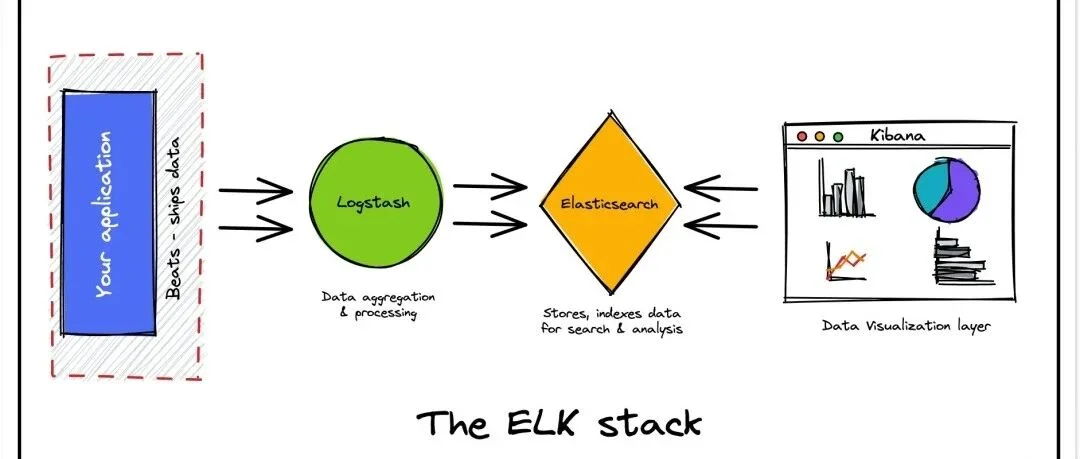
Elastic Stack Overview
Elastic Stack is a suite of open-source products from Elastic for data ingestion, search, analysis, and visualization. Core components include Elasticsearch (a Java-based RESTful distributed search engine), Kibana (visualization), Logstash, and Beats (data collection). This article uses Elasticsearch to build a Tamil lyrics search engine.
Data Collection
Lyrics data (3200+ songs) is scraped from www.tamilpaa.com using a Scrapy spider. The crawler organizes raw data by year (2017-2020) and a random set. Preprocessing converts English field values to Tamil (e.g., A.R.Rahman → A. R. ரஹ்மான்). Modified data adds fields: genre (வகை), views (நுகர்ச்சி), ratings (மதிப்பீடு).
Crawler repository:
https://github.com/VivekVinushanth/TamilSongsLyricsCorpus/blob/master/Tamilsongs_lyric_crawler.ipynbElasticsearch Configuration
Step 1: Install Elasticsearch
Download the appropriate package (ZIP/TAR.GZ) from the official site, extract, and run elasticsearch from the bin directory. Default port is 9200. Verify with http://localhost:9200/. Port can be changed in config/elasticsearch.yml via http.port: 9300.
Step 2: Install Postman
Postman is recommended for interacting with Elasticsearch's RESTful API.
Step 3: Create Index
Elasticsearch concepts map to RDBMS: Index → Database, Properties → Columns, Documents → Rows (Types deprecated since 7.x). Create index tamilsonglyricsdatabase with PUT request:
http://localhost:9200/tamilsonglyricsdatabaseStep 4: Add Data
Documents are JSON. Single document example (index tamilsonglyrics, type lyrics, id 2): http://localhost:9200/tamilsonglyrics/lyrics/2 For bulk import, use Bulk API with metadata lines. Example format:
{ "index": { "_index": "tamilsonglyrics", "_id": 1 } }
{ "title": "Song A", "lyricist": "Lyricist A", "lyrics": "..." }
{ "index": { "_index": "tamilsonglyrics", "_id": 2 } }
{ "title": "Song B", "lyricist": "Lyricist B", "lyrics": "..." }
Python script bulkdata.py automates bulk loading using elasticsearch and elasticsearch-dsl libraries. Key steps:
Install deps: pip install elasticsearch elasticsearch-dsl Run: python bulkdata.py Script reads JSON files from corpus/, transforms fields (Tamil keys: பாடல், திரைப்படம், பாடலாசிரியர், இசையமைப்பாளர், பாடியவர்கள், ஆண்டு, வகை, பாடல்வரிகள், மதிப்பீடு, நுகர்ச்சி), and uses helpers.bulk().
Index creation is commented out by default; uncomment createIndex() for first run.
from elasticsearch import Elasticsearch, helpers
from elasticsearch_dsl import Index
import json, re, codecs, unicodedata

client = Elasticsearch(HOST="http://localhost", PORT=9200)
INDEX = 'lyrics'

def read_all_songs():
    with open('corpus/lyrics_2019.json', 'r', encoding='utf-8-sig') as f:
        all_songs = json.loads("[" + f.read().replace("}
{", "},
{") + "]")
    res_list = [i for n, i in enumerate(all_songs) if i not in all_songs[n + 1:]]
    return res_list

def genData(song_array):
    for song in song_array:
        title = song.get("பாடல்", None)
        movie = song.get("திரைப்படம்", None)
        lyricist = song.get("பாடலாசிரியர்", None)
        composer = song.get("இசையமைப்பாளர்", None)
        singers = song.get("பாடியவர்கள்", None)
        year = song.get("வருடம்", None)
        genre = song.get("வகை", None)
        lyrics = song.get("பாடல்வரிகள்", None)
        rating = song.get("மதிப்பீடு", None)
        views = song.get('நுகர்ச்சி', None)
        yield {
            "_index": "tamilsonglyrics",
            "_source": {
                "பாடல்": title,
                "திரைப்படம்": movie,
                "பாடலாசிரியர்": lyricist,
                "இசையமைப்பாளர்": composer,
                "பாடியவர்கள்": singers,
                "வருடம்": year,
                "வகை": genre,
                "பாடல்வரிகள்": lyrics,
                "மதிப்பீடு": rating,
                "நுகர்ச்சி": views
            }
        }

all_songs = read_all_songs()
helpers.bulk(client, genData(all_songs))
Step 5: Custom Analyzer
Default analyzer insufficient for Tamil's complex morphology. Custom analyzer components:
Character Filter: pre-process text (remove HTML, replace symbols)
Tokenizer: Standard Tokenizer (splits on word boundaries, removes punctuation, multi-language support)
Token Filters (custom):
Custom Stopper: removes frequent low-value Tamil words (ஒரு, என்னும், மற்றும், etc.)
Custom Stems: stems Tamil verb forms to root (உண்ண, உண்டு, உண்டேன், உண்கிறேன், உண்பேன், உண்ணும் → உண்)
Custom Anonymous (synonyms): groups near-synonyms (மிகச்சிறந்த, சிறப்பான, உயர்ந்த → சிறந்த)
Configuration files ( stem.txt, stopwords.txt, synonym.txt) placed in elasticsearch-7.7.1/config/analyze/. Index creation request references the custom analyzer.
Search Query Examples
Basic Full-Text Search
GET http://localhost:9200/tamilsonglyrics/_searchReturns first 10 documents.
query_string Query
Search across all fields when field unknown:
{ "query": { "query_string": { "query": "யுகபாரதி" } } }match Query
Field-specific search for efficiency:
{ "query": { "match": { "பாடலாசிரியர்": "யுகபாரதி" } } }multi_match Query
Search multiple fields simultaneously:
{ "query": { "multi_match": { "query": "அனிருத்", "fields": ["பாடியவர்கள்", "இசையமைப்பாளர்"] } } }Combine with size, sort for top-N results. Example: top 20 highest-rated "குத்துபாடல்" (rock) songs:
{ "size": 20, "sort": [{ "மதிப்பீடு": { "order": "desc" }}], "query": { "multi_match": { "fields": ["வகை"], "query": "குத்துபாடல்", "fuzziness": "AUTO" } } }Sort by views (நுகர்ச்சி) for popularity.
Wildcard Query
Prefix search for uncertain spelling:
{ "query": { "match": { "பாடலாசிரியர்": "யுக*" } } }Note: prefix wildcards are expensive; consider Edge N-gram tokenizer for frequent use.
Bool Query
Combine conditions with must (AND), should (OR), must_not (NOT). Example: songs by composer இமான் in 2019:
{ "query": { "bool": { "must": [ { "match": { "இசையமைப்பாளர்": "இமான்" }}, { "match": { "வருடம்": "2019" }} ] } } }Range Query
Filter by range (gte, lte, gt, lt). Example: இமான்'s songs from 2019 onward:
{ "query": { "bool": { "must": [ { "match": { "இசையமைப்பாளர்": "இமான்" }}, { "range": { "வருடம்": { "gte": "2019" }}} ] } } }Return Specific Fields (_source filtering)
Limit response to needed fields:
{ "_source": { "includes": ["திரைப்படம்", "இசையமைப்பாளர்"] }, "size": 10, "sort": [{ "மதிப்பீடு": { "order": "desc" }}], "query": { "multi_match": { "fields": ["வகை"], "query": "குத்துபாடல்", "fuzziness": "AUTO" } } }More Like This (MLT) Query
Find documents similar to a given text (e.g., lyrics snippet):
{ "query": { "more_like_this": { "fields": ["பாடல்வரிகள்"], "like": "நெஞ்சில் மாமழை...", "min_term_freq": 1, "max_query_terms": 20 } } }Aggregations (Bucket Query)
Statistical analysis: count songs per genre (வகை). Requires fielddata: true on the field.
{ "aggs": { "ratings": { "terms": { "field": "வகை" } } } }Simple UI for Testing
GitHub repo:
https://github.com/VivekVinushanth/TamilSongsLyricSearhEngineFork & clone repo
Copy Analyzer folder to Elasticsearch config Start Elasticsearch
Run bulkdata.py (uncomment index creation if needed)
Place LyricSearch folder in web server htdocs Visit http://localhost/LyricsSearch/ Provided Python modules: query.py: helper functions for standard analyzer, basic search, field search, multi_match, aggregations. searchquery.py: demonstrates basic search via Python client.
For advanced queries, use Postman with the provided collection.
For questions about attribution, corrections or content rights, please contactand we will review it promptly.