
Create Stunning Developer Slides with Slidev: A Complete Markdown‑Based PPT Guide
Slidev is a developer‑focused presentation tool that lets you build sleek, Vue‑enhanced PPTs using familiar Markdown, covering installation, theme and layout customization, advanced features, and static deployment, with practical code examples and tips for creating professional slides.
Markdown is a lightweight markup language that many programmers use for project documentation, and when combined with tools it can also be used to create PPTs. This article shows how to use Markdown to build a cool PPT with Slidev.
Slidev Introduction
Slidev is a presentation tool designed for developers, currently boasting over 23K stars on GitHub. With Slidev you can create impressive PPTs using familiar Markdown while also supporting HTML and Vue components for pixel‑perfect layouts.
Key features include:
Installation
Before using Slidev to create PPTs, you need to set up its environment.
Ensure NodeJS 14+ is installed, then initialize a project with: npm init slidev During installation you will be prompted to enter a project name, e.g., mall-intro-sldev, after which the project starts automatically.
If the project stops, you can run it again with: npm run dev You can also install the Slidev CLI globally and run it with the slidev command: npm i -g @slidev/cli After installation the project runs by default on port 3030 (http://localhost:3030/).
Usage
With the environment ready, you can start creating PPTs. The example below uses a Mall project introduction PPT.
Applying a Theme
Select a theme you like; this guide uses the Penguin theme. npm i slidev-theme-penguin If you see a warning about a missing pre‑processor, install sass:
# Prompt: Preprocessor dependency "sass" not found. Did you install it?
npm i sass
Activate the theme by adding a theme property at the top of your Markdown file:
---
theme: penguin
---
Using Layouts
Layouts let you control the content of each slide. The examples use the penguin theme.
Intro layout – defines a cover page:
---
layout: intro
---
# Mall Open‑Source E‑Commerce Project
Presenter layout – shows author information:
---
layout: presenter
presenterImage: '/logo.png'
---
# macrozheng personal introduction
Default layout – no extra configuration needed:
---
layout: default
---
# Project Introduction
Text‑image layout – displays text and an image side by side (use reverse to switch sides):
---
layout: text-image
media: 'http://img.macrozheng.com/mall/project/mall_admin_show.png'
reverse: false
---
# Project Demo
New‑section layout – centers all content on the slide:
---
layout: new-section
---
# System Architecture
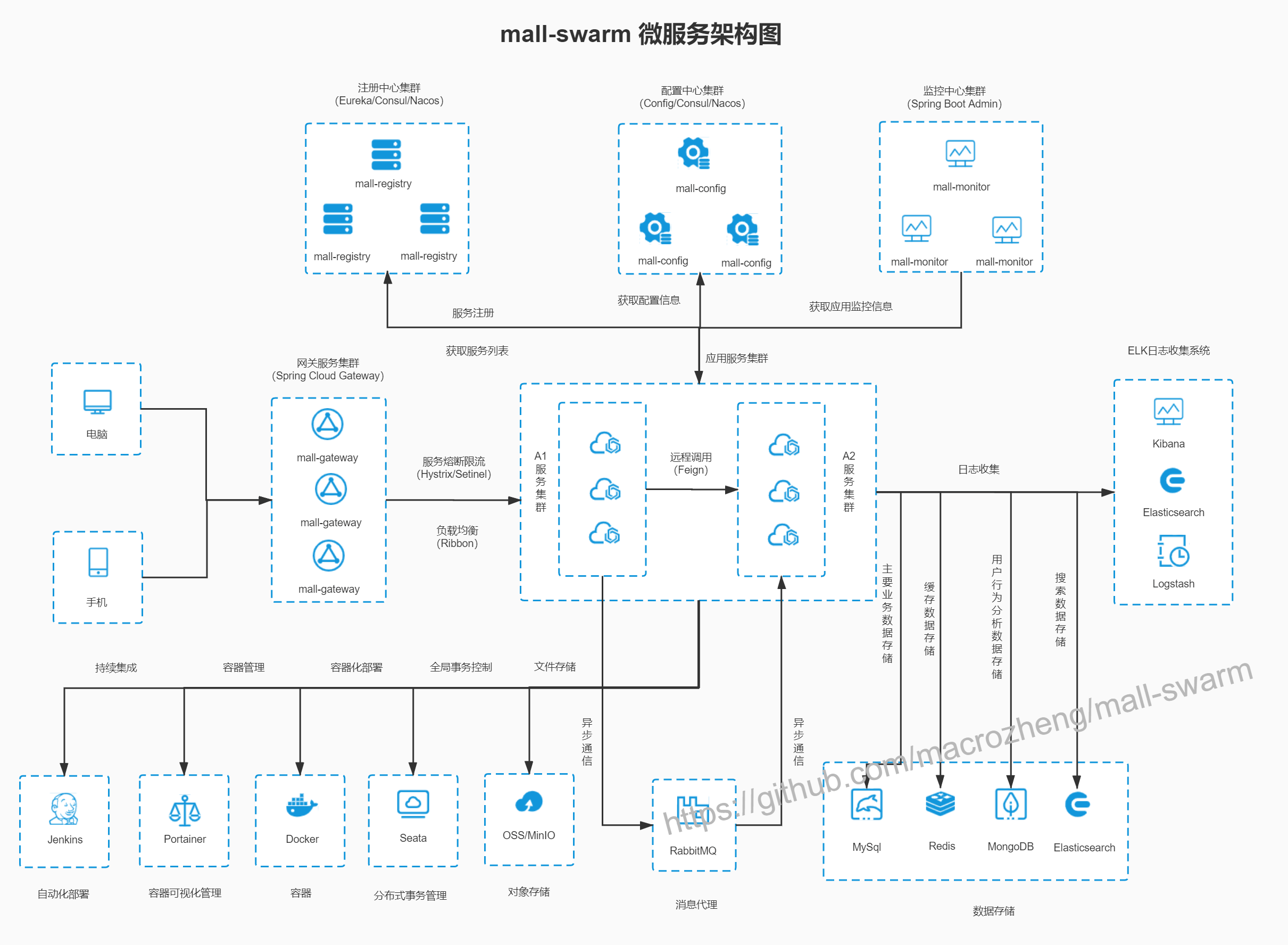Text‑window layout – shows part of the content inside a window using ::window:::
---
layout: text-window
---
# Business Architecture
- Product Management: ...
::window::
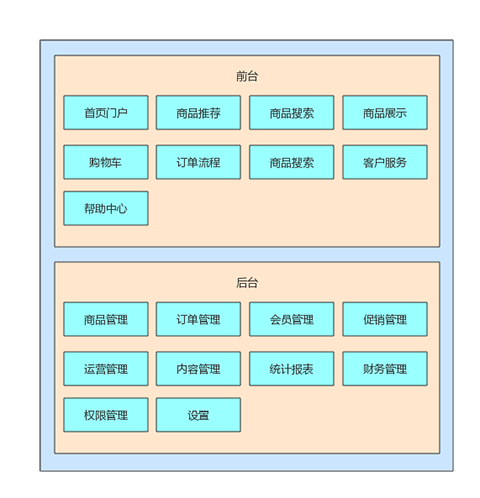Two‑cols layout – creates a double‑column slide using ::right:: to split columns:
---
layout: two-cols
---
Presentation Features
Slidev provides a toolbar with fullscreen, navigation, recording, and online editing buttons.
The "Overview" feature shows a thumbnail view of all slides.
You can switch themes (e.g., to a dark theme) on the fly.
The "Draw" tool lets you annotate important slide content.
Online editing allows you to modify slide content directly in the browser.
Deployment
Static deployment is simple: build the slide with a base path:
slidev build mall-slidev.md --base /mall-slidev/The build output is placed in the dist directory.
Copy dist to the html folder of an Nginx server and rename it (e.g., mall-slidev) to serve the PPT.
Conclusion
Using Markdown to create PPTs is very convenient for developers. Instead of searching for a PPT file, you can share a link that renders the slides instantly. However, Slidev has some drawbacks, such as the inability to fully display content that requires vertical scrolling (e.g., long code blocks or tables).
Reference
Official documentation: https://cn.sli.dev/guide/
Signed-in readers can open the original source through BestHub's protected redirect.
This article has been distilled and summarized from source material, then republished for learning and reference. If you believe it infringes your rights, please contactand we will review it promptly.
macrozheng
Dedicated to Java tech sharing and dissecting top open-source projects. Topics include Spring Boot, Spring Cloud, Docker, Kubernetes and more. Author’s GitHub project “mall” has 50K+ stars.
How this landed with the community
Was this worth your time?
0 Comments
Thoughtful readers leave field notes, pushback, and hard-won operational detail here.