

Debugging Replenishment Errors: Trace the Faulty Layer Before Blaming the Model
This article outlines a systematic debugging process for a replenishment assistant that incorrectly suggested 168 units instead of 60, emphasizing preserving evidence, tracing unit conversion errors through the pipeline, reproducing with saved inputs, regression testing, handling legacy tasks, and deciding whether to continue, reduce, or retire the system based on operational evidence.
Reading font
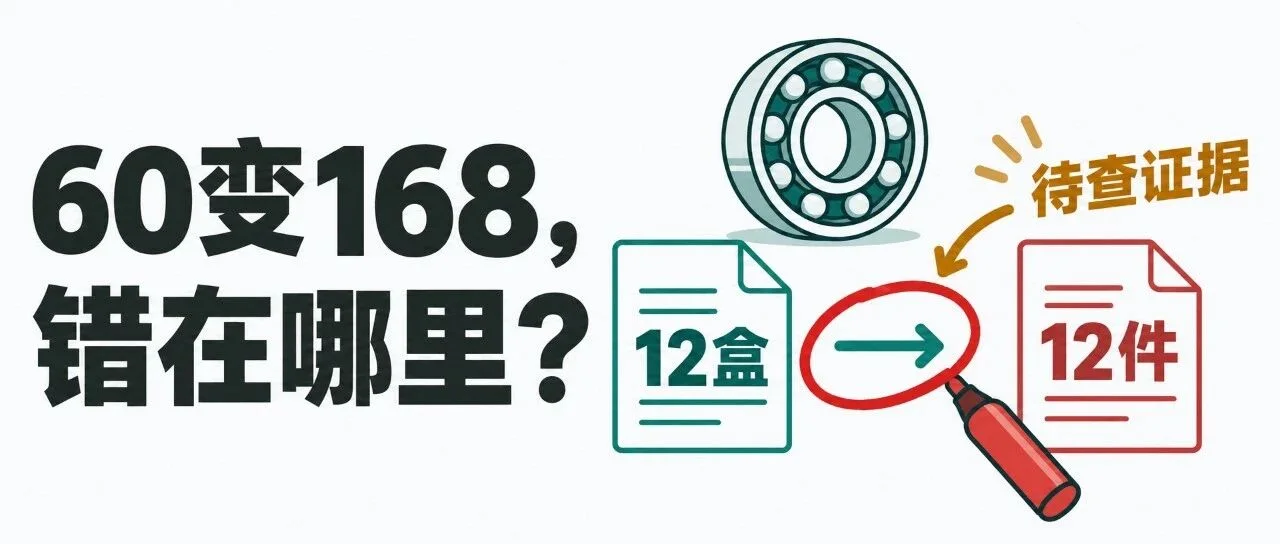
First, Check If the 168 Units Were Actually Ordered
Locate the task and preserve the original suggestion, calculation inputs, version used, approval records, actual request, and response. Do not refresh and ask again; a new 60-unit suggestion could overwrite the original 168, making it impossible to reconstruct what happened.
If the error is still at the suggestion stage, mark it pending verification and pause dependent approvals and creations. If the request has already been sent, continue checking the purchasing system against the original request. No receipt means you cannot conclude no order was placed. Existing documents that need quantity changes or cancellation must follow the original system's permissions and processes.
Also check which tasks used the same data or conversion configuration. The immediate finding involves box-recorded items; start from those records but do not assume piece-recorded items are problem-free. When scope is unclear, first restrict potentially affected suggestions and creations, then narrow the scope with evidence.
Approval must be traced back to the original content. If 60 units were approved but 168 submitted, the pre-submission comparison failed to block it. If the manager approved the erroneous 168-unit suggestion, parameter consistency does not prove the quantity was calculated correctly. These two situations must be investigated separately.
Before fixing the code, determine how far the error has propagated. Otherwise the new version goes live while the old erroneous orders continue flowing downstream.
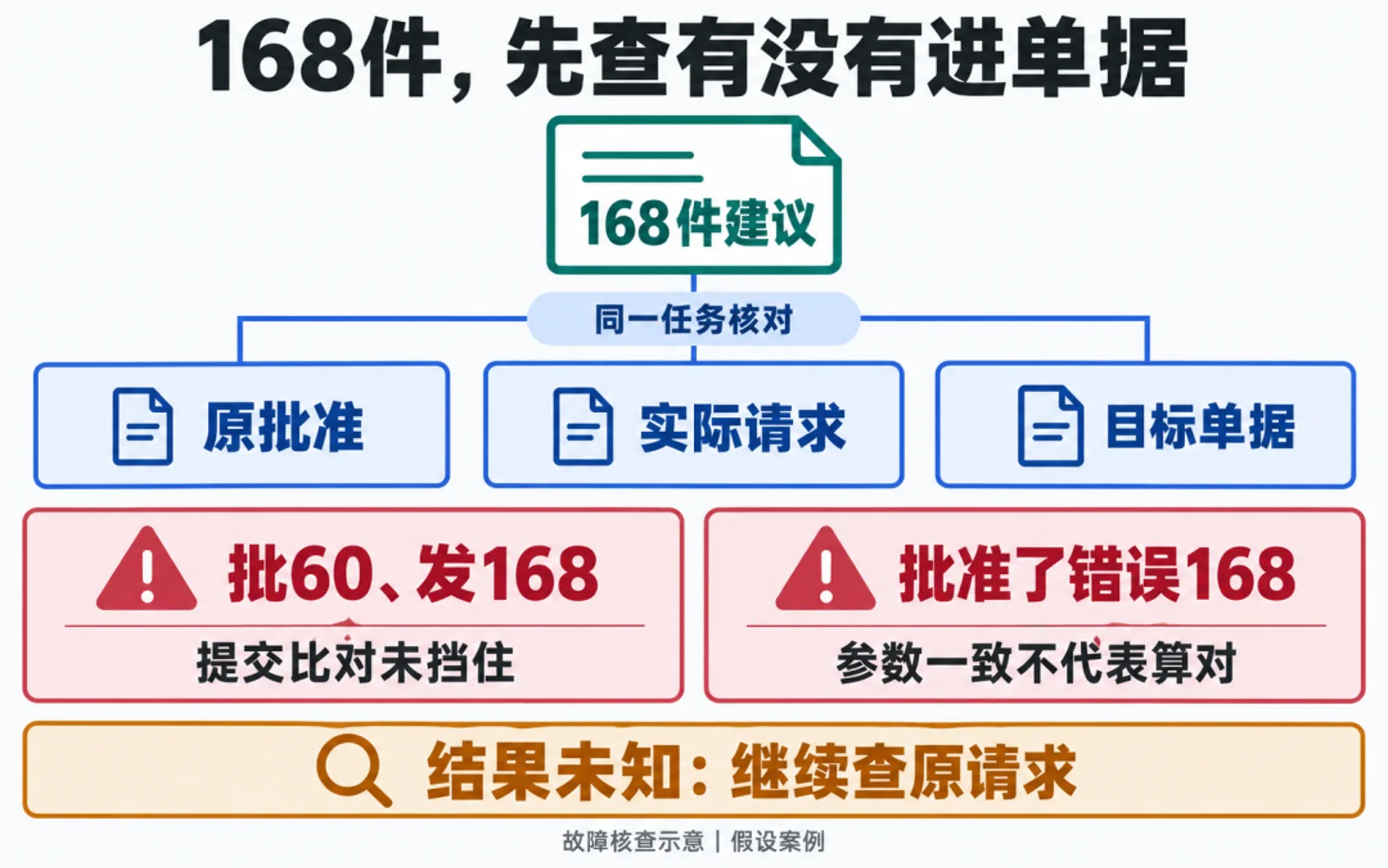
First determine which step the error reached, then distinguish calculation errors from submission parameter mismatches. While the result is unknown, continue verifying the original request; do not assume no order was placed.
Keep a Reproducible Record, Not Just Screenshots of Answers
To compare 60 and 168, first verify they are the same product, same warehouse, same replenishment period, and that the data timestamp and rules have not changed. Today's demand may have genuinely increased, so the correct result could also change; do not judge an error solely because the numbers differ.
In this example we fix the data: Warehouse 1, product SKU6204, available inventory 120 units, valid unreceived purchase quantity 12 boxes at 10 units per box, target 300 units, no other deductible demand, packaging and MOQ allow replenishment of 60 units. The correct formula is 300 − 120 − 12 × 10 = 60 units.
Assume we obtain three records for the same task: the original purchasing interface returns 12 boxes, corresponding to packaging of 10 units per box; the parameter passed to the calculation service is 12 units; the calculation record uses 300 − 120 − 12, yielding 168 units. This confirms the quantity error occurred between data ingestion and calculation, not just in the model's answer.
Trace back along the actual call chain: which step changed "box" to "unit", was the conversion executed, and which configuration version was used? It could be a mapping error or an alternate call path that skipped conversion. Finding the erroneous input only narrows the investigation; the root cause remains to be identified.
Without these records, we can only write "suspected unit handling error." The fact that 168 matches a particular formula is a clue, not proof of root cause.
For reproduction, use the saved inputs, rules, and program versions from that time in an isolated test environment to rerun query processing and calculation, without connecting to the real creation interface. If current inventory needs checking, do a separate online verification; today's data cannot replace the original inputs.
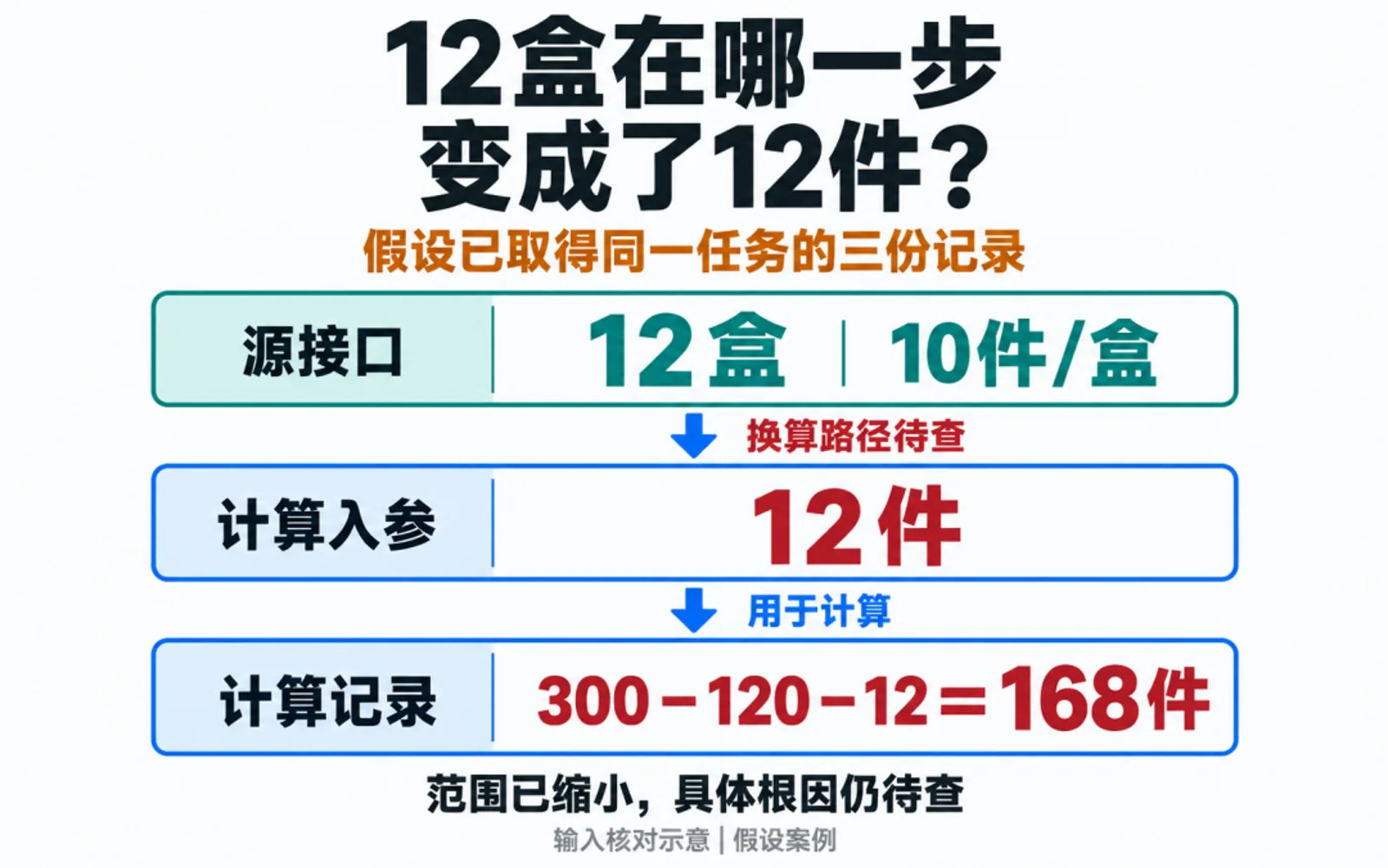
The three records must correspond to the same task to narrow the unit-handling investigation; the exact step where the error was introduced still requires tracing the call path. Replay uses the original inputs and versions, isolating the real creation interface.
Trace Along This Task, Don't Restart from the Ontology Each Time
Once the calculation input is obtained, first check unit handling; if another type of evidence appears, switch to the corresponding entry point. The following list assigns responsibilities; it does not require checking every item each time.
Business Definition : How is unreceived purchase quantity counted? Which products does the target apply to? Verify with confirmed rules, scope, and effective version.
ID Mapping : Is it the same bearing, same target warehouse? Verify with ID correspondence on both sides and original records.
Data Retrieved : Is the document valid? Are date and quantity complete? Any omissions? Verify with original interface result, data timestamp, and query conditions.
Conversion & Calculation : Did box-to-unit conversion occur? What inputs did the formula use? Verify with conversion basis, actual parameters, and calculation records.
Suggestion Expression : Service returned 60, but text says 168? Verify with original tool result and generated output.
Authorization & Execution : Was the request approved? What was actually submitted? Verify with approved version, execution parameters, and target document.
Verification & Handoff : Was the created result lost or misinterpreted? Verify with receipt, verification records, and business handoff status.
If the calculation service returns 60 units, the model input is also 60, but the answer writes 168, focus on generation and output checks. If the service already calculated 168, first check inputs and rules. Swapping in a stronger model will not fix a wrong unit passed upstream.
Temporarily not finding a document does not justify blaming the model. There may have been no approval, a permission denial, an unprocessed interface, or the result is not yet visible. When a request fails authorization, the service correctly rejects it; this should not be counted as a failure to be worked around for higher "success rates."
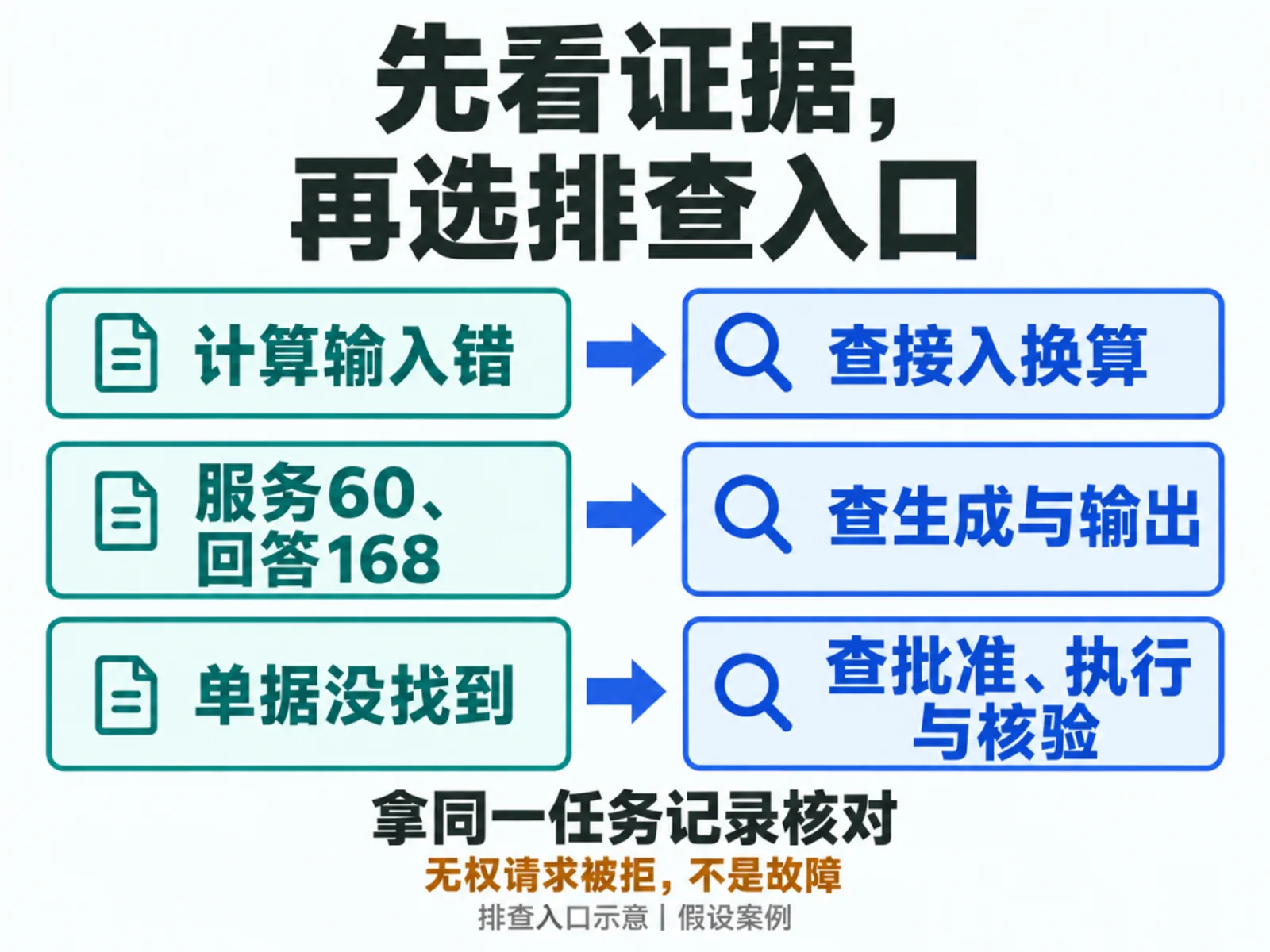
First retrieve records for the same task and verify, then choose where to investigate; multiple issue types may coexist. Unauthorized requests should be rejected by the service; such rejections should not be treated as faults.
After This One Is Fixed, Test a Few Originally Correct Cases
After locating and fixing the specific error, first rerun the saved data; the result should revert from 168 to 60 units. Then test originally correct purchase orders recorded by unit — they must not be multiplied by 10 again. Switch to a case with a documented 12 units per box; use that document's packaging. If conversion basis is missing, prompt for investigation; do not arbitrarily apply 10 units.
If the fix involves a shared ingestion program for two warehouses, test cases for both warehouses. After quantities are correct, also verify the assistant's explanations, submission content, and actual creation parameters to avoid only fixing the calculation while downstream processes still use the cached 168 units.
Program fixes and old task handling must be tracked separately. Identify which tasks used the erroneous configuration, which suggestions were approved, which requests were submitted. When revising suggestions, keep before-and-after versions; continue checking already-sent requests; delegate document changes to authorized personnel. Do not batch-change old suggestions to 60 units and consider the problem resolved.
The fault ticket must separate confirmed findings from pending items. Example: "Confirmed that the source interface for the same task returned 12 boxes, but the calculation input was 12 units. The ingestion owner will determine where the unit was rewritten and fix per packaging basis; the business owner will verify affected documents; testers will retest piece-recorded, box-recorded, different packaging, and missing conversion basis cases." Then assign specific personnel, deadlines, and record locations.
"AI capability needs improvement" and "ontology needs completion" are not actionable. Missing definitions must be specified; if the program didn't convert, fix that program. After retest results and old task disposal plans are confirmed, approve recovery per agreement and monitor for recurrence.
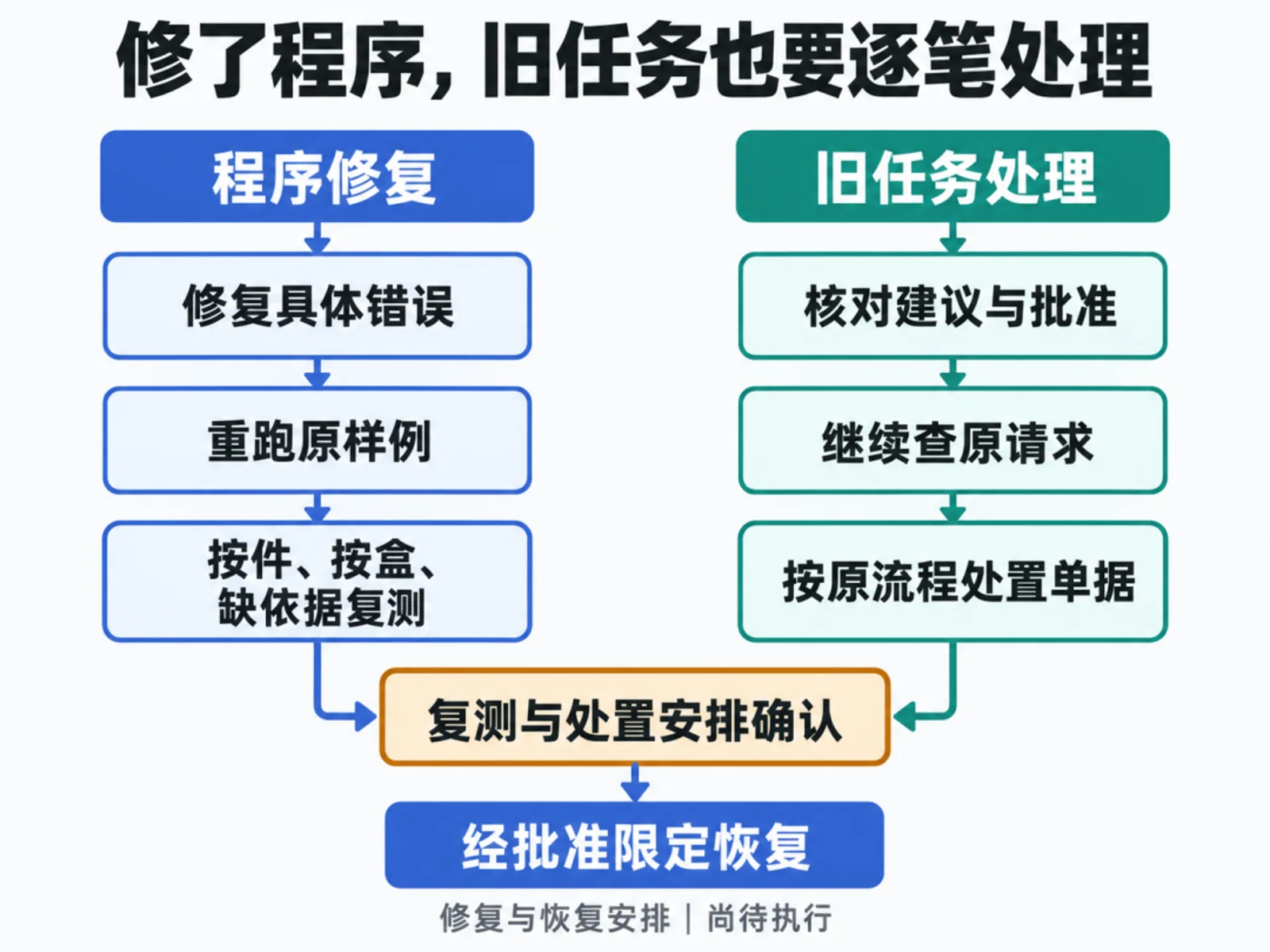
Program fixes and old task handling must be scheduled separately. Piece-recorded items must not be reconverted; different packaging requires checking corresponding basis; missing basis means investigate first — all these scenarios need retesting. Document changes still follow the original process. The image lists planned work; after retest results and old task disposal plans are confirmed, approve recovery of the corresponding scope.
Recurring Issues: Check Construction and Maintenance Practices
Why did the same unit problem reappear? Continue investigating: do the two warehouses each maintain a separate conversion configuration, so fixing one missed the other? Was a test added during the last fix? Did a later release reintroduce the old configuration?
These are open questions; do not conclude who was irresponsible just because "it happened again." Align the timelines of past errors, fixes, retests, and releases to determine whether it's a recurrence of the same issue or a new but similar problem.
Also examine maintenance effort: after adding manual checks, how many errors were reduced, and which functions are still worth keeping. NIST AI RMF's Manage function also considers risk treatment, recovery, and non-AI alternatives. [Reference 1] For this replenishment case, the original procurement reports and manual processing can continue, but reliance on confirmed erroneous data must stop.
Cause identified, fix retested, old tasks have disposal plan → Approve limited-scope recovery, continue monitoring.
Certain goods long lack trusted unit or identity → Suspend judgment for that category, continue verified scope.
Auto-created results still unclear → Stop new submissions, have authorized personnel check original request; independently verified queries and suggestions can be retained.
Simple query service meets needs at lower cost → Reduce unnecessary ontology or model components.
Critical rules unconfirmed, maintenance long absent → Shrink scope or stop relying on related capability.
The list lists discussable options. The project must agree on who decides, the observation period, and the conditions for recovery. Sunk cost should not be the sole reason to expand scope; but a single failure does not invalidate the entire method.
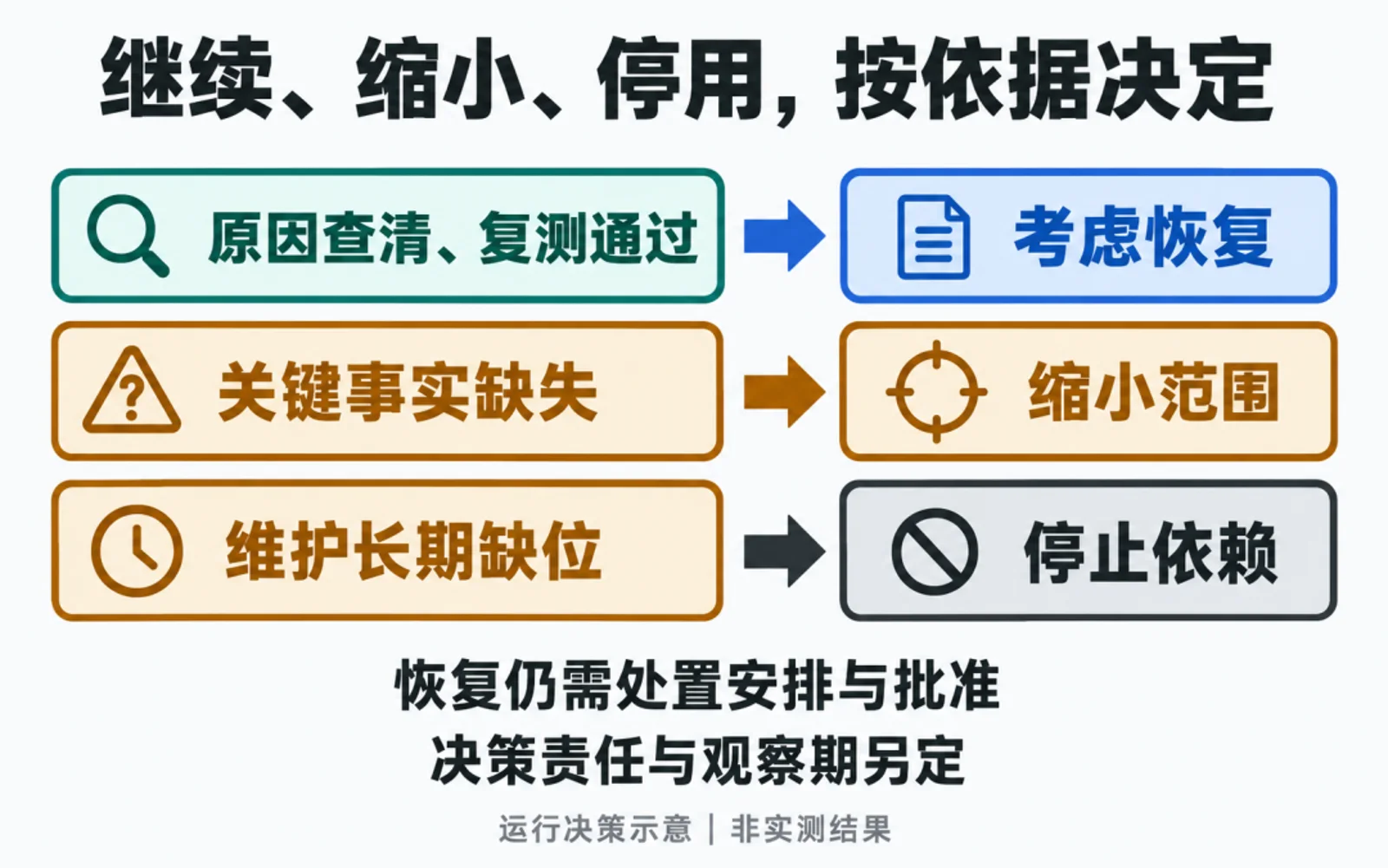
Discuss recovery, reduction, or retirement based on cause, retest evidence, and maintenance conditions; original requests still need verification. Recovery also requires confirmation of old task disposal plans, approved scope, and observation period; do not reject the whole method because of one fault.
Summary
Returning to the purchasing manager's two questions: first check whether the 168 units entered approval and documents, then trace along the same task where the 12 boxes became 12 units. After fixing, replay the original data and handle affected old tasks case by case.
With these records, we know which code segment to fix, which checks to add, and whether an ontology change or model swap is truly needed. Clarify the error source and impact first, so subsequent investment is not misdirected.
After long-term operation, which materials and capabilities are worth keeping, which can be simplified or retired? The next article will examine what an enterprise should retain through a migration drill.
References
NIST, AI RMF 1.0 Core, Manage. Used to illustrate risk treatment, recovery, and alternative approaches; the layered troubleshooting, capability limits, and decision table in this article are the author's suggestions and do not constitute an accident investigation conclusion. https://airc.nist.gov/airmf-resources/airmf/5-sec-core/
For questions about attribution, corrections or content rights, please contactand we will review it promptly.