

Home Repo Pattern: Centralize AI Agent Config Across Multiple Repositories
The article introduces the Home Repo pattern for managing AI agents across multiple repositories, detailing a classification system for shared and repo-specific materials, a four-step setup prompt, and community variations with trade-offs between centralized and per-repo agent entry points.
Reading font
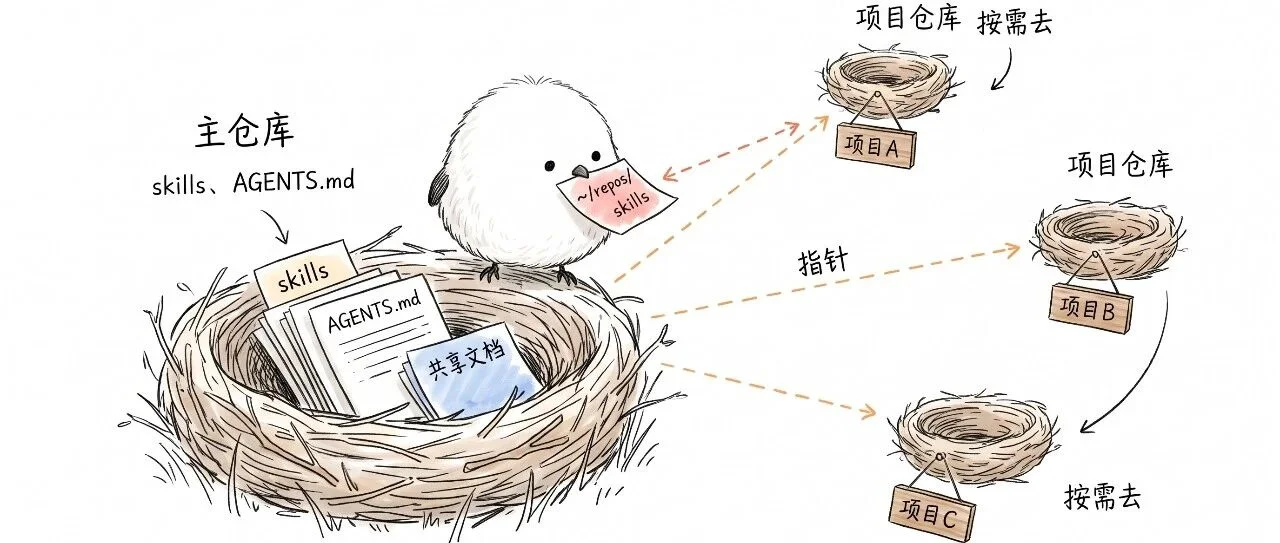
Home Repo Pattern Overview
The Home Repo pattern addresses the challenge of running AI agents across multiple repositories simultaneously. Originating from a tweet by Matt Pocock, the pattern uses a single "home" repository to store all shared skills, steering files, wiki content, and an AGENTS.md file that contains pointers to other repositories. The agent runs inside the home repo, and AGENTS.md lists each target repository with its local path and remote clone URL.
Core Benefits
Centralizes all steering files and tools in one place.
Provides a unified location to run all agents.
Enables a single change to propagate across multiple repositories.
Material Classification Table
A companion short article provides a four-category classification for agent-related materials:
Shared : Cross-repo skills and coding standards → move into home repo, keep one copy.
Duplicate : Same file appears in several repos with differences → compare copies, move the latest version into home repo.
Repo-specific : Build commands, test commands, domain docs for a single repo → leave in the original repo.
Installed : Skills installed from a skills repo or marketplace → keep installed, do not move.
Rule: only move items that apply to all repos; keep repo-specific items in their original repos. Code itself stays untouched; each repo retains its own history, remotes, and issue tracking.
Four-Step Setup Prompt
The article includes a detailed prompt designed to be given to an agent to automate Home Repo creation. The prompt enforces a structured interaction: the agent gathers facts autonomously (file system, git, gh CLI), presents decisions in numbered rounds with recommended answers, waits for user approval before executing, and reports results per item. Key constraints: read-only until step 3 approval; secrets ( .env) are never read.
帮我搭一个 Home Repo:一个 git 仓库,放我共享的 skills、
AGENTS.md 和共享文档,并指向我的其他仓库。我会在里面运行 agent。

## 工作方式

- 所有事实你自己查(文件系统、git、gh)。范围大的搜索用 subagent。
  只把决策交给我。
- 决策分轮交给我。每个问题编号,给出你推荐的答案,掟辝要让"是"
  就能接受它。依赖未决问题的问题,留到后面的轮次。
- 在我批准第三步的计划之剎,只读。
- 密钥留在原处:.env 咆他密钥文件不要读。

## 第一步:清炶仓库

找出我主目录下所有的 git 仓库,跳过依赖目录。对每个仓库记下路径、
yuan端、公开还是私有,以及最后一次提交日期。

第一轮,问:
- Home Repo 指向哪些仓库(推荐最近有提交的)
- 它放在哪,是新建还是复用已有仓库(推荐在现有仓库旁边新建一个
  私有仓库)
- 是个人用还是团队共用
- 会话开始时我的工具加载哪个文件:AGENTS.md、CLAUDE.md 还是两个
  都加载(推荐按我现有的配置来)

找出的每个仓库 dou 标明了是列入还是排除,另外三个问题 dou 有了答案,
这一步才算完。

## 第二步:清炶共享材料

在选中的仓库和我的用户级 skill 目录(比妋 ~/.claude/skills)里,
列出所有 skill(含 SKILL.md 的文件夹)、所有 AGENTS.md 和
CLAUDE.md,以及所有写给 agent 看的文档:编码规范、术语表、ADR。

每一项归入且只归入一类:
- 共享:所有仓库 dou 适用
- 重复:同一个东西出现在好几处;对比各副本,标出最新的
- 仓库专属:关于某一个仓库的代码、命令或领域
- 已安装:来自已发布的 skills 仓库或市场

每一项 dou 恰好落在一个类别里,这一步才算完。

## 第三步:确认计划

给出一张表,列出每一样东西、它现在在哪、最终去哪:
- 共享和重复的:搭进 Home Repo,一份,最新版本
- 仓库专属的:留在原仓库
- 已安装的:保持安装

表下面展示 Home Repo 的 AGENTS.md:一段简短介绍,然后一节
"Other Repos",每个仓库一条指针:

  <名称> (<它是什么>): <本地路径>。如果不存在,从 <远端> 克陶。

仓库需要提示的地方加一句,比妋"先读它的 AGENTS.md"。
超过大约 20 个仓库,把指针按领域分到多个文件里,改为指向这些文件。

未定的事项在后續轮次里解决。我批准这张表和 AGENTS.md,这一步才算完。

## 第四步:执行计划

1. 创建 Home Repo 和 它的 AGENTS.md。如果我的工具加载的是别的文件,
   就在那个文件里加一行指向 AGENTS.md。
2. 把每一份共享材料复制进来,skill 文件夹整个保留。
3. 在每个子仓库里,开一个新的本地分支,删除搭走的那几份副本。
   仓库专属的材料保留。
4. 在 Home Repo 里提交。推不推由我决定。

表里每一行 dou 落实了才算完。报告每一行的结果、你在每个仓库建的分支,
yi及跳过的事项和原因。
Community Variations and Trade-offs
Comments on the original tweet reveal alternative implementations and important trade-offs:
Viking (@vikingmute) uses a "start repo" with all steering files ( agents.md, skills, design.md, wiki config) and a simple markdown document pointing to other projects. Benefits: agent can directly operate on other projects; global rule changes require only one edit; cross-project changes are managed together.
Cen (@RyanCen10) describes a company-internal "shell project" (壳工程) where multiple repos are managed together; each task spawns a workspace directory pulling only needed code, while the shell project holds skills and knowledge base.
Arty (@BobClowdr) prefers the opposite: agents start in isolated repos, each containing pointers to relevant sections of a central repo. Reason: when running in a central repo, agents often wander into other repos unnecessarily.
Matias Poblete (@pobletedev) warns against moving every repo's AGENTS.md entirely. Each repo should retain a small AGENTS.md for repo-specific scripts, lint rules, and off-limits areas; otherwise the central file becomes an exception list. Matt Pocock agreed.
Synthesized Principles
Entry point can have different names: start repo, shell project, Home Repo — all describe the same concept.
Pointers can point outward (from central repo) or inward (from project repos). Outward simplifies cross-repo planning; inward reduces agent distraction.
Move shared materials, but don't empty the repos. Keep a minimal AGENTS.md in each repo to prevent the central file from becoming an exception list.
References
Original tweet: https://x.com/mattpocockuk/status/2120260969750540327
Short article: https://www.aihero.dev/the-home-repo-pattern
Viking: https://x.com/vikingmute
Cen: https://x.com/RyanCen10
Arty: https://x.com/BobClowdr
Matias Poblete: https://x.com/pobletedev
For questions about attribution, corrections or content rights, please contactand we will review it promptly.