

VikingDB: Unifying Vector and Keyword Search for Precise Retrieval
This article explains how VikingDB, a cloud-native vector database, implements keyword search alongside vector search using analyzers, inverted indexes, BM25 scoring, and specialized tokenizers for rare characters, pinyin, multi-field weighting, filtering, and result highlighting.
Reading font
Introduction
Users search either with natural language or exact keywords. Vector search matches by semantic similarity, finding conceptually related content even when wording differs. However, some queries require distinguishing specific names, model numbers, or error codes where a single character change points to a different object, even though the surrounding topic is similar. Semantic similarity does not equal keyword matching.
A concrete example is a Windows blue-screen error manual. Five documents all discuss blue-screen errors, but each covers a different error code, cause, and resolution steps.
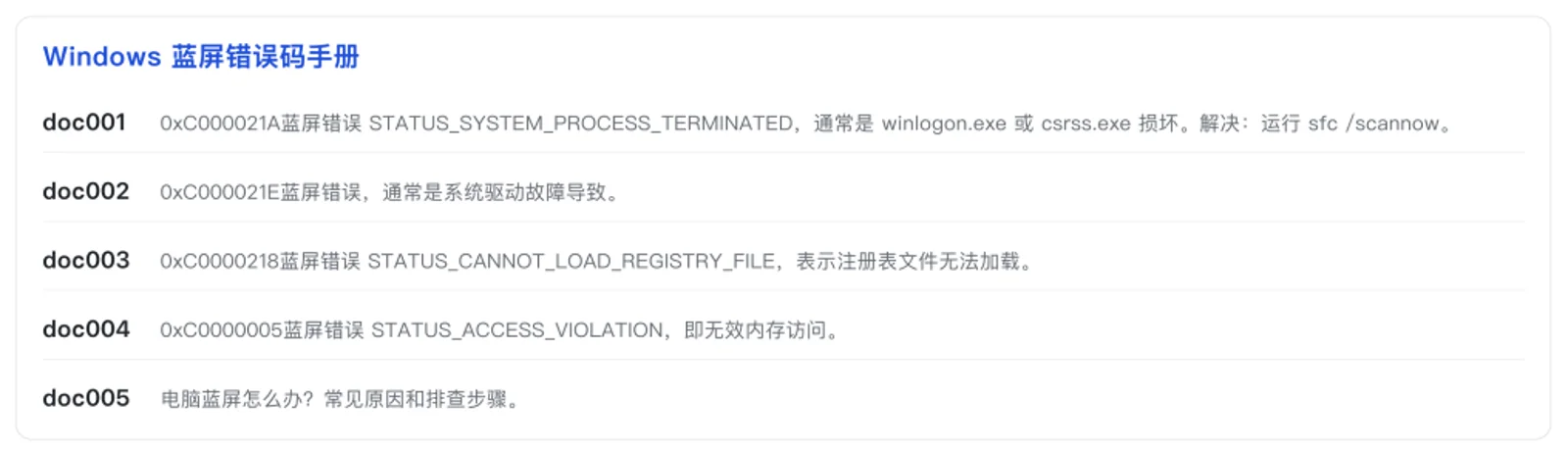
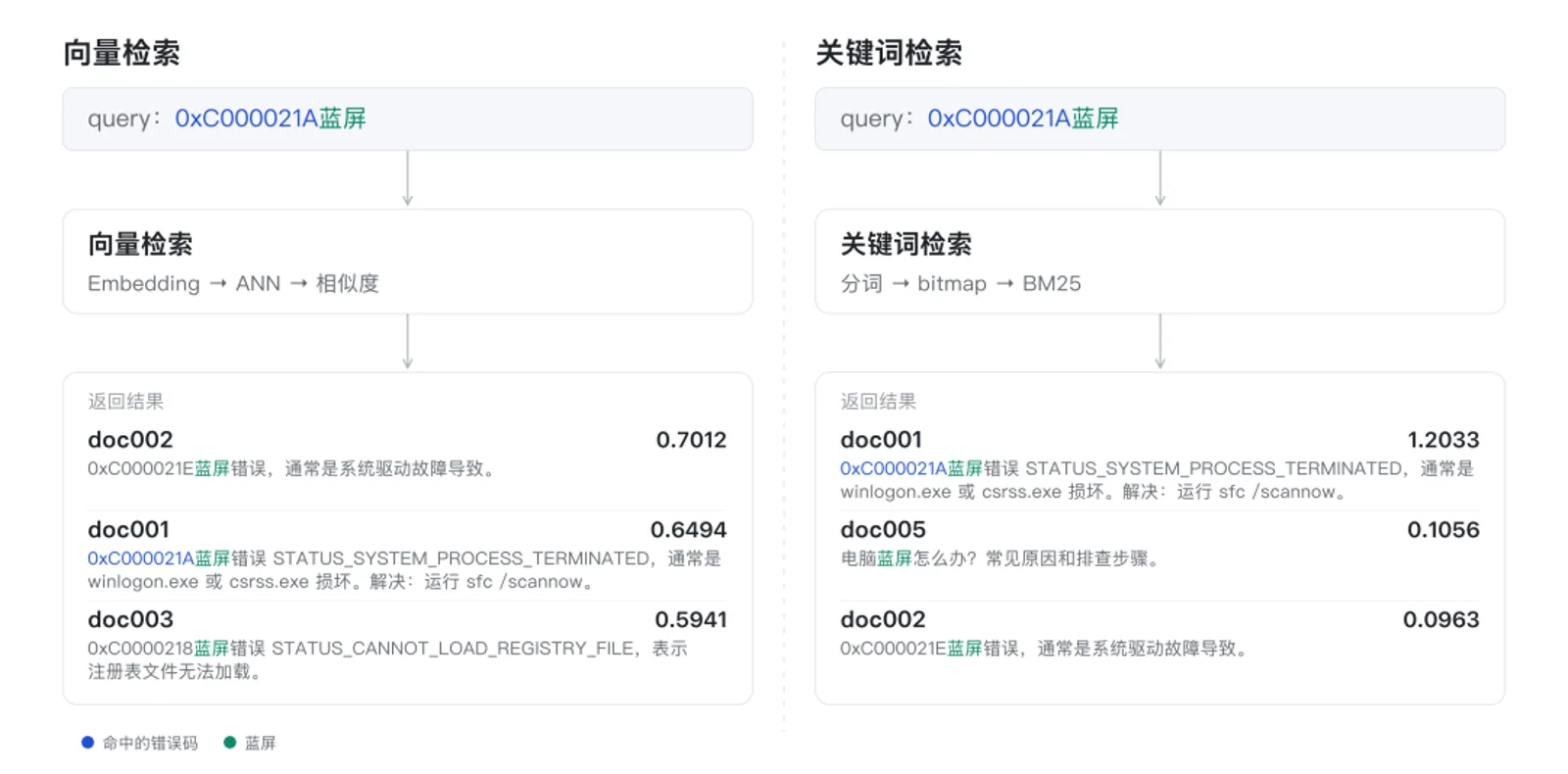
When a user searches for "0xC000021A蓝屏" (0xC000021A blue screen), vector search returns the document for 0xC000021E first because both documents share the "blue screen" semantics, and the 0xC000021E document's text is more concentrated on that phrase, yielding a slightly higher vector similarity. The two error codes differ by only one character but require completely different troubleshooting steps.
Keyword search, by contrast, parses the query into terms ("0xc000021a" and "蓝屏"), uses an inverted index to find documents containing those terms, and ranks by text relevance (BM25). Document 001 hits both terms; the other four hit only "蓝屏", so document 001 scores highest and appears first.
Volcano Engine's VikingDB supports both vector and keyword search within the same collection. VikingDB is a cloud-native vector database built by ByteDance, capable of trillion-scale vectors with millisecond latency. Its keyword search has been hardened across dozens of internal and external retrieval scenarios and underpins platforms such as OpenViking and Viking Knowledge Base for hybrid search and Q&A.
01 | How Keyword Search Works
To ensure identical words in documents and queries match, indexing and querying share the same text analyzer. The analyzer converts text into matching terms through three steps:
Normalization : unify case and full/half-width forms so different writings of the same word map to one term.
Tokenization : split continuous text into terms; Chinese uses dictionary-based segmentation, English and numbers stay intact.
Stop-word filtering : remove high-frequency words like "的", "了" and punctuation to reduce noise.
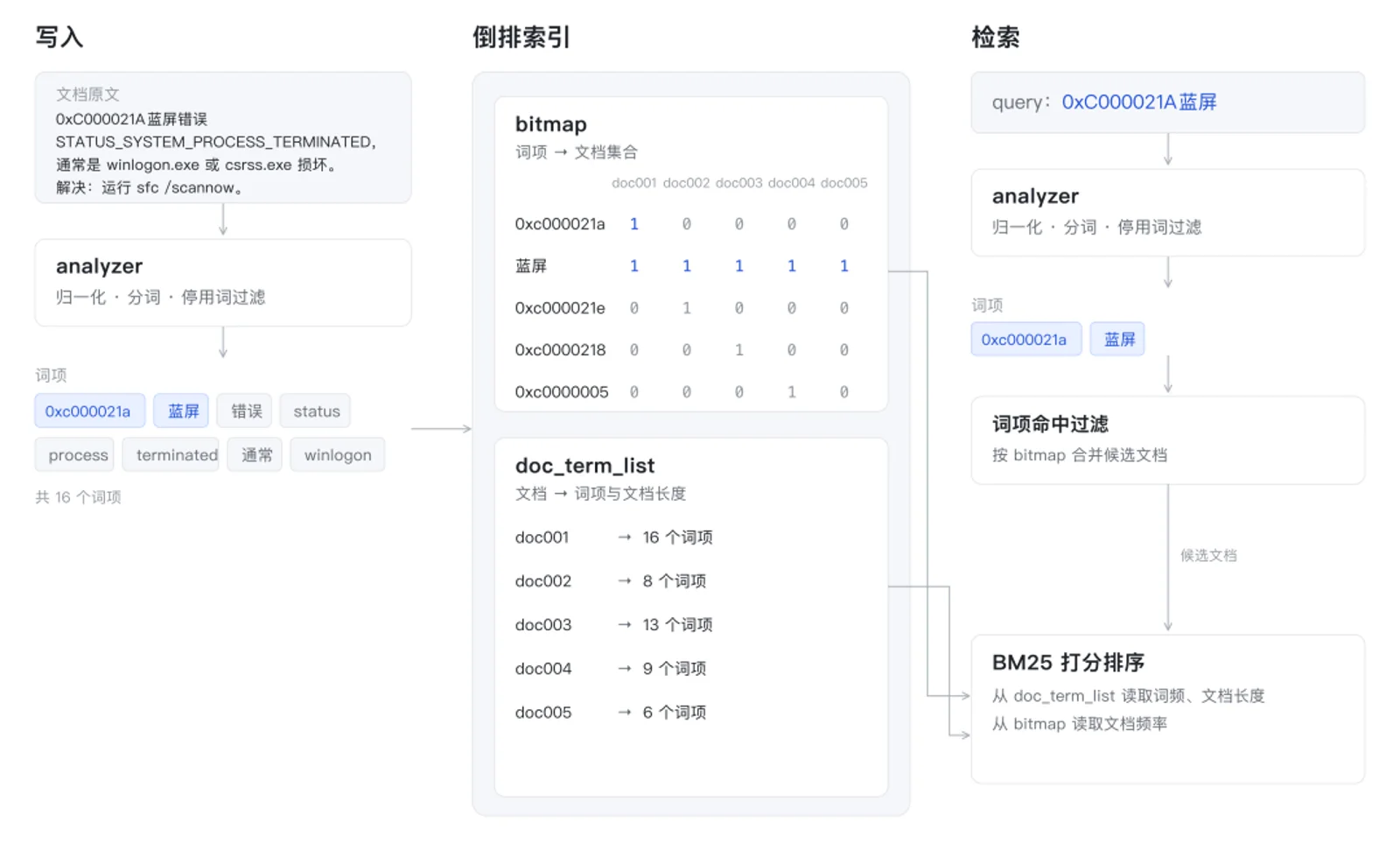
At write time, terms enter the inverted index, which consists of two parts:
Bitmap : per term, records the set of documents containing it.
Document term list (doc_term_list) : per document, stores term frequencies, document length, and other statistics.
At query time, the query passes through the same analyzer to produce a term list. Bitmaps of matching terms are merged to form a candidate set of documents containing at least one query term. Then term frequencies and document lengths are read from doc_term_list and scored with BM25.
This inverted structure retains only statistics essential for keyword search, yielding lower memory footprint and higher performance than traditional general-purpose search systems.
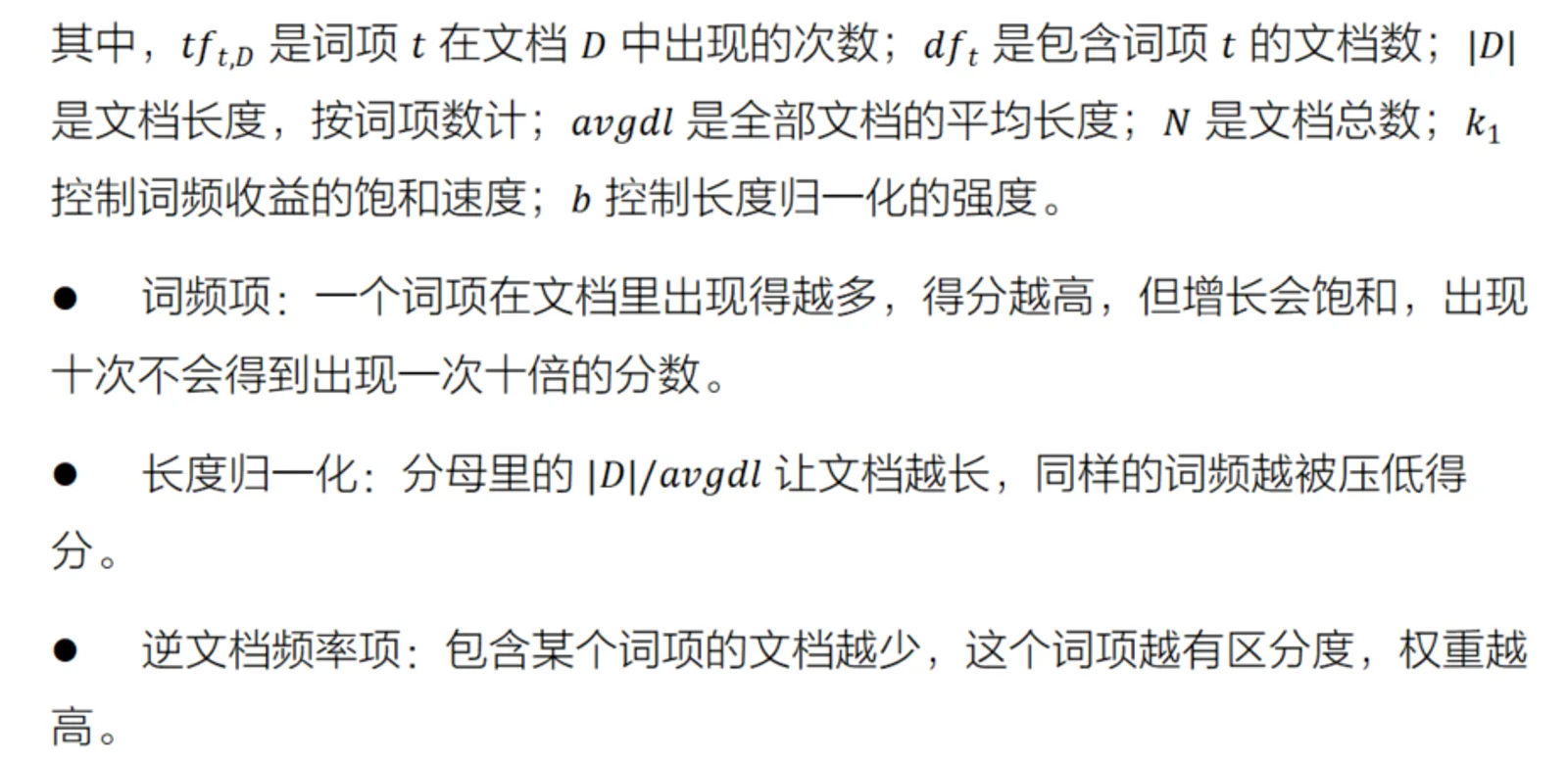
BM25 (Best Matching 25) is the ranking algorithm. It measures document-query relevance: a term appearing more often in a document, being rarer across the collection (higher inverse document frequency), and the document being shorter all increase the score.

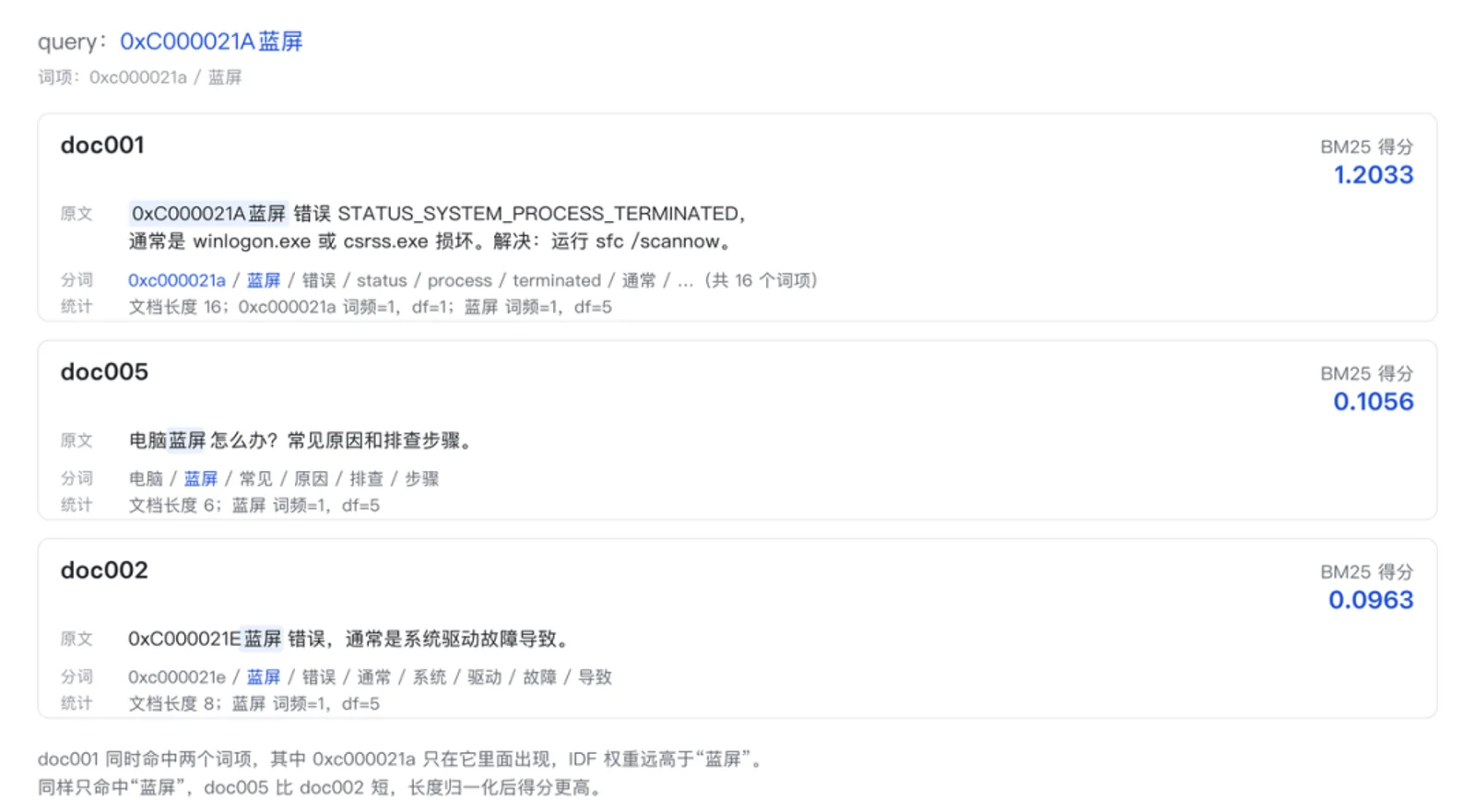
Returning to the five blue-screen documents: query "0xC000021A蓝屏" yields terms 0xc000021a and 蓝屏. Document 001 hits both; the other four hit only 蓝屏. The term 0xc000021a appears only in document 001, giving it a higher IDF and widening the score gap. Among the remaining four, the shorter document 005 scores higher.
02 | Rare Character Search
The standard analyzer works for modern Chinese but fails on classical poetry, literary Chinese, and titles where single characters form words, boundaries differ, and rare characters appear. Standard segmentation mismatches user query boundaries.
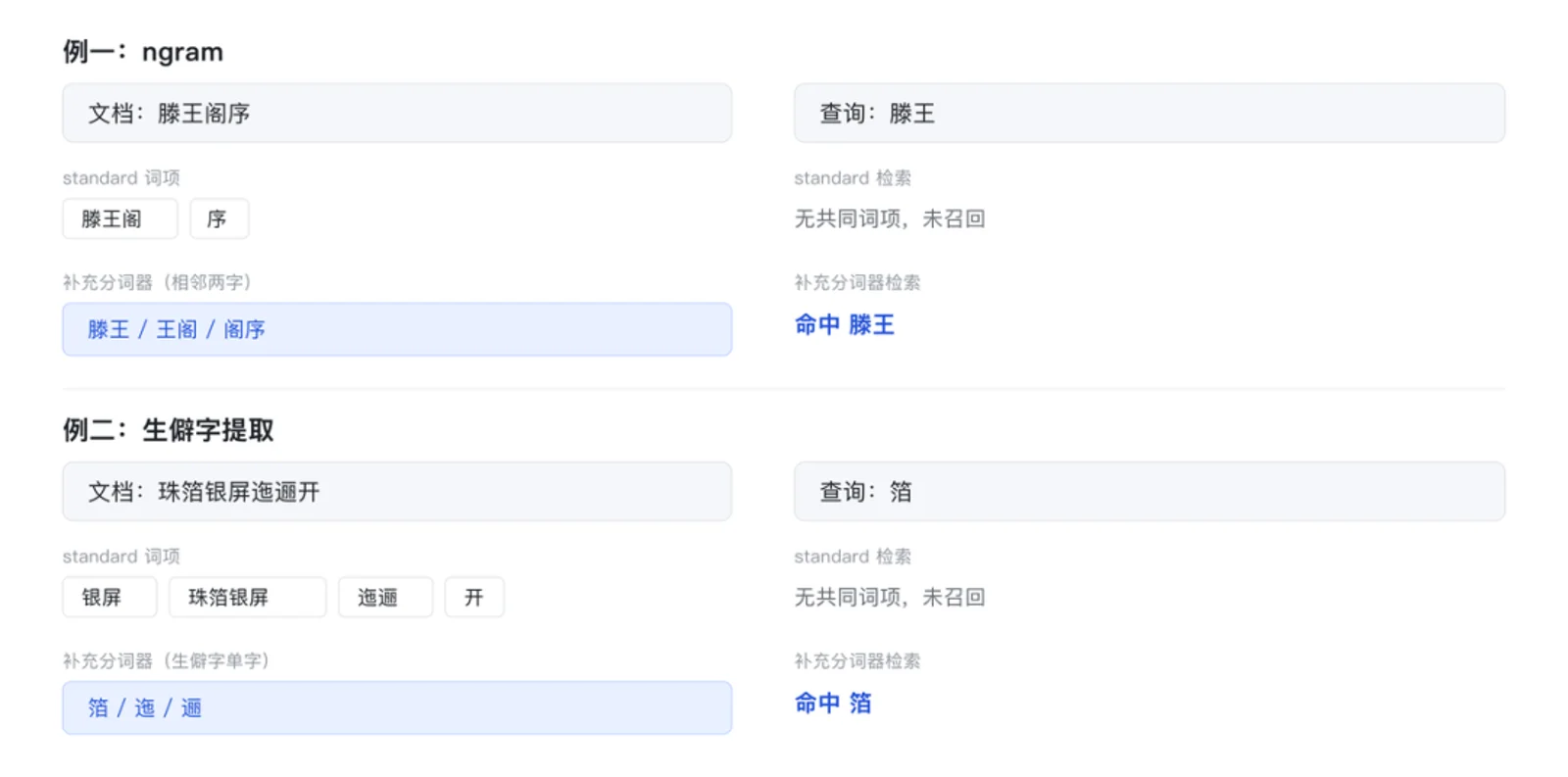
Example: "滕王阁序" (Preface to the Pavilion of Prince Teng) segments into "滕王阁" and "序". A user searching "滕王" finds no common term. "珠箔银屏迤逦开" segments into "银屏", "珠箔银屏", "迤逦", "开"; searching "箔" also fails.
VikingDB supports stacking supplementary tokenizers on a field for coordinated operation:
ngram tokenization : generates overlapping bigrams from consecutive CJK characters without relying on a dictionary, covering arbitrary two-character combinations. Suitable for titles, names, and short texts with uncertain word boundaries.
Rare character tokenization : extracts only CJK rare characters, producing fewer terms than bigrams, ideal for rare-character queries.
After stacking, "滕王阁序" gains "滕王", "王阁", "阁序" enabling "滕王" to match. "珠箔银屏迤逦开" gains "箔", "迤", "逦" enabling "箔" to match.
03 | Pinyin Search
Users may input pinyin instead of Chinese characters — unsure of pronunciation (e.g., "蚌" as bàng or bèng) or stuck in English input mode. Literal matching fails.
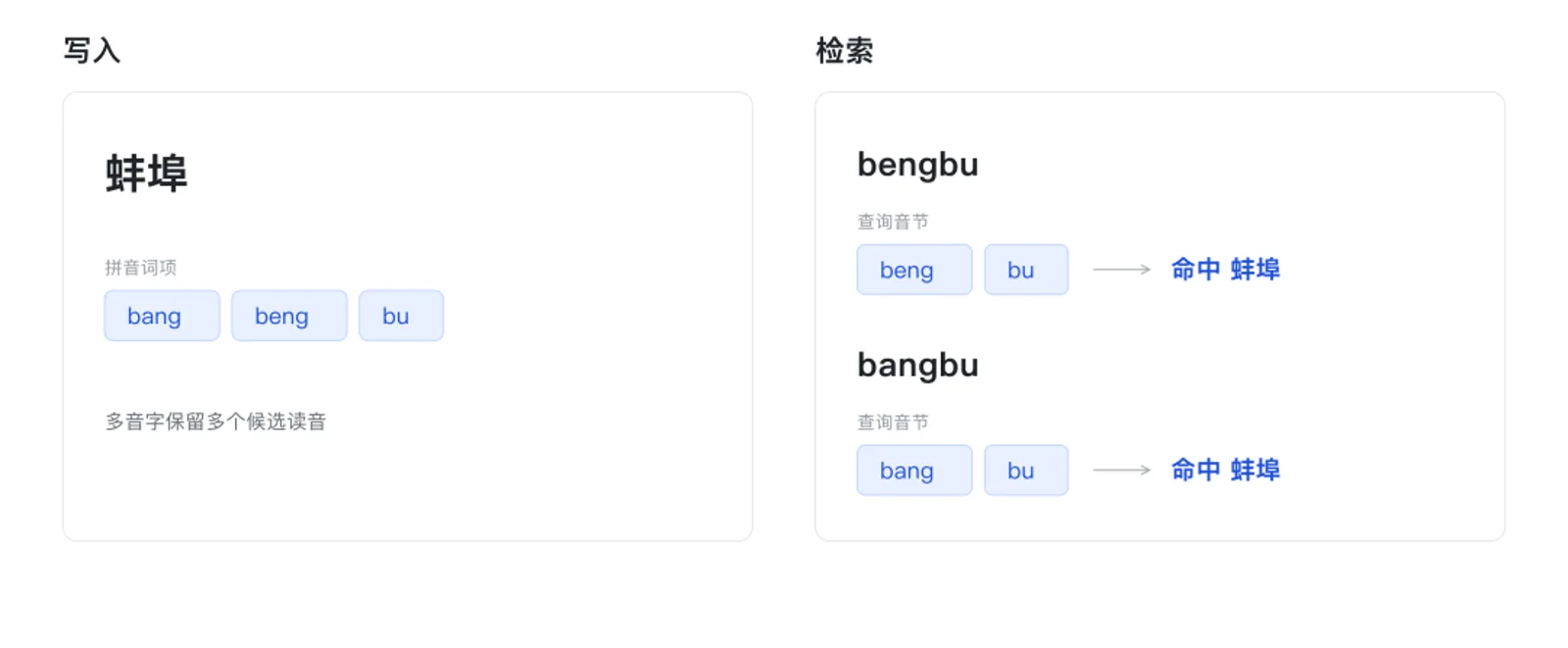
With the pinyin supplementary tokenizer enabled, at write time Chinese characters are converted to tone-less full pinyin; polyphones generate multiple candidate readings: "蚌" → bang, beng; "埠" → bu. At query time, consecutive English letters are parsed as pinyin syllables, so both "bengbu" and "bangbu" match "蚌埠".
04 | Multi-field Search
Products, content, and enterprise knowledge bases have multiple text fields (title, alias, body) with different business value. The same keyword in different fields carries different weight: "iPhone17" in a title signals the document's main topic more strongly than a single mention in the body.
VikingDB supports keyword search across multiple fields. When creating a collection, multiple text fields can each enable keyword search. At query time, specify which fields participate and assign per-field weights. The final score is the weighted sum of each field's BM25 score.
Example: query "iPhone17 手机壳" (iPhone17 phone case). Document A: title "iPhone17 液态硅胶手机壳", body lacks query terms. Document B: title "苹果手机壳 透明防摔", body contains "iPhone17" twice and "手机壳". With 1:1 weight, B ranks higher due to body term frequency. Changing title weight to 5:1 moves A to first place.
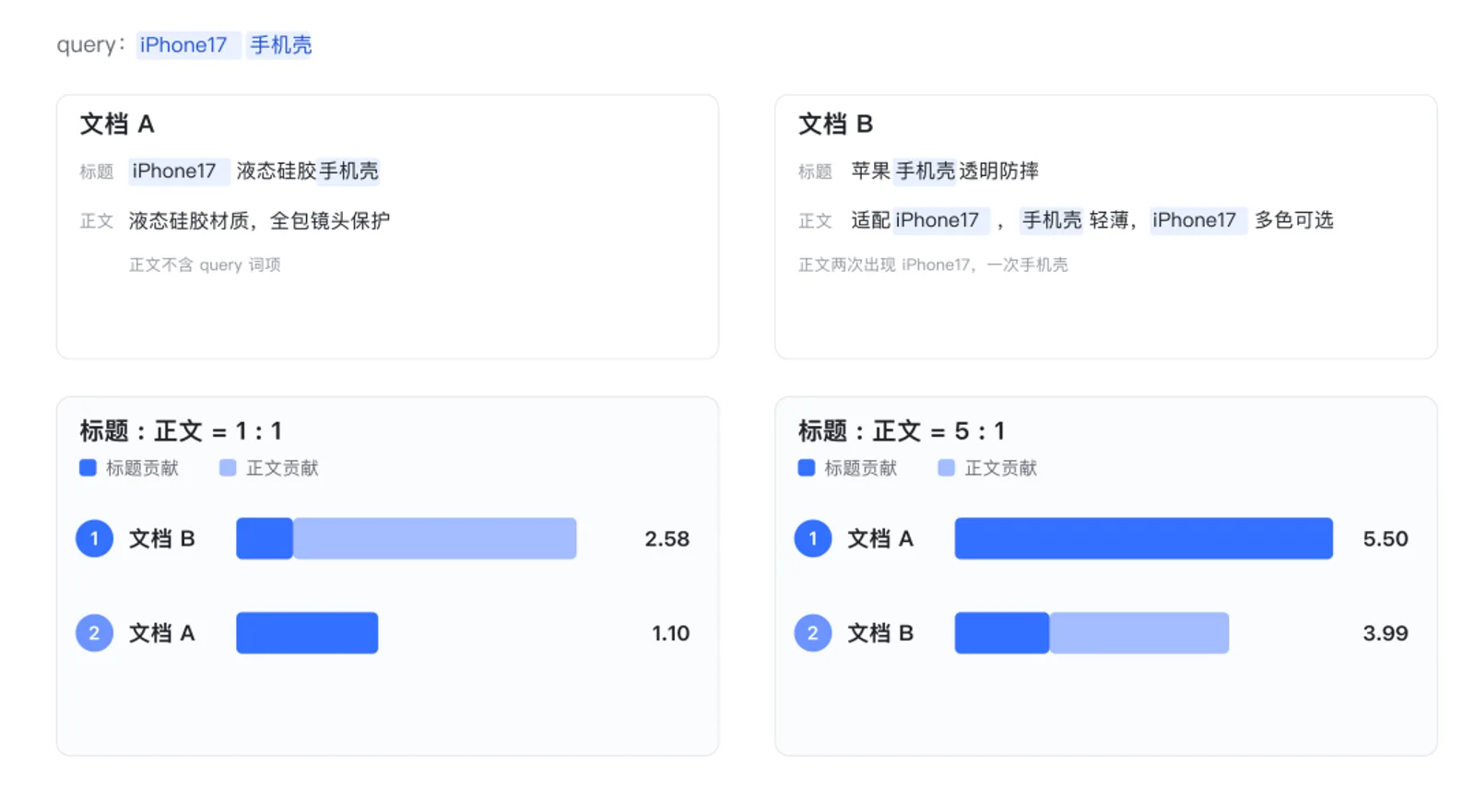
Weights express business trust in a field; they do not alter intra-field BM25 scores, only the relative contribution across fields.
05 | Keyword Positive/Negative Filtering
Field weights adjust ranking, but some business rules must decide whether a document enters the candidate set at all. Documents matching sensitive words or blocklist terms should be excluded before scoring. These conditions do not participate in ranking; they only gate candidate inclusion.
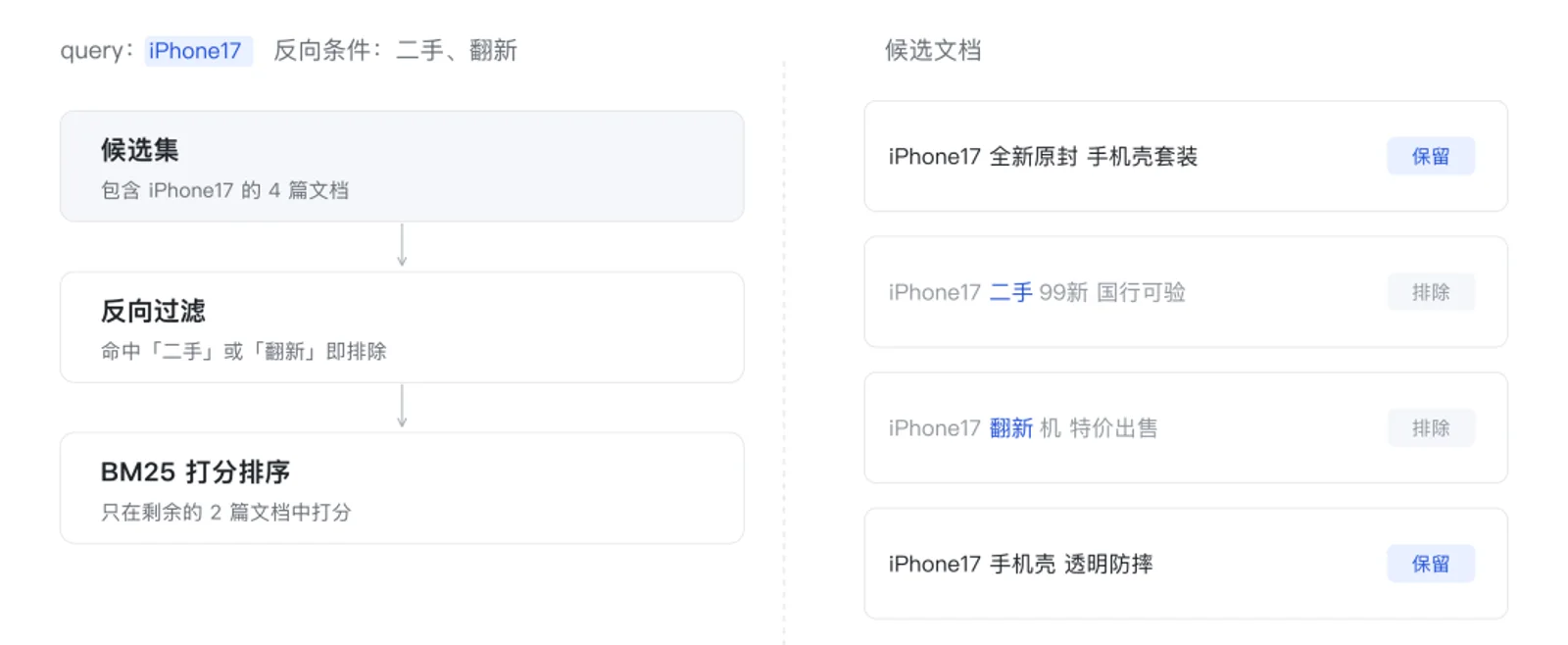
VikingDB supports positive and negative keyword filtering within generic filter expressions: a positive condition requires the document to contain at least one specified term; a negative condition excludes any document containing at least one specified term. Keyword filtering skips BM25 scoring and is available in any search API.
Typical scenario: product search. User selects "new only" but queries only "iPhone17". Results may still include items whose details contain "二手" (second-hand) or "翻新" (refurbished). Applying a negative filter for "二手" and "翻新" removes those items before scoring, so only non-matching products are ranked.
06 | Result Highlighting
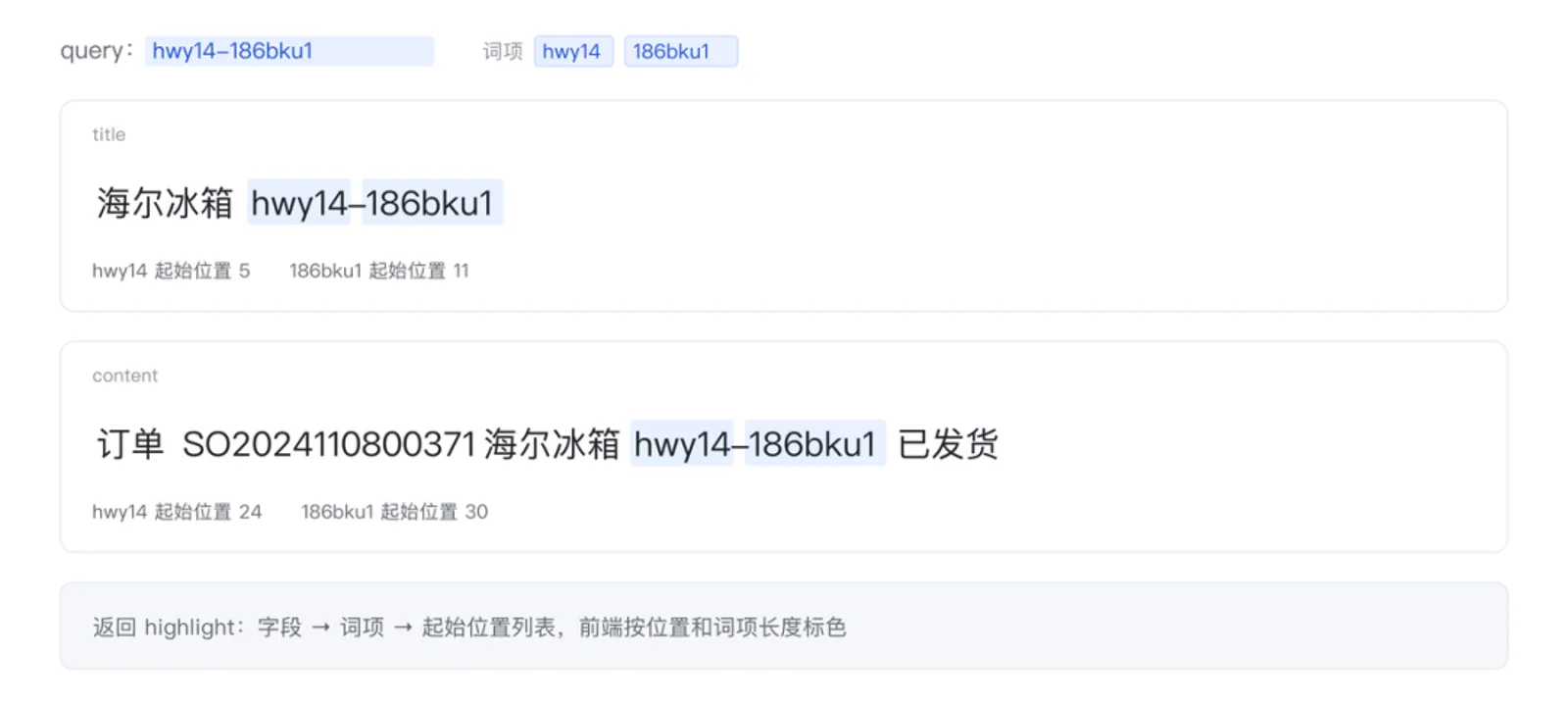
When displaying search results, highlighting matched terms lets users instantly see where the query matched. VikingDB supports enabling highlighting at query time. The response adds a highlight field organized as "field → term → list of start positions": which terms matched and their exact positions in the original text are computed server-side.
Example: order search with query "hwy14-186bku1". Standard analyzer produces terms "hwy14" and "186bku1". Both appear in title and body. The highlight field returns start positions for each term in each field. Front-end uses these positions to bold or color the matches, so users immediately see the hit locations.
07 | Quick Practice: One-line Configuration for Keyword Search
Start with the default standard analyzer. Using the five blue-screen documents from the introduction, the following shows collection configuration and search request.
Add FullText configuration to the content field with analyzer set to standard to enable keyword search.
{
  "CollectionName": "windows_errors",
  "Fields": [
    {"FieldName": "docid", "FieldType": "string", "IsPrimaryKey": true},
    {"FieldName": "content", "FieldType": "text"}
  ],
  "Vectorize": {"Dense": {"ModelName": "doubao-embedding-vision", "ModelVersion": "251215", "TextField": "content"}},
  "FullText": [{"Field": "content", "Analyzer": {"Tokenizer": "standard"}}]
}
Use UpsertData to insert the five documents, providing only docid and content; no manual vector generation needed.
Call SearchByKeywords for keyword search:
{
  "collection_name": "windows_errors", "index_name": "idx_1",
  "query": "0xC000021A蓝屏", "limit": 5,
  "output_fields": ["docid", "content"]
}
Results match section 1: doc001 ranks first; the other documents only hit "蓝屏" and score an order of magnitude lower.
08 | Conclusion
The purpose of search is to accurately find the needed content. VikingDB lets the same data be understood semantically and matched precisely, eliminating the need to maintain separate systems for two search paradigms. When search is accurate, fast, and easy to use, enterprise data can deliver greater value in AI applications.
For questions about attribution, corrections or content rights, please contactand we will review it promptly.