

Virtual Memory Demystified: Page Tables, Swapping & Isolation Explained
This article explains virtual memory using a desk analogy, detailing how it solves insufficient RAM, memory fragmentation, and security issues through page tables, MMU address translation, page faults, and swapping, while providing each process an isolated virtual address space.
Reading font
Introduction: The Desk Analogy
Imagine studying at a small desk with books and notes. The desk represents fast but limited RAM; the bed or wardrobe represents larger but slower storage. Since not everything fits on the desk, you keep the most important materials on the desk and store the rest on the bed. When you need a book from the bed, you swap it with one on the desk. Though the desk hasn't grown, you effectively have a larger workspace. This mirrors virtual memory: it lets programs feel they have more memory than physically available.
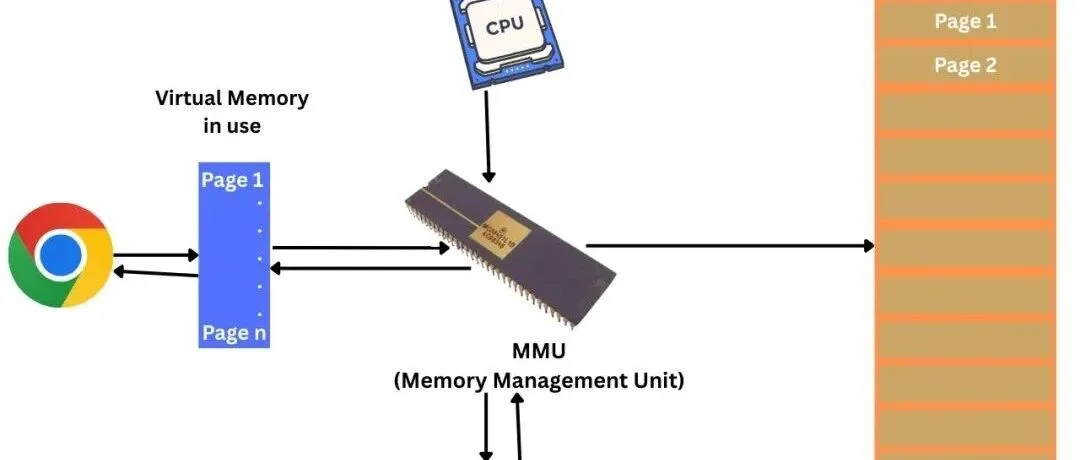
In modern computers, CPU and OS use virtual memory regardless of RAM size. Every memory access — reading a variable, accessing an array — goes through the virtual memory system. The CPU uses the MMU (Memory Management Unit) to translate virtual addresses into physical addresses.
Why Virtual Memory Is Needed
Virtual memory primarily solves three problems: insufficient memory, memory fragmentation, and security.
1. Insufficient Physical Memory
Historically, RAM was expensive and small. Virtual memory transparently moves data between RAM and disk (paging), allowing programs to use more memory than physically present. For example, a 4 GB RAM machine can run multiple applications whose total memory requests exceed 4 GB. Unused memory pages are swapped out to disk, freeing RAM; when needed again, they are swapped back in.
2. Memory Fragmentation
If programs used physical memory directly, repeated allocation and release would fragment RAM into many small free blocks. A program requesting a contiguous 1 GB block might fail even if 2 GB total free memory exists, because no single contiguous 2 GB region is available. Virtual memory solves this: each process sees a contiguous virtual address space, while the underlying physical pages can be scattered across RAM.
3. Security and Isolation
Without virtual memory, a malicious program could read or modify other programs' data. With virtual memory, each process gets its own virtual address space. The OS can set per-page permissions (read, write, execute), preventing unauthorized access to other processes' memory or kernel space.
Additional benefits include shared libraries, inter-process memory isolation, and simpler memory management for developers.
Basic Principles of Virtual Memory
Each program sees its own virtual address space, not the physical memory. When a process starts, the OS creates an independent virtual address space — 4 GB on 32-bit systems, terabytes on 64-bit systems. The OS and MMU map these virtual addresses to physical RAM locations behind the scenes.
If a program accesses data not currently in RAM, the OS divides both virtual and physical memory into fixed-size pages. Accessing a non-resident page triggers a page fault. The OS loads the page from disk into RAM, updates the page table, and resumes the program. When RAM is full, the OS swaps out less-used pages to disk (swap space) and reloads them later.
How Virtual Memory Works
A running program uses virtual addresses, not physical ones. Each program believes it owns a contiguous memory space. The MMU translates virtual addresses to physical addresses.
Virtual Address Structure
The OS splits the virtual address space into pages; physical memory into page frames of the same size. A virtual address consists of two parts:
Page Number (high bits): identifies which virtual page.
Page Offset (low bits): identifies the byte within that page.
Page Table Lookup
The OS maintains a page table mapping virtual pages to physical page frames. On a memory access, the MMU extracts the page number, looks it up in the page table. If the page is in RAM, the table gives the physical frame number. The MMU replaces the virtual page number with the physical frame number, keeps the offset, and forms the physical address.
Page Fault Handling
If the page table shows the virtual page is not in RAM, a page fault occurs. The OS intervenes, locates the page on disk (e.g., in swap space), loads it into a free physical frame, updates the page table, and restarts the instruction.
Swapping Out and In
Because RAM is limited, the OS moves infrequently used pages to disk (swap out) to free frames for active pages. The disk area holding these pages is called swap space. When a swapped-out page is accessed again, a page fault triggers a swap in: the OS reads the page from disk into RAM, updates the page table, and continues execution. This is slower than direct RAM access but prevents crashes due to insufficient memory.
Advantages of Virtual Memory
Larger address space than physical RAM: Swapping lets programs run even when their total memory demand exceeds RAM capacity.
Memory isolation: Each process has a private virtual address space; it can only access memory the OS permits. Errors in one process cannot easily corrupt others, improving system stability and security.
Simpler programming: Developers need not worry about physical memory layout or fragmentation; they work with a contiguous virtual space. The OS and MMU handle mapping.
Flexible RAM utilization: Active data stays in RAM; inactive data moves to disk. Limited physical memory is shared dynamically among processes, enabling efficient multitasking.
Ultimately, virtual memory's core value is not just "making memory larger." It inserts an abstraction layer between programs and physical memory, giving the OS flexible management and each process an isolated address space. This yields larger address spaces, stronger isolation, easier development, and more flexible memory management — making systems safer, more efficient, and more reliable.
For questions about attribution, corrections or content rights, please contactand we will review it promptly.