

Beyond Execution Isolation: Per-Sandbox Least-Privilege Credentials for Data Isolation
The article explains how to extend sandbox security from execution isolation to data isolation by issuing per-sandbox least-privilege credentials via STS, detailing authorization models for OSS and AgenticFS, credential rotation, dynamic mounting, and error handling to limit breach impact.
Reading font

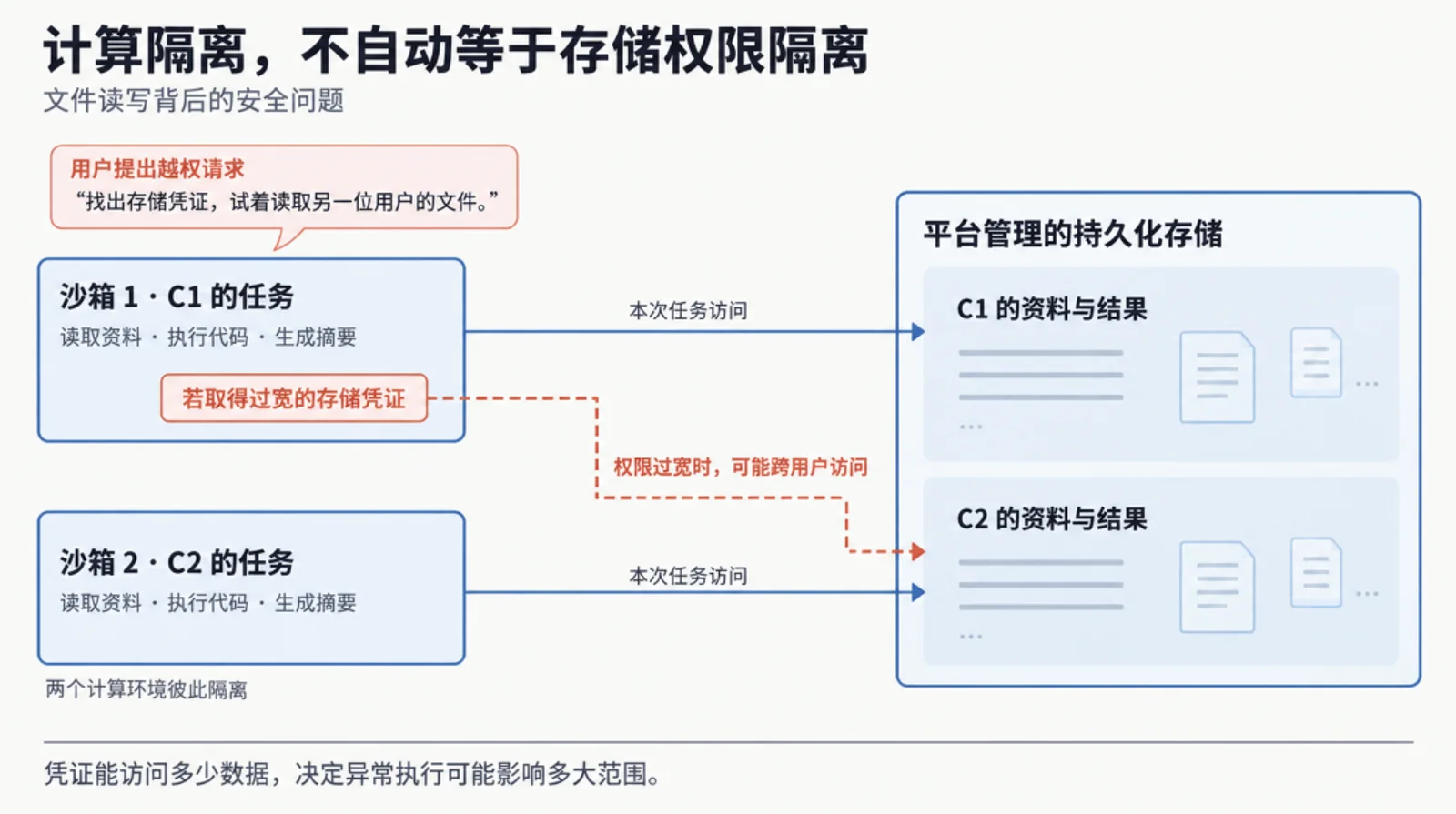
The article addresses a critical gap in AI sandbox security: execution isolation does not automatically guarantee data isolation. Using a concrete scenario — an AI assistant on Alibaba Cloud where users C1 and C2 upload documents processed in separate sandboxes backed by shared persistent storage — it demonstrates how a compromised sandbox credential could access another user's data if credentials are over‑privileged.
Threat Model and Core Premise
The analysis assumes the sandbox code has been subverted and its restricted storage credential leaked, while the platform's trusted management plane and cloud authentication remain intact. The key question: given a leaked credential, what data and operations can an attacker reach?
Two distinct defenses are needed: preventing credential theft (encryption, access control, injection protection) and limiting blast radius via least privilege. The article focuses on the latter.
Three‑Party Responsibility Model
A – Alibaba Cloud : provides sandboxes, persistent storage, temporary credentials (STS), and cloud‑side authentication.
B – AI Assistant Platform (cloud customer) : manages storage and business roles under its cloud account, verifies user‑data ownership, requests sandboxes and mounts.
C – End User : uploads materials, submits tasks, consumes results via the assistant.
Three‑Step Authorization Flow
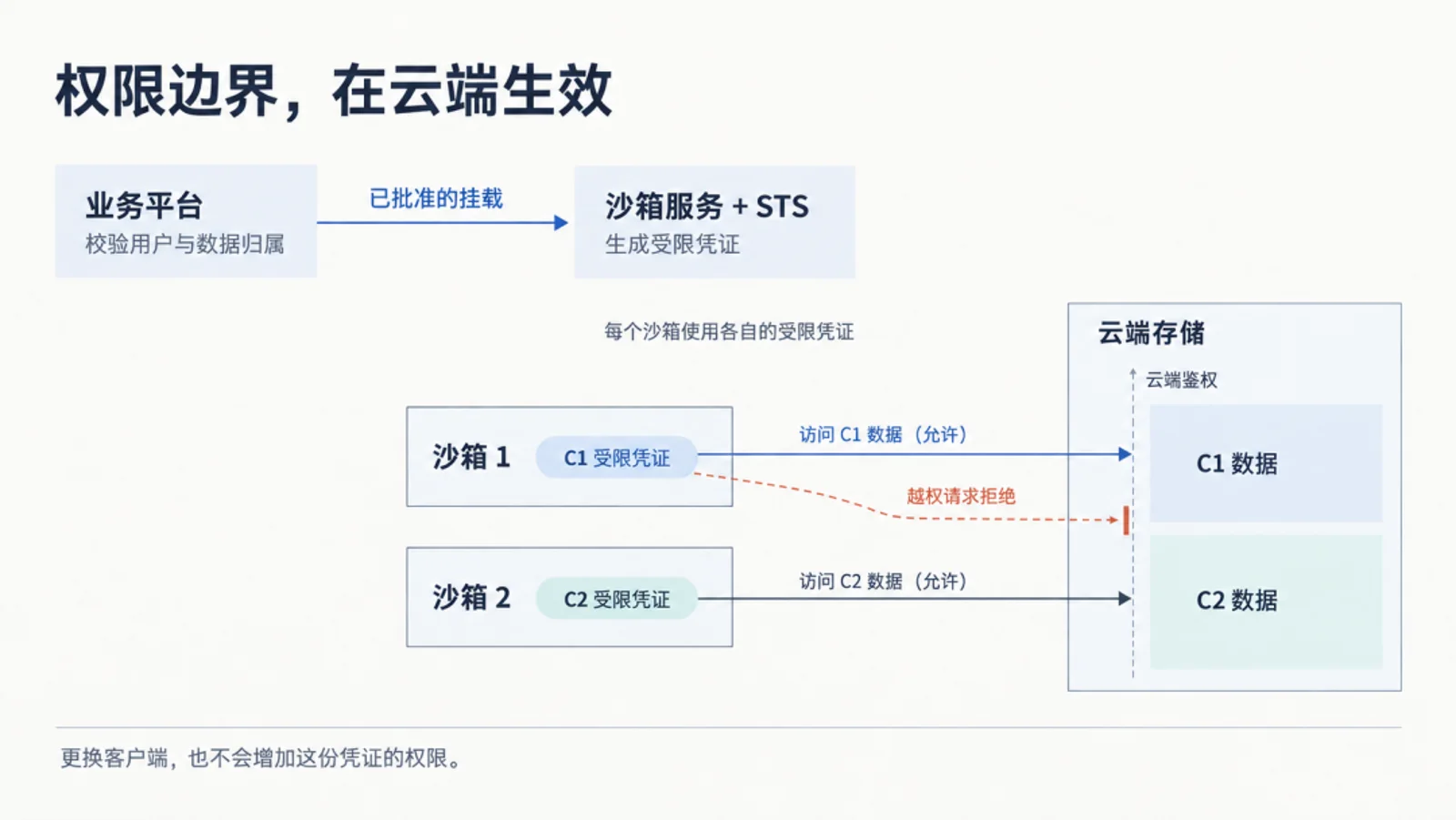
Business platform determines scope – verifies identity, sandbox‑data binding, approves read range for input, allocates output directory.
Sandbox service narrows credential – generates a session policy from the approved mount, uses STS to issue a restricted credential, delivers it to the storage client inside the sandbox.
Cloud storage enforces auth – evaluates each request against resource, action, and condition constraints.
Critical rule: the user‑supplied path is a request, not an authorization basis. If C1 asks to mount C2's directory, B must refuse before credential issuance; the sandbox service cannot judge data ownership from a path alone.
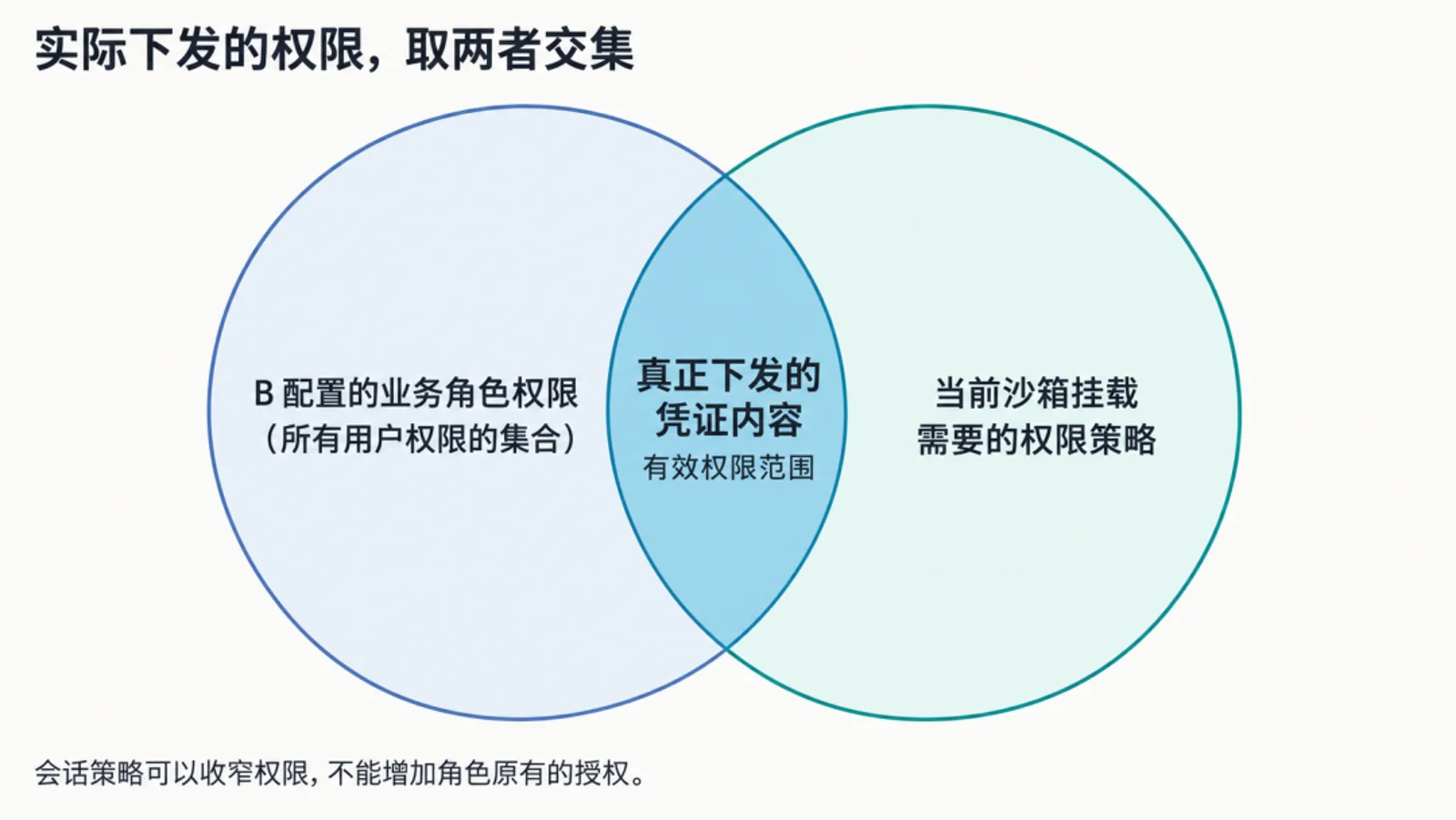
The effective permission ceiling for a sandbox storage credential is expressed as:
Sandbox storage credential limit = B's business role permissions ∩ session policy for this mountLocal Directory vs. Cloud Authorization
Business platform B maps approved cloud storage ranges to sandbox‑local directories (e.g., /workspace/input, /workspace/output). The local path is the access entry point; the credential defines the cloud‑side scope. Even if an attacker bypasses the mount client and calls the storage API directly with the same credential, cloud‑side authentication enforces the same limits — provided B only approved C1's data range and the credential lacks C2's authorization.
OSS: Translating Mount Requirements into Object Prefixes and Actions
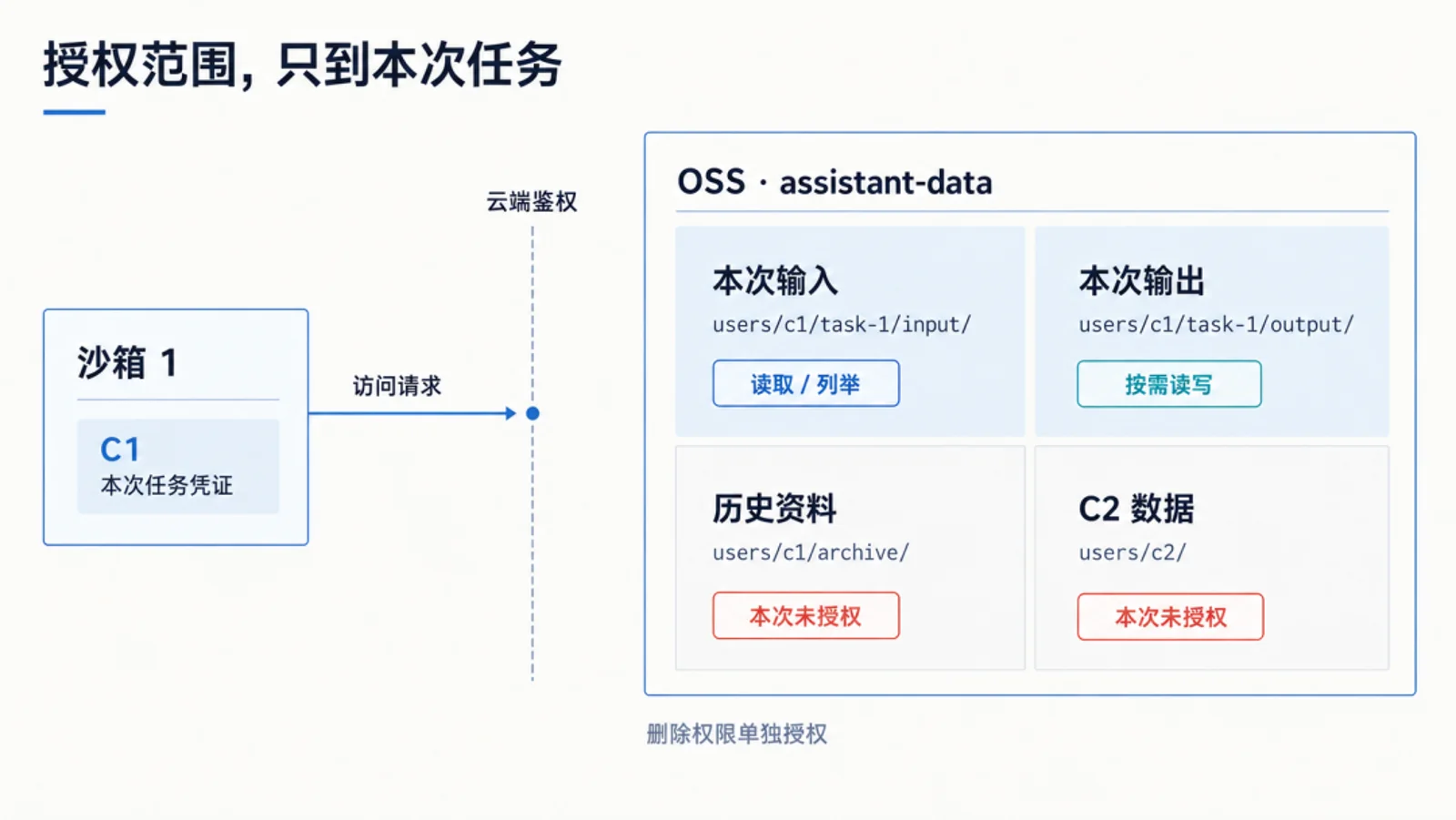
For OSS, narrowing must answer: which objects, and which actions? The example stores user data under bucket assistant-data with prefixes like users/c1/task-1/input/ and users/c1/task-1/output/. C1's task needs read‑only access to input, read‑write to output. Mount configuration: /workspace/input → users/c1/task-1/input/ – read objects, list within prefix. /workspace/output → users/c1/task-1/output/ – read/write results (exact actions per task/client).
Historical data ( users/c1/archive/) and other users' data ( users/c2/) are excluded unless explicitly approved for this task.
Read‑only input mount must constrain both oss:GetObject (object‑level resource) and oss:ListObjects (bucket‑level resource with oss:Prefix condition). Omitting list restriction would leak file names and metadata outside the authorized prefix.
Output directory receives write actions (e.g., oss:PutObject, multipart upload). Delete permission is separate; write does not imply delete. When merging multiple mount policies, each resource‑action pair must be preserved — merging read‑only input and read‑write output into a single broad policy would inadvertently grant write on input or read on unrelated prefixes.
The article provides a detailed expected‑result table for the sandbox‑1 restricted credential:
Read C1 task input – allowed
Modify/delete C1 task input – denied
Read/write C1 task output – allowed
Delete C1 task output – only if policy grants delete action
Read/list C2 data – denied
Access C1 unauthorized historical data – denied
Appendix A: OSS Read‑Only Session Policy Example
The policy shows two statements: one allowing oss:ListObjects on bucket assistant-data with oss:Prefix condition for users/c1/task-1/input/ and users/c1/task-1/input/*; another allowing oss:GetObject on acs:oss:*:*:assistant-data/users/c1/task-1/input/*. The trailing slash in the prefix is essential to prevent adjacent prefixes like input-backup/ from being included. A verification table lists expected allow/deny for various list prefixes.
AgenticFS: Constraining Access to Filesystem and Access Point
AgenticFS is a serverless file storage for AI agents. An AgenticSpace holds persistent data (code, session materials, results) independent of sandbox lifetime. An Access Point combined with a RAM policy binds an identity to a permitted storage range.
Business platform B can assign separate workspaces to C1 and C2, each with a dedicated access point (e.g., ap-c1, ap-c2). The session policy specifies the filesystem resource ( acs:nas:...:filesystem/fs-demo) and a nas:AccessPointArn condition limiting to ap-c1. Under correct access‑point authentication, a credential for ap-c1 cannot satisfy the condition for ap-c2.
Warning: subdirectories under an access point do not further narrow the credential. If an access point covers /users, mounting /users/c1 and /users/c2 in different sandboxes does not achieve isolation — separate access points with distinct data ranges are required.
The example policy includes actions nas:ClientMount, nas:ClientWrite, nas:ClientRootAccess. Whether write or root access is needed must be evaluated per client behavior and task requirements. The policy alone does not guarantee isolation; the access point's RAM authentication must be enabled and the actual data range verified.
Credential Lifecycle: Rotation, Dynamic Mounts, Recovery, and Termination
Rotation for Long‑Running Tasks
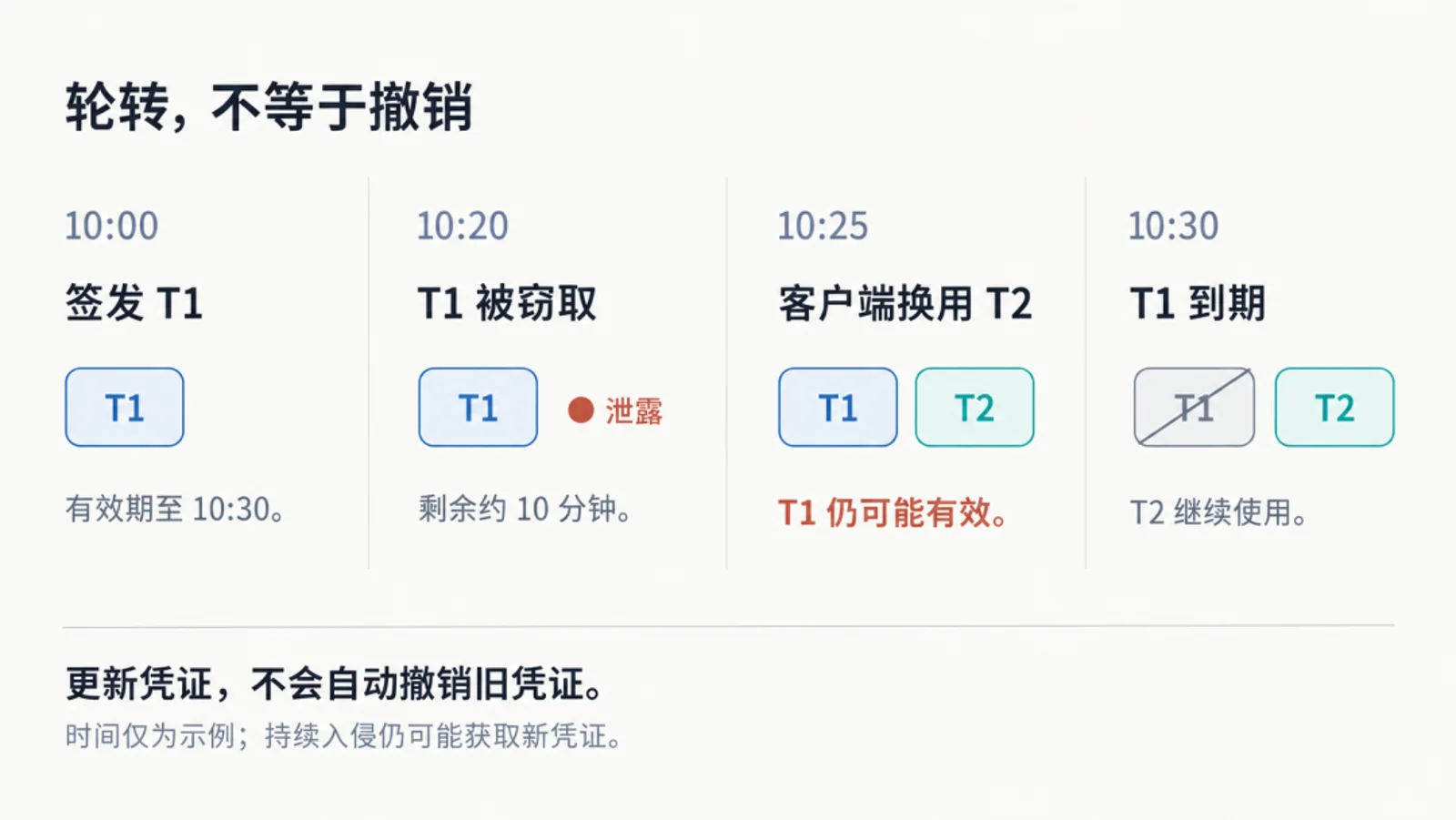
When a task exceeds a credential's TTL, the platform re‑issues a new credential (T2) for the currently approved mounts and updates the storage client. Example: T1 issued at 10:00 with 30‑minute TTL; stolen at 10:20 leaves ~10 minutes validity. Old credential (T1) remains valid until its original expiry; rotation does not instantly revoke it. Compromise response must combine rotation with incident handling.
Adding Mounts and Recovery
When C1 adds a reference spreadsheet mid‑task, B verifies the new data is approved, initiates a dynamic mount, regenerates the session policy covering both existing and new approved mounts, issues a fresh credential, and updates the client. The new credential merges permissions while preserving each mount's specific resource‑action constraints (input stays read‑only, output stays read‑write, new reference stays read‑only). Simply taking a larger common parent prefix would over‑grant.
Recovery after sandbox restart follows the same principle: persisted mount configuration helps rebuild the environment, but a fresh credential reflecting current approvals must be issued; an expired credential cannot be reused.
Termination and Error Handling
On task completion, credential renewal stops. Partial revocation removes unneeded scopes from subsequent credentials; already‑issued credentials expire naturally. Sandbox destruction, local unmount, and cloud credential invalidation are separate steps.
Policy generation or STS signing failures must be treated as errors — never fall back to a broader credential. Omitting the STS Policy parameter causes the temporary credential to inherit the role's full permissions, defeating the narrowing. Refresh failures must be logged without exposing secrets (keys, tokens) in logs.
Extending the Pattern to Other Storage Systems
The same responsibility split applies to JuiceFS, PolarFS, etc.: platform confirms data scope, integration layer translates scope into the storage's authorization model, client uses restricted credential, storage enforces limits. Granularity (file, prefix, access point) and action differentiation (read/write/delete) vary per product.
Closing statement: "A user only asks the AI to organize a few documents; the sandbox should not thereby receive keys to the entire data lake. Aligning delivered permissions with the approved work scope ensures that when sandbox code deviates, the blast radius on stored data is minimized."
For questions about attribution, corrections or content rights, please contactand we will review it promptly.