

CPU Cache Demystified: Hierarchy, Cache Lines, and Prefetching Explained
This article explains CPU cache hierarchy (L1/L2/L3), cache lines (64-byte units), cache hits/misses, prefetcher behavior, and practical optimization tips like keeping data small, accessing memory linearly, and packing data into cache lines, with examples from Apple M1 and Intel CPUs.
Reading font
What Is CPU Cache?
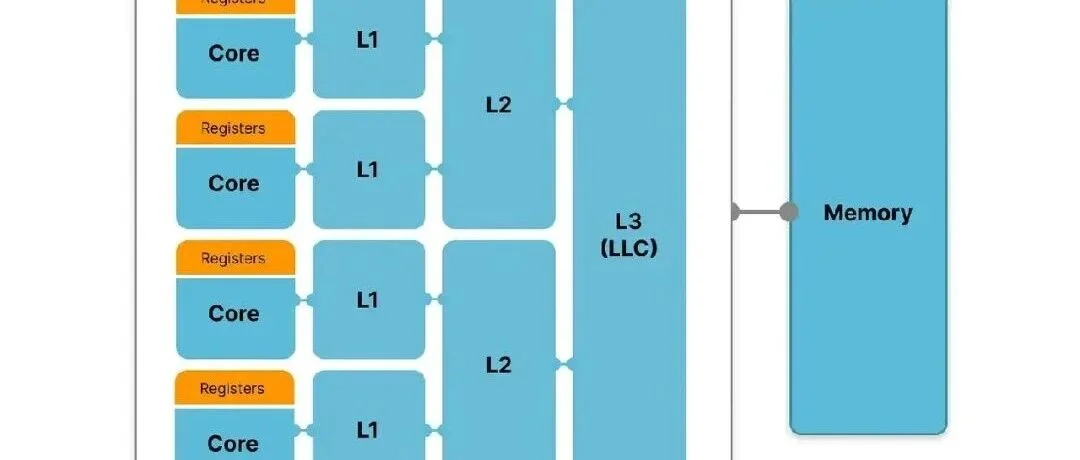
Modern CPUs include cache positioned between registers and main memory. Cache access is much faster than memory, and its primary role is to temporarily hold frequently accessed data so the CPU does not have to fetch it from slower memory each time.
Cache capacity is far smaller than memory — typically under 50 MB — but it offers lower latency and higher bandwidth.
Multi-Level Cache in Multi-Core CPUs
Multi-core processors use multiple cache levels. Some levels are shared across cores; others are private to a single core.
Apple M1: Two levels — L2 shared by all cores, each core has its own L1.
Intel Core i7-9700K: Three levels — L3 (Last Level Cache, LLC) shared by all cores.
Higher-level caches (LLC) are larger but slower; lower-level caches (L1) are smaller, with higher bandwidth and lower latency.
Concrete Cache Sizes: Intel Core i9-12900K (Performance Cores)
L1 cache: 80 KB
L2 cache: 1,280 KB
L3 cache: 30 MB
L1 provides near-register speed; L2 balances capacity, bandwidth, and latency; L3 is the largest but slowest.
How Fast Is CPU Cache?
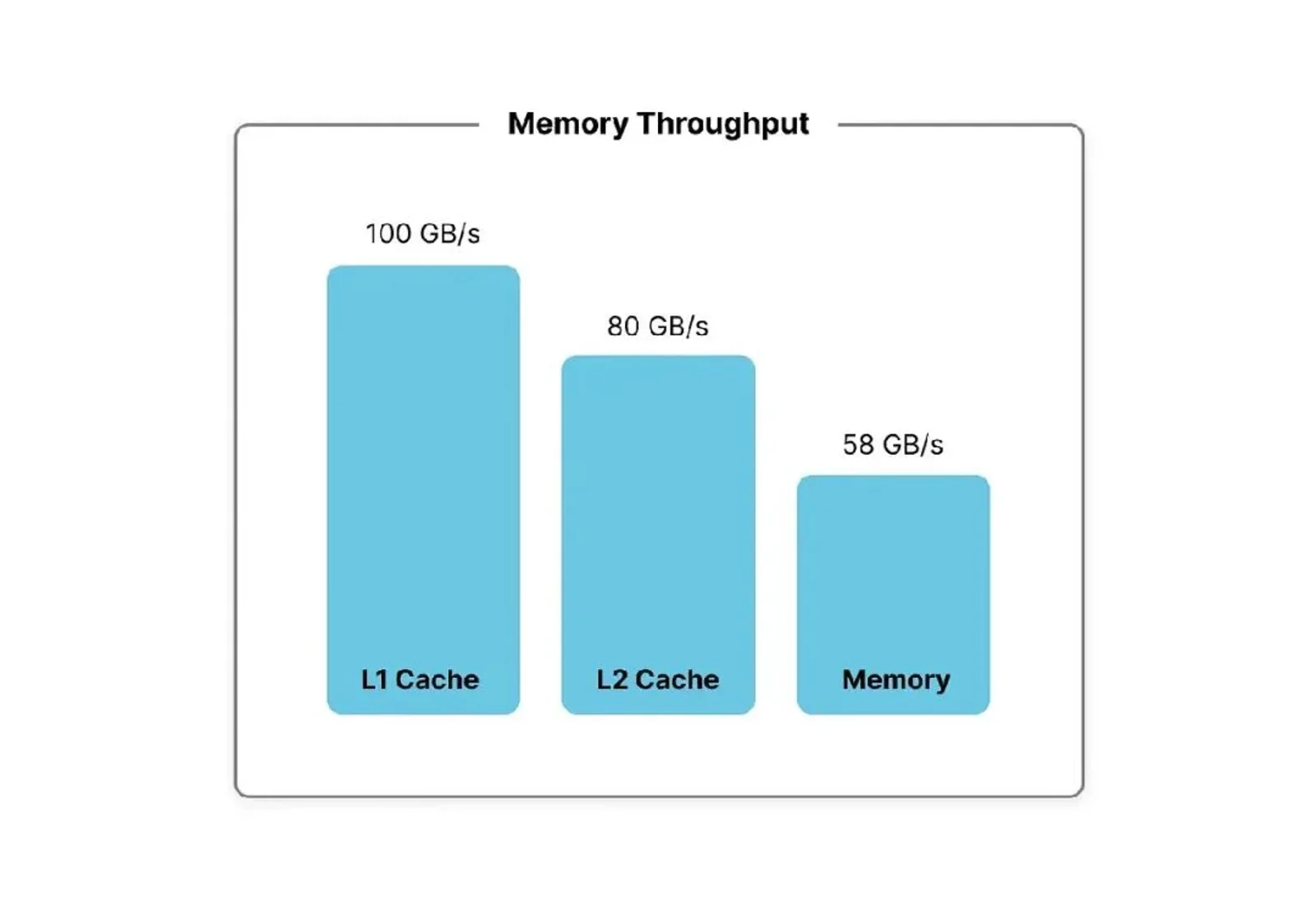
Tests on an M1 CPU (two cache levels) show significant throughput differences:
When data fits entirely in L1, memory throughput doubles compared to L2 or main memory.
However, fitting all data into cache is difficult because programmers cannot directly control cache placement and capacity is limited.
Cache Line (缓存行)
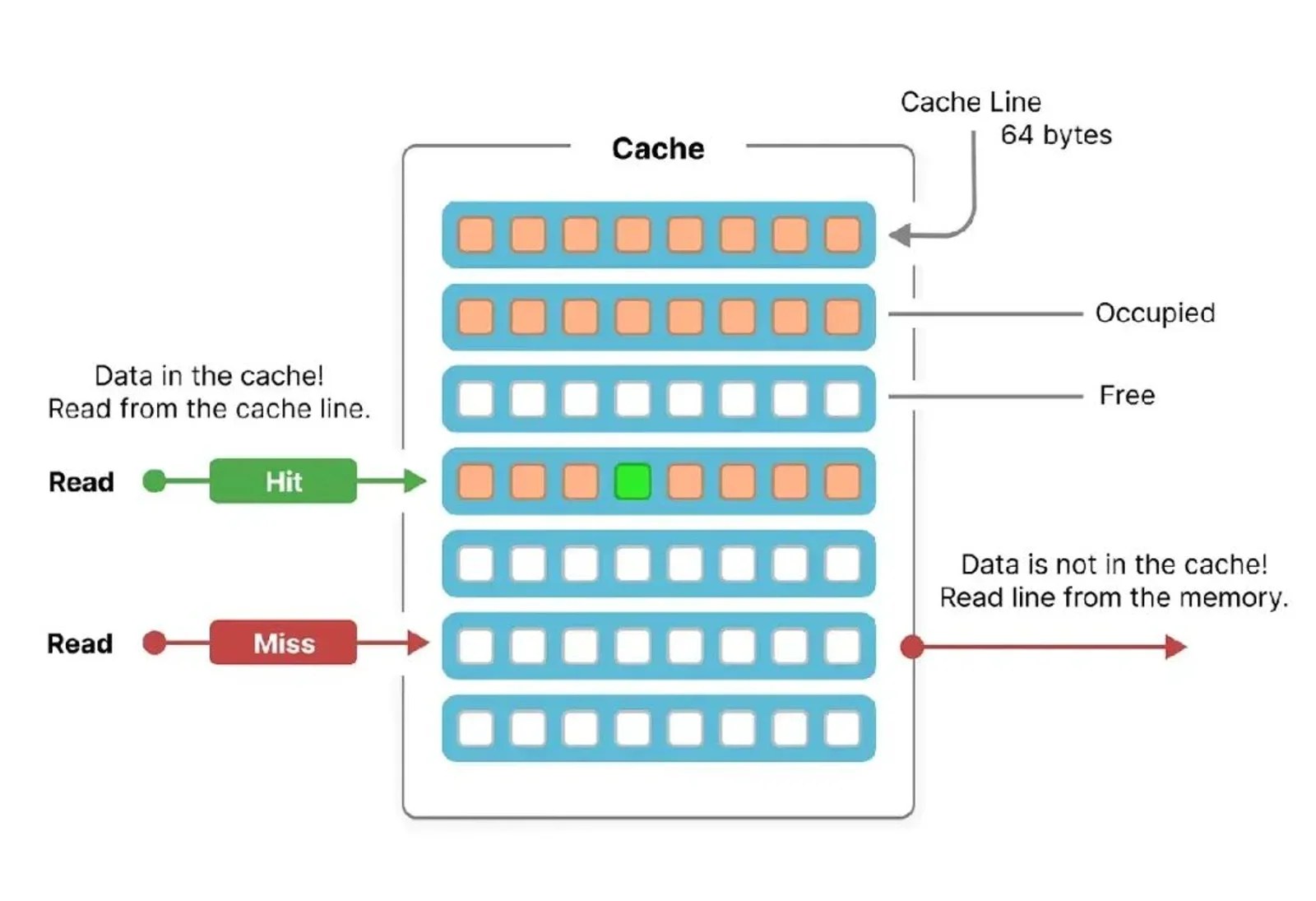
A cache line is the minimum unit of data transfer between memory and cache. Typical size is 64 bytes.
When the CPU reads a single 4-byte integer, it actually loads the entire 64-byte cache line containing that integer. Subsequent accesses to the remaining 60 bytes are then served from cache (cache hit).
Cache hit: Data already in cache — fast access.
Cache miss: Data not in cache — must fetch from slower memory.
Performance analyzers can count cache hits and misses precisely.
Which Data Enters CPU Cache?
Programmers control register and memory placement; cache management is entirely handled by the CPU.
Frequently Accessed Data
Cache aims to retain hot data. If a program repeatedly accesses certain memory locations and the data set is small enough, that data stays in cache.
Linearly Accessed Data (Prefetcher)
The hardware prefetcher observes memory access patterns and speculatively loads upcoming data into cache.
Example: A program reading every 4 bytes across a 64-byte region likely scans an array. The prefetcher can pull the next array segment into cache using peak memory bandwidth, so subsequent reads hit in cache.
Conversely, random jumps across a memory region larger than cache defeat prefetching, causing near-constant cache misses.
How to Get Data Into CPU Cache (Optimization Guidelines)
The author previews a follow-up article with code experiments, but summarizes key principles:
Keep Data Small Enough
If data exceeds L1, split it across cores so each core's working set fits in its private L1.
At minimum, ensure the working set fits in the LLC.
Access Data Predictably — Linear Access Is Best
Randomly linked structures (e.g., linked lists with scattered nodes) are worst-case for prefetchers. Switching to arrays or improving memory layout yields measurable speedups.
Pack Related Data Into a Single Cache Line
If multiple fields reside in the same 64-byte line, reading one brings the others for free. This reduces cache misses when accessing related data together.
The next article will demonstrate these principles with benchmarks comparing different memory access patterns.
For questions about attribution, corrections or content rights, please contactand we will review it promptly.