

Database Ransomware Emergency Response: Attack Chain, Failure Scenarios & Recovery Strategies
This article analyzes ransomware attack chains targeting databases, classifies failure scenarios by deployment architecture, details emergency recovery procedures for seven scenarios, outlines six backup tiers with anti-ransomware ratings, and defines four recovery paths with applicability conditions and time estimates.
Reading font
1. Ransomware Technical Principles
1.1 Databases at the End of the Attack Chain
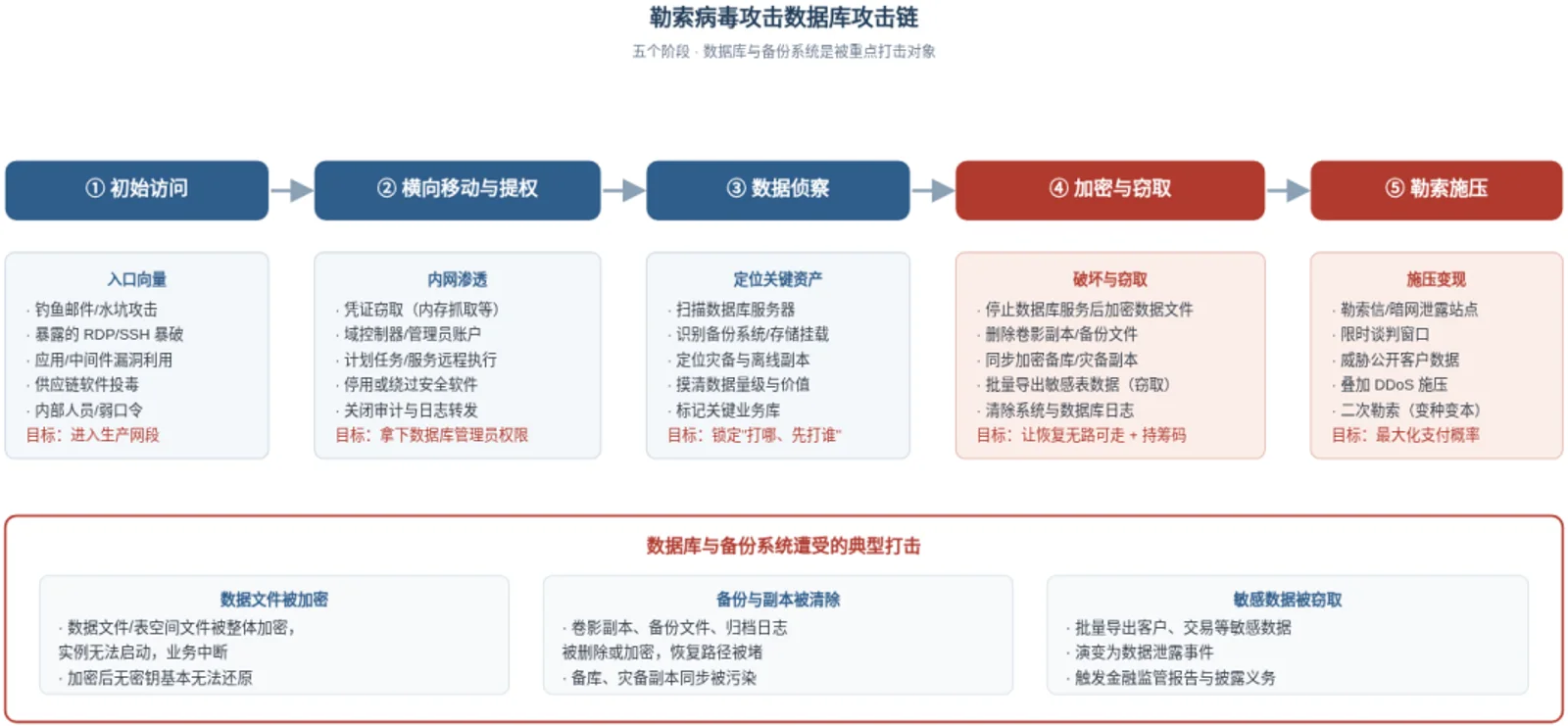
Most ransomware incidents do not start at the database server. Attackers first breach edge systems (phishing, exposed RDP/SSH weak passwords, middleware vulnerabilities, supply-chain compromise), then move laterally, harvest credentials (memory passwords, hashes), target domain admins and database/backup admin accounts, conduct internal reconnaissance to locate database servers, backup servers, and storage mount points, and finally stop database services, encrypt data files and tablespaces, delete volume shadow copies, wipe backup files, and exfiltrate sensitive tables. The encryption and exfiltration phase can complete in minutes; by the time alerts fire, the damage is already done. Attackers then drop ransom notes pointing to dark-web leak sites, using time-limited negotiation, data publication threats, and DDoS pressure to force payment.
1.2 Encryption Mechanism and Recovery Feasibility
Ransomware typically uses hybrid encryption: data files are encrypted with a symmetric algorithm, and the session key is encrypted with the attacker's public key. The private decryption key resides only on the attacker's C2 infrastructure, not on the victim host. Even full memory and disk images rarely yield a usable private key. Additionally, attackers delete volume shadow copies, disable system restore, and clear event logs to eliminate local recovery traces, forcing reliance on the backup system.
Two database-specific risks exist: encryption of online data files while the database is running (may cause instance crashes and file corruption) or after stopping the database (cleaner but still replica-dependent). Breaking the encryption is not realistically feasible; recovery capability must be built on usable replicas.
1.3 Ransomware Evolution
Three generations are observed: (1) encryption-only, demanding payment for decryption keys; (2) double extortion — data theft before encryption, threatening public release if unpaid, turning a recovery incident into a data breach with regulatory and reputational impact exceeding the ransom; (3) triple extortion — adding DDoS attacks to further degrade availability.
1.4 Why Databases Are More Vulnerable Than File Servers
Databases consist of interdependent files (data files, redo/undo logs, control files, archived logs, parameter files); damage to any critical file can render the entire database unavailable, and missing archived logs prevent point-in-time recovery. Encryption cannot be remedied by replacing single files; a full database rollback is usually required. Replication links are contagious: log-based standbys can be polluted by logical corruption via SQL replay or compromised standby hosts; storage-level replication copies encrypted bytes verbatim. Three real-world factors increase targeting: high data value (customer, transaction, ledger data), backups often co-located with production in the same city/domain so they fall together, and regulatory RTO/RPO mandates shrink negotiation time.
2. Failure Emergency Assessment by Scenario
2.1 Risk Assessment
2.1.1 Five Assessment Layers
Assessment proceeds bottom-up across five layers:
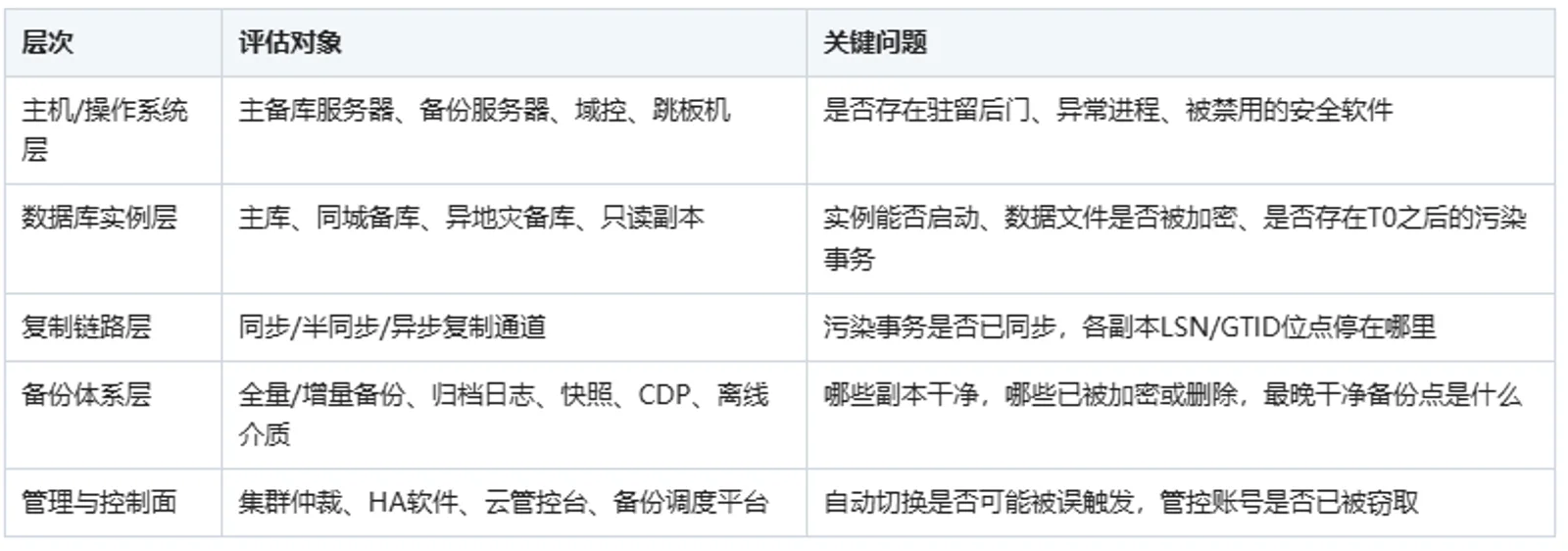
Host & OS layer: Check primary/standby servers, backup servers, domain controllers, jump hosts for resident backdoors, anomalous processes, disabled security software.
Database instance layer: Check primary, local standby, remote DR standby, read replicas: can instances start? Are data files encrypted? Are there post-T0 contaminated transactions?
Replication link layer: Check sync, semi-sync, async channels: have contaminated transactions replicated? What are the LSN/GTID positions of each replica?
Backup system layer: Check full/incremental backups, archived logs, snapshots, CDP, offline media: which replicas are clean? Which are encrypted or deleted? What is the latest clean backup timestamp?
Management & control plane: Check cluster arbitration, HA software, cloud console, backup scheduling platform: could auto-failover be triggered mistakenly? Are control-plane accounts compromised?
2.1.2 Determining the Last Known Good Time (T0)
T0 is the moment contamination began and anchors the entire recovery. Cross-verify from multiple sources:
Database audit logs, archived logs: timestamps of DROP, TRUNCATE, large-batch UPDATE.
File-system mtime mutation points on data files.
EDR alert timeline, anomalous login records, exfiltration traffic start time.
Per-replica verification: primary T0, standby T0, backup set contamination boundaries.
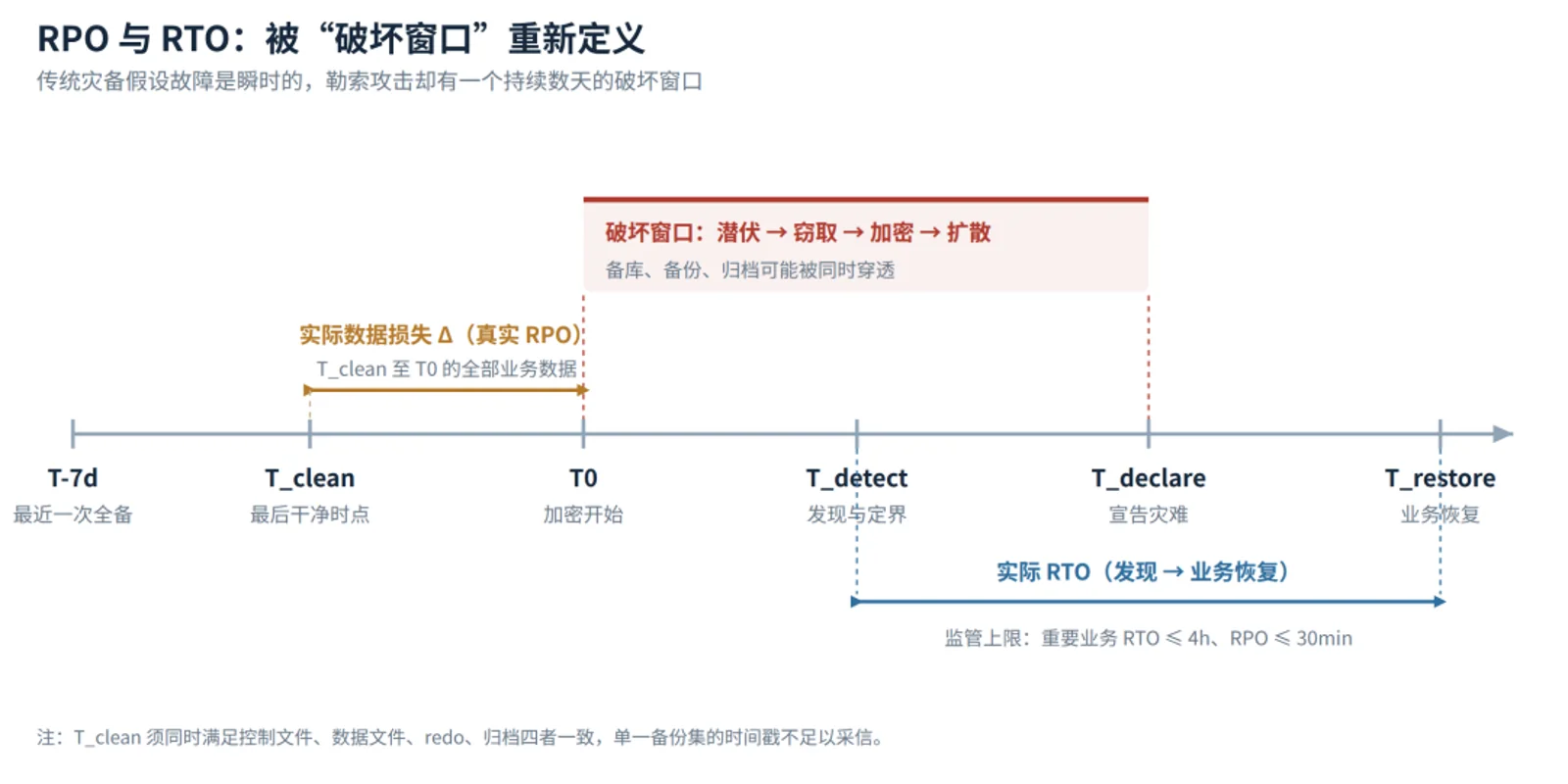
Unlike traditional failures, ransomware damage is not instantaneous; the window from first encryption to discovery can span hours or days. This destruction window causes actual RPO to far exceed design values (contamination may have entered backups days earlier), and RTO includes not only data restoration time but also the time to prove data cleanliness and validate correctness.
2.1.3 Common Database Deployment Architectures
Single instance: small/auxiliary systems, no redundancy, failure = outage.
Local primary-standby: one primary, one standby; sync replication RPO near zero, async RPO minutes.
Multi-site multi-center: intra-city sync or cross-region async; sync RPO near zero, async RPO minutes; covers single-point and regional disasters.
Distributed multi-active: OceanBase, TiDB, etc., multi-node multi-replica, majority quorum for availability; partial node damage can be rebuilt from surviving replicas.
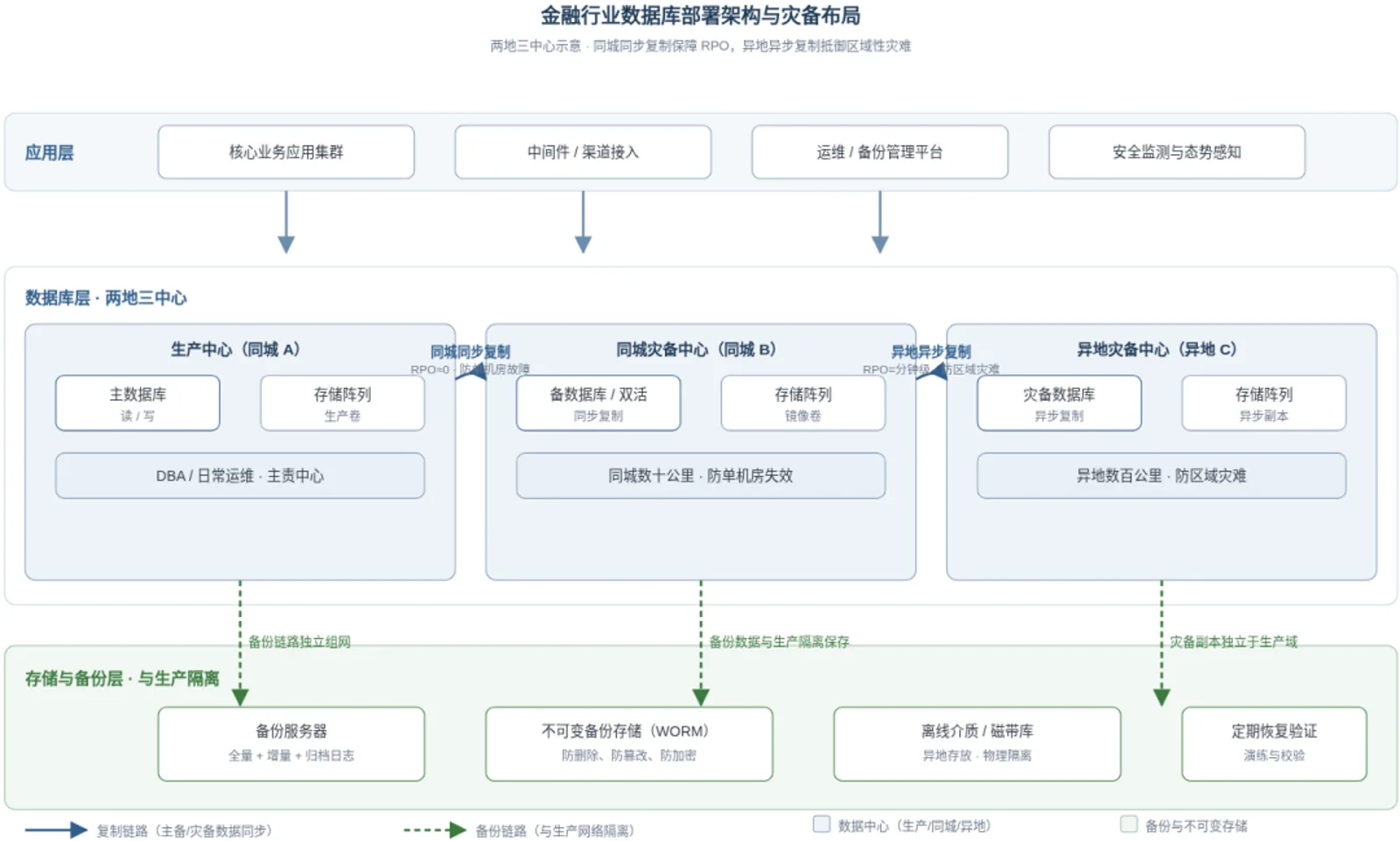
2.1.4 Failure Scenario Classification & Impact Matrix
Impact assessed across four dimensions: (1) Damage scope — which of primary, standby, remote DR, backup, offline media are contaminated; (2) Damage type — encryption (irreversible), deletion (partially recoverable via logs), theft (data breach); (3) Time window — duration from first encryption to discovery, determining recoverable RPO; (4) Business impact — outage duration, data loss volume, external service impact, driving incident grading and reporting obligations.
The following table summarizes seven scenarios with estimated RTO for 100 GB (actual RTO scales with data volume):
Scenario | Damage Scope | Backup | Recoverability | Primary Path | Est. RTO
A: Only standby damaged | Standby encrypted/corrupted | Available | High | Rebuild standby | 2-6 hrs, no business interruption
B: Primary damaged | Primary down, standby pending verification | Available | High | Verify then failover | 0.5-2 hrs
C: Primary & standby both damaged | Both unavailable | Available | Medium | Backup restore + PITR | 4-8 hrs
D: Intra-city site affected | Production & intra-city both abnormal | Partially available | Medium-low | Remote DR recovery | 8-24 hrs
E: Distributed multi-replica | Quorum unavailable | Available | Medium | Minority rebuild or PITR | 2-12 hrs
F: Backup available but stale | Online unavailable | Stale but usable | Medium | Backup + log replay | 4-12 hrs
G: All backups unavailable | Online & backup both unavailable | None | Extremely low | Forensics/decryption or rebuild + compensation | Days, inevitable loss
2.2 Emergency Procedures per Scenario
2.2.1 Scenario A: Only Standby Damaged
Primary serves normally; standby reports errors or file anomalies.
Judgment criteria: Primary read/write normal, app metrics stable; standby reports block corruption, instance won't start, or data file mtime spikes; standby host shows anomalous processes, scheduled tasks, network connections; replication link broken.
Procedure:
Isolate: remove standby host from network, preserve memory/disk forensics, do not power off or reboot.
Cut replication link to prevent abnormal standby state affecting primary.
Expand primary archive log space.
Rebuild standby, validate, then reattach.
Risks: Standby compromise often means attacker is in the same network segment. Immediately run IOC sweep on primary: anomalous processes, scheduled tasks, new accounts, abnormal outbound connections. Check for shared storage, shared backup agents, shared domain accounts between primary and standby.
2.2.2 Scenario B: Primary Damaged, Standby Appears Normal
Common pitfalls: standby already logically contaminated; old primary re-joining causes re-infection.
Judgment criteria: Primary cannot read/write, app errors; primary reports block corruption, instance won't start, or data file mtime spikes.
Procedure:
Stop all automation. Auto-failover in ransomware scenarios amplifies risk, propagating contamination to the new primary.
Physically network-isolate old primary but do not power off. Power-off destroys memory evidence (processes, connections, key material) and may trigger pre-planted destruction logic.
Verify standby usability: replication stopped before T0? No logical corruption traces? Data files unmodified? Standby host IOC-free? Standby in read-only mode?
Promote standby to primary. Prefer switchover if old primary reachable; otherwise failover.
Record failover anchor: SCN, GTID, binlog position at cutover for later old-primary rejoin and data backfill.
Handle old primary: retain disk read-only image and memory image, rebuild old primary and reattach.
Risks: Failover may incur data loss.
2.2.3 Scenario C: Primary & Standby Simultaneously Damaged
Causes: storage-level replication (LUN mirror, VM replication) copies file-level encryption byte-for-byte; or domain controller/unified Ops platform compromised, attacker pushes single task to all database hosts.
Judgment criteria: Both hosts show data file mtime spikes within same ~10-minute window; standby redo apply stops post-T0 with same block corruption; identical ransom note filenames or encryption extensions on both; shared storage, domain accounts, automation platform between primary and standby.
Procedure:
Follow backup restoration workflow.
Check if archive log directory falls within encryption scope; if on independent mount/permissions, immediately mount read-only and copy to isolation zone.
Trusted recovery sources in order: offline/immutable backups, remote DR backups, archive logs.
Restore in cleanroom, validate, verify business, then cut over wholesale.
2.2.4 Scenario D: Intra-City Site Affected
Production and intra-city DR both abnormal in same time window. Root causes: shared domain controller, bastion host, backup accounts; lack of east-west traffic control between sites; replication link itself becomes attack vector (shared tnsnames, shared jump host).
Procedure:
Sever all network paths between production and intra-city: database ports, management network, backup network, replication network.
Shift recovery base entirely to remote DR. Verify remote DR does not share credentials or domain controller. If shared, rotate passwords in isolated environment first.
If remote DR also compromised, fall back to backup-only restoration.
2.2.5 Scenario E: Distributed Database Multi-Replica Damage
Distributed databases (Paxos/Raft) tolerate single-node encryption; cluster remains read/write, replica auto-rebuilds. Attacker must encrypt a majority to halt business, raising cost. However, majority can be simultaneously encrypted.
Procedure:
Determine if majority quorum is healthy.
Immediately halt replica rebuild. Evict contaminated nodes from cluster; prevent auto-rejoin, else they would spread encrypted data as healthy replicas.
Check if Paxos log / clog directories are within encryption scope. These often reside on separate disks; if intact, use them for PITR to T_clean.
Rebuild replicas based on majority status or perform PITR from backup, consistent with traditional databases.
2.2.6 Scenario F: Backup Available But Stale
Procedure:
Restore latest full backup to isolation zone. Do not restore to original production paths; residual encryption processes or malicious drivers may remain.
Replay archive logs or binlogs forward to T_clean. Roll forward to last known clean timestamp.
Assess gaps: if archive logs have gaps, switch to business-side backfill.
Backfill via business reconciliation: application-level补录 (reconciliation and re-entry).
Unrecoverable portions: make accounting adjustments with audit trail.
2.2.7 Scenario G: All Backups Unavailable
Objective shifts from data recovery to business continuity. RTO measured in days, RPO uncontrollable. Immediately escalate to major incident, trigger regulatory reporting and customer notification.
Procedure:
Forensic & decryption feasibility assessment. Preserve full encrypted disk images; do not operate on original disks.
Reverse-reconstruct from peripheral systems. Core ledger data often leaves traces in multiple upstream/downstream systems.
Business degradation & alternatives: manual branch ledger entry, post-event backfill, restrict transaction types to queries and non-fund operations, publish service disruption notice.
Rebuild in clean environment, backfill from peripheral sources, daily reconciliation until ledger balances.
3. Backup Domain Recovery System
3.1 Six Backup Tiers
Backup tiers differ significantly in anti-ransomware resilience:
Tier | Form | Recovery Granularity | Anti-Ransomware | Typical Failure Cause
L0 Local Snapshot | Storage snapshot, VSS, LVM snapshot | Minute-level | ★☆☆☆☆ | Snapshot co-resident with production; attacker deletes all after enumeration
L1 Local Backup | Backup server + disk pool | Hour-level | ★★☆☆☆ | Backup server in same domain; domain admin can directly log in
L2 Intra-City Backup | Independent DC backup storage | Hour-level | ★★★☆☆ | Shared backup accounts & transport links with production
L3 Remote Backup | Cross-city backup storage, object storage | Hour-to-day level | ★★★★☆ | Transport link compromised or sync credentials leaked
L4 Immutable Storage | WORM, Object Lock, retention policy lock | Hour-to-day level | ★★★★★ | Misconfiguration: versioning or compliance mode not enabled
L5 Offline Media | Tape off-site, physically isolated disks | Day-level | ★★★★★ | Slow restore, media aging, index loss
Anti-ransomware strength and recovery speed are roughly inversely proportional: the safer the backup, the slower the restore.
3.2 Immutable Storage & Air Gap
Object Lock has Compliance and Governance modes. Only Compliance mode enforces retention even against root; Governance mode can be overridden by privileged users. Financial scenarios must use Compliance mode.
Tape off-site: after write, remove from tape library, store in physically isolated safe.
Backup data flows only from production to backup domain; reverse path blocked. Even if production domain fully compromised, attacker cannot reach backups.
Independent accounts, independent KMS keys, independent MFA. Backup domain uses completely separate accounts/domains from production; keys not shared.
Beware pseudo-immutability: backup software may have retention policies but underlying storage is a writable filesystem; attacker can delete with rm. Test by attempting to delete a retention-locked backup with highest privileges; if deletable, it is not truly immutable.
3.3 3-2-1-1-0 Principle
Classic 3-2-1: 3 copies, 2 media types, 1 off-site. Anti-ransomware adds two rules: 1 offline or immutable copy; 0 errors — backups must pass restore validation.
4. Summary
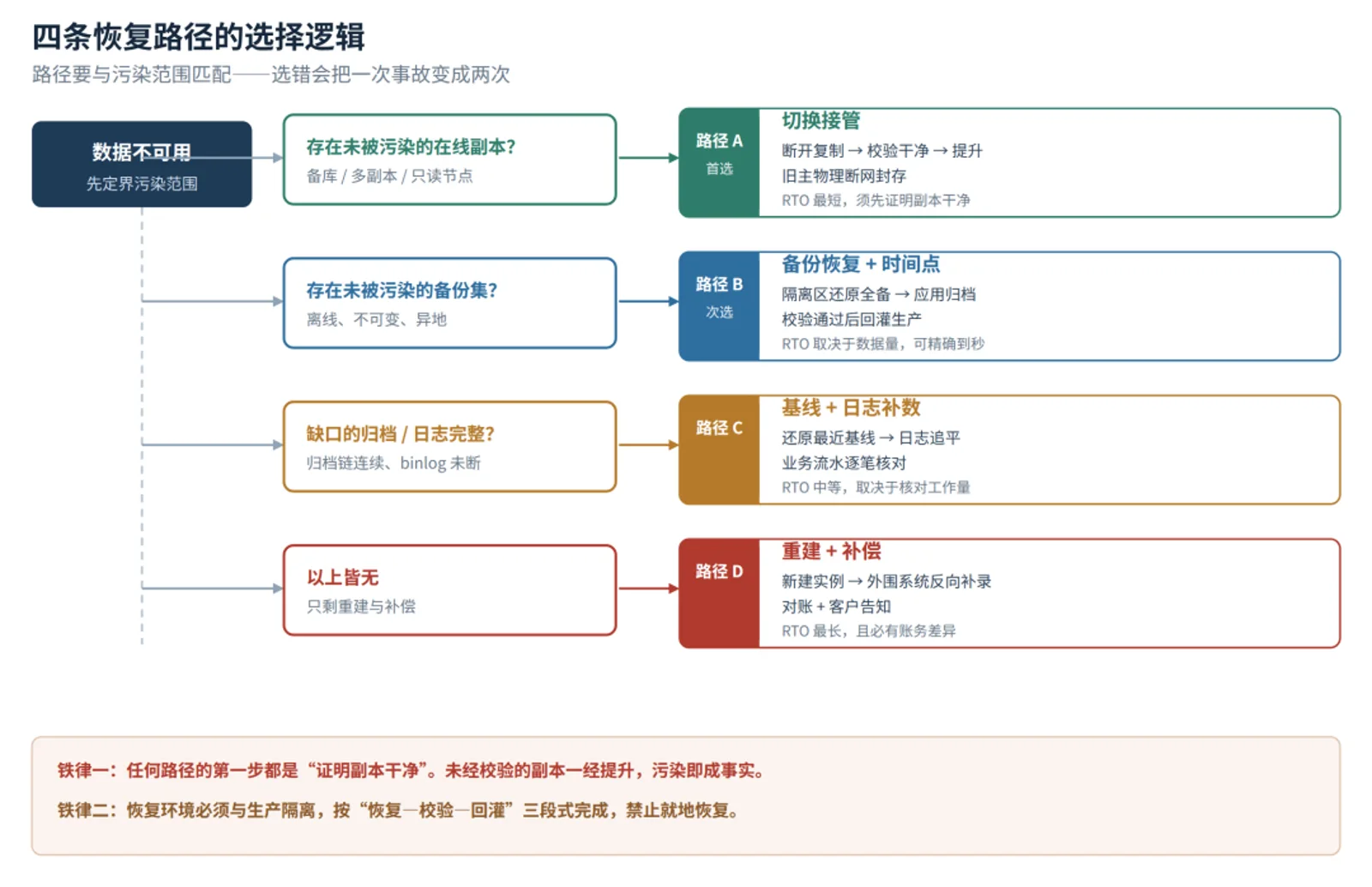
All failure scenarios ultimately resolve into four recovery paths. Applicability, advantages, costs, and typical durations:
Path | Applicability | Advantages | Costs & Risks | Typical Duration
Failover Takeover | Verified online replica exists (standby or multi-replica) | Shortest RTO, freshest data | Must prove replica clean; async replication may lose small data | 0.5-2 hrs
Backup Restore + PITR | Verified backup set + continuous archive logs | Data precise to second, high trust | Depends on backup freshness; large data volumes take long | 4-8 hrs
Baseline + Log Backfill | Backup stale but archive/binlog complete | Compresses delta from days to minutes | Backfill requires line-by-line verification, high manual cost | 4-12 hrs
Rebuild + Compensation | No clean replica whatsoever | Business can resume | Inevitable ledger discrepancies; requires customer notification & regulatory reporting | Days
Key principles for ransomware emergency response:
At least one backup copy or backup dataset must reside where attackers cannot reach — physically isolated from production domain and immutable.
Any replica or backup set is only a candidate recovery source until it passes block-level verification, log parsing, and IOC sweep.
Recovery capability must be validated through regular, thorough drills.
In an era of normalized ransomware attacks, the foundation of database recoverability lies in whether the backup system can withstand the attacker's priority targeting of backups. Backup isolation, immutable storage, offline copies, and periodic recovery drills determine whether an organization retains viable recovery options in extreme scenarios.
For questions about attribution, corrections or content rights, please contactand we will review it promptly.