

Deep Agents Memory: How Agents Learn Across Sessions
This article explains Deep Agents' file-based memory system for cross-session persistence, covering memory scopes (agent/user/organization), memory types (semantic/procedural/episodic), update strategies (real-time vs background consolidation), security considerations, and practical implementation patterns with code examples.
Reading font
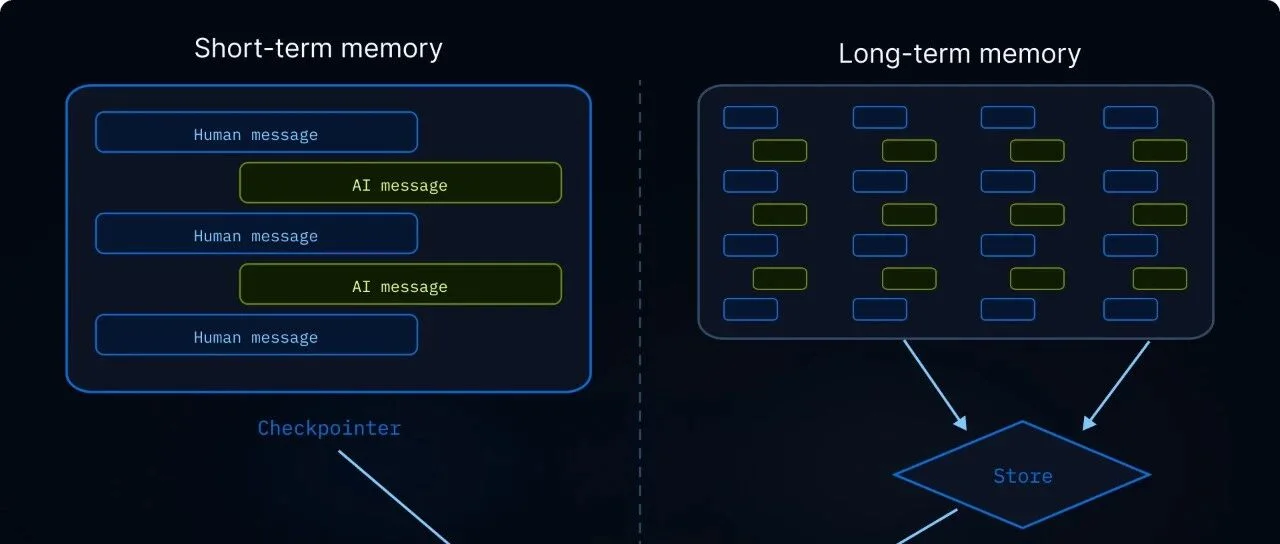
Reading Guide Memory — a core topic in intelligent agent development. A "smart" AI Agent should not only perform well within a single conversation but also accumulate experience, remember user preferences, and correct its own behavior across interactions. Deep Agents manages memory by reading and writing files, while developers control storage location and access scope via the backend. Non-agent developers can skim subheadings for a high-level framework; agent development engineers are advised to read alongside the code — the difficulty level is low.
1. Memory — A Core Agent Capability
Deep Agents' Memory refers to long-term memory : a cross-session persistent memory capability. It allows the Agent to retain and update learned information across different conversations.
Note the distinction: short-term memory (conversation history and temporary files within a single session) is automatically managed by context engineering and is not covered in this article.
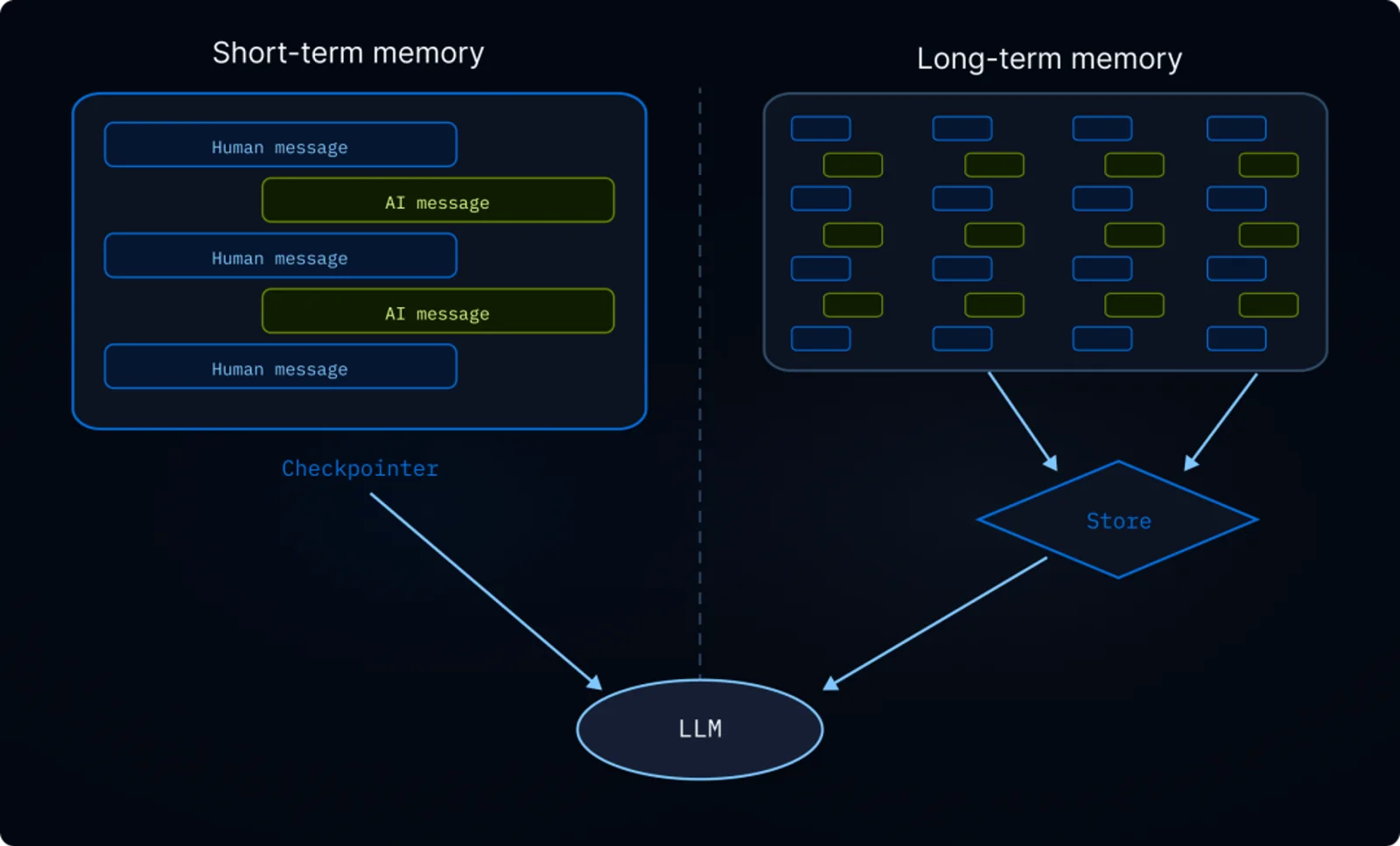
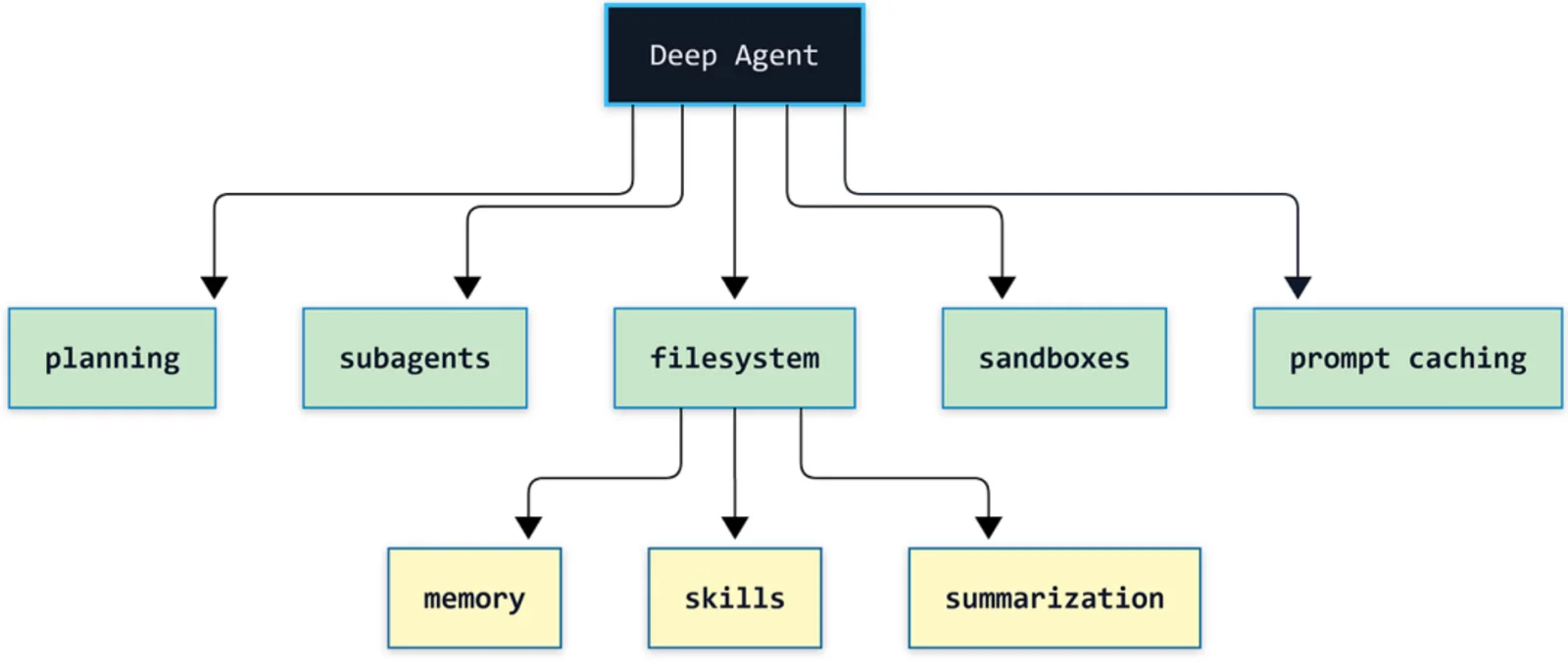
Deep Agents' memory mechanism has a core characteristic: file-system based . The Agent treats memory as files to read and write, consistent with how it operates on code and configuration files. Benefits:
Transparent and readable: memory is Markdown files, easy to debug and audit
Tool reuse: Agent uses the built-in edit_file tool to update memory
Flexible storage: via backend, memory can be stored in local state, Store, or any custom backend
2. How Memory Works
Memory operation can be broken down into three steps:
1. Specify Memory File Paths
When creating an Agent, pass memory file paths via the memory= parameter. Skills (procedural memory — reusable operation instructions) can be passed via skills=.
from deepagents import create_deep_agent
from deepagents.backends import CompositeBackend, StateBackend, StoreBackend

agent = create_deep_agent(
    model="google_genai:gemini-3.1-pro-preview",
    memory=["/memories/AGENTS.md"],
    skills=["/skills/"],
    backend=CompositeBackend(
        default=StateBackend(),
        routes={
            "/memories/": StoreBackend(
                namespace=lambda rt: (rt.server_info.assistant_id,),
            ),
            "/skills/": StoreBackend(
                namespace=lambda rt: (rt.server_info.assistant_id,),
            ),
        },
    ),
)
The backend determines where memory files live and who can access them. CompositeBackend can route different directories to different storage backends based on path.
2. Agent Reads Memory
Two reading modes:
Load at startup : inject memory file content into the system prompt
On-demand reading : e.g., skills load only descriptions at startup; full file is read when actually used, keeping context lean
3. Agent Updates Memory (Optional)
When the Agent learns new information, it can use the built-in edit_file tool to update memory files. Updates can:
Happen in real-time during conversation (default behavior)
Happen in background between conversations (background consolidation, see below)
Updated content persists and is immediately available in the next conversation. Note: not all memory is writable — developer-defined skills and organizational policies are typically read-only.
3. Memory Scope (Scoped Memory)
Memory can be divided by scope; the two most common patterns are Agent-scoped and User-scoped .
Agent-Scoped Memory
Gives the Agent a "persistent identity" — all users share the same memory. The Agent continuously accumulates knowledge, refines style, and learns skills across interactions with different users, forming its own "persona".
The key is setting the backend namespace to (assistant_id,):
agent = create_deep_agent(
    model="google_genai:gemini-3.1-pro-preview",
    memory=["/memories/AGENTS.md"],
    skills=["/skills/"],
    backend=CompositeBackend(
        default=StateBackend(),
        routes={
            "/memories/": StoreBackend(
                namespace=lambda rt: (rt.server_info.assistant_id,),
            ),
            "/skills/": StoreBackend(
                namespace=lambda rt: (rt.server_info.assistant_id,),
            ),
        },
    ),
)
Complete Example: Seeding Memory and Cross-Session Recall
The following example initializes memory and skills in the store, then invokes the Agent in two different threads to observe how it remembers and applies what it learned.
from langchain_core.utils.uuid import uuid7
from deepagents import create_deep_agent
from deepagents.backends import CompositeBackend, StateBackend, StoreBackend
from deepagents.backends.utils import create_file_data
from langgraph.store.memory import InMemoryStore

store = InMemoryStore()  # Use platform store when deploying to LangSmith

# Seed memory file
store.put(
    ("my-agent",),
    "/memories/AGENTS.md",
    create_file_data("""## Response style
- Keep responses concise
- Use code examples where possible
"""),
)

# Seed a skill
store.put(
    ("my-agent",),
    "/skills/langgraph-docs/SKILL.md",
    create_file_data("""---
name: langgraph-docs
description: Fetch relevant LangGraph documentation to provide accurate guidance.
---

# langgraph-docs

Use the fetch_url tool to read https://docs.langchain.com/llms.txt, then fetch relevant pages.
"""),
)

agent = create_deep_agent(
    model="google_genai:gemini-3.1-pro-preview",
    memory=["/memories/AGENTS.md"],
    skills=["/skills/"],
    backend=lambda rt: CompositeBackend(
        default=StateBackend(rt),
        routes={
            "/memories/": StoreBackend(rt, namespace=lambda rt: ("my-agent",)),
            "/skills/": StoreBackend(rt, namespace=lambda rt: ("my-agent",)),
        },
    ),
    store=store,
)

# Session 1: Agent learns new preference and writes to memory
config1 = {"configurable": {"thread_id": str(uuid7())}}
agent.invoke(
    {"messages": [{"role": "user", "content": "I prefer detailed explanations. Remember that."}]},
    config=config1,
)

# Session 2: Agent reads memory and applies the preference
config2 = {"configurable": {"thread_id": str(uuid7())}}
agent.invoke(
    {"messages": [{"role": "user", "content": "Explain how transformers work."}]},
    config=config2,
)
User-Scoped Memory
Each user has an independent memory file, isolated from others. Namespace uses (user_id,):
agent = create_deep_agent(
    model="google_genai:gemini-3.1-pro-preview",
    memory=["/memories/preferences.md"],
    skills=["/skills/"],
    backend=CompositeBackend(
        default=StateBackend(),
        routes={
            "/memories/": StoreBackend(
                namespace=lambda rt: (rt.server_info.user.identity,),
            ),
            "/skills/": StoreBackend(
                namespace=lambda rt: (rt.server_info.user.identity,),
            ),
        },
    ),
)
After deployment, each authenticated request automatically parses rt.server_info.user.identity as the current user, so different users (e.g., Alice and Bob) only see their own preferences.
4. Advanced Usage
Beyond basic scope configuration, Memory has multiple tunable dimensions:
Duration — How long is memory retained? Options: Short-term (single session) / Long-term (cross-session)
Information Type — What type of information? Options: Episodic / Procedural (skills) / Semantic (facts)
Scope — Who can see and modify? Options: User-level / Agent-level / Organization-level
Update Strategy — When to write memory? Options: During conversation (default) / Between conversations (background consolidation)
Read Mode — How to read memory? Options: Load at startup (default) / On-demand
Permission — Can Agent write? Options: Read-write (default) / Read-only
1. Episodic Memory
Episodic memory preserves past "experiences": what happened, in what order, and the outcome. Unlike semantic memory (facts and preferences), episodic memory retains full conversation context , letting the Agent recall "how a problem was solved".
Deep Agents' built-in checkpointer already persists each conversation as a checkpoint. To make historical conversations retrievable, wrap thread search into a tool, obtaining user_id from the runtime context: (DEPLOYMENT_URL refers to the API endpoint obtained when deploying a LangGraph application to LangSmith)
from langgraph_sdk import get_client
from langchain.tools import tool, ToolRuntime

client = get_client(url="<DEPLOYMENT_URL>")

@tool
async def search_past_conversations(query: str, runtime: ToolRuntime) -> str:
    """Search past conversations for relevant context."""
    user_id = runtime.server_info.user.identity
    threads = await client.threads.search(
        metadata={"user_id": user_id},
        limit=5,
    )
    results = []
    for thread in threads:
        history = await client.threads.get_history(thread_id=thread["thread_id"])
        results.append(history)
    return str(results)
By adjusting metadata filters, conversations can be retrieved by user or by organization. This is especially useful for agents performing complex multi-step tasks — e.g., a coding agent can review the last debugging session and jump straight to a likely root cause.
2. Organization-Level Memory
Similar to user-level memory, but namespace switches to organization dimension. Suitable for storing policies or knowledge shared by all members.
Security tip : Organization-level memory should usually be read-only to prevent prompt injection via shared state.
agent = create_deep_agent(
    model="google_genai:gemini-3.1-pro-preview",
    memory=[
        "/memories/preferences.md",
        "/policies/compliance.md",
    ],
    backend=CompositeBackend(
        default=StateBackend(),
        routes={
            "/memories/": StoreBackend(
                namespace=lambda rt: (rt.server_info.user.identity,),
            ),
            "/policies/": StoreBackend(
                namespace=lambda rt: (rt.context.org_id,),
            ),
        },
    ),
)
Organization memory is populated by application code:
from langgraph_sdk import get_client
from deepagents.backends.utils import create_file_data

client = get_client(url="<DEPLOYMENT_URL>")

await client.store.put_item(
    (org_id,),
    "/compliance.md",
    create_file_data("""## Compliance policies
- Never disclose internal pricing
- Always include disclaimers on financial advice
"""),
)
3. Background Consolidation
By default, the Agent writes memory in real-time during conversation (hot path). An alternative is to process memory between conversations as a background task, also called "sleep time compute". A separate consolidation Agent reviews recent conversations, extracts key facts, and merges them with existing memory.
Comparison of modes:
Hot path (during conversation): Memory immediately available, transparent to user. Cons: Adds latency, Agent must multitask.
Background (between conversations): No user-perceived latency, can synthesize across multiple conversations. Cons: Memory only available next session, requires a second Agent.
For most applications, the hot path is sufficient. Introduce background consolidation when latency or memory quality across many conversations becomes a bottleneck.
Consolidation Agent
The consolidation Agent reads recent conversations and merges key facts into the memory store. Registered in langgraph.json alongside the main Agent:
# consolidation_agent.py
from datetime import datetime, timedelta, timezone
from deepagents import create_deep_agent
from langchain.tools import tool, ToolRuntime
from langgraph_sdk import get_client

sdk_client = get_client(url="<DEPLOYMENT_URL>")

@tool
async def search_recent_conversations(query: str, runtime: ToolRuntime) -> str:
    """Search this user's conversations updated in the last 6 hours."""
    user_id = runtime.server_info.user.identity

    since = datetime.now(timezone.utc) - timedelta(hours=6)
    threads = await sdk_client.threads.search(
        metadata={"user_id": user_id},
        updated_after=since.isoformat(),
        limit=20,
    )
    conversations = []
    for thread in threads:
        history = await sdk_client.threads.get_history(
            thread_id=thread["thread_id"]
        )
        conversations.append(history["values"]["messages"])
    return str(conversations)

agent = create_deep_agent(
    model="google_genai:gemini-3.1-pro-preview",
    system_prompt="""Review recent conversations and update the user's memory file.
Merge new facts, remove outdated information, and keep it concise.""",
    tools=[search_recent_conversations],
)
// langgraph.json
{
"dependencies": ["."],
"graphs": {
"agent": "./agent.py:agent",
"consolidation_agent": "./consolidation_agent.py:agent"
},
"env": ".env"
}Trigger via Cron
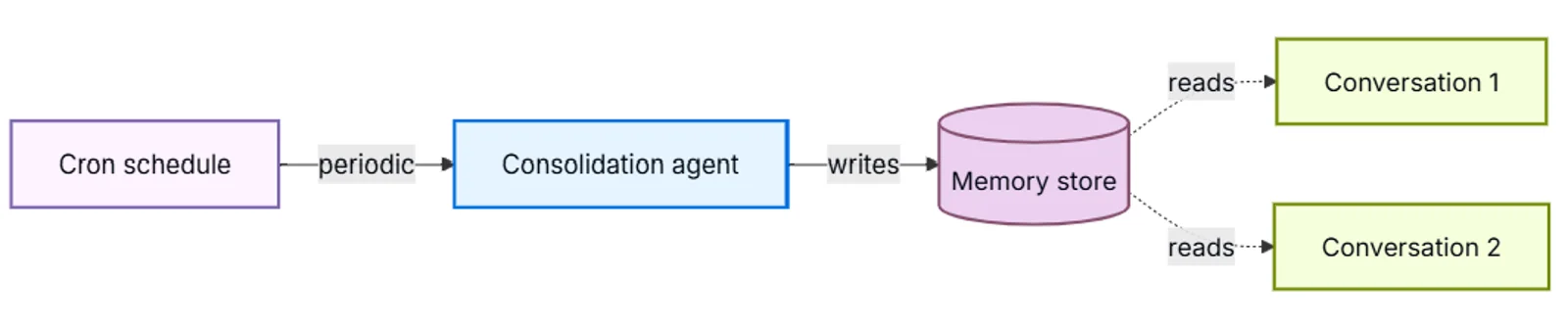
Run the consolidation Agent on a fixed schedule via cron job. The cadence should match actual user interaction frequency: high-DAU chat products can consolidate every few hours; tools used only a few times a week can run daily or weekly.
from langgraph_sdk import get_client

client = get_client(url="<DEPLOYMENT_URL>")

cron_job = await client.crons.create(
    assistant_id="consolidation_agent",
    schedule="0 */6 * * *",
    input={"messages": [{"role": "user", "content": "Consolidate recent memories."}]},
)
Important : The cron interval must align with the consolidation Agent's lookback window. The example runs every 6 hours, matching timedelta(hours=6) in search_recent_conversations . If cron runs more frequently than the lookback window, the same conversations are reprocessed; if less frequently, memories outside the window are missed. All cron schedules are interpreted in UTC.
4. Read-Only vs Writable Memory
Read-write (default): Use cases — User preferences, Agent self-improvement, learned skills. How it works — Agent updates files via edit_file tool.
Read-only : Use cases — Organizational policies, compliance rules, shared knowledge bases, developer-defined skills. How it works — Populated by application code or Store API; deny writes to specific paths via permissions, or use policy hooks for custom validation.
Security consideration : If one user can write to memory read by another, a malicious user could inject instructions via shared state. Mitigations include:
Default to user-level scope (user_id) unless explicit sharing is needed
Use read-only memory for shared policies (populated by app code, not Agent)
Add human approval before Agent writes to shared memory, using interrupt to require human confirmation for writes to sensitive paths
5. Concurrent Writes
Multiple threads can write memory in parallel, but concurrent writes to the same file may cause "last write wins" conflicts. For user-level memory this is rare since a user typically has only one active session. For Agent-level or organization-level memory, consider using background consolidation to serialize writes, or split memory into topic-specific files to reduce contention.
In practice, even if a write fails due to conflict, the LLM usually retries intelligently or recovers gracefully, so a single lost write is rarely catastrophic.
6. Multiple Agents in the Same Deployment
To give each Agent independent memory in a shared deployment, include assistant_id in the namespace:
StoreBackend(
    namespace=lambda rt: (
        rt.server_info.assistant_id,
        rt.server_info.user.identity,
    ),
)
If only Agent-level isolation is needed (no user-level), just use assistant_id alone.
Tip : LangSmith tracing can audit what memory the Agent wrote. Every file write appears as a tool call in the trace.
5. Summary
Deep Agents' Memory mechanism revolves around the "file as memory" philosophy, delivering several key advantages:
Cross-session persistence : Agents are no longer "forgetful"; they can learn from historical interactions
Flexible scoping : Easily implement Agent-level, User-level, Organization-level isolation via namespace
Diverse information types : Covers semantic memory (facts/preferences), procedural memory (skills), episodic memory (historical conversations)
Controllable update strategies : Hot-path real-time writes or asynchronous background consolidation
Robust security model : Read-only memory, permission controls, human approval layers
Implementation recommendations:
Start with User-level memory + hot-path updates — covers most scenarios
Use read-only organization-level memory for shared policies and compliance rules
Introduce background consolidation only when latency or memory quality becomes a bottleneck
Always audit memory writes with LangSmith tracing for observability
With proper use of Memory, your Agent will truly gain the ability to "get smarter with use".
For questions about attribution, corrections or content rights, please contactand we will review it promptly.