

Deep Agents Context Engineering: Keeping Long-Running Agents Focused and Memory-Efficient
This article dissects Deep Agents' five-layer context management system—input context, runtime context, compression, subagent isolation, and long-term memory—showing how each mechanism prevents context overflow and amnesia in multi-turn, tool-heavy AI agent workflows.
Reading font
Introduction: The Context Engineering Challenge
Early agent developers know two failure modes: context starvation (model misses key constraints) and context explosion (window clogged with tool outputs and history, scattering attention and burning tokens). Context engineering means delivering the right information in the right format at the right time so the model stays on task. In a chatbot this is trivial; in a complex, multi-turn, tool-calling, subagent-spawning workflow (e.g., code generation) it becomes a real engineering problem. Deep Agents provides a ready-made context management stack; this article breaks down its design.
Five Context Types: Complete Lifecycle Coverage
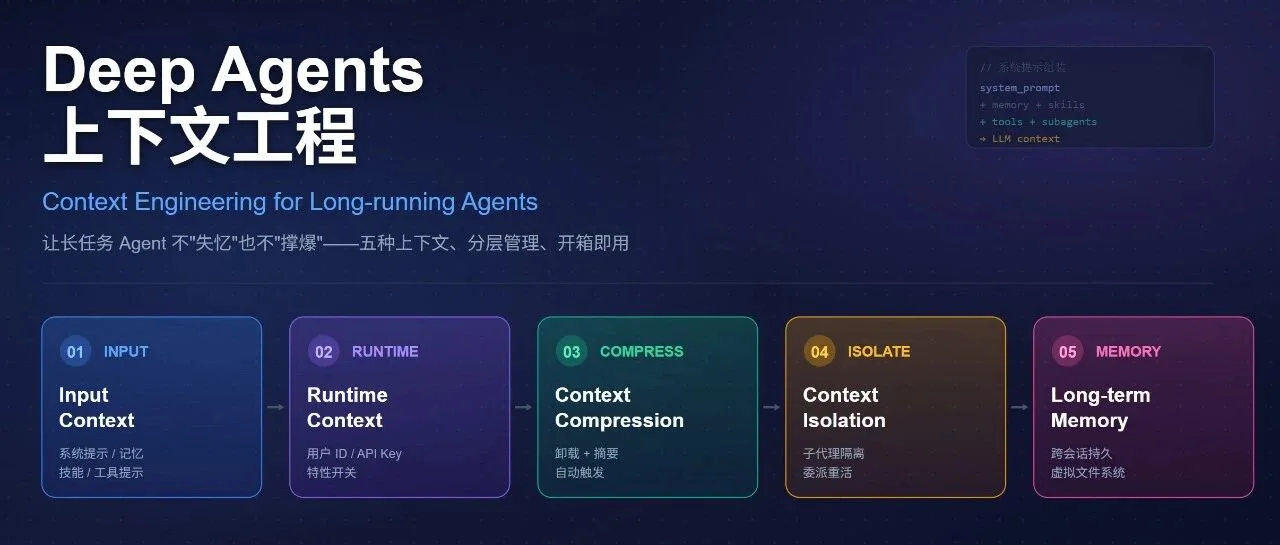
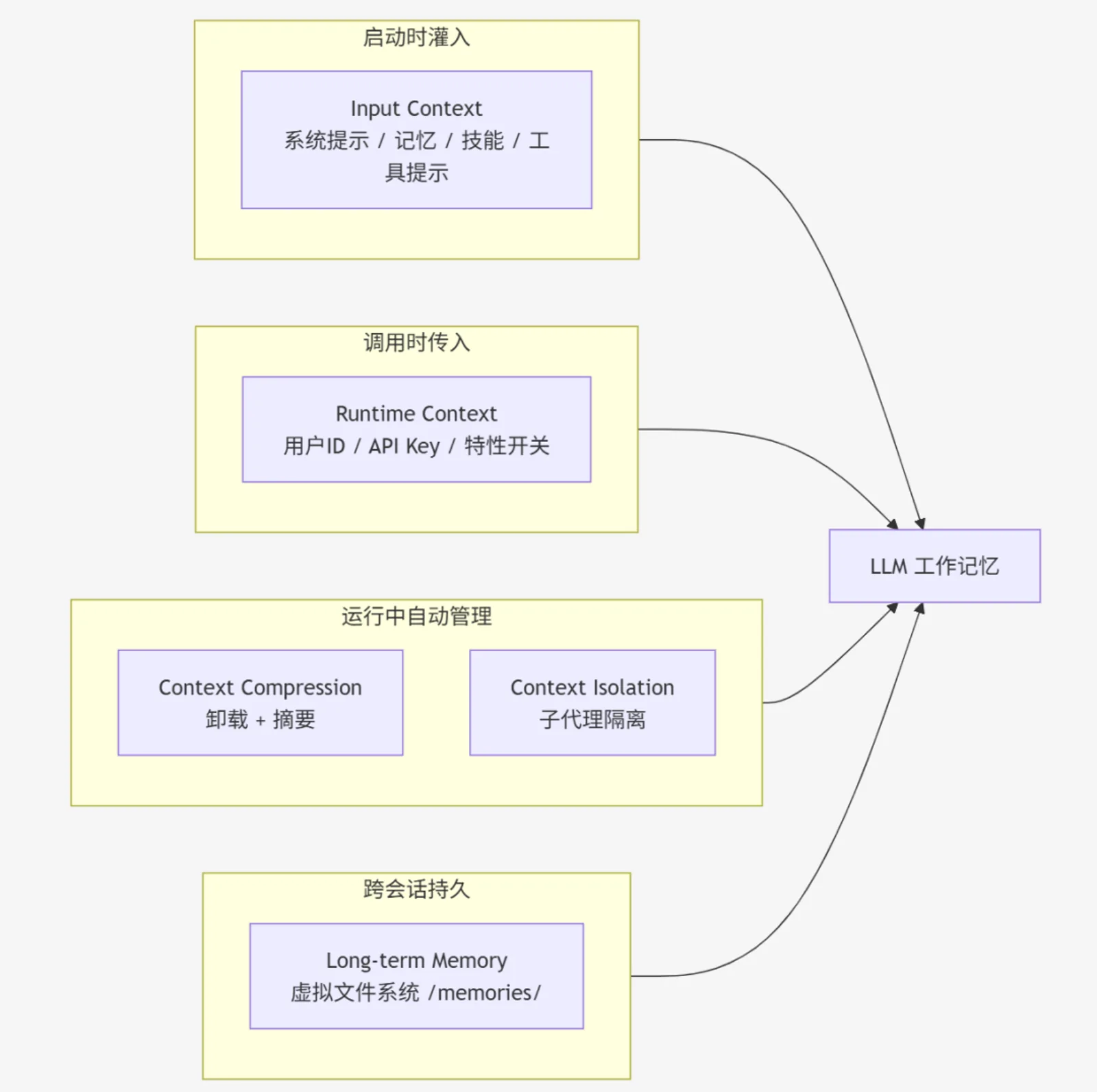
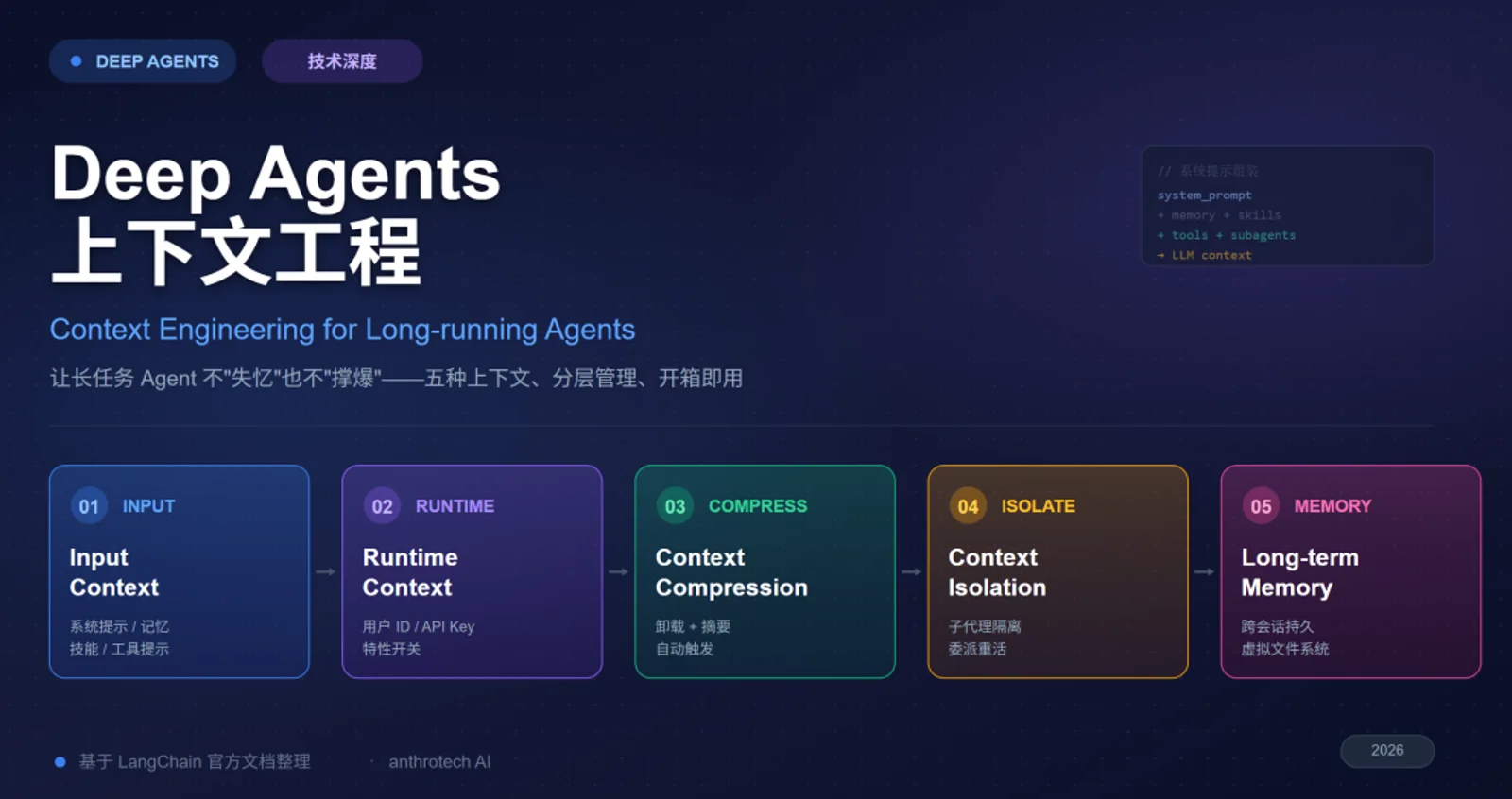
Deep Agents splits the context an agent can touch into five categories, covering the full lifecycle from static startup injection to cross-session persistence:
Input context — static content injected into the system prompt at startup (system prompt, memory, skills). Applies every run.
Runtime context — dynamic configuration passed at invoke time (user metadata, API keys, connections). Single run, propagates to subagents.
Context compression — built-in offloading and summarization to keep context under the window. Triggers automatically near the limit.
Context isolation — delegates heavy work to subagents; only the final result returns to the parent. Active when a subagent is dispatched.
Long-term memory — cross-thread persistence backed by a virtual filesystem. Persists across sessions.
Input Context: What Gets Injected at Startup
Input context assembles four pieces into the system prompt:
1. System Prompt (Static, with Dynamic Option)
Your custom system prompt is prepended to Deep Agents' built-in prompt. It defines role, behavior, and knowledge. Example:
from deepagents import create_deep_agent
agent = create_deep_agent(
    model="anthropic:claude-sonnet-4-6",
    system_prompt=(
        "You are a research assistant specializing in scientific literature. "
        "Always cite sources. Use subagents for parallel research on different topics."
    ),
)
The system_prompt is static per invocation. For runtime-dependent changes (e.g., admin vs. read-only), use the @dynamic_prompt decorator with middleware reading request.runtime.context and request.runtime.store. Only add middleware when tools need to update alongside the system prompt ; tools can directly access ToolRuntime for context/store without middleware.
2. Memory (Always Loaded, Keep Lean)
Memory files (typically AGENTS.md) are fully injected every run . Suited for project conventions, user preferences, and rules that must always apply. Example:
agent = create_deep_agent(
    model="anthropic:claude-sonnet-4-6",
    memory=["/project/AGENTS.md", "~/.deepagents/preferences.md"],
)
Memory does not use progressive disclosure — everything loads each time. Keep it concise; detailed workflows and domain knowledge belong in Skills.
3. Skills (Progressive Disclosure / Lazy Loading)
Skills are capability packs loaded on demand. At startup the agent reads only each SKILL.md frontmatter; full content loads when the agent judges the skill relevant. This progressive disclosure saves tokens. Example:
agent = create_deep_agent(
    model="anthropic:claude-sonnet-4-6",
    skills=["/skills/research/", "/skills/web-search/"],
)
Skill authoring principles:
Focus each skill on a single workflow or domain (≤500 lines).
Keep main content lean; reference detailed materials in separate files.
Always-on conventions go in Memory, not Skills.
4. Tool Prompts (Shaping Tool Use)
Tool prompts tell the model how to use each tool. Two categories:
Built-in tools — middleware auto-appends usage instructions (e.g., ls, read_file, write_file, edit_file, delete, glob, grep, sandbox execute, subagent task, human-in-the-loop pause).
Custom tools — passed via tools parameter; descriptions sent to the model. Must clearly specify when to use the tool. Example with LangChain @tool:
from langchain.tools import tool

@tool(parse_docstring=True)
def search_orders(user_id: str, status: str, limit: int = 10) -> str:
    """Search for user orders by status.

    Use this when the user asks about order history or wants to check
    order status. Always filter by the provided status.

    Args:
        user_id: Unique identifier for the user
        status: Order status: 'pending', 'shipped', or 'delivered'
        limit: Maximum number of results to return
    """
    return f"orders for {user_id} with status {status} (limit {limit})"
Tip: Unused built-in tools still send their full schema every turn. For read-only agents, disable write_file, execute, etc., via excluded_tools to shrink the baseline prompt. This is a config-level optimization, separate from runtime compression.
How the Full System Prompt Is Assembled (8 Parts in Order)
The model's actual system message concatenates eight sections sequentially. Knowing this order helps debug missing or misplaced content:
Custom system_prompt passed to create_deep_agent.
Built-in base agent prompt (Deep Agents' role/behavior guidance).
Memory prompt (loads AGENTS.md and usage rules when memory configured).
Skills prompt (loads skill list and usage when skills configured).
Virtual filesystem prompt (file tool usage: ls / read / write / edit / grep...).
Subagent prompt ( task tool usage guide).
User-defined middleware prompt (appended via middleware).
Human-in-the-loop prompt (added when interrupt_on set).
Runtime Context: Dynamic Config Passed at Invoke
Unlike input context, runtime context is supplied at invoke time and does not automatically appear in the model prompt — only tools or middleware that explicitly read it will use it. Ideal for user IDs, API keys, DB connections, feature flags. Define shape with context_schema (dataclass or TypedDict), pass values via invoke 's context argument:
from dataclasses import dataclass
from deepagents import create_deep_agent
from langchain.tools import ToolRuntime, tool

@dataclass
class Context:
    user_id: str
    api_key: str

@tool
def fetch_user_data(query: str, runtime: ToolRuntime[Context]) -> str:
    """Fetch data for the current user."""
    user_id = runtime.context.user_id
    return f"Data for user {user_id}: {query}"

agent = create_deep_agent(
    model="anthropic:claude-sonnet-4-6",
    tools=[fetch_user_data],
    context_schema=Context,
)

result = agent.invoke(
    {"messages": [{"role": "user", "content": "Get my recent activity"}]},
    context=Context(user_id="user-123", api_key="sk-..."),
)
Key point: Runtime context propagates to all subagents; each child receives the same context object.
Custom State Schema: Mutable State Across Turns (deepagents≥0.6.6)
Some data must persist across the entire agent lifecycle, survive checkpoints, and be shared by multiple tools/middleware — use a custom state schema instead of runtime context. Typical uses:
Counters, flags, accumulators spanning the whole run.
Tool writes a value, middleware hook reads it (or vice versa).
Cross-cutting concerns: rate limiting, usage metering, audit logs.
Seed initial values at invoke, let agent update during execution.
Custom state schema must inherit DeepAgentState to retain the built-in DeltaChannel reducer, keeping messages checkpoint growth linear as conversation lengthens. Example:
from deepagents import DeepAgentState, create_deep_agent
from langchain.tools import ToolRuntime, tool

class ResearchState(DeepAgentState):
    page_url: str
    file_urls: list[str]

@tool
def cite_page(runtime: ToolRuntime) -> str:
    """Return the current page URL."""
    return runtime.state["page_url"]

agent = create_deep_agent(
    model="anthropic:claude-sonnet-4-6",
    tools=[cite_page],
    state_schema=ResearchState,
)

result = agent.invoke({
    "messages": [{"role": "user", "content": "Cite the current page"}],
    "page_url": "https://example.com/report",
    "file_urls": [],
})
One-line distinction: Immutable per-run inputs (user ID, credentials, feature flags) → runtime context; mutable, checkpointed, graph-state data → state_schema.
Declarative SubAgent (via subagents=) inherits parent state_schema; CompiledSubAgent and AsyncSubAgent do not (graph pre-compiled or remote) — supply a compatible schema at compile time if needed.
Context Compression: Built-In Guard Against Window Overflow
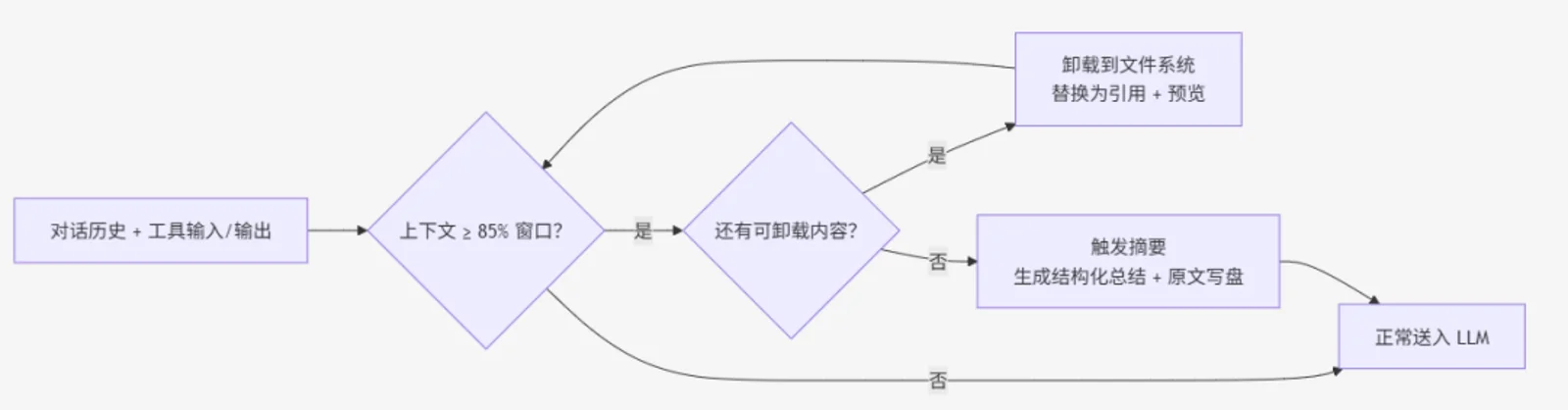
Every create_deep_agent call includes context compression automatically — no extra middleware required. Long tasks explode with tool outputs and history; two mechanisms backstop this: offloading and summarization .
1. Offloading (Default Threshold: 20,000 Tokens)
Uses the built-in virtual filesystem to move large chunks to disk, replacing them with retrievable pointers. Two trigger cases:
Case A: Tool call input > 20K tokens. Write/edit operations leave full file content in history, but it's already persisted on disk. When session context exceeds 85% of model window, old tool calls are truncated to a disk file pointer.
Case B: Tool call result > 20K tokens. Response offloaded to configured backend, replaced by a file path reference + first 10 lines preview. Agent can later read_file or grep to retrieve.
Note: Built-in compression does not handle images — no resizing, resolution reduction, or visual embeddings. See official Multimodal docs for multimodal scenarios.
2. Summarization (Triggers at 85% Window, After Offloading Exhausted)
When context crosses 85% of max_input_tokens (from model profile) and no offloadable content remains, SummarizationMiddleware fires. It does two things:
In-context summary: LLM generates a structured summary (session intent, artifacts created, next steps) that replaces the full conversation history .
Filesystem preservation: Original message text written to filesystem as searchable archive.
Result: agent retains goal/progress awareness (via summary) and can fetch details on demand (via search).
Key config points:
Trigger threshold = 85% of model's max_input_tokens (from model profile).
Retains most recent 10% of tokens as recent context.
Fallback when model profile unavailable: 170,000 token trigger / retain 6 messages.
Any ContextOverflowError from model call immediately falls back to summarization, then retries with summary + recent messages.
3. On-Demand Compression Tool
Auto-compression runs only at the 85% threshold. You can also give the agent a compact_conversation tool to proactively trigger compression (e.g., between tasks). Enable via middleware:
from deepagents import create_deep_agent
from deepagents.backends import StateBackend
from deepagents.middleware.summarization import create_summarization_tool_middleware

backend = StateBackend()
model = "anthropic:claude-sonnet-4-6"

agent = create_deep_agent(
    model=model,
    middleware=[
        create_summarization_tool_middleware(model, backend),
    ],
)
Adding this tool does not disable the 85% auto-compression ; both share the same summarization engine and state.
Subagents: Context Isolation for Heavy Work
Subagents solve context bloat . When the main agent uses web search, file reads, DB queries, outputs rapidly fill the window. Subagents isolate that work — parent receives only the final result, not dozens of intermediate tool calls.
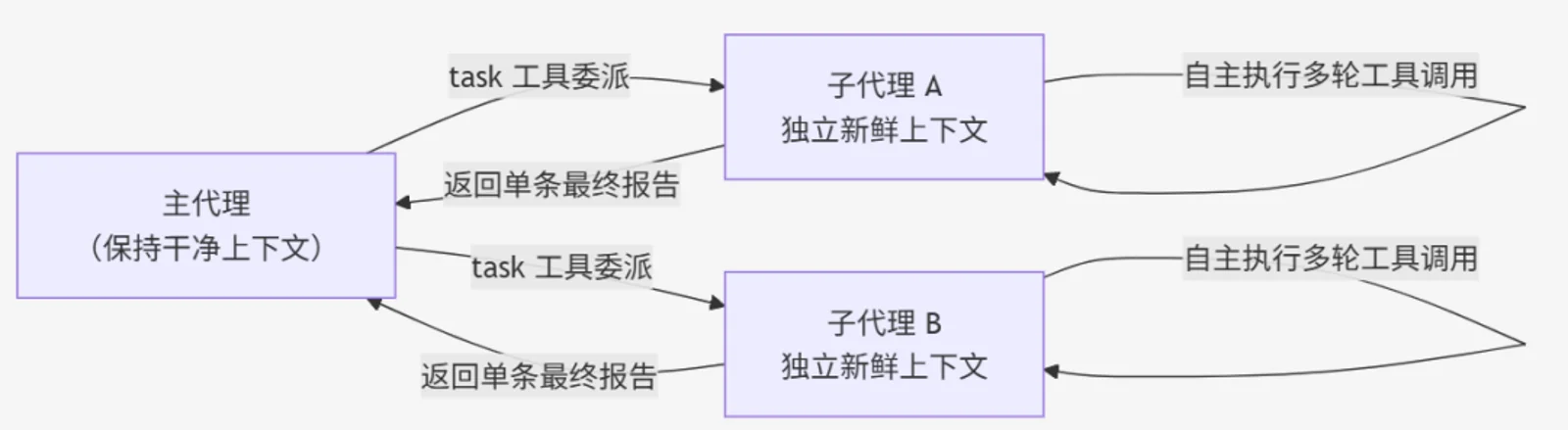
Workflow:
Parent dispatches task via task tool.
Subagent runs with its own fresh context .
Executes autonomously to completion.
Returns a single final report to parent.
Parent context stays clean.
Three best practices:
Delegate complex, multi-step, high-output tasks to subagents.
Require concise results — in subagent's system prompt explicitly demand summary-only output, e.g.:
"IMPORTANT: Return only the essential summary (under 500 words). Do NOT include raw search results or detailed tool outputs."Large data goes to filesystem — subagent writes files, parent reads on demand via read_file / grep.
Long-Term Memory: Cross-Session Persistence
Clarify a common confusion: /memories/ (long-term memory) and AGENTS.md (input context memory) are not the same — loading mechanisms differ entirely:
AGENTS.md (memory param): Loaded every startup, fully injected into system prompt. Scope: current session baseline. Fits: project conventions, coding standards, always-on preferences. Initial state: you pre-write files.
/memories/ (CompositeBackend): Agent on-demand calls read_file / grep to fetch. Scope: cross-thread, cross-session persistent . Fits: user preferences revealed in conversation, accumulated knowledge, research progress. Initial state: empty; agent writes files via write_file / edit_file when users share memorable info.
In short: AGENTS.md is "always online" → must stay lean; /memories/ is "read when needed" → can hold lots, agent retrieves when relevant.
Implementation uses CompositeBackend routing a specific path (usually /memories/) to LangGraph Store for cross-thread persistence. CompositeBackend is hybrid: some files persist indefinitely, others remain single-thread bound.
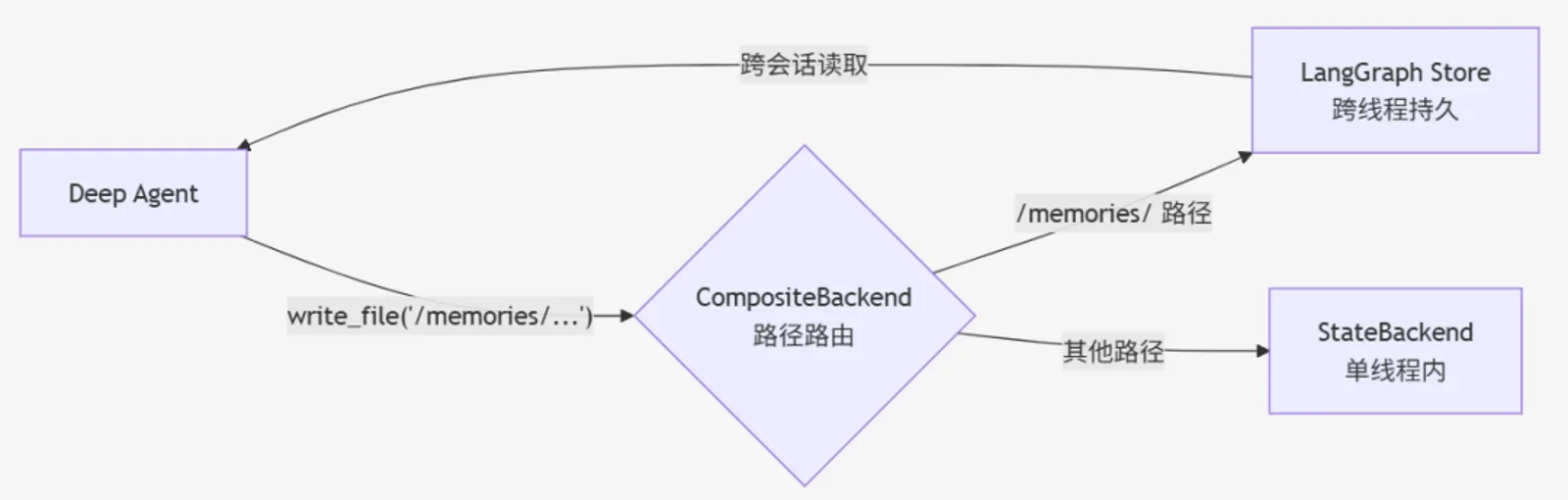
Code skeleton:
from deepagents import create_deep_agent
from deepagents.backends import CompositeBackend, StateBackend, StoreBackend
from langgraph.store.memory import InMemoryStore

store = InMemoryStore()

agent = create_deep_agent(
    model="anthropic:claude-sonnet-4-6",
    store=store,
    backend=CompositeBackend(
        default=StateBackend(),
        routes={
            "/memories/": StoreBackend(namespace=lambda _rt: ("memories",)),
        },
    ),
    system_prompt="""When users tell you their preferences, save them to
/memories/user_preferences.txt so you remember them in future conversations.""",
)
No need to pre-populate /memories/. Configure backend, store, and system prompt telling agent what to save and where . Path starts empty; agent creates files when users share noteworthy information.
Six Practical Best Practices
Start input context from the right place. Always-on conventions → Memory (keep lean); task-specific capabilities → Skills (lazy-loaded).
Offload heavy work to subagents. Multi-step, high-output tasks delegated out, keeping parent context clean.
Watch subagent output during debugging. If too verbose, add "return only summary, synthesize findings" guidance to its system_prompt.
Leverage the filesystem. Large outputs to disk (subagent writes or auto-offload); active context stays small; model fetches slices via read_file / grep when needed.
Document long-term memory structure. In system prompt, describe what lives under /memories/ and how to use it.
Runtime config for tools goes in context. User metadata, API keys, feature flags → pass via context parameter, not stuffed into system prompt.
Conclusion
Deep Agents' context engineering boils down to one principle: let the model see only what it needs at each moment .
Inject what belongs at startup (input context).
Pass what belongs at invoke time (runtime context).
Persist what spans turns into state schema.
Auto-offload and summarize when nearing window limits (compression).
Isolate heavy work in subagents (isolation).
Persist cross-session knowledge into the virtual filesystem's /memories/ (long-term memory).
Each layer solves a concrete problem real long-running agents face. Understanding this layered map makes reading Deep Agents source or building your own complex agents far clearer.
For questions about attribution, corrections or content rights, please contactand we will review it promptly.