

Deep Agents Sandbox: Secure Code Execution for AI Agents
This article provides a comprehensive analysis of the sandbox component in LangChain's Deep Agents framework, explaining how isolated execution environments enable AI agents to safely run shell commands, install dependencies, and execute code while protecting host systems, covering architecture, lifecycle management, integration patterns, and security boundaries.
Reading font
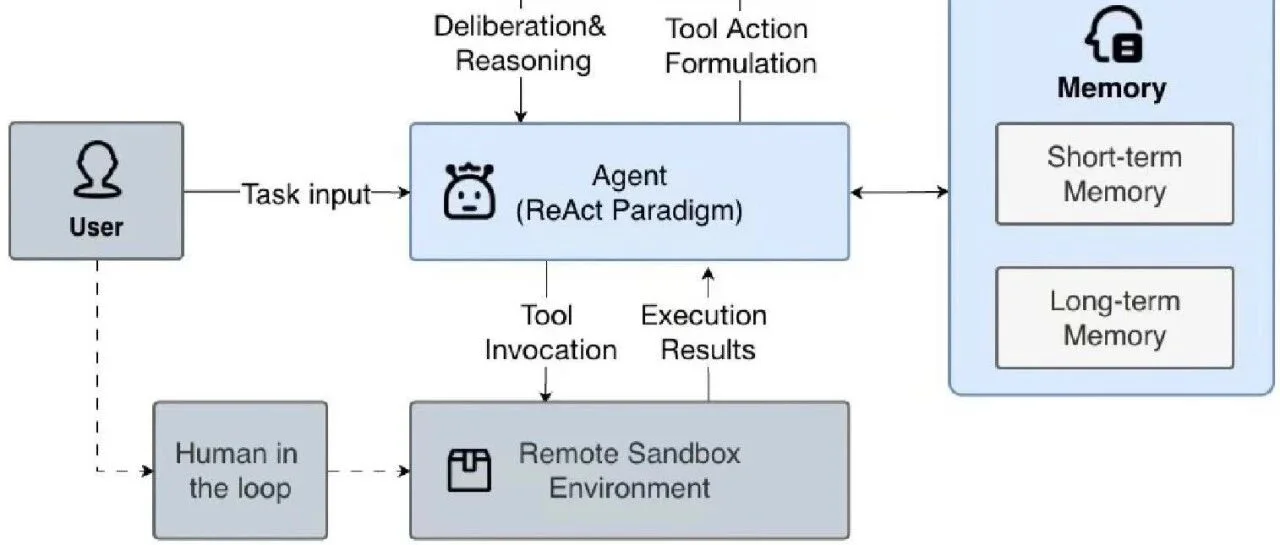
One-Sentence Understanding of Sandbox
A sandbox is an isolated execution environment where an agent can read and write files, run shell commands, install dependencies, and execute code without directly touching the local system.
An isolated execution environment where the agent can read/write files, run shell commands, install dependencies, and execute code, but will not directly access your local system.
Deep Agents defines sandbox as a backend type. This distinction matters because it shows sandbox is not an isolated feature but a backend implementation of the agent's runtime environment.
Regular backends mainly expose filesystem capabilities to the agent.
Sandbox backends add an execute tool beyond filesystem capabilities.
With the execute tool, the agent can truly run shell commands.
When configured with a sandbox backend, the agent typically gains:
Filesystem tools: ls, read_file, write_file, edit_file, glob, grep An execute tool for arbitrary shell commands
A security boundary isolated from the host environment
The core value of sandbox is not merely "one more tool" but advancing the agent from "only manipulating text and files" to "completing real execution tasks in an isolated environment."
Why Deep Agents Needs Sandbox
Security comes first, capability extension second. Agent execution behavior is highly unpredictable — you cannot fully know in advance what commands the model will generate, which files it will read, whether it will install dependencies, or whether it will repeatedly run an erroneous script. As soon as code execution is allowed, isolation must be considered first.
The official documentation emphasizes sandbox's goal: protect the host system, preventing the agent from directly accessing:
Your local files
Host environment variables and credentials
Other processes on the host
Network and system resources the agent should not directly manipulate
This is why Deep Agents clearly separates "code execution" from "regular file backends." Not every backend has execute; only backends that truly implement the sandbox protocol expose this capability to the agent. The design philosophy is not "default allow everything, then gradually restrict" but "only when a qualified sandbox backend is connected can the agent execute code."
Suitable Scenarios for Sandbox
1. Coding Agents
Examples:
Creating project files
Running tests
Installing dependencies
Executing build scripts
Cloning repositories
Invoking git or Docker workflows
Without sandbox, these capabilities are nearly impossible to land safely.
2. Data Analysis Agents
Examples:
Uploading CSV or Excel data
Installing analysis libraries like pandas, numpy Executing statistical analysis
Generating charts, reports, or presentation files
These tasks typically require both code execution and generation of intermediate files and output artifacts, making them ideal for isolated environments.
Key Implementation Point: execute()
From an implementation perspective, sandbox design is quite simple. The sandbox provider's key method is execute(), responsible for running a shell command inside the sandbox and returning the result. The result usually includes:
Standard output and standard error output
Exit code
Truncation notice when output is too large
Notably, many seemingly "advanced file tools" in Deep Agents are essentially built on top of execute(). Tools like read_file, write_file, edit_file, ls, glob, grep can all be implemented by the base class constructing scripts in the sandbox and then calling execute().
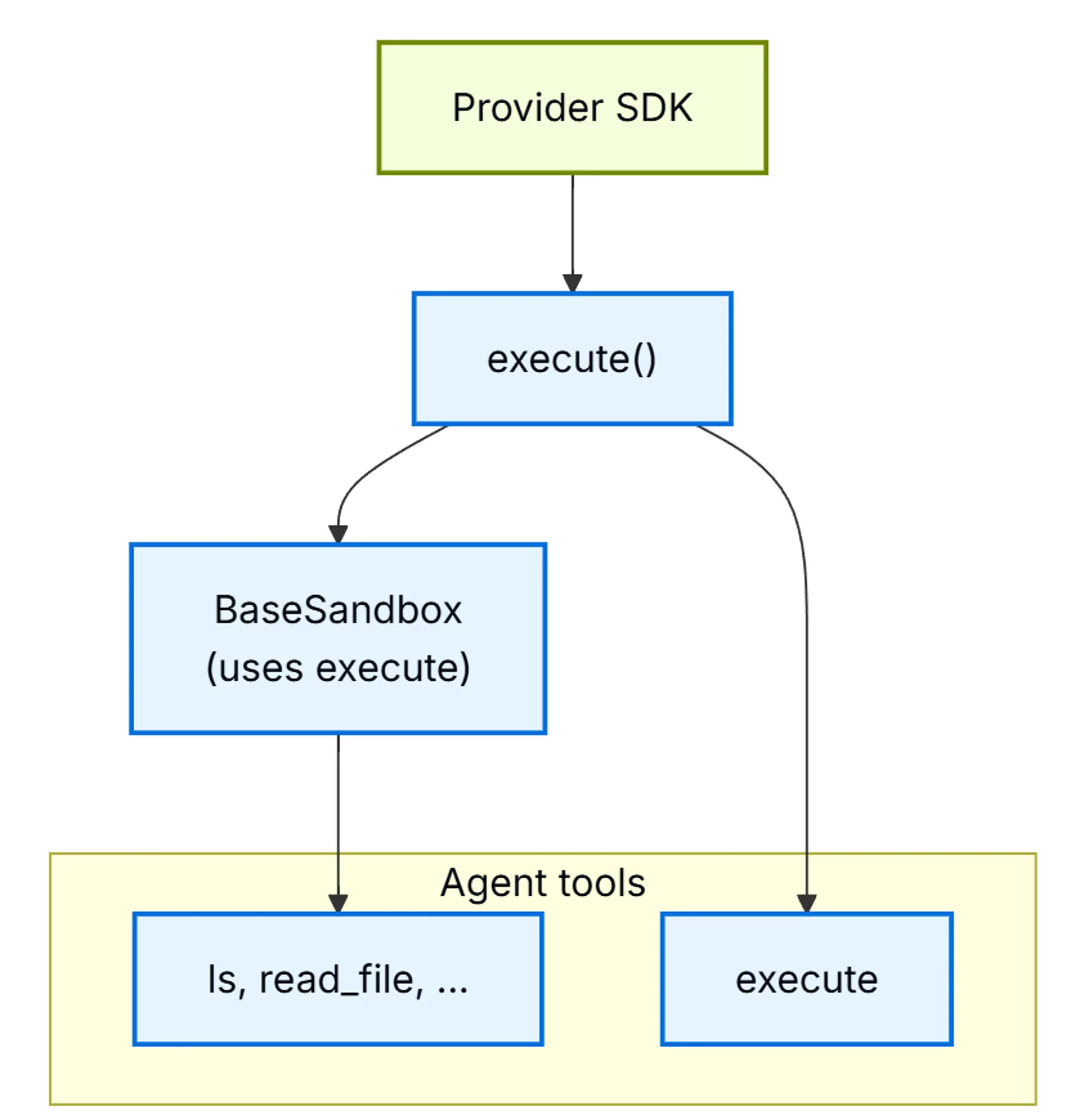
This design brings two direct benefits:
1. Easier Integration of New Providers
As long as a sandbox provider can reliably execute commands and return standard result formats, it is easier to integrate with Deep Agents.
2. Clearer Capability Boundaries
The agent sees a set of tools, but the platform's true core capability concentrates on the execute() layer. This makes the system easier to maintain and easier to implement permission and behavior controls.
File Access Actually Splits into Two Channels
This is a point worth highlighting separately in the official documentation because many people confuse it on first read.
In sandbox scenarios, file ingress and egress have two completely different mechanisms.
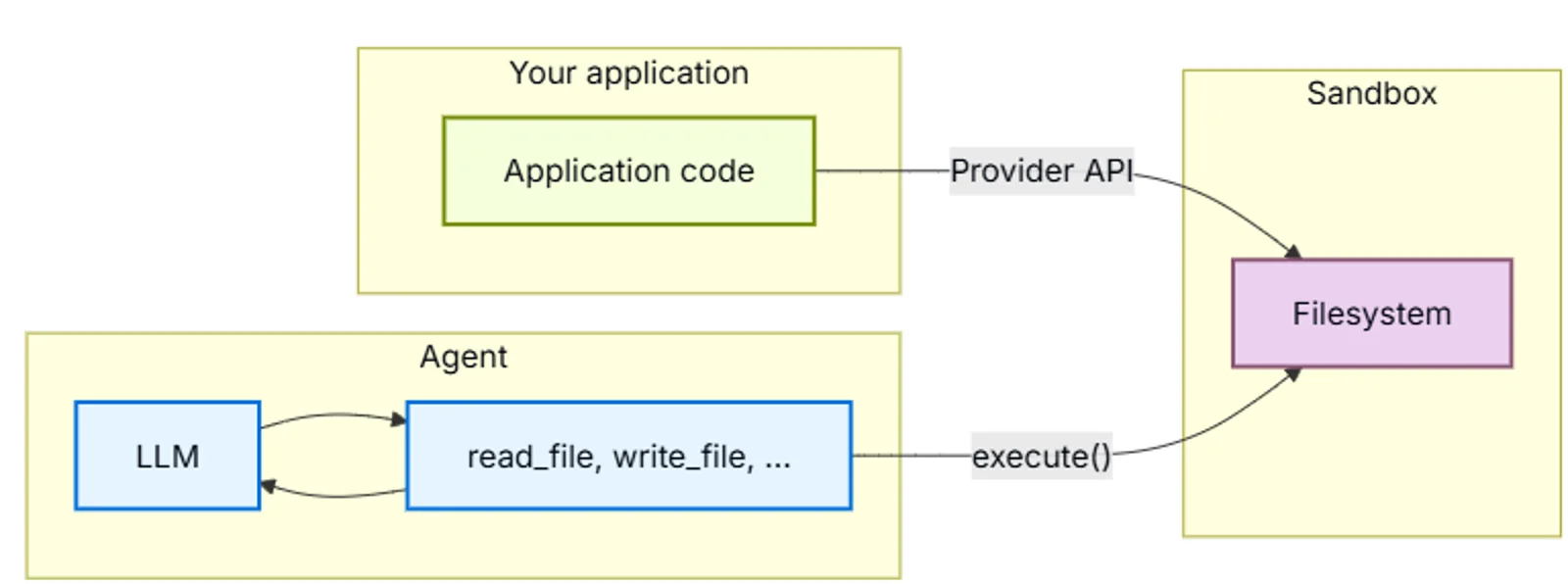
First Channel: Filesystem Tools Used by Agent at Runtime
These tools include:
read_filewrite_fileedit_filelsglobgrepexecuteThese tools are directly invoked by the agent during reasoning and task execution. They serve the agent's workflow, such as reading code, modifying files, running tests.
Second Channel: File Transfer APIs Between Application and Sandbox
These interfaces are typically called directly by your application code, for example:
upload_files()download_files()They are not for the model to call during reasoning, but for system developers to use for:
Placing project code, config files, data files into the sandbox before the agent starts work
Retrieving generated results back to the host application after the agent finishes
Preparing required resources for the sandbox in advance
This layering is important:
The agent works inside the sandbox via tools
The application moves files between host and sandbox via provider APIs
Understanding this separation prevents confusing "uploading initial files" with "letting the agent read/write files itself."
Lifecycle Design: A Critical Decision for Production
If execute() determines whether sandbox works, lifecycle design determines whether it spirals out of control in production.
The official documentation poses a core question:
How long should a sandbox live?
Deep Agents primarily offers two scope designs.
1. Thread-Scoped: Isolated by Session
This is the officially recommended default for most cases.
Each conversation thread corresponds to one sandbox
Subsequent messages in the same thread reuse the same sandbox
New threads get a fresh environment
When TTL expires or the thread is cleaned up, the sandbox is destroyed
This approach suits data analysis, one-off task processing, temporary code execution, because each conversation starts from a clean environment without leftover files and dependencies from previous tasks.
2. Assistant-Scoped: Shared by Assistant
Multiple conversations under the same assistant share one sandbox
Installed dependencies, cloned repositories, generated files persist across conversations
This fits long-term coding assistants maintaining a code repository. For example, an engineering assistant needing to persistently retain a repository copy, virtual environment, and build artifacts benefits from reusing the same sandbox.
However, the official documentation specifically warns of risks:
Files accumulate
Dependencies accumulate
Disk and memory usage grow continuously
Therefore, assistant-scoped mode usually requires additional measures:
TTL
Snapshot reset mechanisms
Periodic cleanup logic
Without these governance measures, long-running sandboxes easily turn from "convenient reuse" into "uncontrollable state."
Why Official Docs Repeatedly Emphasize TTL
TTL is fundamentally a lifecycle governance mechanism.
In chat applications, a user might open once today and return tomorrow; you usually cannot predict in advance whether they will continue the thread. If sandboxes are never cleaned up, resource costs increase continuously.
Recommendations:
Map sandboxes to thread_id or assistant_id Configure TTL for sandboxes
Auto-archive or delete when idle
This is not an "implementation detail" but a mandatory item when sandbox enters production, because sandboxes consume real resources and incur real costs.
Two Integration Architectures: Agent in Sandbox vs. Sandbox as Tool
Deep Agents summarizes sandbox integration into two architectures, worth clarifying.
1. Agent in Sandbox
In this mode, the agent itself runs inside the sandbox. You package the agent framework and runtime together into an image or VM environment, then communicate with it over the network.
Advantages:
Local development and production shapes are closer
Agent and execution environment are more tightly coupled
Costs:
API keys often need to be placed inside the sandbox
Updating agent logic usually requires rebuilding the image
Additional communication layer maintenance (e.g., HTTP or WebSocket)
2. Sandbox as Tool
Here, the agent runs on your application server; when it needs to execute commands or manipulate files, it calls the remote sandbox via the sandbox backend.
Advantages:
Faster agent code updates, no image rebuild needed
API keys can stay outside the sandbox
Cleaner separation of agent state and execution environment
More flexible parallel use of multiple sandboxes
Main cost:
Each execution call introduces network latency
Official sandbox examples primarily adopt the second mode — using sandbox as a tool backend.
Simplified engineering judgment:
Want rapid agent logic iteration? Prefer sandbox as tool.
Want local and production runtime consistency, and provider handles communication layer? Consider agent in sandbox.
Simplified Integration Process
Abstracting from official examples, sandbox integration typically boils down to four steps:
Step 1: Create Sandbox via Provider SDK
Different providers have different APIs, but the idea is consistent: first create a sandbox instance on a remote execution environment platform.
Step 2: Wrap It into a Deep Agents Usable Backend
Create the corresponding sandbox backend object.
Step 3: Pass Backend to create_deep_agent
Only then does the agent gain tools to interact with the sandbox.
Step 4: Properly Release Resources After Task Completion
Whether stop(), terminate(), or shutdown(), they all underscore: sandbox is not free nor infinitely persistent; lifecycle must be explicitly governed.
Simplified illustrative code:
from deepagents import create_deep_agent
from langchain_anthropic import ChatAnthropic

# Pseudo-code: first create provider's own sandbox instance
sandbox = create_provider_sandbox()

# Pseudo-code: then wrap as Deep Agents backend
backend = ProviderSandboxBackend(sandbox=sandbox)

agent = create_deep_agent(
    model=ChatAnthropic(model="claude-sonnet-4-6"),
    system_prompt="You are an assistant that can execute code in an isolated environment.",
    backend=backend,
)

result = agent.invoke(
    {
        "messages": [
            {
                "role": "user",
                "content": "Create a minimal Python project and run tests"
            }
        ]
    }
)

# Release sandbox after task completion
destroy_provider_sandbox(sandbox)
This code illustrates the key point: sandbox is not "imagined" by the model; it is created by your system first, then injected into the agent via backend.
What Sandbox Can Protect, What It Cannot
This is the most critical area to avoid misjudgment when understanding sandbox.
The official documentation explicitly states that sandbox does protect the host system, but it is not a silver bullet for all security concerns.
What Sandbox Can Protect
Agent cannot directly read your local files
Agent cannot directly access host environment variables
Agent cannot directly affect other processes on the host
Even if the agent crashes or exhausts resources during execution, the impact is mainly confined to the sandbox itself, not your main service
What Sandbox Cannot Automatically Solve
1. Context Injection
If an attacker controls part of the agent's input, they can still induce the model to execute dangerous commands inside the sandbox. The sandbox merely contains the risk within the isolated environment; it does not prevent "the command being executed" itself.
2. Network Exfiltration
If the sandbox allows network access, an induced agent can still send data out via HTTP, DNS, etc. In other words, "isolation" does not equal "no exfiltration risk."
Correct understanding:
Sandbox solves host isolation problems, not all security problems.
For stronger security, you must also combine:
Network access restrictions
Credential injection and secret isolation strategies
Sensitive operation approval workflows
Input governance and context sanitization
Why Large Outputs Don't Blow Up Context
A practical detail in Deep Agents: when command output is too large, the system does not stuff all results directly back into the model context. Instead, it saves the large output to a file and prompts the agent to use read_file to read it in segments.
This design is representative because it reflects a Deep Agents philosophy:
Give the agent execution capability
But avoid dumping massive results into the context window at once
This is especially important for high-volume scenarios like log analysis, test output, and build output.
How to Choose in Practice
If you are designing a Deep Agents-based system, start with this simple decision framework.
Situations Suitable for Sandbox
You need to run Python, Shell, or other commands
You need to install dependencies
You need to execute tests, builds, or data analysis pipelines
You need the agent to handle real files and generate artifacts
Situations Where Sandbox May Not Be Needed Yet
Your agent only does Q&A
It only reads/writes controlled files, no code execution
You explicitly do not want the model to have shell capabilities
Lifecycle Selection Recommendations
Default to thread-scoped first
Only consider assistant-scoped when you explicitly need cross-session environment persistence
Once using assistant-scoped, you must simultaneously design TTL and cleanup strategies
Architecture Selection Recommendations
Most business systems should prefer sandbox as tool
Only consider agent in sandbox when you truly need "agent runs entirely inside container" consistency
Summary
To summarize Deep Agents' sandbox in one engineering-focused sentence:
It is an isolated execution backend that securely introduces "code execution capability" into agent systems.
Four keywords:
Code execution capability
Isolation
Backend
Lifecycle governance
For questions about attribution, corrections or content rights, please contactand we will review it promptly.