

Deep Agents Backends: File System Abstraction, Storage Backends & Security Patterns
This article provides a comprehensive analysis of Deep Agents' backend abstraction layer, detailing built-in backends (StateBackend, FilesystemBackend, StoreBackend, LocalShellBackend, Sandbox, CompositeBackend), their use cases, security considerations, custom backend implementation, permission controls, and migration guides for production-ready AI agent file system management.
Reading font
What Is a Backend
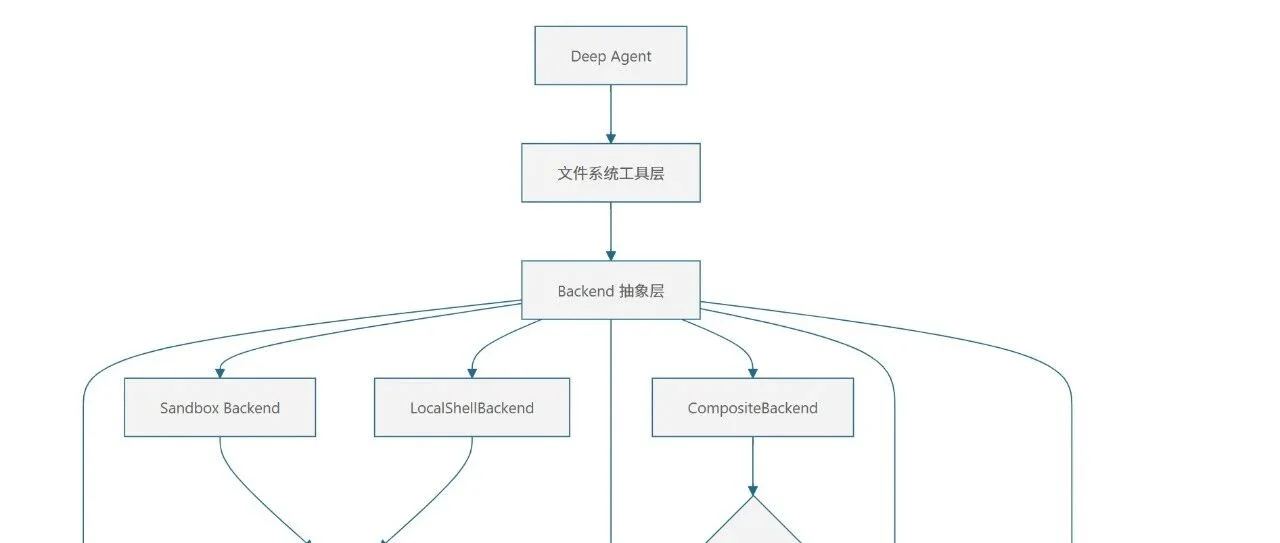
In Deep Agents, the agent does not see the real disk directly but a file system capability abstraction called the Backend . Deep Agents exposes a set of file system tools ( ls, read_file, write_file, edit_file, glob, grep) through a pluggable backend , allowing the agent's file system to connect to different storage targets:
LangGraph state for temporary workspace
Local disk for real file I/O
LangGraph store for cross-thread persistent storage
Sandbox environments for isolated file and command execution
Custom S3, Postgres, or remote object storage
The core value: decouple the agent's file system surface from the underlying real storage .
Important Nuances
Official docs highlight that read_file natively supports image files ( .png, .jpg, .jpeg, .gif, .webp) on all backends, returning multimodal content blocks, making backends part of the agent's multimodal input channel.
Only two backends provide an execute tool: Sandboxes and LocalShellBackend. Most backends only handle file operations; shell execution requires a sandbox or the local shell backend.
Mental Model
Two key ideas:
Same tools, different storage implementations.
Different paths can route to different backends. This is the purpose of CompositeBackend. Example: /workspace/* → temporary state, /memories/* → persistent store, /docs/* → custom document backend. The agent sees a unified file system namespace while the backend freely composes storage layers.
Built-in Backends Overview
Backend Comparison
StateBackend : Storage location: LangGraph state; Persistent: current thread only; Executes commands: No; Best for: temporary scratch pad, single-thread intermediate results.
FilesystemBackend : Storage location: local disk; Persistent: yes; Executes commands: No; Best for: local projects, CI work directories, mounted volumes.
StoreBackend : Storage location: LangGraph store; Persistent: yes, cross-thread; Executes commands: No; Best for: long-term memory, multi-user isolation, deployment environments.
Sandbox Backend : Storage location: sandbox filesystem; Persistent: depends on sandbox; Executes commands: Yes; Best for: isolated execution, safer production file interaction.
LocalShellBackend : Storage location: host disk + shell; Persistent: yes; Executes commands: Yes; Best for: controlled dev environments, local coding assistants.
CompositeBackend : Storage location: multiple backends combined; Persistent: mixed; Executes commands: depends on routed target; Best for: temp + memory + custom zones coexisting.
One-line summaries: StateBackend: Lightest, default, good for "just run it". FilesystemBackend: Most direct, gives agent real files. StoreBackend: Best for long-term memory and multi-tenant isolation. LocalShellBackend: Most capable, highest risk. CompositeBackend: Most flexible, suits real projects.
Capability Boundaries: FilesystemBackend vs LocalShellBackend vs Sandbox
Key misconceptions clarified: FilesystemBackend only gives real files, does not provide execute.
True isolated command execution with host protection is sandbox backend , not LocalShellBackend.
Guidance:
Only need file ops → FilesystemBackend.
Need host command execution → LocalShellBackend.
Need execution + host protection → sandbox backend.
StateBackend: Default, Lightweight, Thread-Local Persistence
Default if no backend specified:
from deepagents import create_deep_agent
agent = create_deep_agent(model="google_genai:gemini-3.1-pro-preview")
# Equivalent to:
from deepagents.backends import StateBackend
agent = create_deep_agent(model="google_genai:gemini-3.1-pro-preview", backend=StateBackend())
Where Files Are Stored
Files go into the LangGraph agent state — not local disk, not a database. They persist via checkpoints across multiple turns within the same thread , but do not share across threads .
Best Uses
Scratch pad for intermediate results.
Storing large tool outputs for later chunked reads.
Aligns with Deep Agents' context engineering: don't stuff long text into conversation context; write to files, read back on demand.
Subagent Sharing
StateBackendis shared between supervisor and subagents . Files written by a subagent persist after it ends, visible to supervisor and other subagents. Not isolated per subagent.
When Not to Use
Need cross-thread persistence.
Need explicit multi-user isolation.
Need real project directory access.
Need existing external storage.
Then consider StoreBackend, FilesystemBackend, or CompositeBackend.
FilesystemBackend: Direct Real Disk I/O
from deepagents import create_deep_agent
from deepagents.backends import FilesystemBackend
agent = create_deep_agent(
    model="google_genai:gemini-3.1-pro-preview",
    backend=FilesystemBackend(root_dir=".", virtual_mode=True),
)
How It Works
Reads/writes real files under configurable root_dir.
Optional virtual_mode=True normalizes paths and restricts to root_dir.
Safer path resolution; blocks unsafe symlink traversal; grep can use ripgrep for speed.
root_dir Meaning
Defines the agent's root directory. Should be scoped to a project or dedicated workspace, not the entire host disk.
virtual_mode=True Is a Security Boundary, Not Optional
Always use virtual_mode=True with root_dir to enable path-based access restrictions.
It blocks .. directory traversal, ~ home shortcuts, and absolute paths outside root_dir. Official docs stress: default virtual_mode=False provides no security even with root_dir set. Many mistakenly think root_dir auto-sandboxes; it does not.
Suitable Scenarios
Local development CLI
CI sandbox
Mounted persistent volumes
Unsuitable Scenarios
Do not expose directly to web servers or HTTP APIs. Safer alternatives: StateBackend, StoreBackend, sandbox backend.
Why Risk Is High
Agent can read any permissioned file.
Can access API keys, credentials, .env.
With network tools, can exfiltrate secrets.
Can make permanent, irreversible file modifications.
Official Mitigation Baseline
Use HITL (Human-in-the-Loop) middleware for sensitive ops.
Keep secrets out of agent-accessible paths, especially CI/CD.
In production, prefer sandbox backend for file interaction.
Always enable virtual_mode=True with root_dir.
LocalShellBackend: Direct Host Shell Execution
Extends FilesystemBackend with execute tool running commands via subprocess.run(shell=True) on the host. No sandbox.
from deepagents import create_deep_agent
from deepagents.backends import LocalShellBackend
agent = create_deep_agent(
    model="google_genai:gemini-3.1-pro-preview",
    backend=LocalShellBackend(root_dir=".", env={"PATH": "/usr/bin:/bin"}),
)
Configuration Options
timeout(default 120s) max_output_bytes (default 100000)
envinherit_envroot_dir Is Not a Security Boundary Here
Shell commands can access arbitrary system paths regardless of root_dir. virtual_mode=True provides no security with shell access enabled because shell bypasses file-tool restrictions.
Suitable Scenarios
Local dev CLI
Trusted personal dev environments
CI/CD pipelines with solid secret management
Unsuitable Scenarios
Production
Web APIs
Multi-tenant systems
Untrusted user input
Untrusted code execution
Higher Risk Than FilesystemBackend
Arbitrary shell command execution
Runs with current user privileges
Can exhaust CPU/memory/disk
Permanent, irreversible system changes
Official stance: Only in controlled dev environments, strongly recommend HITL, production → sandbox backend.
StoreBackend: Persistent, Cross-Thread, Namespaced File Storage
Stores files in LangGraph BaseStore for durable cross-thread storage .
from langgraph.store.memory import InMemoryStore
from deepagents import create_deep_agent
from deepagents.backends import StoreBackend
agent = create_deep_agent(
    model="google_genai:gemini-3.1-pro-preview",
    backend=StoreBackend(
        namespace=lambda rt: (rt.context.user_id,),
    ),
    store=InMemoryStore(),
)
Assumes user_id in LangGraph context schema.
Ideal For
Long-term memory
Long-term instructions
User personalization
Multi-session reusable knowledge
Core Concept: namespace
The most important config is namespace, not store. Store is a shared container; namespace decides ownership. Multi-user deployments must set a namespace factory or all users share one storage.
Namespace Factory
Function receiving LangGraph Runtime, returning string tuple:
NamespaceFactory = Callable[[Runtime], tuple[str, ...]]Runtime Information Sources
rt.context: user context from LangGraph context schema rt.server_info: server info (assistant ID, graph ID, auth user) when on LangGraph Server rt.execution_info: execution identity (thread ID, run ID, checkpoint ID)
Common Namespace Patterns
1. Per-User Isolation
backend = StoreBackend(
    namespace=lambda rt: (rt.server_info.user.identity,),
)
Each user gets own long-term memory.
2. Per-Assistant Isolation
backend = StoreBackend(
    namespace=lambda rt: (rt.server_info.assistant_id,),
)
All users of same assistant share filesystem data.
3. Per-Thread Isolation
backend = StoreBackend(
    namespace=lambda rt: (rt.execution_info.thread_id,),
)
Data scoped to single session.
Composite Namespaces
Combine dimensions, e.g., (user_id, thread_id) for per-user per-session isolation. Add fixed suffix like "filesystem" for clarity.
Namespace Character Restrictions
Allowed: alphanumeric, hyphen -, underscore _, dot ., at @, plus +, colon :, tilde ~. Wildcards *, ? rejected to prevent glob injection.
Official Stance
New code must always explicitly set namespace . Default policies often merge users under one assistant, unacceptable for multi-user production.
LangSmith Deployment Note
On LangSmith Deployment, store= parameter can be omitted (platform auto-provisions store), but backend=StoreBackend(...) and namespace design remain your responsibility.
CompositeBackend: Unified Namespace Routing to Multiple Backends
Routes file ops by path prefix to different backends.
from deepagents import create_deep_agent
from deepagents.backends import CompositeBackend, StateBackend, StoreBackend
from langgraph.store.memory import InMemoryStore
agent = create_deep_agent(
    model="google_genai:gemini-3.1-pro-preview",
    backend=CompositeBackend(
        default=StateBackend(),
        routes={
            "/memories/": StoreBackend(),
        },
    ),
    store=InMemoryStore(),
)
How It Works
Paths like /workspace/plan.md → StateBackend; /memories/agent.md → StoreBackend. Agent sees one unified file system; you compose storage layers underneath.
Key Value
Simultaneously have:
Temporary workspace
Long-term memory zone
Custom external knowledge zone
All under one namespace for the agent.
Typical Pattern: Default Temp, Memory Persistent
backend=CompositeBackend(
    default=StateBackend(),
    routes={
        "/memories/": FilesystemBackend(
            root_dir="/deepagents/myagent",
            virtual_mode=True,
        ),
    },
)
Ordinary files temporary; only /memories/ hits real persistent layer.
Routing Rules Details
1. Longer Prefix Wins
If routes include /memories/ and /memories/projects/, the latter matches /memories/projects/a.md.
2. List/Search Preserve Original Prefixes
ls, glob, grep return unified namespace paths (e.g., /memories/...), not backend implementation details.
StoreBackend Routing Prerequisite
If a route targets StoreBackend, ensure store is passed to create_deep_agent or auto-provisioned by platform. CompositeBackend is just a router; it doesn't create storage resources.
How to Specify a Backend
Pass backend instance directly to create_deep_agent(model=..., backend=...). Must implement BackendProtocol. Omitting defaults to StateBackend().
from deepagents import create_deep_agent
from deepagents.backends import FilesystemBackend
agent = create_deep_agent(
    model="google_genai:gemini-3.1-pro-preview",
    backend=FilesystemBackend(root_dir="/path/to/project", virtual_mode=True),
)
Now recommended: pass constructed backend instance, not factory function (see migration section).
Selection Guide
Scenario 1: Local Validation, Quick Start
Choose StateBackend — default, zero config, good for temporary intermediate results.
Scenario 2: Agent Operates Project Files Directly
Choose FilesystemBackend with explicit root_dir, virtual_mode=True, preferably HITL.
Scenario 3: Long-Term Memory, Cross-Session Sharing
Choose StoreBackend with well-designed namespace (user/tenant/thread/assistant isolation).
Scenario 4: Both Temp and Long-Term Zones
Choose CompositeBackend — common production shape: /workspace/ temp, /memories/ persistent, /policies/ read-only.
Scenario 5: Need Code/Command Execution Without Host Exposure
Choose sandbox backend. Official: Production execution → sandbox, not LocalShellBackend .
Scenario 6: Local Dev Assistant, Fully Trusted Environment
Choose LocalShellBackend — effectively grants current user privileges to agent.
Implementing Custom Virtual File Systems
Map external storage (S3, Postgres, remote object store, internal knowledge base) to Deep Agents file tools.
Design Principles
Use absolute paths (e.g., /x/y.txt).
You decide path-to-key/row mapping. ls and glob should be efficient; server-side filtering preferred.
For external persistent backends, write / edit success returns files_update=None.
Method names: ls, glob.
Errors: return structured error objects, don't throw exceptions.
S3-Style Skeleton
from deepagents.backends.protocol import (
    BackendProtocol, WriteResult, EditResult, LsResult, ReadResult, GrepResult, GlobResult
)

class S3Backend(BackendProtocol):
    def __init__(self, bucket: str, prefix: str = ""):
        self.bucket = bucket
        self.prefix = prefix.rstrip("/")
    def _key(self, path: str) -> str:
        return f"{self.prefix}{path}"
    def ls(self, path: str) -> LsResult: ...
    def read(self, file_path: str, offset: int = 0, limit: int = 2000) -> ReadResult: ...
    def grep(self, pattern: str, path: str | None = None, glob: str | None = None) -> GrepResult: ...
    def glob(self, pattern: str, path: str = "/") -> GlobResult: ...
    def write(self, file_path: str, content: str) -> WriteResult: ...
    def edit(self, file_path: str, old_string: str, new_string: str, replace_all: bool = False) -> EditResult: ...
Postgres Approach
Table:
files(path text primary key, content text, created_at timestamptz, modified_at timestamptz). Map ops to SQL: ls → WHERE path LIKE $1 || '%'; glob → SQL-side filter or post-filter; grep → narrow by extension/time then scan content.
Why Custom Backends Matter
Agent sees "file system" but you provide: document library, database, object bucket, tenant-isolated enterprise knowledge space. More unified than exposing raw DB query tools; works seamlessly with read_file / grep / glob.
Permissions & Policy Control: Don't Expose Backend Capabilities Raw
Two layers:
Permissions : declarative path-based read/write control.
Policy hooks : imperative extensions (audit, rate-limit, content inspection).
1. Permissions: Declarative Rules Evaluated Before Backend
from deepagents import create_deep_agent, FilesystemPermission
from deepagents.backends import CompositeBackend, StateBackend, StoreBackend
agent = create_deep_agent(
    model="google_genai:gemini-3.1-pro-preview",
    backend=CompositeBackend(
        default=StateBackend(),
        routes={
            "/memories/": StoreBackend(namespace=lambda rt: (rt.server_info.user.identity,)),
            "/policies/": StoreBackend(namespace=lambda rt: (rt.context.org_id,)),
        },
    ),
    permissions=[
        FilesystemPermission(
            operations=["write"],
            paths=["/policies/**"],
            mode="deny",
        ),
    ],
)
Even if /policies/ routes to a writable store, agent cannot write there. Permissions enforce "can/cannot" outside backend; backend only handles "how".
2. Policy Hooks: When Path Rules Aren't Enough
For rate limiting, audit, content validation, sensitive prefix blocking. Implement via subclassing or wrapping backend.
Approach A: Subclass Specific Backend
from deepagents.backends.filesystem import FilesystemBackend
from deepagents.backends.protocol import WriteResult, EditResult

class GuardedBackend(FilesystemBackend):
    def __init__(self, *, deny_prefixes: list[str], **kwargs):
        super().__init__(**kwargs)
        self.deny_prefixes = [p if p.endswith("/") else p + "/" for p in deny_prefixes]
    def write(self, file_path: str, content: str) -> WriteResult:
        if any(file_path.startswith(p) for p in self.deny_prefixes):
            return WriteResult(error=f"Writes are not allowed under {file_path}")
        return super().write(file_path, content)
    def edit(self, file_path: str, old_string: str, new_string: str, replace_all: bool = False) -> EditResult:
        if any(file_path.startswith(p) for p in self.deny_prefixes):
            return EditResult(error=f"Edits are not allowed under {file_path}")
        return super().edit(file_path, old_string, new_string, replace_all)
Approach B: Wrap Any Backend
from deepagents.backends.protocol import (
    BackendProtocol, WriteResult, EditResult, LsResult, ReadResult, GrepResult, GlobResult
)

class PolicyWrapper(BackendProtocol):
    def __init__(self, inner: BackendProtocol, deny_prefixes: list[str] | None = None):
        self.inner = inner
        self.deny_prefixes = [p if p.endswith("/") else p + "/" for p in (deny_prefixes or [])]
    def _deny(self, path: str) -> bool:
        return any(path.startswith(p) for p in self.deny_prefixes)
    def ls(self, path: str) -> LsResult:
        return self.inner.ls(path)
    def read(self, file_path: str, offset: int = 0, limit: int = 2000) -> ReadResult:
        return self.inner.read(file_path, offset=offset, limit=limit)
    def grep(self, pattern: str, path: str | None = None, glob: str | None = None) -> GrepResult:
        return self.inner.grep(pattern, path, glob)
    def glob(self, pattern: str, path: str = "/") -> GlobResult:
        return self.inner.glob(pattern, path)
    def write(self, file_path: str, content: str) -> WriteResult:
        if self._deny(file_path):
            return WriteResult(error=f"Writes are not allowed under {file_path}")
        return self.inner.write(file_path, content)
    def edit(self, file_path: str, old_string: str, new_string: str, replace_all: bool = False) -> EditResult:
        if self._deny(file_path):
            return EditResult(error=f"Edits are not allowed under {file_path}")
        return self.inner.edit(file_path, old_string, new_string, replace_all)
Division of Labor
Simple path-based rules → permissions.
Complex context/content-dependent rules → wrapper/subclass.
Both layers can coexist.
Migrating from Backend Factory: Pass Instances Directly
Why Factory Existed
Early backends ( StateBackend, StoreBackend) needed runtime for state/store access:
backend=lambda rt: StateBackend(rt)Why Not Needed Now
Backends now self-resolve context via LangGraph helpers: get_config(), get_store(), get_runtime(). No manual runtime injection required.
New Recommended Style
Old: backend=lambda rt: StateBackend(rt) → New: backend=StateBackend() Old: backend=lambda rt: StoreBackend(rt) → New: backend=StoreBackend() Old:
backend=lambda rt: CompositeBackend(default=StateBackend(rt), ...)→ New:
backend=CompositeBackend(default=StateBackend(), ...)Full Migration Example
# Before
agent = create_deep_agent(
    model="google_genai:gemini-3.1-pro-preview",
    backend=lambda rt: CompositeBackend(
        default=StateBackend(rt),
        routes={
            "/memories/": StoreBackend(
                rt,
                namespace=lambda rt: (rt.server_info.user.identity,),
            ),
        },
    ),
)

# After
agent = create_deep_agent(
    model="google_genai:gemini-3.1-pro-preview",
    backend=CompositeBackend(
        default=StateBackend(),
        routes={
            "/memories/": StoreBackend(
                namespace=lambda rt: (rt.server_info.user.identity,),
            ),
        },
    ),
)
Deprecated APIs
Passing callable to
create_deep_agentbackend=. StateBackend(runtime), StoreBackend(runtime) constructors. WriteResult /
EditResultfiles_updateold usage.
Middleware returning Command(update=...) for write/edit tools.
Factory pattern still runs with deprecation warning; future major version will remove. Safest: always pass backend instances.
Migrating from BackendContext: Namespace Factory Now Receives Runtime
In deepagents>=0.5.2 (Python) and deepagents>=1.9.1 (TypeScript), namespace factory receives LangGraph Runtime, not BackendContext.
Three Changes
1. Parameter Type Changed
Old: namespace=lambda ctx: ... → New:
namespace=lambda rt: ...2. No More .runtime Access
# Before
StoreBackend(namespace=lambda ctx: (ctx.runtime.context.user_id,))
# After
StoreBackend(namespace=lambda rt: (rt.server_info.user.identity,))
3. ctx.state Has No Direct Replacement
Namespace should be read-only and stable per run; state is mutable. Basing namespace on mutable state risks inconsistent keys. Official discourages this; file issue if needed.
BackendProtocol Reference: Required Methods for Custom Backends
Every backend must implement BackendProtocol.
Required Methods
1. ls(path: str) -> LsResult
At least return path.
Optionally is_dir, size, modified_at.
Results sorted by path for stable output.
2. read(file_path: str, offset: int = 0, limit: int = 2000) -> ReadResult
Success returns file data.
Not found: return ReadResult(error="Error: File '/x' not found"), no exception.
3. grep(pattern: str, path: Optional[str] = None, glob: Optional[str] = None) -> GrepResult
Return structured match list.
Errors via GrepResult(error="..."), no exceptions.
4. glob(pattern: str, path: str = "/") -> GlobResult
Return list of FileInfo matches.
No matches → empty list, not error.
5. write(file_path: str, content: str) -> WriteResult
Semantics: create-only .
If target exists → error.
Success sets path.
State backends set files_update={...}; external backends use files_update=None. write is not overwrite; modifications use edit.
6. edit(file_path: str, old_string: str, new_string: str, replace_all: bool = False) -> EditResult
Default: old_string must be unique. replace_all=True allows multiple replacements.
Not found → error.
Success includes occurrences.
Supporting Data Types
LsResult(error, entries)ReadResult(error, file_data)GrepResult(error, matches)GlobResult(error, matches)WriteResult(error, path, files_update)EditResult(error, path, files_update, occurrences)FileInfo: path required; optional is_dir, size, modified_at. GrepMatch: path, line, text. FileData: content, encoding, created_at, modified_at. FileData.encoding only "utf-8" or "base64".
Protocol Design Philosophy
Prefer structured results over exceptions.
Tool layer sees uniform abstraction, ignorant of storage details.
State vs external backend differences compressed into protocol details like files_update.
Thus custom backends plug seamlessly: obey protocol, agent need not know if backend is disk, memory, or database.
Common Misconceptions
1. root_dir ≠ Security
FilesystemBackend: requires virtual_mode=True. LocalShellBackend: virtual_mode=True provides no security with shell access.
2. StateBackend Not "Gone After One Call"
Persists across same thread's multiple turns via checkpoints.
3. StoreBackend Challenge Is Isolation, Not Storage
Namespace design determines safety and multi-tenancy correctness.
4. CompositeBackend Is Router, Not Storage
Routes paths to backends; doesn't create storage resources.
5. write Is Not Overwrite
Create-only; modify existing files via edit.
6. Custom Backend Errors: Return Structured Errors
Don't throw for routine failures (file not found, bad glob, bad grep params); put in result error field.
Practical Configuration Template
For an agent with temp workspace, long-term memory, and basic write protection:
from deepagents import create_deep_agent, FilesystemPermission
from deepagents.backends import CompositeBackend, StateBackend, StoreBackend
from langgraph.store.memory import InMemoryStore

store = InMemoryStore()
agent = create_deep_agent(
    model="google_genai:gemini-3.1-pro-preview",
    backend=CompositeBackend(
        default=StateBackend(),
        routes={
            "/memories/": StoreBackend(
                namespace=lambda rt: (rt.server_info.user.identity, "filesystem"),
            ),
        },
    ),
    store=store,
    permissions=[
        FilesystemPermission(
            operations=["write"],
            paths=["/memories/policies/**"],
            mode="deny",
        ),
    ],
)
Benefits: temp files in thread, long-term memory in persistent store, user-isolated namespaces, critical prefixes write-protected. Embodies typical production Deep Agents backend engineering.
Summary
Backend abstracts agent file system capabilities , connecting unified tool interface to diverse real storage.
CompositeBackend + StoreBackend + permissions is the closest-to-production combo, solving temp workspace, long-term memory, and safety control together.
FilesystemBackend and LocalShellBackend are powerful but highest risk ; in production or multi-tenant, prefer sandbox and explicit namespace isolation.
Deep Agents uses backend to unify:
Context engineering
Memory persistence
Multi-tenant isolation
File permission control
External storage integration
For questions about attribution, corrections or content rights, please contactand we will review it promptly.