

Deploy DeepSeek & Dify Locally: Build RAG-Powered AI Agents
This guide compares RAG, fine-tuning, and distillation; evaluates Dify, LangChain, and Coze agent platforms; then walks through local deployment of DeepSeek via Ollama and Dify via Docker, including troubleshooting Docker mirror issues and port conflicts, and shows how to create a vector knowledge base and build a RAG-powered AI agent application in Dify.
Reading font
The article explains three mainstream approaches for putting large language models into production: Retrieval-Augmented Generation (RAG), fine-tuning, and model distillation. Each approach is broken down into its core concept, typical workflow phases, and trade-offs.
1. RAG, Fine-Tuning, and Distillation
1.1 RAG (Retrieval-Augmented Generation)
Core idea: Combine external knowledge retrieval with LLM generation. The LLM acts as a "reasoning expert" while RAG supplies a "real-time reference library" to reduce hallucinations and adapt to new domains without retraining.
Three-phase workflow:
Data preparation: Collect documents (PDF, text, databases, web, APIs), split into semantically coherent chunks (e.g., 512 tokens), clean and standardize, then embed with models like BERT or Sentence-BERT into dense vectors stored in vector databases (FAISS, Milvus, Pinecone).
Retrieval: Embed user query with the same model, compute similarity (cosine, Euclidean) against the vector store, return top-K chunks (K=3–10), optionally re-rank with a cross-encoder. Retrieval algorithms include dense, sparse, and hybrid methods.
Augmented generation: Fuse retrieved chunks with the user query into a prompt, constrain the model to answer only from the provided evidence via prompt engineering or fine-tuning.
1.2 Fine-Tuning
Core idea: Transfer learning — reuse general knowledge from a pre-trained model (GPT, BERT, LLaMA) and inject domain-specific knowledge by continuing training on a curated dataset, turning a "generalist" into a "specialist".
Four-phase workflow:
Data preparation: Collect, annotate, denoise, clean, standardize, and align with pre-training format.
Model selection & configuration: Choose base model and fine-tuning strategy: full-parameter fine-tuning or parameter-efficient methods (PEFT) such as LoRA (low-rank adaptation), Adapter (insert small modules between Transformer layers), or Prefix-Tuning (learnable prefix vectors).
Training: Iterative optimization on the target task.
Evaluation & deployment: Metrics include accuracy, F1, recall, and human evaluation; compare against baseline and iterate.
1.3 Distillation
Core idea: Compress a large "teacher" model into a smaller "student" model by having the student mimic the teacher's output distribution (soft labels) or intermediate features, preserving performance while reducing size and compute.
Three-phase workflow:
Teacher training: Train a high-capacity model (e.g., BERT, GPT-3, ResNet-152) to high accuracy on the target task.
Knowledge transfer design: Define what the student imitates — output-layer logits (soft-label distillation), intermediate-layer features (feature distillation), or inter-sample relationships (relation distillation).
Student training: Train the lightweight student using teacher outputs and original data.
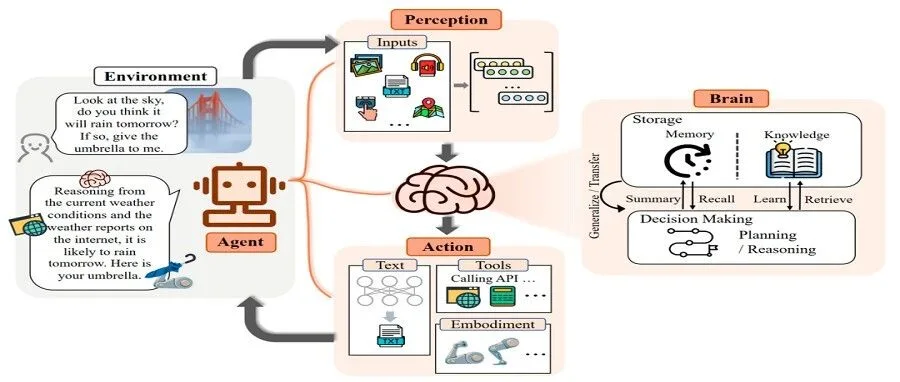
1.4 AI Agent Concept
An AI agent perceives, plans, remembers, uses tools, and acts. Key components:
Perception: Collect and parse environment data.
Planning: Decompose goals into executable steps.
Memory: Short-term (conversation context) and long-term (persistent knowledge).
Tool use: Call APIs, libraries, hardware, or services.
Action: Execute concrete operations based on plan and memory.
Agent capabilities are powered by LLMs, reinforcement learning, and multimodal fusion.
2. General Agent Platform Comparison
The author compares three platforms — Dify (open-source), LangChain (open-source framework), and Coze (commercial) — across six dimensions:
2.1 Usability
Dify: Visual low-code UI, suitable for non-technical users, rapid production-grade apps.
LangChain: Steep learning curve; requires familiarity with modular components (Chains, Agents) and programming; best for strong technical backgrounds.
Coze: Drag-and-drop with pre-built templates; targets lightweight AI bot deployment.
2.2 Features
Dify: Integrated RAG engine, agent framework, multi-model support, prompt orchestration, data ops, API integration, LLMOps lifecycle management.
LangChain: Modular design (Model I/O, Retrieval, Agents), complex chaining and dynamic agent interaction, rich open-source ecosystem.
Coze: Bot-centric with dialogue management, plugin marketplace, multimodal interaction, pre-trained workflows, automated deployment.
2.3 Community & Ecosystem
Dify: Early-stage community; relies on official docs and enterprise support; fewer third-party integrations.
LangChain: Active open-source community (87k+ GitHub stars), multi-language (Python/JS), extensive vector DB, tool, and plugin integrations.
Coze: Backed by a large vendor; rich plugin marketplace and templates but limited community contributions.
2.4 Open-Source Nature
Dify: Fully open-source (Apache 2.0); community version feature-limited; enterprise version requires commercial license.
LangChain: Fully open-source (Apache 2.0); active contributions; supports custom modules but lacks unified productized support.
Coze: Closed-source commercial platform; cloud service and API only; extensibility depends on official interfaces.
2.5 Problem Fit
Dify: Enterprise apps — knowledge-base QA, automated workflows, API service deployment.
LangChain: Deep customization — multi-model collaboration, complex logic chains.
Coze: Conversational scenarios — customer service, entertainment bots; multi-platform distribution.
2.6 Model Support
Dify: Widest compatibility — OpenAI, Anthropic, LLaMA series, commercial and open-source; local or cloud deployment.
LangChain: Modular interfaces connect to many models (Hugging Face, Azure OpenAI); high flexibility but requires developer configuration.
Coze: Prioritizes ByteDance ecosystem (Doubao); good support for Chinese models (GLM, MoonShot); limited extensibility.
3. Local Dify Deployment
3.1 DeepSeek Local Deployment via Ollama
Run the DeepSeek-R1 1.5B model and the BGE-M3 embedding model locally:
ollama run deepseek-r1:1.5b
ollama pull bge-m3
3.2 Dify Platform Deployment
3.2.1 Clone Dify Repository
# git clone https://github.com/langgenius/dify.git --branch 0.15.3
Cloning into 'dify'...
remote: Enumerating objects: 144842, done.
remote: Counting objects: 100% (1116/1116), done.
remote: Compressing objects: 100% (505/505), done.
remote: Total 144842 (delta 926), reused 613 (delta 611), pack-reused 143726 (from 3)
Receiving objects: 100% (144842/144842), 78.11 MiB | 1.94 MiB/s, done.
Resolving deltas: 100% (106284/106284), done.
Note: checking out 'ca19bd31d42fb87c83b91541c473ebae85e9d14e'.
3.2.2 Start Dify
Enter the Docker directory: cd dify/docker Copy environment template: cp .env.example .env Start containers (Docker Compose V2): docker compose up -d (V1: docker-compose up -d)
Initial startup failed due to Docker Hub connectivity:
ERROR: Get https://registry-1.docker.io/v2/: read tcp 192.168.112.110:60148->52.1.121.53:443: read: connection reset by peerSolution: Configure a Docker mirror registry.
If NGINX port 80 is already allocated:
ERROR: for docker_nginx_1 Cannot start service nginx: driver failed programming external connectivity on endpoint docker_nginx_1: Bind for 0.0.0.0:80 failed: port is already allocatedFix by editing /dify/docker/.env (around line 780) and changing EXPOSE_NGINX_PORT from 80 to an available port (e.g., 10080):
EXPOSE_NGINX_PORT=10080
EXPOSE_NGINX_SSL_PORT=443
Then re-run docker-compose up -d. Successful output shows 9 containers running: three business services (api, worker, web) and six infrastructure components (weaviate, db, redis, nginx, ssrf_proxy, sandbox). Note: docker_sandbox_1 showed "Restarting" status in the example.
3.2.3 Access Dify
Open http://<host-ip>:10080/install (default port 80, changed to 10080) to complete initialization and log in.
3.3 Building an AI Agent in Dify
3.3.1 Model Integration
Dify categorizes models into four types:
System reasoning models: Used for chat, conversation naming, next-question suggestions. Supported providers: OpenAI, Azure OpenAI, DeepSeek, Anthropic, Hugging Face Hub, Replicate, Xinference, OpenLLM, iFlytek Spark, Baidu Wenxin, Alibaba Qwen, Minimax, ZHIPU (ChatGLM), etc.
Embedding models: Used for document chunk embedding and query embedding in knowledge bases. Providers: OpenAI, ZHIPU, Jina AI, Rerank models.
Rerank models: Improve retrieval quality. Providers: Cohere, Jina AI.
Speech-to-text models: For voice-enabled apps. Provider: OpenAI.
Steps to add local DeepSeek via Ollama:
In Settings → Model Providers, add Ollama.
Configure Ollama base URL (default 127.0.0.1:11434; change via OLLAMA_HOST environment variable to the host IP, e.g., xx.xx.xx.xx:11434).
Select the pulled deepseek-r1:1.5b as the reasoning model.
Add embedding model (e.g., bge-m3) similarly.
3.3.2 Create Knowledge Base
Create a new knowledge base in Dify.
Import files (PDF, text, etc.), define chunking rules (e.g., 512 tokens), and select the embedding model.
Configure embedding model (already added).
Inspect imported file details and chunk vectors.
3.3.3 Create Agent Application
Create a workflow in Dify, attach the knowledge base, and configure the reasoning model.
Run the agent; it retrieves relevant chunks from the knowledge base and generates answers grounded in the retrieved evidence.
The author notes that Dify's built-in tool set is still limited; some third-party integrations (e.g., Feishu Docs) require extra authorization and the experience is not as smooth.
References: https://docs.dify.ai/zh-hans https://blog.csdn.net/m0_56255097/article/details/143693499
For questions about attribution, corrections or content rights, please contactand we will review it promptly.