

LangChain Deep Agents Subagents: Orchestration, Context Isolation & Dynamic Delegation
This article explains how LangChain Deep Agents use subagents to isolate context, delegate specialized tasks, and enable dynamic orchestration via code interpreters, covering configuration, streaming, structured output, and best practices for building scalable multi-agent systems.
Reading font
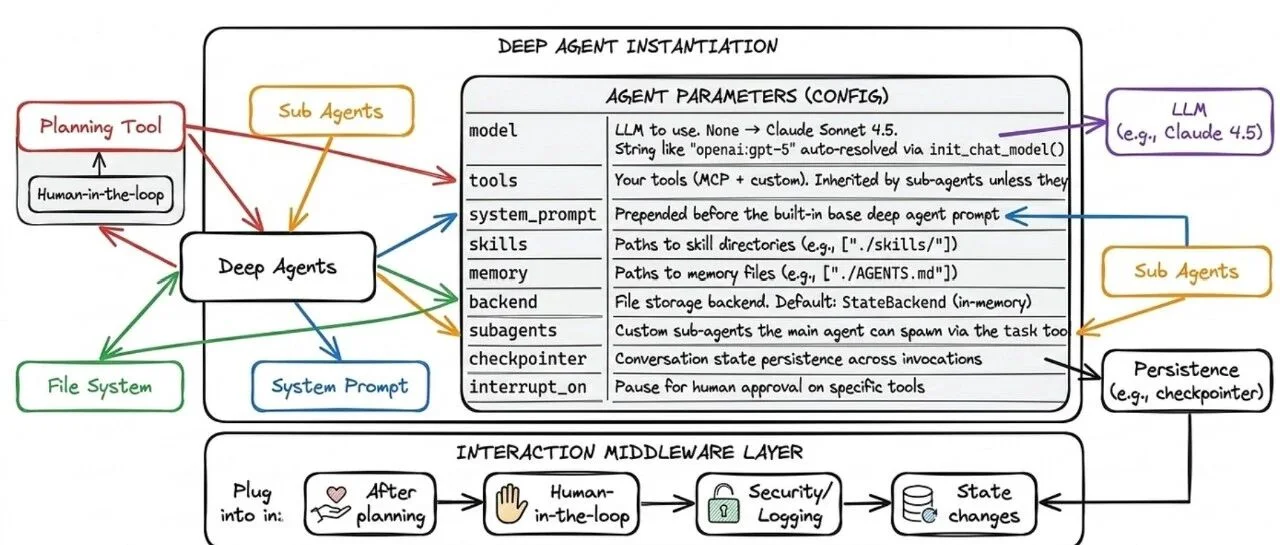
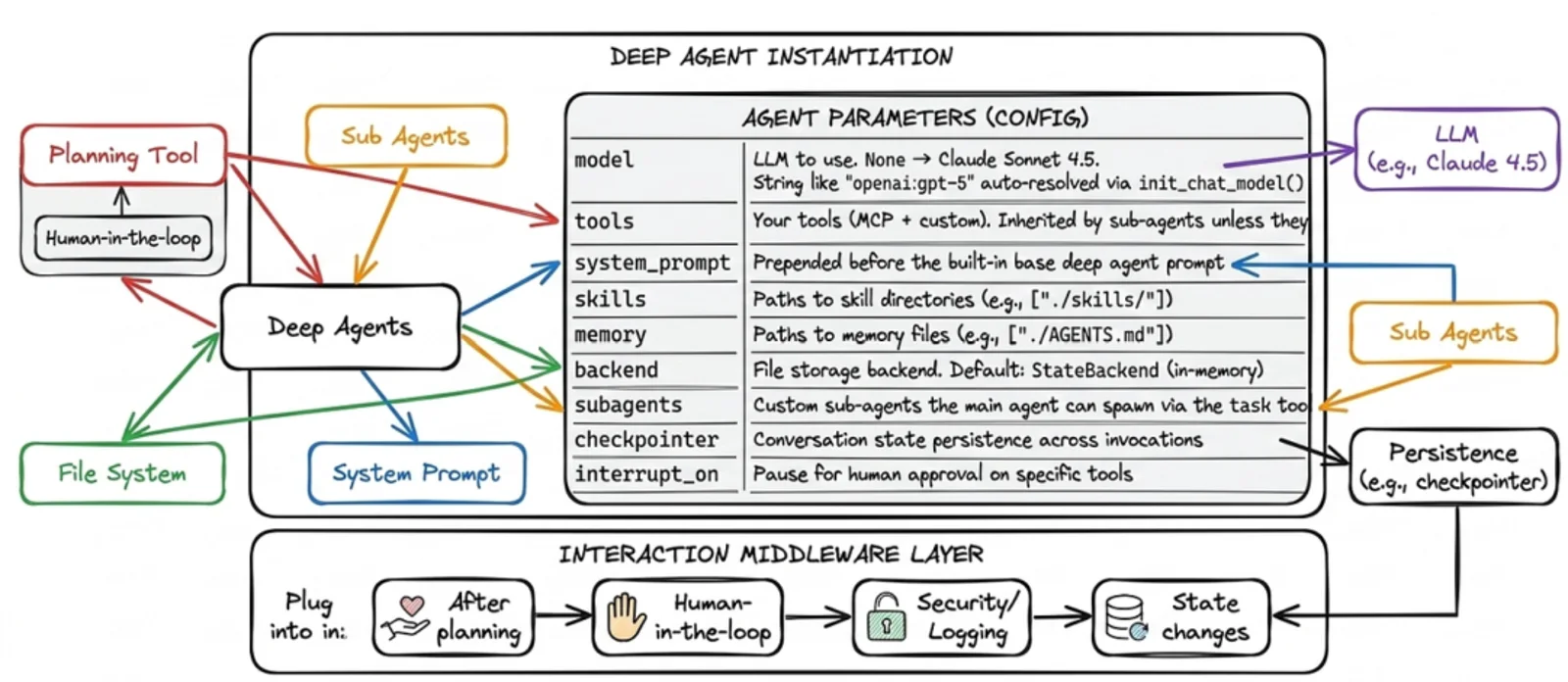
Reading Hint Subagents are the key mechanism for Deep Agents to solve "context bloat", letting the main agent focus on high-level coordination while delegating specialized, detailed work to subagents. Suitable for cross-domain and long-horizon tasks. Non-agent developers can skim subheadings for a framework overview; agent engineers should read alongside code. Difficulty is low; focus on "context isolation" and dynamic subagents. Subagents are also called child agents; the main agent may be called parent agent or scheduler, per preference.
1. What Are Subagents
Deep Agents can create subagents to delegate work, specified via the subagents parameter of create_deep_agent. Core values:
Context isolation (context quarantine) : Isolate detailed work that produces large intermediate results inside the subagent; the main agent receives only the final result, keeping its context clean.
Specialized instructions : Configure custom system prompts, tools, or even models for different domains.
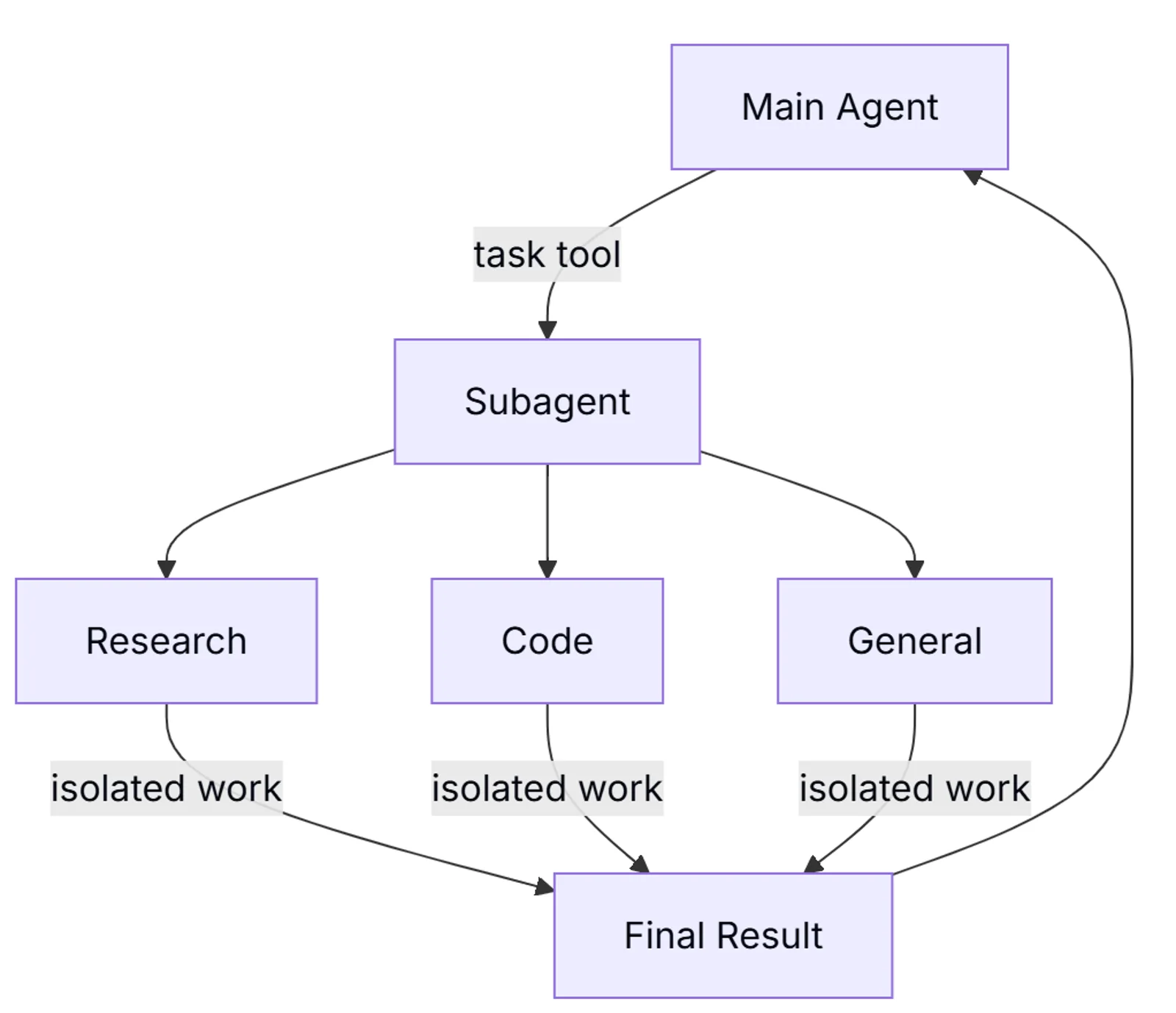
📌 This article covers synchronous subagents : the supervisor (main agent) blocks waiting for the subagent to complete. For long tasks, parallel workflows, runtime control and cancellation, we will explore Async subagents later.
2. Why Use Subagents
Subagents solve the context bloat problem . When an agent uses tools that produce large outputs (web search, file reads, database queries), the context window quickly fills with intermediate results. Even with growing context lengths, excessive context dilutes attention. Subagents isolate these details, letting the main agent receive only the final result, not the dozens of tool calls that produced it.
When to use:
Multi-step tasks that would clutter the main agent's context
Specialized domains requiring custom instructions or tools
Tasks needing different model capabilities
When you want the main agent to focus on high-level coordination
When not to use:
Simple single-step tasks
When intermediate context must be retained
When overhead outweighs benefit
3. Default Subagents
The subagents parameter is a list of elements that can be dictionaries (matching the SubAgent spec) or CompiledSubAgent objects .
Default Subagent: general-purpose
Deep Agents automatically adds a synchronous general-purpose subagent (unless you already provided one with the same name). It includes filesystem tools by default and can be customized with extra tools/middleware. Three handling methods:
Replace : Pass a subagent with name="general-purpose" .
Rename/change prompt : Set general_purpose_subagent=GeneralPurposeSubagentProfile(...) on the harness profile.
4. Custom Subagents
Define expert subagents (code review, web research, test running, etc.) via the subagents parameter. Most scenarios use dictionaries; complex workflows use CompiledSubAgent.
Dictionary SubAgent Fields Explained
name ( str ) — Required . Unique identifier. Main agent invokes via task() using this name. Becomes AIMessage and streaming metadata for distinguishing agents.
description ( str ) — Required . Describes what this subagent does; must be specific and action-oriented. Main agent uses this to decide when to delegate.
system_prompt ( str ) — Required . Subagent instructions, must be customized, including tool usage and output format requirements. Does not inherit from main agent.
tools ( list[Callable] ) — Optional. Tools available to the subagent; keep minimal. Default inherits from main agent; once specified, completely overrides inherited tools.
model ( str | BaseChatModel ) — Optional. Overrides main agent model; if omitted, inherits. Can pass 'provider:model' string (e.g. 'openai:gpt-5.5' ) or model object.
middleware ( list[Middleware] ) — Optional. Extra middleware for custom behavior, logging, rate limiting. Does not inherit from main agent; instead appends to default subagent stack .
interrupt_on ( dict[str, bool | InterruptOnConfig] ) — Optional. Configure human-in-the-loop for specific tools; can be True / False or InterruptOnConfig with allowed_decisions . Requires checkpointer. Default inherits; subagent value overrides.
skills ( list[str] ) — Optional. Skills source paths. Does not inherit from main agent (only general-purpose subagent inherits). Configuring skills runs an independent SkillsMiddleware instance; skill state is bidirectionally isolated.
response_format ( ResponseFormat ) — Optional. Structured output schema. When set, parent receives JSON instead of free text. Supports Pydantic models, ToolStrategy(...) , ProviderStrategy(...) , or raw schema types.
permissions ( list[FilesystemPermission] ) — Optional. Filesystem permission rules. When set, completely replaces parent permissions. Default inherits.
CompiledSubAgent
For complex workflows, use a pre-compiled LangGraph graph as a CompiledSubAgent:
name ( str ) — Required . Unique identifier; becomes message and streaming metadata.
description ( str ) — Required . What this subagent does.
runnable ( Runnable ) — Required . Compiled LangGraph graph (must have been .compile() d).
5. Basic Subagent Creation Usage
Dictionary SubAgent
import os
from typing import Literal
from deepagents import create_deep_agent
from tavily import TavilyClient

tavily_client = TavilyClient(api_key=os.environ["TAVILY_API_KEY"])

def internet_search(
    query: str,
    max_results: int = 5,
    topic: Literal["general", "news", "finance"] = "general",
    include_raw_content: bool = False,
):
    """Run a web search"""
    return tavily_client.search(
        query,
        max_results=max_results,
        include_raw_content=include_raw_content,
        topic=topic,
    )

research_subagent = {
    "name": "research-agent",
    "description": "Used to research more in depth questions",
    "system_prompt": "You are a great researcher",
    "tools": [internet_search],
    "model": "openai:gpt-5.5",  # optional override, defaults to main agent model
}

agent = create_deep_agent(
    model="google_genai:gemini-3.5-flash",
    subagents=[research_subagent],
)
CompiledSubAgent
Use LangChain's create_agent or graph API to build a custom graph. If using a custom LangGraph graph, ensure the graph has a state key named "messages" :
from deepagents import create_deep_agent, CompiledSubAgent
from langchain.agents import create_agent

# Create custom agent graph
custom_graph = create_agent(
    model=your_model,
    tools=specialized_tools,
    prompt="You are a specialized agent for data analysis..."
)

# As custom subagent
custom_subagent = CompiledSubAgent(
    name="data-analyzer",
    description="Specialized agent for complex data analysis tasks",
    runnable=custom_graph
)

agent = create_deep_agent(
    model="google_genai:gemini-3.5-flash",
    tools=[internet_search],
    system_prompt=research_instructions,
    subagents=[custom_subagent]
)
6. Dynamic Subagents (Beta)
By default, the main agent delegates to subagents via the task tool (multiple parallel invocations per turn; note: Deep Agents subagents can run in parallel). With an interpreter mounted, the agent can instead dispatch subagents from code — using loops, branches, and parallel batches to fan out work to multiple items and programmatically synthesize results. This is dynamic subagents .
Applicable scenarios: Work spans multiple independent units (review every file in a directory, batch-process tickets), needs multiple perspectives, or benefits from recursive analysis.
⚠️ Official notice: dynamic subagents use the interpreter runtime and are in beta ; API and lifecycle may change between versions.
Enabling Dynamic Subagents
Dynamic dispatch is available when the agent has both subagents and the interpreter middleware. Install the QuickJS interpreter package and add CodeInterpreterMiddleware:
pip install -U "deepagents[quickjs]"from deepagents import create_deep_agent
from langchain_quickjs import CodeInterpreterMiddleware
agent = create_deep_agent(
model="openai:gpt-5.5",
subagents=[{
"name": "reviewer",
"description": "Reviews code for security issues, citing lines and severity",
"system_prompt": "You are a security-focused code reviewer. Report issues with line numbers and severity.",
}],
middleware=[CodeInterpreterMiddleware()],
)📌 As long as the agent has both subagents and the interpreter middleware, dynamic dispatch is enabled by default. Pass CodeInterpreterMiddleware(subagents=False) to force the regular task tool path. Interpreter requires langchain-quickjs>=0.2.0 and Python >=3.11 .
Triggering Dynamic Orchestration
Dynamic dispatch is implicit : the agent decides based on task shape whether to fan out from code, not by explicit invocation flags.
💡 "workflow" is a useful trigger word . The built-in interpreter system prompt treats "workflow" as a signal to organize work via the interpreter — the main agent uses task() to dispatch subagents. Phrasing the request as a "workflow" is a deliberate lever to enable dynamic orchestration; for a single direct delegation, just state it plainly.
result = await agent.ainvoke({
    "messages": [{"role": "user", "content": "Run a workflow that reviews every file in src/routes/ and summarizes the top risks."}]
})
Quick Experience with dcode
dcodeis a terminal coding agent based on Deep Agent, with a built-in code interpreter; dynamic subagents work out of the box:
curl -LsSf https://langch.in/dcode | bash
dcode
Trigger by asking for a "workflow", e.g. "Run a workflow to review every file in src/ for SQL injection." When subagents are spawned, dcode displays them in a dynamic subagent panel, grouped by dispatch into multiple stages.
7. Streaming
Deep Agents supports streaming updates from both the main agent and each delegated subagent. Use stream_events to get typed projections — subagents, messages, tool calls, and values each have independent iterators.
Streaming Subagent Progress
The simplest mode is iterating stream.subagents to track each delegated task's start, run, and completion. Each subagent handle exposes .name, .messages, .tool_calls, .output.
from deepagents import create_deep_agent

agent = create_deep_agent(
    model="openai:gpt-5.5",
    system_prompt=(
        "You are a project coordinator with no research knowledge. "
        "For every user request, you must call the task() tool with "
        "subagent_type set to research-agent. Never answer research "
        "questions yourself."
    ),
    subagents=[
        {
            "name": "research-agent",
            "description": "Delegate research to this subagent. Give one topic at a time.",
            "system_prompt": "You are a great researcher. Return a brief summary.",
        },
    ],
    name="main-agent",
)

if __name__ == "__main__":
    stream = agent.stream_events(
        {"messages": [{"role": "user", "content": "Research one recent advance in quantum computing."}]},
        version="v3",
    )

    coordinator_messages = []
    subagent_handles = []

    for name, item in stream.interleave("messages", "subagents"):
        if name == "messages":
            print("[coordinator]", item.text)
            coordinator_messages.append(item.text)
        else:
            print(f"[{item.name}] started")
            subagent_handles.append(item)
            for message in item.messages:
                print(f"[{item.name}]", message.text)
            print(f"[{item.name}] status: {item.status}")
💡 Official also provides Google, Anthropic, OpenRouter, Fireworks, Baseten, Ollama model variants; logic is identical, only the model field differs.
8. Structured Output
Subagents support structured output, letting the main agent receive predictable, parsable JSON instead of free text.
⚠️ Requires deepagents>=0.5.3 .
Pass response_format in the subagent config. On completion, the structured response is JSON-serialized and returned to the parent as a ToolMessage content. The schema accepts any type supported by create_agent.
from pydantic import BaseModel, Field
from deepagents import create_deep_agent

class ResearchFindings(BaseModel):
    """Structured findings from a research task."""
    summary: str = Field(description="Summary of findings")
    confidence: float = Field(description="Confidence score from 0 to 1")
    sources: list[str] = Field(description="List of source URLs")

research_subagent = {
    "name": "researcher",
    "description": "Researches topics and returns structured findings",
    "system_prompt": "Research the given topic thoroughly. Return your findings.",
    "tools": [web_search],
    "response_format": ResearchFindings,
}

agent = create_deep_agent(
    model="claude-sonnet-4-6",
    subagents=[research_subagent],
)

result = await agent.ainvoke(
    {"messages": [{"role": "user", "content": "Research recent advances in quantum computing"}]}
)

# Parent's ToolMessage contains JSON-serialized structured data:
# '{"summary": "...", "confidence": 0.87, "sources": ["https://..."]}'
Without response_format, the parent receives the last message text as-is; with it, the parent always gets valid JSON, convenient for programmatic handling or passing to downstream tools.
10. general-purpose Subagent Deep Dive
Besides user-defined subagents, every deep agent always has access to a general-purpose subagent, which:
Uses its own default system prompt (with profile overrides).
Can access the same full toolset .
Uses the same model (unless overridden).
When configured with skills, inherits the main agent's skills.
When to Use
Suitable for "needs context isolation but no specialized behavior" scenarios. The main agent can delegate complex multi-step tasks to it, receiving a concise conclusion without bloating context with intermediate tool calls.
💡 Example : Instead of letting the main agent do 10 web searches that fill context, delegate to the general-purpose subagent: task(name="general-purpose", task="Research quantum computing trends") . The subagent performs all searches internally and returns only the summary.
Overriding the general-purpose Subagent
Place a subagent with name="general-purpose" in the subagents list to replace the default:
from deepagents import create_deep_agent

# Main agent uses Gemini; general-purpose subagent uses GPT
agent = create_deep_agent(
    model="google_genai:gemini-3.5-flash",
    tools=[internet_search],
    subagents=[
        {
            "name": "general-purpose",
            "description": "General-purpose agent for research and multi-step tasks",
            "system_prompt": "You are a general-purpose assistant.",
            "tools": [internet_search],
            "model": "openai:gpt-5.5",  # delegated tasks use a different model
        },
    ],
)
When a same-named subagent is provided, the default general-purpose is not added; your config fully replaces it. To completely remove rather than replace, set the harness profile's general-purpose subagent enabled to False.
Skills Inheritance Rules
general-purpose subagent : automatically inherits main agent's skills.
Custom subagents : default do not inherit ; must use skills parameter to assign their own skills.
⚠️ Only subagents with configured skills get a SkillsMiddleware instance. Skill state is bidirectionally fully isolated.
from deepagents import create_deep_agent

research_subagent = {
    "name": "researcher",
    "description": "Research assistant with specialized skills",
    "system_prompt": "You are a researcher.",
    "tools": [web_search],
    "skills": ["/skills/research/", "/skills/web-search/"],  # subagent-exclusive skills
}

agent = create_deep_agent(
    model="google_genai:gemini-3.5-flash",
    skills=["/skills/main/"],           # main agent and GP subagent get these
    subagents=[research_subagent],       # only gets /skills/research/ and /skills/web-search/
)
11. Practical Considerations from Demos
1. Write Clear Descriptions
The main agent relies on the description to decide which subagent to call, so be specific:
✅ "Analyzes financial data and generates investment insights with confidence scores"
❌ "Does finance stuff"
2. Keep system_prompt Detailed
research_subagent = {
    "name": "research-agent",
    "description": "Conducts in-depth research using web search and synthesizes findings",
    "system_prompt": """You are a thorough researcher. Your job is to:
    1. Break down the research question into searchable queries
    2. Use internet_search to find relevant information
    3. Synthesize findings into a comprehensive but concise summary
    4. Cite sources when making claims

    Output format:
    - Summary (2-3 paragraphs)
    - Key findings (bullet points)
    - Sources (with URLs)

    Keep your response under 500 words to maintain clean context.""",
    "tools": [internet_search],
}
3. Minimize Toolset (Also Consider Model Capability)
# ✅ Good: focused toolset
email_agent = {"name": "email-sender", "tools": [send_email, validate_email]}

# ❌ Bad: too many tools
email_agent = {"name": "email-sender", "tools": [send_email, web_search, database_query, file_upload]}
4. Choose LLM per Task (Based on Available Resources)
subagents = [
    {
        "name": "contract-reviewer",
        "description": "Reviews legal documents and contracts",
        "system_prompt": "You are an expert legal reviewer...",
        "tools": [read_document, analyze_contract],
        "model": "google_genai:gemini-3.5-flash",  # long docs need large context
    },
    {
        "name": "financial-analyst",
        "description": "Analyzes financial data and market trends",
        "system_prompt": "You are an expert financial analyst...",
        "tools": [get_stock_price, analyze_fundamentals],
        "model": "openai:gpt-5.5",  # stronger at numerical analysis
    },
]
5. Return Concise Results (Consider Structured Output)
data_analyst = {
    "system_prompt": """Analyze the data and return:
    1. Key insights (3-5 bullet points)
    2. Overall confidence score
    3. Recommended next actions

    Do NOT include:
    - Raw data
    - Intermediate calculations
    - Detailed tool outputs

    Keep response under 300 words."""
}
12. Common Pattern: Creating Multiple Specialized Subagents at Once
from deepagents import create_deep_agent

subagents = [
    {"name": "data-collector", "description": "Gathers raw data from various sources",
     "system_prompt": "Collect comprehensive data on the topic",
     "tools": [web_search, api_call, database_query]},
    {"name": "data-analyzer", "description": "Analyzes collected data for insights",
     "system_prompt": "Analyze data and extract key insights",
     "tools": [statistical_analysis]},
    {"name": "report-writer", "description": "Writes polished reports from analysis",
     "system_prompt": "Create professional reports from insights",
     "tools": [format_document]},
]

agent = create_deep_agent(
    model="google_genai:gemini-3.5-flash",
    system_prompt="You coordinate data analysis and reporting. Use subagents for specialized tasks.",
    subagents=subagents
)
Typical workflow: Main agent plans high-level → delegates to data-collector to gather → passes results to data-analyzer for analysis → sends insights to report-writer to write report → aggregates final output. Each subagent works in a clean, task-focused context.
13. Context Management (Runtime Context Propagation)
When invoking the parent agent with a runtime context, that context automatically propagates to all subagents . Every subagent run receives the same runtime context; tools inside subagents can access the same context values.
from dataclasses import dataclass
from deepagents import create_deep_agent
from langchain.messages import HumanMessage
from langchain.tools import tool, ToolRuntime

@dataclass
class Context:
    user_id: str
    session_id: str

@tool
def get_user_data(query: str, runtime: ToolRuntime[Context]) -> str:
    """Fetch data for the current user."""
    user_id = runtime.context.user_id
    return f"Data for user {user_id}: {query}"

research_subagent = {
    "name": "researcher",
    "description": "Conducts research for the current user",
    "system_prompt": "You are a research assistant.",
    "tools": [get_user_data],
}

agent = create_deep_agent(
    model="google_genai:gemini-3.5-flash",
    subagents=[research_subagent],
    context_schema=Context,
)

# context automatically flows into researcher subagent and its tools
result = await agent.invoke(
    {"messages": [HumanMessage("Look up my recent activity")]},
    context=Context(user_id="user-123", session_id="abc"),
)
Customizing Context per Subagent
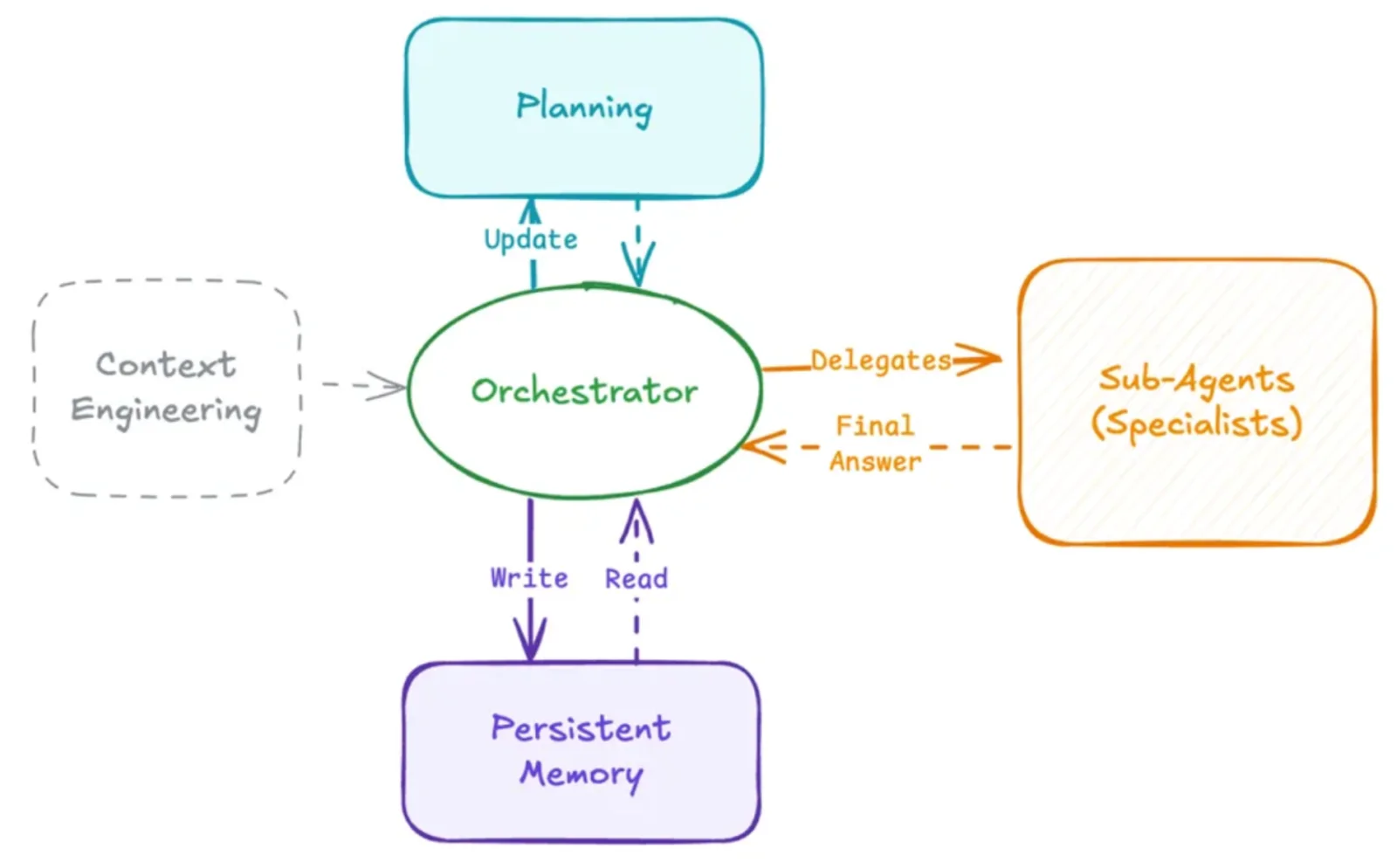
All subagents receive the same parent context. To pass subagent-specific config, two approaches:
Namespaced keys : In the flat context mapping, use the subagent name as prefix (e.g. researcher:max_depth ).
Model as separate fields : Add fields on the context type prefixed with the subagent name.
@dataclass
class Context:
    user_id: str
    researcher_max_depth: int | None = None
    fact_checker_strict_mode: bool | None = None

result = await agent.invoke(
    {"messages": [HumanMessage("Research this and verify the claims")]},
    context=Context(
        user_id="user-123",
        researcher_max_depth=3,
        fact_checker_strict_mode=True,
    ),
)
Identifying Which Subagent Called a Tool
When the same tool is shared by the parent and multiple subagents, use the lc_agent_name metadata to determine the caller, and combine with context settings:
@tool
def flexible_search(query: str, runtime: ToolRuntime[Context]) -> str:
    """Search with agent-specific settings."""
    agent_name = runtime.config.get("metadata", {}).get("lc_agent_name", "unknown")
    ctx = runtime.context
    if agent_name == "researcher":
        max_results = ctx.researcher_max_depth or 5
    else:
        max_results = 5
    return perform_search(query, max_results=max_results)
14. Troubleshooting Quick Reference
Subagent not called , main agent does it itself: ① Make description more specific (e.g. "Conducts in-depth research...Use when you need detailed information that requires multiple searches." ); ② In main agent system_prompt, explicitly instruct "Use task() to delegate complex tasks to subagents, keep context clean"
Context still bloating : ① Instruct subagent to return only necessary summary (limit word count, forbid raw data); ② Have subagent write large raw data to filesystem /data/raw_results.txt and return only analysis summary
Wrong subagent selected : Clearly differentiate in descriptions, e.g. quick-researcher (simple facts, 1-2 searches) vs deep-researcher (multi-search + synthesis for deep reports)
15. Summary
Subagents are Deep Agents' key balancer between "capability extension" and "context governance". Core points recap:
Essence : Main agent delegates work via task tool; subagent completes in isolated context
Two Core Values : Context isolation + specialized instructions/tools/models
Two Static Types : Dictionary SubAgent (common) and CompiledSubAgent (pre-compiled graph)
Dynamic Subagents : With interpreter, can fan out from code; "workflow" is trigger word (beta)
Default Exists : Always has general-purpose subagent, replaceable/disableable
Field Inheritance : tools / model / interrupt_on / permissions inherit by default; system_prompt / middleware / skills do not inherit (middleware appends to default stack)
Structured Output : response_format makes parent receive valid JSON (requires deepagents>=0.5.3 )
Tracing Distinction : lc_agent_name metadata identifies which agent produced data; filterable in LangSmith UI/SDK
Context Propagation : Runtime context auto-propagates to all subagents; use namespaced keys/separate fields for per-agent customization
In short: make descriptions specific, prompts detailed, toolsets minimal, models matched to tasks, results concise. Get these five right and subagents become the main agent's true force multipliers, not extra complexity burdens.
For questions about attribution, corrections or content rights, please contactand we will review it promptly.