

LangChain & Deep Agents: 17 Production-Ready Middleware Components Explained
This comprehensive guide details 17 production-ready middleware components in LangChain and Deep Agents, covering context management, reliability patterns, rate limiting, human-in-the-loop approval, PII detection, tool management, and sub-agent delegation with code examples and configuration parameters for each.
Reading font
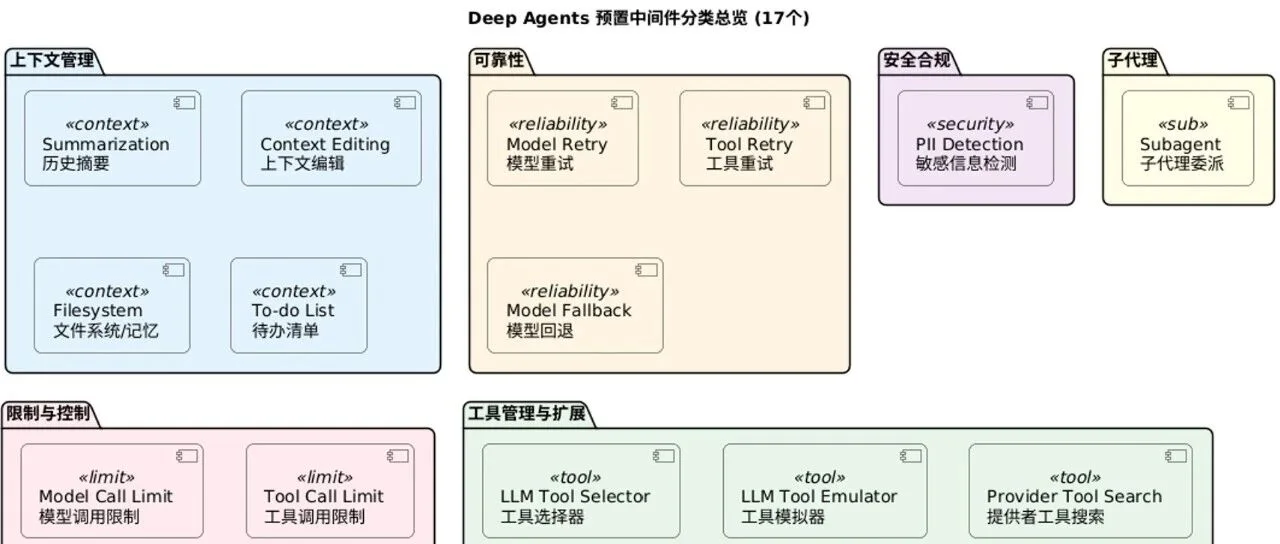
What Is Middleware?
In LangChain and Deep Agents, Middleware is a pluggable interceptor that wraps key points in the agent lifecycle — model calls, tool executions, and message flow — letting you extend behavior without modifying core agent logic. Think of it as a filter chain in the request/response pipeline. You pass middleware via create_agent(model, tools, middleware=[...]); they execute in order. All 17 built-in middleware are production-grade and configurable.
Officially they split into two categories:
Provider-agnostic — compatible with any LLM provider; 17 total, covered in this article.
Provider-specific — optimized for a particular vendor (e.g., Anthropic prompt caching, OpenAI content moderation).
1. Context Management Middleware
1. SummarizationMiddleware (History Summarization)
Purpose: When context nears the token limit, automatically compress earlier messages into a summary while preserving the most recent N messages verbatim.
Typical scenarios: Long-running multi-turn conversations, apps that must retain full context.
⚠️ Summarization is text-level compression; it does not downsample images/audio/video. Summarized old messages keep only text summaries; retained recent messages still contain original multimodal blocks. For image-heavy apps, store media in object storage and pass only URLs or references in messages.
Minimal example:
from langchain.agents import create_agent
from langchain.agents.middleware import SummarizationMiddleware

agent = create_agent(
    model="gpt-5.5",
    tools=[your_weather_tool, your_calculator_tool],
    middleware=[
        SummarizationMiddleware(
            model="gpt-5.4-mini",  # cheap model for summaries
            trigger=("tokens", 4000),  # trigger at 4000 tokens
            keep=("messages", 20),     # retain last 20 messages
        ),
    ],
)
Key parameters: model: Model used to generate summaries (string ID or BaseChatModel instance). trigger: Threshold that fires summarization. Supports three types: fraction: proportion of model context window (0–1). tokens: absolute token count. messages: message count.
A single tuple means "trigger when reached"; a dict means multiple thresholds combined with AND ; a list means multiple conditions combined with OR . keep: How much context to retain after summarization; same threshold types as trigger.
Others: summary_prompt (custom template, must contain {messages} placeholder), trim_tokens_to_summarize (trim input to N tokens before summarizing).
AND/OR combination example —
(tokens>=5000 AND messages>=3) OR (tokens>=3000 AND messages>=6):
SummarizationMiddleware(
    model="gpt-5.4-mini",
    trigger=[
        {"tokens": 5000, "messages": 3},  # AND
        {"tokens": 3000, "messages": 6},  # AND
    ],  # two dicts = OR
    keep=("messages", 20),
)
2. ContextEditingMiddleware (Context Editing)
Purpose: Also saves tokens, but by directly clearing earlier tool-call results , keeping only the most recent N. Harder than summarization; no extra LLM call required.
Typical scenarios: Long conversations with many tool calls, want to cut token cost directly, only keep last few tool results.
Example:
from langchain.agents import create_agent
from langchain.agents.middleware import ContextEditingMiddleware, ClearToolUsesEdit

agent = create_agent(
    model="gpt-5.5",
    tools=[],
    middleware=[
        ContextEditingMiddleware(
            edits=[
                ClearToolUsesEdit(
                    trigger=100000,  # trigger when exceeding 100k tokens
                    keep=3,          # always keep last 3 tool results
                ),
            ],
        ),
    ],
)
ClearToolUsesEdit key parameters: trigger (default 100000): Token threshold; cleanup fires when exceeded. keep (default 3): Number of most recent tool results that are never cleared . clear_at_least (default 0): Minimum tokens to reclaim; 0 means clean as needed. clear_tool_inputs (default False): Whether to also clear the tool-call arguments in the AI message. exclude_tools (default ()): Tools whose outputs are never cleared. placeholder (default [cleared]): Replacement text for cleared content. token_count_method optional: 'approximate' (default, character-based) or 'model' (model tokenizer).
3. FilesystemMiddleware (File System: Short- & Long-Term Memory)
Purpose: Gives the agent four file-operation tools — ls, read_file, write_file, edit_file — so it can write intermediate artifacts, long results, and memories to files, thereby freeing the context window . This is the core component for Deep Agents' Context Engineering ; create_deep_agent enables it by default.
Typical scenarios: RAG/web_search returning long results, need to persist intermediate state across steps, need cross-session long-term memory.
Basic usage (default: in-graph ephemeral filesystem):
from langchain.agents import create_agent
from deepagents.middleware.filesystem import FilesystemMiddleware

agent = create_agent(
    model="claude-sonnet-4-6",
    middleware=[
        FilesystemMiddleware(
            backend=None,  # default StateBackend
            system_prompt="Write to the filesystem when...",
            custom_tool_descriptions={
                "ls": "Use the ls tool when...",
                "read_file": "Use the read_file tool to...",
            },
        ),
    ],
)
Short-term vs. long-term: By default all files live in graph state (visible only in current session). To persist certain paths across sessions, use CompositeBackend to route a specific prefix (e.g., /memories/) to a StoreBackend:
from langchain.agents import create_agent
from deepagents.middleware import FilesystemMiddleware
from deepagents.backends import CompositeBackend, StateBackend, StoreBackend
from langgraph.store.memory import InMemoryStore

store = InMemoryStore()

agent = create_agent(
    model="claude-sonnet-4-6",
    store=store,
    middleware=[
        FilesystemMiddleware(
            backend=CompositeBackend(
                default=StateBackend(),
                routes={"/memories/": StoreBackend()}  # /memories/ prefix persisted
            ),
        ),
    ],
)
Any file under /memories/ goes to persistent storage and survives across threads; other files remain ephemeral.
4. TodoListMiddleware (To-Do List)
Purpose: Automatically injects a write_todos tool and matching system prompt so the agent learns to plan and track multi-step tasks with visible progress.
Typical scenarios: Complex multi-step tasks, coordination across multiple tools, long tasks needing visible progress.
from langchain.agents import create_agent
from langchain.agents.middleware import TodoListMiddleware

agent = create_agent(
    model="gpt-5.5",
    tools=[read_file, write_file, run_tests],
    middleware=[TodoListMiddleware()],
)
Optional: system_prompt (custom planning prompt), tool_description (custom write_todos tool description).
2. Reliability Middleware (Retry & Fallback)
Network jitter, rate limits, and transient model unavailability are the most common production issues. Three middleware help build resilient agents.
5. ModelRetryMiddleware (Model Call Retry)
Purpose: Automatically retries failed model calls with exponential backoff.
from langchain.agents import create_agent
from langchain.agents.middleware import ModelRetryMiddleware

agent = create_agent(
    model="gpt-5.5",
    tools=[search_tool, database_tool],
    middleware=[
        ModelRetryMiddleware(
            max_retries=3,
            backoff_factor=2.0,
            initial_delay=1.0,
        ),
    ],
)
Key parameters: max_retries (default 2): Retries beyond the initial call (3 total attempts). backoff_factor (default 2.0): Backoff multiplier; 0.0 = fixed interval. initial_delay (default 1.0): Seconds to wait before first retry. max_delay (default 60.0): Cap on backoff growth. jitter (default True): Add ±25% random jitter to avoid thundering herd. retry_on (default (Exception,)): Exception types tuple, or callable(exception)->bool. on_failure (default 'continue'): After retries exhausted: 'continue' returns AIMessage with error; 'error' raises; or custom function returning string.
Custom exception filter example:
def should_retry(error: Exception) -> bool:
    if isinstance(error, TimeoutError):
        return True
    if hasattr(error, "status_code"):
        return error.status_code in (429, 503)  # rate limit or service unavailable
    return False

retry_with_filter = ModelRetryMiddleware(
    max_retries=3,
    retry_on=should_retry,
)
6. ToolRetryMiddleware (Tool Call Retry)
Purpose: Same structure as Model Retry but targets tool call failures, suitable for transient external API faults.
from langchain.agents import create_agent
from langchain.agents.middleware import ToolRetryMiddleware

agent = create_agent(
    model="gpt-5.5",
    tools=[search_tool, database_tool, api_tool],
    middleware=[
        ToolRetryMiddleware(
            max_retries=3,
            backoff_factor=2.0,
            initial_delay=1.0,
            max_delay=60.0,
            jitter=True,
            tools=["api_tool"],  # only retry api_tool
            retry_on=(ConnectionError, TimeoutError),
            on_failure="continue",  # return error message after exhaustion
        ),
    ],
)
Differences from Model Retry:
Extra tools parameter: specify which tools to retry; None = all tools. on_failure default is 'return_message' (returns ToolMessage for LLM to handle); also supports 'raise' and custom callable.
7. ModelFallbackMiddleware (Model Fallback)
Purpose: When the primary model fails, automatically switch to backup models in order until one succeeds or all fail.
Typical scenarios: Model service outage disaster recovery, cost optimization (expensive first, then cheap), cross-vendor redundancy (OpenAI ↔ Anthropic).
from langchain.agents import create_agent
from langchain.agents.middleware import ModelFallbackMiddleware

agent = create_agent(
    model="gpt-5.5",
    tools=[],
    middleware=[
        ModelFallbackMiddleware(
            "gpt-5.4-mini",          # first fallback
            "claude-3-5-sonnet-20241022",  # second fallback
        ),
    ],
)
Parameters: first_model (required, string or BaseChatModel) + *additional_models (ordered fallbacks).
3. Limiting & Control Middleware
Prevent runaway agents, control costs, and introduce human oversight.
8. ModelCallLimitMiddleware (Model Call Limit)
Purpose: Cap the number of model invocations to avoid infinite loops or cost overruns.
⚠️ thread_limit (cumulative across multiple runs) requires a checkpointer to maintain state.
from langchain.agents import create_agent
from langchain.agents.middleware import ModelCallLimitMiddleware
from langgraph.checkpoint.memory import InMemorySaver

agent = create_agent(
    model="gpt-5.5",
    checkpointer=InMemorySaver(),
    tools=[],
    middleware=[
        ModelCallLimitMiddleware(
            thread_limit=10,  # max 10 calls per thread
            run_limit=5,      # max 5 calls per single invoke
            exit_behavior="end",  # 'end' graceful stop; 'error' raises
        ),
    ],
)thread_limit: Total calls across all runs in a thread (needs checkpointer). run_limit: Per-invoke limit (resets on each new user message). exit_behavior: 'end' (default, graceful) or 'error' (raise).
9. ToolCallLimitMiddleware (Tool Call Limit)
Purpose: Limit tool invocations, globally or per-tool. Finer-grained than Model Call Limit; often used to protect expensive APIs or enforce rate limits.
from langchain.agents import create_agent
from langchain.agents.middleware import ToolCallLimitMiddleware

agent = create_agent(
    model="gpt-5.5",
    tools=[search_tool, database_tool],
    middleware=[
        ToolCallLimitMiddleware(thread_limit=20, run_limit=10),  # global
        ToolCallLimitMiddleware(tool_name="search", thread_limit=5, run_limit=3),  # per-tool
    ],
)
exit_behavior three modes (default 'continue' ): 'continue': Over-limit tool call returns error message; agent continues, model decides whether to stop. 'error': Immediately raises ToolCallLimitExceededError. 'end': Ends with ToolMessage + AI message; only for single-tool scenarios .
At least one of thread_limit or run_limit must be specified.
10. HumanInTheLoopMiddleware (Human-in-the-Loop)
Purpose: Pause the agent before a tool actually executes , waiting for human approve/edit/reject. Essential guardrail for high-sensitivity operations (DB writes, transfers).
⚠️ Must configure a checkpointer because the paused state is restored via checkpoint.
from langchain.agents import create_agent
from langchain.agents.middleware import HumanInTheLoopMiddleware
from langgraph.checkpoint.memory import InMemorySaver

def your_read_email_tool(email_id: str) -> str:
    """Read an email by its ID."""
    return f"Email content for ID: {email_id}"

def your_send_email_tool(recipient: str, subject: str, body: str) -> str:
    """Send an email."""
    return f"Email sent to {recipient} with subject '{subject}'"

agent = create_agent(
    model="gpt-5.5",
    tools=[your_read_email_tool, your_send_email_tool],
    checkpointer=InMemorySaver(),
    middleware=[
        HumanInTheLoopMiddleware(
            interrupt_on={
                "your_send_email_tool": {"allowed_decisions": ["approve", "edit", "reject"]},
                "your_read_email_tool": False,  # False = pass through, no intercept
            }
        ),
    ],
)interrupt_onis a dict: key = tool name, value = False (allow) or dict configuring allowed decisions ["approve", "edit", "reject"].
4. PII Detection
11. PIIMiddleware (Personal Identifiable Information Detection)
Purpose: Detect and handle personally identifiable information (PII). Supports built-in types ( email, credit_card, ip, mac_address, url) and custom types.
Four handling strategies: 'block': Raise exception on detection. 'redact': Replace with [REDACTED_{PII_TYPE}]. 'mask': Partial mask, e.g., ****-****-****-1234. 'hash': Replace with deterministic hash.
from langchain.agents import create_agent
from langchain.agents.middleware import PIIMiddleware

agent = create_agent(
    model="gpt-5.5",
    tools=[],
    middleware=[
        PIIMiddleware("email", strategy="redact", apply_to_input=True),
        PIIMiddleware("credit_card", strategy="mask", apply_to_input=True),
    ],
)
Custom PII types — three ways: regex string, compiled re.Pattern, custom function.
import re
from langchain.agents.middleware import PIIMiddleware

# 1) Regex string
PIIMiddleware("api_key", detector=r"sk-[a-zA-Z0-9]{32}", strategy="block")

# 2) Compiled regex
PIIMiddleware("phone_number", detector=re.compile(r"\+?\d{1,3}[\s.-]?\d{3,4}[\s.-]?\d{4}"), strategy="mask")

# 3) Custom detection function (with validation logic)
def detect_ssn(content: str) -> list[dict[str, str | int]]:
    """Return [{text, start, end}, ...]"""
    matches = []
    for m in re.finditer(r"\d{3}-\d{2}-\d{4}", content):
        ssn = m.group(0)
        first_three = int(ssn[:3])
        if first_three not in [0, 666] and not (900 <= first_three <= 999):
            matches.append({"text": ssn, "start": m.start(), "end": m.end()})
    return matches

PIIMiddleware("ssn", detector=detect_ssn, strategy="hash")
Scope parameters: apply_to_input (default True): Check user messages before model call. apply_to_output (default False): Check AI messages after model call; in langchain>=1.3.2 also applies streaming transformer to incremental output, tool-call args, tool results, and state snapshots. apply_to_tool_results (default False): Check tool results after execution.
5. Tool Management & Extension Middleware
When tool count grows, or you need testing, file-system or shell access, these middleware shine.
12. LLMToolSelectorMiddleware (LLM Tool Selector)
Purpose: Before the main model call, use a (cheap) LLM to pick the tools most relevant to the current question , passing only those schemas to the main model.
Typical scenarios: Tool count ≥10, only a few relevant per turn; reduces token usage, improves selection accuracy.
from langchain.agents import create_agent
from langchain.agents.middleware import LLMToolSelectorMiddleware

agent = create_agent(
    model="gpt-5.5",
    tools=[tool1, tool2, tool3, tool4, tool5],
    middleware=[
        LLMToolSelectorMiddleware(
            model="gpt-5.4-mini",
            max_tools=3,              # pick at most 3
            always_include=["search"],  # mandatory tools, don't count toward quota
        ),
    ],
)
Internally uses structured output to let the LLM choose tools; many providers quietly inject the schema into the system prompt.
13. LLMToolEmulator (LLM Tool Emulator)
Purpose: Use an LLM to fake tool return results without actually executing the tool. Built for testing and prototyping.
Typical scenarios: Debug agent behavior without calling expensive/unavailable tools; validate flow before implementing real tools.
from langchain.agents import create_agent
from langchain.agents.middleware import LLMToolEmulator

# Emulate all tools
agent = create_agent(
    model="gpt-5.5",
    tools=[get_weather, send_email],
    middleware=[LLMToolEmulator()],
)

# Emulate only get_weather
agent2 = create_agent(
    model="gpt-5.5",
    tools=[get_weather, send_email],
    middleware=[LLMToolEmulator(tools=["get_weather"])],
)

# Use a different model to generate emulated responses
agent4 = create_agent(
    model="gpt-5.5",
    tools=[get_weather, send_email],
    middleware=[LLMToolEmulator(model="claude-sonnet-4-6")],
)tools: None (default) = emulate all; [] = emulate none; list = emulate only listed tools. model: Defaults to agent's main model; can specify another.
14. ProviderToolSearchMiddleware (Provider-Side Tool Search)
Purpose: Defer exposing certain tools to the model until the provider's server-side "tool search" surfaces them. Model discovers tools on demand instead of receiving all schemas upfront.
Typical scenarios: Huge tool sets bloating context; want higher tool-selection accuracy.
⚠️ Requires a model that supports server-side tool search: Anthropic (Claude Sonnet 4+/Opus 4+/Haiku 4.5+) or OpenAI (gpt-5.5+); otherwise raises ValueError .
from langchain.agents import create_agent
from langchain.agents.middleware import ProviderToolSearchMiddleware

agent = create_agent(
    model="anthropic:claude-opus-4-8",
    tools=[get_weather, lookup_order],
    middleware=[
        ProviderToolSearchMiddleware(searchable_tools=["lookup_order"]),
    ],
)
Can also mark tools at definition time with extras={"defer_loading": True} so they're deferred without listing in searchable_tools:
from langchain.tools import tool

@tool(extras={"defer_loading": True})
def send_email(to: str) -> str:
    """Send an email."""
    return "sent"
15. FilesystemFileSearchMiddleware (File Search)
Purpose: Injects Glob and Grep tools for finding files and searching content in the filesystem.
from langchain.agents import create_agent
from langchain.agents.middleware import FilesystemFileSearchMiddleware
from langchain.messages import HumanMessage

agent = create_agent(
    model="gpt-5.5",
    tools=[],
    middleware=[
        FilesystemFileSearchMiddleware(
            root_path="/workspace",
            use_ripgrep=True,  # prefer ripgrep, fallback to Python regex
            max_file_size_mb=10,
        ),
    ],
)

result = agent.invoke({
    "messages": [HumanMessage("Find all Python files containing 'async def'")]
})
# Agent will first glob_search(pattern="**/*.py"), then grep_search(pattern="async def", include="*.py")
Glob tool: Supports patterns like **/*.py, src/**/*.ts; returns results sorted by modification time.
Grep tool: Full regex; include filters by filename; output modes: files_with_matches, content, count.
16. ShellToolMiddleware (Persistent Shell Session)
Purpose: Exposes a persistent shell session to the agent, allowing sequential command execution with state retained within the session.
Typical scenarios: Running system commands, automating dev/deploy, filesystem ops, script execution.
⚠️ Security: Must use an execution policy matching your deployment ( HostExecutionPolicy , DockerExecutionPolicy , CodexSandboxExecutionPolicy ). ⚠️ Limitation: Current persistent shell session does not support combination with interrupt (human-in-the-loop).
from langchain.agents import create_agent
from langchain.agents.middleware import (
    ShellToolMiddleware, HostExecutionPolicy, DockerExecutionPolicy, RedactionRule,
)

# Basic: host execution
agent = create_agent(
    model="gpt-5.5",
    tools=[search_tool],
    middleware=[
        ShellToolMiddleware(
            workspace_root="/workspace",
            execution_policy=HostExecutionPolicy(),
        ),
    ],
)

# Docker isolation + startup commands
agent_docker = create_agent(
    model="gpt-5.5",
    tools=[],
    middleware=[
        ShellToolMiddleware(
            workspace_root="/workspace",
            startup_commands=["pip install requests", "export PYTHONPATH=/workspace"],
            execution_policy=DockerExecutionPolicy(
                image="python:3.11-slim",
                command_timeout=60.0,
            ),
        ),
    ],
)

# Redact command output (note: redaction happens AFTER execution; cannot prevent data exfiltration under HostExecutionPolicy)
agent_redacted = create_agent(
    model="gpt-5.5",
    tools=[],
    middleware=[
        ShellToolMiddleware(
            workspace_root="/workspace",
            redaction_rules=[
                RedactionRule(pii_type="api_key", detector=r"sk-[a-zA-Z0-9]{32}"),
            ],
        ),
    ],
)
Main config: workspace_root: Session base directory; if omitted, uses temp dir deleted when agent ends. startup_commands / shutdown_commands: Commands run sequentially at session start/end. execution_policy: Three policies shown above. redaction_rules: Post-process output for PII (note it cannot prevent active exfiltration under HostExecutionPolicy). shell_command: Default /bin/bash; can swap. env: Injected environment variables.
6. Sub-Agent Middleware
17. SubAgentMiddleware (Sub-Agent Delegation)
Purpose: Lets a supervisor agent delegate sub-tasks to sub-agents via a task tool. Core value is context isolation — the main agent's context stays clean of intermediate tool-call details, receiving only the sub-agent's concise conclusion.
from langchain.tools import tool
from langchain.agents import create_agent
from deepagents.middleware.subagents import SubAgentMiddleware

@tool
def get_weather(city: str) -> str:
    """Get the weather in a city."""
    return f"The weather in {city} is sunny."

agent = create_agent(
    model="claude-sonnet-4-6",
    middleware=[
        SubAgentMiddleware(
            default_model="claude-sonnet-4-6",
            default_tools=[],
            subagents=[
                {
                    "name": "weather",
                    "description": "This subagent can get weather in cities.",
                    "system_prompt": "Use the get_weather tool to get the weather in a city.",
                    "tools": [get_weather],
                    "model": "gpt-5.5",
                    "middleware": [],
                }
            ],
        )
    ],
)
Each sub-agent defined by name / description / system prompt / tools ; can also override model and add extra middleware .
Using a pre-compiled LangGraph graph as a sub-agent — for complex scenarios, wrap any compiled graph as a CompiledSubAgent:
from langchain.agents import create_agent
from deepagents.middleware.subagents import SubAgentMiddleware
from deepagents import CompiledSubAgent
from langgraph.graph import StateGraph

def create_weather_graph():
    workflow = StateGraph(...)
    # build your custom graph
    return workflow.compile()

weather_subagent = CompiledSubAgent(
    name="weather",
    description="This subagent can get weather in cities.",
    runnable=create_weather_graph(),
)

agent = create_agent(
    model="claude-sonnet-4-6",
    middleware=[
        SubAgentMiddleware(
            default_model="claude-sonnet-4-6",
            default_tools=[],
            subagents=[weather_subagent],
        )
    ],
)
📌 The main agent always has access to a built-in general-purpose sub-agent: it shares the main agent's instructions and tools, primarily used for "context isolation" — delegate complex work out, get back a clean answer.
7. Provider-Specific Middleware
Beyond the 17 generic middleware, the library offers vendor-optimized middleware; not covered here — consult respective docs:
Anthropic : Prompt caching, bash tool, text editor, memory, file search
AWS (Bedrock) : Prompt caching
OpenAI : Content moderation
8. Quick Selection Guide
Facing 17 middleware, how to pick fast? Below is a cheat-sheet by "problem domain":
Conversation too long, context overflow : SummarizationMiddleware (keep summary) / ContextEditingMiddleware (drop old tool results)
Tool returns too long, eating context : FilesystemMiddleware (persist to disk) + ContextEditingMiddleware Need cross-session long-term memory : FilesystemMiddleware + CompositeBackend ( /memories/ → StoreBackend)
Model occasional failures : ModelRetryMiddleware Model service entirely unavailable : ModelFallbackMiddleware External API occasional failures : ToolRetryMiddleware Prevent agent runaway loops / cost overruns : ModelCallLimitMiddleware + ToolCallLimitMiddleware High-risk ops need human approval : HumanInTheLoopMiddleware (needs checkpointer)
Compliance, redaction, log sanitization : PIIMiddleware Multi-step tasks need planning & visible progress : TodoListMiddleware Too many tools hurting accuracy & tokens : LLMToolSelectorMiddleware or ProviderToolSearchMiddleware Debugging without real tool calls : LLMToolEmulator Let agent operate filesystem : FilesystemMiddleware / FilesystemFileSearchMiddleware Let agent run commands : ShellToolMiddleware (mind execution policy & security)
Task delegation, context isolation : SubAgentMiddleware Practical tips:
Middleware compose: A production agent typically stacks several (e.g., Summarization + ToolRetry + ModelFallback + ToolCallLimit), separated by concern.
Stateful middleware need checkpointer: HumanInTheLoop, thread_limit -style limits all rely on checkpoints.
Security first: Shell, PII, Human-in-the-loop scenarios must run in controlled environments or sandboxes.
Test before deploy: Use LLMToolEmulator to verify agent behavior without real tool dependencies.
Understanding and combining these built-in middleware covers nearly all production agent requirements, letting you focus on business logic. Happy building!
For questions about attribution, corrections or content rights, please contactand we will review it promptly.